
在MVC中如何使用杨涛老师的【Webdiyer.MVCPager】分页控件
一、操作教程
1.在【Blogsystem.MvcSite】UI层,右击点击【管理NuGet程序包】
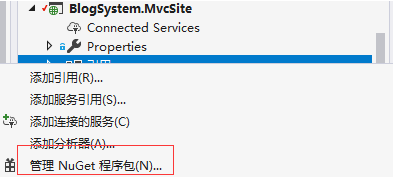
2.然后搜索【Webdiyer.MVCPager】点击【下载】

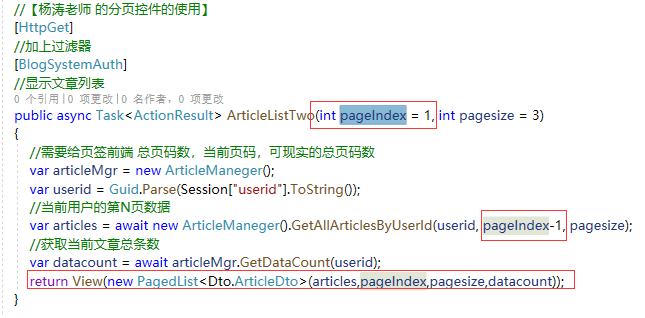
3.在【控制器】中修改代码(红色框框是修改的数据)。
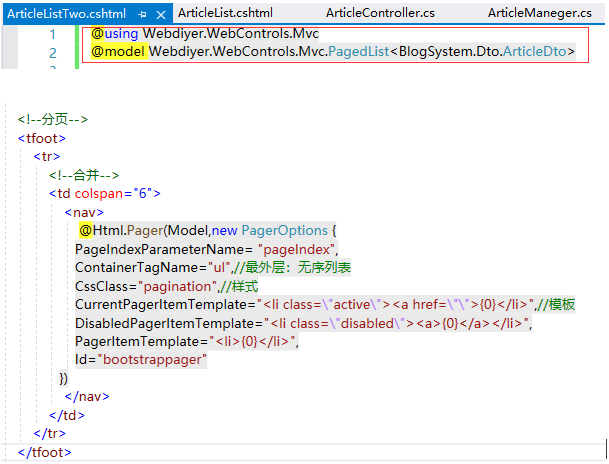
4.在【视图】中修改的代码。
5.最后看效果

二、学习源码
1.自己写的获取数据分页的方法:

 /// <summary>
        ///  根据用户Id获得文章
        /// </summary>
        /// <param name="userid"></param>
        /// <returns></returns>
        public async Task<List<ArticleDto>> GetAllArticlesByUserId(Guid userid, int pageIndex, int pageSize)
        {
            /*
             Include:引入外键
             当前——>.Include(m=>n.User):文章——>用户
             */
            using (IDAL.IArticleService articleAvc = new DAL.ArticleService())
            {
                var list = await articleAvc.GetAllByPageOrder(pageSize, pageIndex,asc:false).Include(m => m.User)
                    .Where(u => u.UserId.Equals(userid))
                    //需要进行Dto转换
                    .Select(u => new ArticleDto()
                    {
                        Title = u.Title,
                        BadCount = u.BadCount,
                        GoodCount = u.GoodCount,
                        Email = u.User.Email,//用到用户表的Email
                        Content = u.Content,
                        CreateTime = u.CreateTime,
                        Id = u.Id,
                        ImagePath = u.User.ImagePath//用到用户表的头像
                    })
                    .ToListAsync();

                //去另外一张表获取
                using (IArticleToCategoryService articleToCategoryService = new ArticleToCategoryService())
                {
                    //循环添加
                    foreach (var articleDto in list)
                    {
                        var cates = await articleToCategoryService.GetAllAsync().Where(u => u.ArticleId.Equals(articleDto.CategoryIds)).ToListAsync();
                        articleDto.CategoryIds = cates.Select(m => m.BlogCategoryId).ToArray();//ID
                        articleDto.CategoryName = cates.Select(m => m.BlogCategory.CategroyNmae).ToArray();//Name
                    }
                    return list;
                }
            }
        }
2.【控制器】中的代码:
 [HttpGet]
        //加上过滤器
        [BlogSystemAuth]
        //显示文章列表
        public async Task<ActionResult> ArticleListTwo(int pageIndex = 1, int pagesize = 3)
        {
            //需要给页签前端 总页码数,当前页码,可现实的总页码数
            var articleMgr = new ArticleManeger();
            var userid = Guid.Parse(Session["userid"].ToString());
            //当前用户的第N页数据
            var articles = await new ArticleManeger().GetAllArticlesByUserId(userid, pageIndex-1, pagesize);
            //获取当前文章总条数
            var datacount = await articleMgr.GetDataCount(userid);
            return View(new PagedList<Dto.ArticleDto>(articles,pageIndex,pagesize,datacount));
        }
3.【视图】中的代码:
@using Webdiyer.WebControls.Mvc
@model Webdiyer.WebControls.Mvc.PagedList<BlogSystem.Dto.ArticleDto>

@{
    ViewBag.Title = "ArticleListTwo";
}

<h2>ArticleListTwo</h2>

<p>
    @Html.ActionLink("Create New", "Create")
</p>
<table class="table table-bordered">
    <thead>
        <tr>
            <th>
                @Html.DisplayNameFor(model => model.Title)
            </th>
            <th>
                @Html.DisplayNameFor(model => model.CreateTime)
            </th>
            <th>
                @Html.DisplayNameFor(model => model.Email)
            </th>
            <th>
                @Html.DisplayNameFor(model => model.GoodCount)
            </th>
            <th>
                @Html.DisplayNameFor(model => model.BadCount)
            </th>
            <th></th>
        </tr>
    </thead>

    <tbody>
        @foreach (var item in Model)
        {
            <tr>
                <td>
                    @Html.DisplayFor(modelItem => item.Title)
                </td>
                <td>
                    @Html.DisplayFor(modelItem => item.CreateTime)
                </td>
                <td>
                    @Html.DisplayFor(modelItem => item.Email)
                </td>
                <td>
                    @Html.DisplayFor(modelItem => item.GoodCount)
                </td>
                <td>
                    @Html.DisplayFor(modelItem => item.BadCount)
                </td>
                <td>
                    @Html.ActionLink("修改", "Edit", new { id = item.Id }) |
                    @Html.ActionLink("详情", "ArticleDetails", new { id = item.Id }) |
                    @Html.ActionLink("删除", "Delete", new { id = item.Id })
                </td>
            </tr>
        }
    </tbody>


    <!--分页-->
    <tfoot>
        <tr>
            <!--合并-->
            <td colspan="6">
                <nav>
                    @Html.Pager(Model,new PagerOptions {
                   PageIndexParameterName= "pageIndex",
                   ContainerTagName="ul",//最外层:无序列表
                   CssClass="pagination",//样式
                   CurrentPagerItemTemplate="<li class=\"active\"><a href=\"\">{0}</li>",//模板
                   DisabledPagerItemTemplate="<li class=\"disabled\"><a>{0}</a></li>",
                   PagerItemTemplate="<li>{0}</li>",
                   Id="bootstrappager"
               })
                </nav>
            </td>
        </tr>
    </tfoot>
</table>


@section headers{
    <style>
        .pagination {
            display:flex;
            flex-direction:row;
            justify-content:center;
            margin:0;
            padding:3px;
        }
    </style>
    }

 浙公网安备 33010602011771号