
wpf ICommand接口 MVVM
先来点儿抽象的,在mvvm编程模式的命令中,有两个主要的角色,invoker和receiver
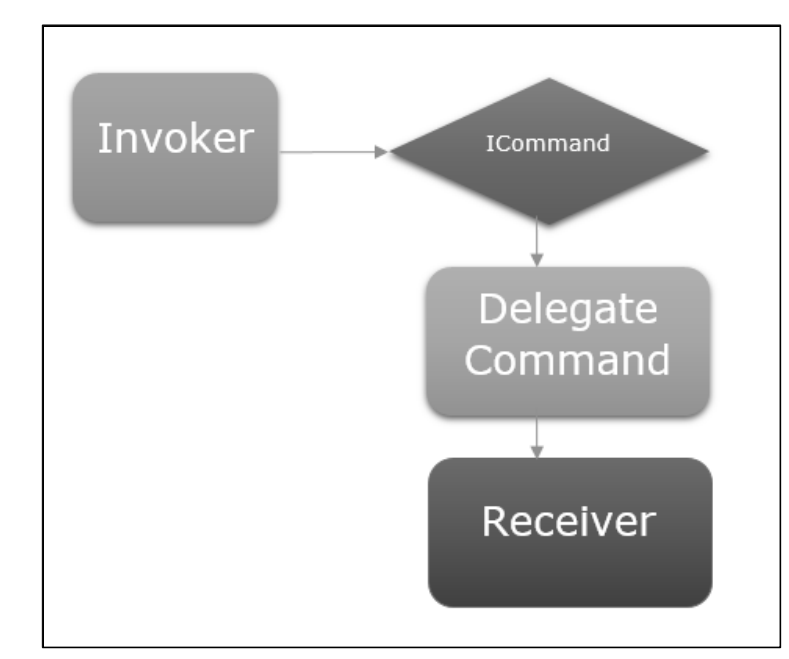
invoker
- invoker是一段可以执行一定逻辑的代码
- 一般的,它是在UI框架的context中的用户与之交互的UI元素。
receiver
- receiver是invoker触发时会执行的逻辑
- 在MVVM 中,receiver通常是viewmodel中需要被调用的方法
invoker和receiver不需要知道彼此的存在
ICommand接口
icommand接口的源代码为:
点击查看代码
public interface ICommand
    {
        /// <summary>
        /// Raised when the ability of the command to execute has changed.
        /// </summary>
        event EventHandler? CanExecuteChanged;

        /// <summary>
        /// Returns whether the command can be executed.
        /// </summary>
        /// <param name="parameter">A parameter that may be used in executing the command. This parameter may be ignored by some implementations.</param>
        /// <returns>true if the command can be executed with the given parameter and current state. false otherwise.</returns>
        bool CanExecute(object? parameter);

        /// <summary>
        /// Defines the method that should be executed when the command is executed.
        /// </summary>
        /// <param name="parameter">A parameter that may be used in executing the command. This parameter may be ignored by some implementations.</param>
        void Execute(object? parameter);
    }
个人的简单理解
- 自定义的命令类需要继承这个接口
- 顾名思义,CanExecute方法就是查看命令能不能执行的
- 顾名思义,Execute方法就是执行命令要进行的操作
下面进行自定义命令
在visual studio中直接继承并实现ICommand接口后会得到以下代码:
点击查看代码
    class MyCommand : ICommand
    {
        public event EventHandler? CanExecuteChanged;

        public bool CanExecute(object? parameter)
        {
            throw new NotImplementedException();
        }

        public void Execute(object? parameter)
        {
            throw new NotImplementedException();
        }
    }
- 首先,不应该在定义命令的时候直接定死Execute执行的操作,所以在自定义的命令类中要声明一个Action,在实例化命令的时候指定Action,然后在Execute方法中调用Action。该部分的代码如下:
点击查看代码
        private Action? _TargetExecuteMethod;

        public void Execute(object? parameter)
        {
            //throw new NotImplementedException();
            if (_TargetExecuteMethod != null)
            {
                _TargetExecuteMethod();
            }
        }
- 然后,CanExecute也不应该在定义命令类的时候直接定死,而是在声明命令的时候进行指定,所以在自定义命令类中要声明一个Func
,在声明命令的时候对其进行赋值,在CanExecute中根据Func 的情况进行判断命令是否可以执行。改部分代码如下:
点击查看代码
		private Func<bool>? _TargetCanExecuteMethod;

		public bool CanExecute(object? parameter)
        {
            if(this._TargetCanExecuteMethod!=null)
            {
                return _TargetCanExecuteMethod();
            }
            else
            {
                if(this._TargetExecuteMethod!=null)
                {
                    return true;
                }
                else
                {
                    return false;
                }
            }
        }
- 然后,为自定义命令类添加构造函数,该部分代码如下:
点击查看代码
public MyCommand(Action? targetExecuteMethod, Func<bool>? targetCanExecuteMethod)
        {
            _TargetExecuteMethod = targetExecuteMethod;
            _TargetCanExecuteMethod = targetCanExecuteMethod;
        }
- 至此,我们得到了一个比较完整的自定义命令类:
点击查看代码
class MyCommand : ICommand
    {
        public event EventHandler? CanExecuteChanged;

        public MyCommand(Action? targetExecuteMethod, Func<bool>? targetCanExecuteMethod)
        {
            _TargetExecuteMethod = targetExecuteMethod;
            _TargetCanExecuteMethod = targetCanExecuteMethod;
        }

        /// <summary>
        /// 传入的目标方法
        /// </summary>
        private Action? _TargetExecuteMethod;
        private Func<bool>? _TargetCanExecuteMethod;

        public bool CanExecute(object? parameter)
        {
            if(this._TargetCanExecuteMethod!=null)
            {
                return _TargetCanExecuteMethod();
            }
            else
            {
                if(this._TargetExecuteMethod!=null)
                {
                    return true;
                }
                else
                {
                    return false;
                }
            }
        }

        public void Execute(object? parameter)
        {
            //throw new NotImplementedException();
            if (_TargetExecuteMethod != null)
            {
                _TargetExecuteMethod();
            }
        }
    }
- Q:ICommand接口中还有一个CanExecuteChanged事件呢,怎么没说?A:因为我没学到,不会
有了自定义命令后,就可以使用了
- 首先,在ViewModel中声明该属性,并进行赋值。
点击查看代码
        public MyCommand Command1 { get; set; }
		 public StudentViewModel()
        {
            studentmodel = new StudentModel();
            Command1 = new MyCommand(
            () =>
            {
                MessageBox.Show("this is a command");
            },

            () =>
            {
                return true;
            }
            );
        }
- 然后在view中指定ViewModel为datacontext,并把按钮的命令绑定到ViewModel的属性上
点击查看代码
	<UserControl.DataContext>
        <viewmodel:StudentViewModel/>
    </UserControl.DataContext>
点击查看代码
<Button Content="test" Command="{Binding Path=Command1}"/>
运行结果


 浙公网安备 33010602011771号