
SpringBoot容器功能-@Configuration
1.组件添加
1.1 @Configuration
总的来说:使用@Configuration和@Bean注解给容器中注册组件
之前使用SSM去开发时,在xml文件中编写bean标签,但是SpringBoot不推荐使用xml文件。
@Configuration注解相当于beans标签
@Bean注解相当于bean标签
id="方法名 | 注解中的name属性(优先级更高)"
class="方法的返回结果"
@Configuration    //代表当前类是一个配置类
public class UserConfig {

    @Bean(name = "user1")        // 构建一个实例,放到spring容器中
    public User user() {
        User user = new User();
        user.setId(1);
        user.setName("张三");
        return user;
    }
    /*
     <beans>      @Configuration
        <bean id="user" class="com.company.demo.entiy.User"/>
     </beans>
     */
}
Full(proxyBeanMethods=true),代表配置类MyConfig中每个给容器中组件注册的方法,在外面可以随便调用,都会去容器中找组件
Lite(proxyBeanMethods=false),代表配置类在容器中不会保存代理对象,在外面无限次调用这些方法,每一次调用都会产生一个新的对象
这个是用来解决组件依赖的场景的。
Full模式与Lite模式:
- 配置类组件之间无依赖关系用Lite模式加速容器启动过程,减少判断
- 配置类组件之间有依赖关系,方法会被调用得到之前单实例组件,用Full模式
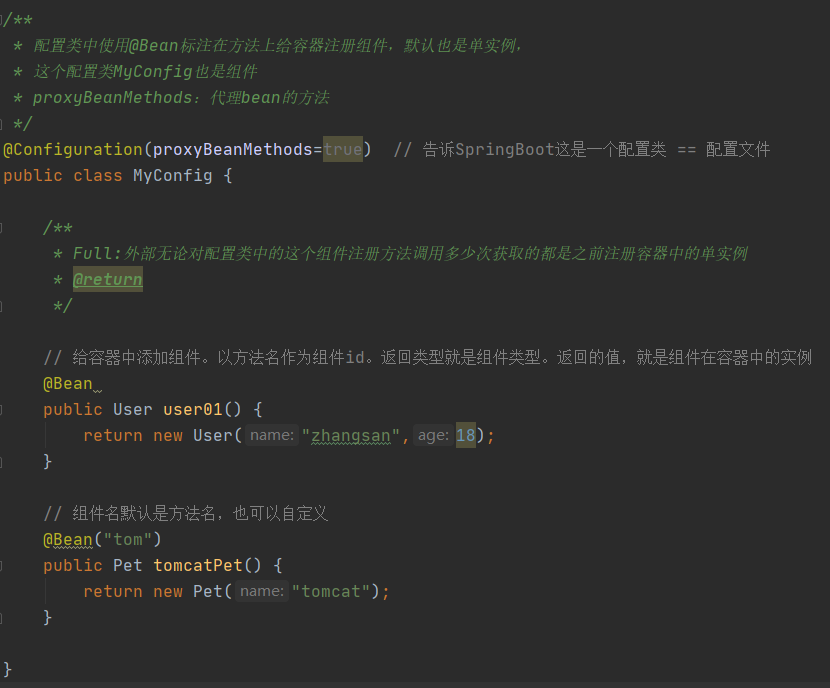
- 配置类里面使用@Bean标注在方法上给容器注册组件,默认也是单实例的
- 配置类本身也是组件
- proxyBeanMethods:代理bean的方法
Full(proxyBeanMethods=true) 【保证每个@Bean方法被调用多少次返回的组件都是单实例的】
Full(proxyBeanMethods=false) 【每个@Bean方法被调用多少次返回的组件都是新创建的】
如果我们给容器中只是单单注册组件,别人也不依赖这些组件,一般都把proxyBeanMethods=false,这样SpringBoot启动会非常快,加载起来也会非常快
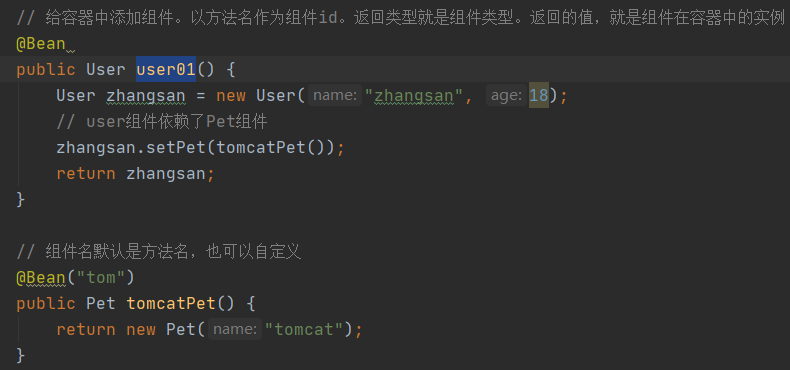
如果我们的组件明显在下面还要用,就proxyBeanMethods=true,能保证容器中user组件依赖的Pet组件就是容器中的
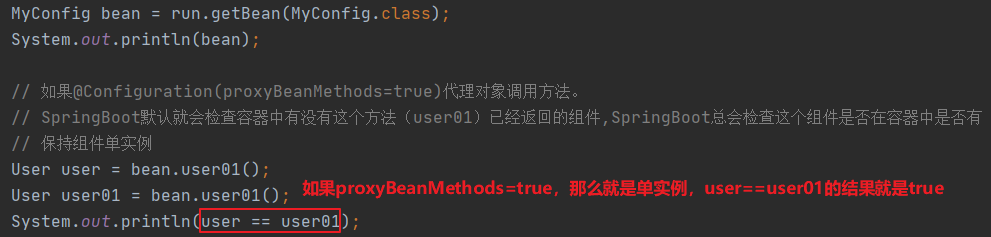
下面的例子1:是观察设置proxyBeanMethods=true,是否单实例
MyConfig.java
MainApplication.java
例子2:演示roxyBeanMethods=true时,user组件依赖了Pet组件,

MyConfig.java
MainApplication.java

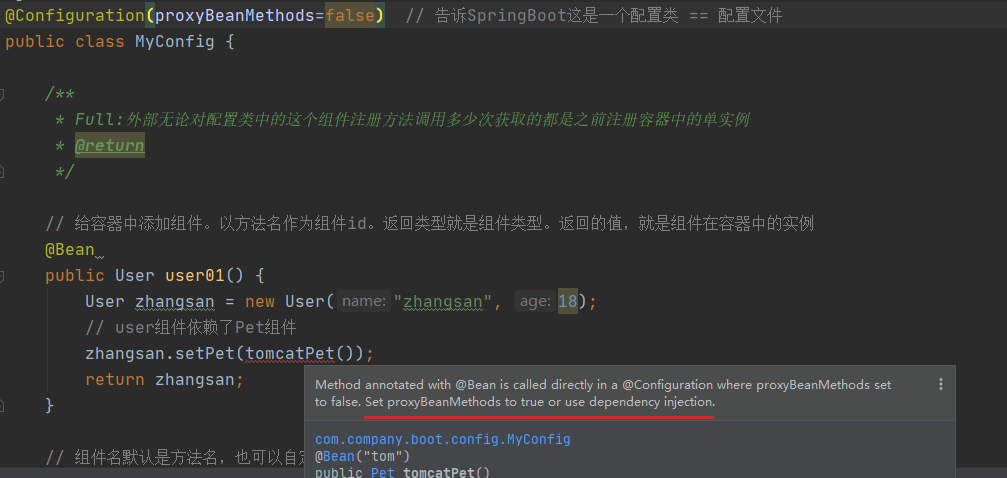
结果:

如果是false,那么就不是组件依赖了
1.2 以前用的,现在在SpringBoot中照样能用
@Component 代表它是一个组件
@Controller 代表它是一个控制器
@Service 代表它是一个业务逻辑组件
@Repository 代表它是一个数据库层组件
完整的代码:
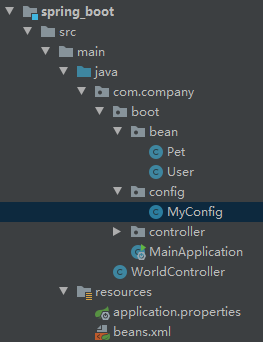
MyConfig.java
package com.company.boot.config;

import com.company.boot.bean.Pet;
import com.company.boot.bean.User;

import org.springframework.context.annotation.Bean;
import org.springframework.context.annotation.Configuration;

/**
 * 配置类中使用@Bean标注在方法上给容器注册组件,默认也是单实例,
 * 这个配置类MyConfig也是组件
 * proxyBeanMethods:代理bean的方法
 */
@Configuration(proxyBeanMethods=true)  // 告诉SpringBoot这是一个配置类 == 配置文件
public class MyConfig {

    /**
     * Full:外部无论对配置类中的这个组件注册方法调用多少次获取的都是之前注册容器中的单实例
     * @return
     */

    // 给容器中添加组件。以方法名作为组件id。返回类型就是组件类型。返回的值,就是组件在容器中的实例
    @Bean
    public User user01() {
        User zhangsan = new User("zhangsan", 18);
        // user组件依赖了Pet组件
        zhangsan.setPet(tomcatPet());
        return zhangsan;
    }

    // 组件名默认是方法名,也可以自定义
    @Bean("tom")
    public Pet tomcatPet() {
        return new Pet("tomcat");
    }

}
MainApplication.java
package com.company.boot;

import com.company.boot.bean.Pet;
import com.company.boot.bean.User;
import com.company.boot.config.MyConfig;

import org.springframework.boot.SpringApplication;
import org.springframework.boot.autoconfigure.SpringBootApplication;
import org.springframework.context.ConfigurableApplicationContext;

/**
 * 主程序类
 * @SpringBootApplication:这是一个SpringBoot应用
 */
@SpringBootApplication(scanBasePackages = "com.company")
public class MainApplication {
    public static void main(String[] args) {
        // 返回IOC容器
        ConfigurableApplicationContext run = SpringApplication.run(MainApplication.class, args);

        // 查看容器里的组件
        String[] beanDefinitionNames = run.getBeanDefinitionNames();

        for (String beanDefinitionName : beanDefinitionNames) {
            System.out.println(beanDefinitionName);
        }

        // 从容器中获取组件,注册的组件默认是单实例的,创建再多的实例,都是同一个
        Pet tom1 = run.getBean("tom", Pet.class);
        Pet tom2 = run.getBean("tom", Pet.class);
        System.out.println("组件:"+(tom1 == tom2));

        MyConfig bean = run.getBean(MyConfig.class);
        System.out.println(bean);

        // 如果@Configuration(proxyBeanMethods=true)代理对象调用方法。
        // SpringBoot默认就会检查容器中有没有这个方法(user01)已经返回的组件,SpringBoot总会检查这个组件是否在容器中是否有
        // 保持组件单实例
        User user = bean.user01();
        User user1 = bean.user01();
        System.out.println(user == user1);


        User user01 = run.getBean("user01",User.class);
        Pet tom = run.getBean("tom", Pet.class);
        System.out.println("用户的宠物:"+(user01.getPet() == tom));

    }
}
beans.xml
<?xml version="1.0" encoding="UTF-8"?>

<beans xmlns="http://www.springframework.org/schema/beans"
       xmlns:xsi="http://www.w3.org/2001/XMLSchema-instance"
       xsi:schemaLocation="http://www.springframework.org/schema/beans http://www.springframework.org/schema/beans/spring-beans.xsd">

    <bean id="user01" class="com.company.boot.bean.User">
        <property name="name" value="zhangsan"></property>
        <property name="age" value="16"></property>
    </bean>
    <bean id="cat" class="com.company.boot.bean.Pet">
        <property name="name" value="tomcat"></property>
    </bean>
</beans>
Pet.java
package com.company.boot.bean;

public class Pet {
    private String name;

    public Pet() {
    }

    public Pet(String name) {
        this.name = name;
    }

    public String getName() {
        return name;
    }

    public void setName(String name) {
        this.name = name;
    }

    @Override
    public String toString() {
        return "Pet{" + "name='" + name + '\'' + '}';
    }
}
User.java
package com.company.boot.bean;

public class User {
    private String name;
    private Integer age;
    private Pet pet;

    public User(String name, Integer age) {
        this.name = name;
        this.age = age;
    }

    public User() {

    }

    public String getName() {
        return name;
    }

    public void setName(String name) {
        this.name = name;
    }

    public Integer getAge() {
        return age;
    }

    public void setAge(Integer age) {
        this.age = age;
    }

    public Pet getPet() {
        return pet;
    }

    public void setPet(Pet pet) {
        this.pet = pet;
    }

    @Override
    public String toString() {
        return "User{" + "name='" + name + '\'' + ", age=" + age + ", pet=" + pet + '}';
    }
}
参考:https://www.yuque.com/atguigu/springboot/qb7hy2#oHrLy

 浙公网安备 33010602011771号