
环境准备
下载
下载连接:http://download.redis.io/releases/
上传解压
上传看自己的环境,解压命令如下:
tar -zxvf redis-5.0.5.tar.gz
编译安装
cd redis-5.0.5
make
cd src
make install
集群配置
编辑集群创建脚本:/redis-5.0.5/utils/create-cluster/create-cluster
#!/bin/bash

# Settings
PORT=30000
TIMEOUT=12000
NODES=16
REPLICAS=1
HOSTNAME=节点ip   #这是节点ip的配置,如果是节点ip2,那么把HOSTNAME和HOSTNAME2替换下位置即可
HOSTNAME2=节点ip2
HOSTNAME3=节点ip3
HOSTNAME4=节点ip4

# You may want to put the above config parameters into config.sh in order to
# override the defaults without modifying this script.
#--masterauth Hxin1746 --requirepass Hxin1746

if [ -a config.sh ]
then
    source "config.sh"
fi

# Computed vars
ENDPORT=$((PORT+NODES))
if [ "$1" == "start" ]
then
    while [ $((PORT < ENDPORT)) != "0" ]; do
        PORT=$((PORT+1))
        echo "Starting $PORT"
        ../../src/redis-server ../../redis.conf --bind $HOSTNAME --port $PORT --cluster-enabled yes --client-output-buffer-limit slave 0 0 0  --maxclients 100000  --maxmemory 100G  --maxmemory-policy volatile-lru --protected-mode no --cluster-config-file nodes-${PORT}.conf --cluster-node-timeout $TIMEOUT --appendonly no --appendfilename appendonly-${PORT}.aof --save "" --dbfilename dump-${PORT}.rdb --logfile ${PORT}.log --daemonize yes --masterauth 集群密码 --requirepass 集群密码
    done
    exit 0
fi

if [ "$1" == "create" ]
then
    HOSTS=""
    while [ $((PORT < ENDPORT)) != "0" ]; do
        PORT=$((PORT+1))
        HOSTS="$HOSTS $HOSTNAME:$PORT $HOSTNAME2:$PORT $HOSTNAME3:$PORT $HOSTNAME4:$PORT"
    done
    ../../src/redis-cli --cluster create $HOSTS -a 集群密码 --cluster-replicas $REPLICAS
    exit 0
fi


if [ "$1" == "stop" ]
then
    while [ $((PORT < ENDPORT)) != "0" ]; do
        PORT=$((PORT+1))
        echo "Stopping $PORT"
        ../../src/redis-cli -p $PORT -h $HOSTNAME -a 集群密码 shutdown nosave
    done
    exit 0
fi

if [ "$1" == "watch" ]
then
    PORT=$((PORT+1))
    while [ 1 ]; do
        clear
        date
        ../../src/redis-cli -p $PORT -h $HOSTNAME  cluster nodes | head -200
        sleep 1
    done
    exit 0
fi

if [ "$1" == "tail" ]
then
    INSTANCE=$2
    PORT=$((PORT+INSTANCE))
    tail -f ${PORT}.log
    exit 0
fi

if [ "$1" == "call" ]
then
    while [ $((PORT < ENDPORT)) != "0" ]; do
        PORT=$((PORT+1))
        ../../src/redis-cli -p $PORT -h $HOSTNAME -a 集群密码 $2 $3 $4 $5 $6 $7 $8 $9
    done
    exit 0
fi

if [ "$1" == "clean" ]
then
    rm -rf *.log
    rm -rf appendonly*.aof
    rm -rf dump*.rdb
    rm -rf nodes*.conf
    exit 0
fi

echo "Usage: $0 [start|create|stop|watch|tail|clean]"
echo "start       -- Launch Redis Cluster instances."
echo "create      -- Create a cluster using redis-trib create."
echo "stop        -- Stop Redis Cluster instances."
echo "watch       -- Show CLUSTER NODES output (first 30 lines) of first node."
echo "tail <id>   -- Run tail -f of instance at base port + ID."
echo "clean       -- Remove all instances data, logs, configs."
在所有的机器启动集群
/redis-5.0.5/utils/create-cluster/create-cluster start
然后任选一台机器执行集群关联命令
redis-5.0.5/utils/create-cluster/create-cluster create
测试
登录集群
redis-cli -h ip -p port -c -a 密码
执行
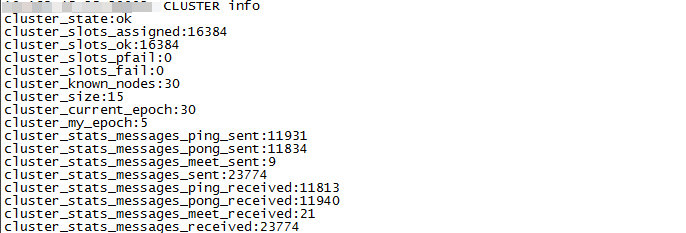
cluster info
搭建成功
本文仅作为笔记使用,方便以后查询,可读性可能不是很好,记录信息大部分来自网上

 浙公网安备 33010602011771号