
pybind11(二):使用矩阵类演示 C++ 类的 Python 绑定方法
前面的文章主要介绍了如何在 Python 中调用简单的 C++ 函数,而本篇文章将进一步探讨如何在 Python 中使用 C++ 定义的类及其成员函数。本文将分别在 C++ 和 Python 中实现一个矩阵类,并为其编写矩阵乘法的成员函数。最后,我们将把两种实现与 NumPy 的矩阵乘法进行性能对比,以观察各自的效率差异。
矩阵类实现思路
定义一个矩阵需要三个基本要素:行数、列数以及存储矩阵元素的数据。对于矩阵操作,还需要一些基础方法,例如获取行数或列数,以及设置或读取指定位置的元素。因此,一个矩阵类可以定义如下:
# 矩阵类的伪代码
class Matrix:
    int rows
    int cols
    vector<float> data

    int get_row_num()
    int get_col_num()

    void set(int row, int col, float value)
    float get(int row, int col)
在这个矩阵实现中,我们使用一维数组来存储矩阵的数据,并通过行列索引计算对应的一维下标,从而定位到具体的元素。
矩阵乘法实现思路
这里不使用任何矩阵乘法优化算法,就使用矩阵乘法定义的算法:
设矩阵 \(A\) 为 \(m \times n\),矩阵 \(B\) 为 \(n \times p\),则矩阵 \(C = A B\)为 \(m \times p\),其中元素 \(c_{ij}\) 的计算方式为:
# 计算 C = A × B 的伪代码
# A: m × n
# B: n × p
# C: m × p

for i = 0 to m-1:
    for j = 0 to p-1:
        C[i][j] = 0
        for k = 0 to n-1:
            C[i][j] += A[i][k] * B[k][j]
C++ 矩阵类具体实现
在明确了矩阵类的设计思路后,我们首先给出矩阵类在 C++ 中的完整实现。该实现包含数据存储、元素读写、随机填充、矩阵乘法等核心功能。
#include <cstddef>
#include <cstdlib>
#include <ctime>

#include <pybind11/pybind11.h>

class Matrix {
	private:
		int rows, cols;
		std::vector<float> data;

	public:
		Matrix(int rows, int cols)
		: rows(rows), cols(cols), data(rows * cols, 0.0f) {
			srand((unsigned)time(NULL));
		};

		void set(int row, int col, float value);
		float get(int row, int col) const;

		int rows_num() const;
		int cols_num() const;

		// 使用随机数填充矩阵
		void fill_random();

		Matrix dot(const Matrix &other) const;

		void print() const;
};
#include "matrix.h"
#include <cstdio>
#include <iostream>
#include <stdexcept>

void Matrix::set(int row, int col, float value) {

    if ((row >= 0 && row < rows) && (col >= 0 && col < cols)) {
        data[row * cols + col] = value;
    }

    return;
}

float Matrix::get(int row, int col) const {

    float value;

    if ((row >= 0 && row < rows) && (col >= 0 && col < cols)) {
        value = data[row * cols + col];
    }

    return value;
}

int Matrix::rows_num() const { return rows; }

int Matrix::cols_num() const { return cols; }

void Matrix::fill_random() {
    for (float &i : data) {
        i = rand() / float(RAND_MAX);
    }
}

Matrix Matrix::dot(const Matrix &other) const {
    if (other.rows != cols) {
        std::invalid_argument("Matrix dimisions not match for dot product!");
    }

    Matrix result(rows, other.cols);
    float sum = 0;

    for (int i = 0; i < rows; i++) {
        for (int j = 0; j < other.cols; j++) {
            sum = 0;
            for (int k = 0; k < cols; k++) {
                sum += this->get(i, k) * other.get(k, j);
            }
            result.set(i, j, sum);
        }
    }
    return result;
}

void Matrix::print() const{

    std::cout << '[' << ' ';

    for (int i = 0; i < rows_num(); i++) {
        for (int j = 0; j < cols_num(); j++) {
            std::cout << get(i, j) << " ";
        }
        if (i < rows_num() - 1)
            std::cout << '\n' << "  ";
    }

    std::cout << "]" << '\n';

    return;
}
使用 pybind11 将 C++ 类导出
为了使 Python 能直接调用 C++ 实现的矩阵类,我们使用 pybind11 将其封装为 Python 扩展模块。通过绑定类的方法、构造函数以及成员函数,Python 端便可像使用普通对象一样创建和操作 C++ 的 Matrix 类实例。以下代码展示如何通过 pybind11 暴露该类。
/*
 *
 * 简要说明:
 *   该文件通过 pybind11 暴露了一个名为 "my_matrix" 的 Python 扩展模块。
 *   模块中注册了一个 Matrix 类(C++ 实现),用于在 Python 中创建和操作矩阵对象。
 *
 * 导出的主要功能(Python 侧):
 *   - 类名: my_matrix.Matrix
 *   - 构造器:
 *       Matrix(rows: int, cols: int)
 *         创建一个指定行列数的矩阵(初始内容由底层实现决定)。
 *   - 实例方法(代表性说明):
 *       set(i: int, j: int, value)
 *         在位置 (i, j) 设置元素值(下标约定以实现为准,通常为 0 基或 1 基,参见实现文档)。
 *       get(i: int, j: int) -> value
 *         返回位置 (i, j) 的元素值。
 *       rows_num() -> int
 *         返回矩阵的行数。
 *       cols_num() -> int
 *         返回矩阵的列数。
 *       fill_random()
 *         用随机值填充矩阵(随机数分布与范围由实现决定)。
 *       dot(other)
 *         矩阵乘法(点乘/矩阵积)。若维度不匹配,应抛出异常或以实现约定处理。
 *       print()
 *         将矩阵内容以可读格式输出(用于调试/展示)。
 *
 */
#include <pybind11/detail/common.h>
#include <pybind11/pybind11.h>

#include "matrix.h"

namespace py = pybind11;

PYBIND11_MODULE(my_matrix, m){
    py::class_<Matrix>(m, "Matrix")
        .def(py::init<int, int>())
        .def("set", &Matrix::set)
        .def("get", &Matrix::get)
        .def("rows_num", &Matrix::rows_num)
        .def("cols_num", &Matrix::cols_num)
        .def("fill_random", &Matrix::fill_random)
        .def("dot", &Matrix::dot)
        .def("print", &Matrix::print)
    ;
}
编写 CMakeLists.txt
要成功构建 Python 扩展模块,需要使用 CMake 对项目进行配置。CMakeLists.txt 文件主要负责指定编译选项、寻找依赖库(如 Python、pybind11),并将 C++ 源文件编译为可供 Python 导入的模块。本节给出完整的 CMake 构建脚本,确保项目可以顺利编译运行。
# 最小 CMake 版本要求
cmake_minimum_required(VERSION 3.14)

# 定义项目名称为 'matrix',并指定项目使用 C++ 语言。
project(matrix LANGUAGES CXX)

# 查找 Python 3 环境。
# COMPONENTS Interpreter Development: 确保找到 Python 解释器和开发头文件/库。
find_package(Python3 REQUIRED COMPONENTS Interpreter Development)

# 查找 pybind11 库。
# REQUIRED: 如果找不到 pybind11,则停止配置并报错。
find_package(pybind11 REQUIRED)

# 设置 C++ 语言标准为 C++11。pybind11 通常至少需要 C++11。
set(CMAKE_CXX_STANDARD 11)
# 强制要求编译器必须支持设置的 C++ 标准
set(CMAKE_CXX_STANDARD_REQUIRED True)
# 设置默认构建类型为 Release。这会启用优化选项。
set(CMAKE_BUILD_TYPE Release)
# 为 Release 构建类型设置高级优化标志 (-O3)
set(CMAKE_CXX_FLAGS_RELEASE "-O3")

# 使用 pybind11 提供的便捷函数来创建 Python 扩展模块。
# 目标名: my_matrix (对应于 Python 中 import my_matrix)
# 源文件: matrix.cpp matrix_bind.cpp
# pybind11 会自动处理链接 Python 库和添加必要的包含目录。

pybind11_add_module(my_matrix matrix.cpp matrix_bind.cpp)
编写 python 脚本
在 Python 脚本中,我们同样定义了一个 Matrix 类,其接口设计与 C++ 版本基本一致,用于保持对比的一致性。在主程序中,我们依次使用下列三种方式执行矩阵乘法:
- 使用 pybind11 导出的 C++ 版本 Matrix 类
- 使用 Python 纯接口实现的 Matrix 类
- 使用 NumPy 的矩阵乘法(高度优化)
通过测量三者的运行时间,便可以直观地比较不同语言、不同实现方式的执行效率。
import my_matrix
import numpy as np
import time
import random

class Matrix:
    def __init__(self, rows, cols, data):
        self.rows = rows
        self.cols = cols

        if data is None:
            self.data = [0.0] * (rows * cols)
        else:
            self.data = list(data)

    def index(self, row, col):
        return row * self.cols + col

    def set(self, row, col, value):
        if ((row >=0 and row < self.rows) and (col >= 0 and col < self.cols)):
            self.data[self.index(row, col)] = value

    def get(self, row, col):
        if ((row >=0 and row < self.rows) and (col >= 0 and col < self.cols)):
            return self.data[self.index(row, col)]

    def fill_random(self):
        for i in range(self.rows * self.cols):
            self.data[i] = random.random()

    def dot(self, other):
        if self.cols != other.rows:
            raise ValueError("Matrix shapes do not match for multiplication")

        result = Matrix(self.rows, other.cols, None)

        for i in range(self.rows):
            for j in range(other.cols):
                sum = 0.0
                for k in range(self.cols):
                    sum += self.get(i, k) * other.get(k, j)
                result.set(i, j, sum)

        return result

if __name__ == "__main__":

    a_rows = 100
    a_cols = b_rows = 100
    b_cols = 400

    a = my_matrix.Matrix(a_rows, a_cols)
    b = my_matrix.Matrix(b_rows, b_cols)
    a.fill_random()
    b.fill_random()

    start = time.perf_counter()
    c = a.dot(b)
    elapsed = time.perf_counter() - start
    print(f"my matrix compute time: c computed in {elapsed:.6f} s")

    a = np.random.rand(a_rows, a_cols).astype(np.float32)
    b = np.random.rand(b_rows, b_cols).astype(np.float32)
    start = time.perf_counter()
    c = np.dot(a, b)
    elapsed = time.perf_counter() - start
    print(f"numpy compute time: c computed in {elapsed:.6f} s")

    a = Matrix(a_rows, a_cols, None)
    b = Matrix(b_rows, b_cols, None)
    a.fill_random()
    b.fill_random()
    start = time.perf_counter()
    c = a.dot(b)
    elapsed = time.perf_counter() - start
    print(f"python matrix compute time: c computed in {elapsed:.6f} s")
实验结果
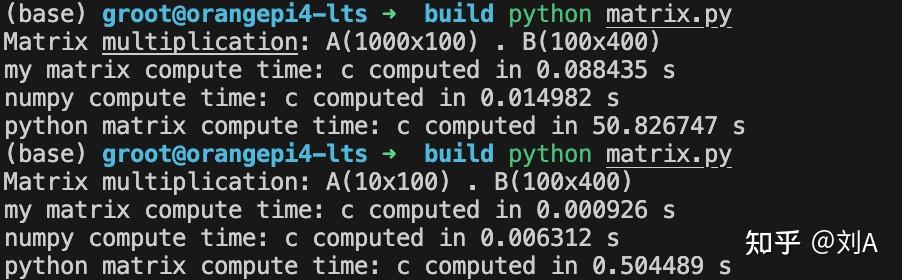
在小规模矩阵乘法中,C++ 实现表现最为出色,NumPy 次之,而纯 Python 的性能最弱。随着矩阵规模增大,NumPy 的优势逐渐显现,在大规模矩阵乘法中性能最优;C++ 紧随其后;纯 Python 与二者相比则存在巨大差距。
文件结构如下:
.
├── build
│   ├── CMakeCache.txt
│   ├── CMakeFiles
│   ├── cmake_install.cmake
│   ├── Makefile
│   ├── matrix.py
│   └── my_matrix.cpython-313-aarch64-linux-gnu.so
├── CMakeLists.txt
├── extern
│   └── pybind11
├── matrix_bind.cpp
├── matrix.cpp
├── matrix.h
├── matrix.py
└── __pycache__

 浙公网安备 33010602011771号