
JavaScript基础
1、进入JavaScript
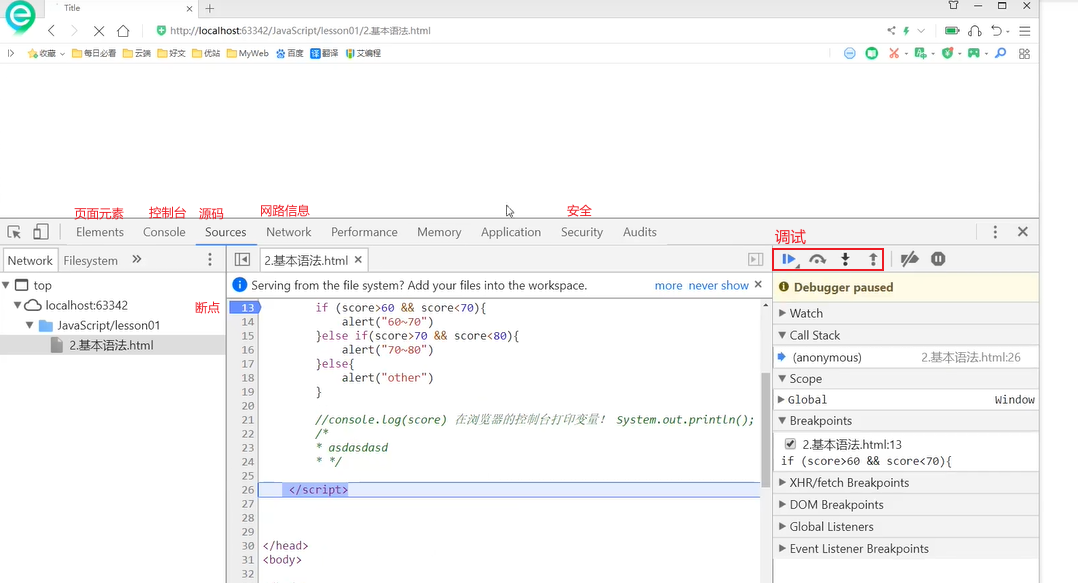
浏览器中的调试
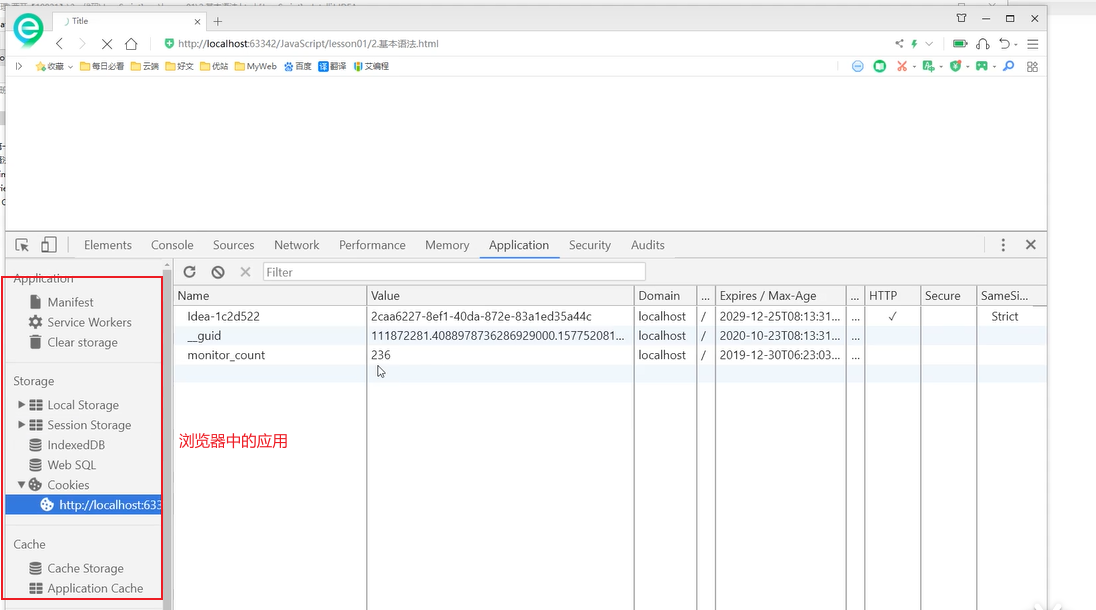
浏览器中的应用
建议局部变量使用let进行定义
基本语法
- 数据类型:
- Number:不区分小数和整数
- NaN:Not a Number不是一个数字
- Infinity:表示无限大
- 字符串: 'abc'
- 布尔值:true、false
- 逻辑运算符:&&、||、!
- 比较运算符:(值等于)、=(类型等于值等于)、>、<、>=、<=、!==
- 算数运算符:+、-、*、/
- 赋值运算符:=、+=、-=、*=、/=
- 自增自减:++、--
- NaN==NaN 结果为false
- NaN只能通过isNaN(xxx)进行判断
- (1/3)==(1-2/3) 结果为false,存在精度丢失问题
- null、undefined(null:空值)(undefined:未定义)
- 数组:var arr=【1,2,3,true,'abc',123.33】(数据类型可以不同)
- 数组第二种定义形式:var arr=new Array(1,2,3,true,'abc',123.33)
- 如果数组下标越界会显示:undefined
- 对象:var person=
- 对象取值:person.name
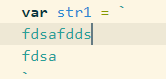
- ``可以实现换行输入:
- ${name}:
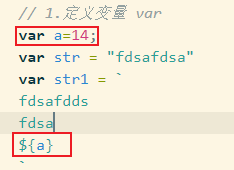
可以直接取到a的值
'use strict'严格检查模式,需要放入<script></script>中的第一行
基本方法:字符串
- str.length:字符串长度
- str【0】:字符串按照下标取值
- str.toUpperCase():转换为大写
- str.toLowerCase():转换为小写
- str.indexOf('aa'):查找字符串
- str.substring(1):从第一个字符串取到最后一个字符串
- str.substring(1,3):取下标为一、二的字符串,不包含下标为三的
基本方法:数组
- var arr = 【1,23,4,6】
- arr【1】通过下标取值、赋值
- arr.length:返回数组长度
- arr.slice():截取整个数组
- arr.slice(2):从数组下标为2开始截取到最后一个
- arr.slice(1,3):截取数组下标1到3中间的值
- arr.push(1,23,5):向数组的尾部存储值
- arr.pop():将数组尾部的值删除
- arr.unshift(1,4):添加到数组的头部
- arr.shift():删除数组的头部元素
- arr.sort():数组排序
- arr.reverse():数组反转
- arr.concat([54,123,53,6]):合并两个数组返回一个新的数组,并没有改变arr
- arr.join('-'):打印数组并将数组以'-'进行拼接
- 多维数组:var arr=[[],[],[]]
对象
- 对象的创建
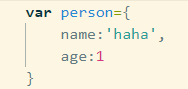
- 使用一个不存在的对象属性不会报错会出现:undefined
- 可以删除对象的属性:delete person.name
- 添加对象的属性:person.haha='haha'
- 'age' in person:判断属性是否存在于某个对象(in会先在自身找,没有就去父类中找,找得到返回为true)
- person.hasOwnProperty('age'):判断对象自身是否存在某个属性
流程控制
- if(){}else if(){}else{}
- while(){}
- for(let i=0;i<10;i++){}
- for(let num of arr){}:num是一个索引
- arr.forEach(function(value){ })
Maphe和Set
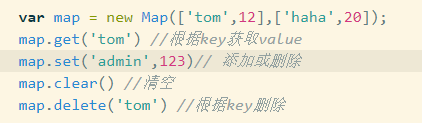
- map
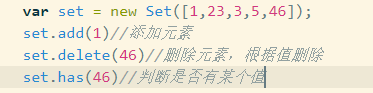
- set无序不重复集合
- 遍历Map:for(let x of map){} 取出的是[]
- 遍历Set:for(let x of set){} 取出的是值
函数
- 函数的定义:function abc(x){}
- 第二种定义方式:var abc = function(x){}
- arguments:可以获取到传递给函数的所有参数,是一个数组arguments[0],可以对arguments进行遍历进行获取
- rest:function abc(x,y,...rest){console.log(rest)} 这里的rest可以获取到未定义的所有参数,也是一个数组
变量的作用域
- var定义的变量是有作用域的
- 在函数体中定义的变量在,函数体外不可以使用(闭包)
- 两个函数内部使用了同样的变量名,这两个变量互不冲突
- 内部函数可以访问外部函数的成员,反之则不行
- 如果内部函数定义的变量与外部函数定义的变量重名了,两个重名的变量互不影响
- 全局变量,定义在最外面的变量 var x=1;
- 所有的全局变量全部绑定在Windows对象下,所以x等价于window.x
- alert()函数本身也是window的一个函数
全局作用域 var
JavaScript只有一个全局作用域,且全局变量都是绑定在window对象上的,所以如果引入了多个js文件的话,可能会造成命名冲突的问题,如何解决?
- 自定义一个存储区域,将变量、函数等放入其中存储,如此可以解决这个问题
示例:
<script>
        var O = {};
        O.name='xx';
        O.add=function(){
            console.log('这是一个O下的add方法')
        }
</script>
局部作用域 let
- let a=1; 使用let修饰a就是一个局部变量
- 问题?两个js文件同样的变量名使用let定义变量,会发生冲突吗
常量(只读变量)const
- const PI=3.14;
- 不可进行第二次赋值
方法
- 方法的定义
- this是指当前对象,gaopeng
var gaopeng={
            name:'gaopeng',
            birthday:1998,
            age:function(){
                return new Date().getFullYear()-this.birthday;
            }
        }
- apply:可以控制this的指向
- 如果直接调用getAge() 会返回NaN,因为此时this指向的对象是window,它不具有birthday属性
- 而apply可以将对象的指向切换为gaopeng,它具有birthday的属性
function getAge(){
            return new Date().getFullYear()-this.birthday;
        }
        var gaopeng={
            name:'gaopeng',
            birthday:1998,
            age:getAge
        }
        getAge.apply(gaopeng,[]);//gaopeng是所指向的对象,[]是传递的参数
常用对象
- typeof
typeof 123
'number'
typeof '123'
'string'
typeof 12.32
'number'
typeof NaN
'number'
typeof []
'object'
typeof {}
'object'
typeof Math.abs
'function'
typeof undefined
'undefined'
- Date
var date = new Date();
date.getFullYear();
date.getMonth();
date.getDate();
date.getDay();
date.getHours();
date.getMinutes();
date.getSeconds();
date.getTime();
new Date(1636288538441)//将时间戳转换为时间
date.toLocaleString();//返回本地之间
date.toUTCString();//返回世界时间
操作Bom对象(浏览器对象模型)
- window对象:浏览器窗口的一些信息
- navigator:浏览器的一些信息
- screen:屏幕信息
- location:当前页面的url信息
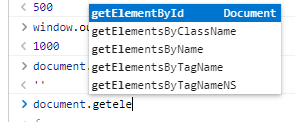
- document:代表当前页面信息、HTML、DOM文档树。能够动态的获取到DOM文档树节点。能够获取到Cookie
document.cookie
6. history:代表浏览器的历史纪录
操作Dom对象
- 浏览器网页就是一个Dom树形结构
- 获取Dom节点对其进行操作
- 更新Dom节点
- 删除Dom节点
- 遍历Dom节点
- 添加Dom节点
- 获得Dom节点
//根据CSS选择器
document.getElementsByTagName('h1')//根据标签获取元素
document.getElementById('p1')//根据id获取元素
document.getElementsByName('p2')//根据name获取元素
document.getElementById('p1').innerText//获取元素文本
document.getElementById('p1').style.color='red'//改变css样式
- 删除节点:先获取父节点,然后通过父节点删除自己
- 按照下标删除节点,需要注意,节点是动态的,删掉第一个,第二个会成为第一个
document.getElementById('p1').parentElement.removeChild(p1)
- 移动节点
<body>
    <p id="js">JavaScript</p>
    <div id="list">
        <p id="se">JavaSE</p>
        <p id="ee">JavaEE</p>
        <p id="me">JavaMe</p>
    </div>

    <script>
        // 注意script需要放到body的最后面,不然获取不到节点
        //1. 插入节点
        // 获取ID为js的元素将其添加到id为list的div中
        var js = document.getElementById('js');
        var list = document.getElementById('list');
        // list.appendChild(js);
        //2. 创建一个新的标签
        var newP = document.createElement('p');
        newP.id='newP';
        newP.innerText='这是使用JS插入的一个标签';
        list.appendChild(newP);
        //3. 创建一个script脚本
        var myScript = document.createElement('script');
        myScript.setAttribute('type','text/javascript');
        myScript.innerText='alert(\'haha\')';
        list.appendChild(myScript);
        //4. 创建一个style标签
        var myStyle = document.createElement('style');
        myStyle.setAttribute('type','text/css');
        myStyle.innerText='body{background-color:grey}';
        list.appendChild(myStyle)
        //5. insertBefore
        var ee = document.getElementById('ee');
        //要包含的节点.insertBefore(newNode,targetNode)
        list.insertBefore(js,ee);//插入到了JavaEE的前面

    </script>
</body>
操作form表单
<body>
    <form action="/haha" method="post">
        <p>
            <span>用户名:</span>
            <input type="text" id="username" name="username" required></input>
        </p>
        <p>
            <span>密码:</span>
            <input type="password" id="password" name="password" required></input>
        </p>
        <p>
            <span>性别:</span>
            <input type="radio" id="boy" value="0" name="sex">男</input>
            <input type="radio" id="girl" value="1" name="sex">女</input>
        </p>
        <p>
            <button>提交</button>
        </p>
    </form>


    <script>
        var username = document.getElementById('username')
        var boyRadio = document.getElementById('boy')
        var girlRadio = document.getElementById('girl')
        // 获取输入框的值
        console.log(username.value)
        // 修改输入框的值
        username.value = '1231312313131'
        // 查看单选的值,只能看到值不能看到是否选中
        boyRadio.value
        // 如果为true则选中
        boyRadio.checked

    </script>
</body>
表单密码加密
<body>
    <form action="/haha" method="post">
        <p>
            <span>用户名:</span>
            <input type="text" id="username" name="username" required></input>
        </p>
        <p>
            <span>密码:</span>
            <input type="password" id="password1" name="password1" required></input>
            <input type="hidden" id="password" name="password" required></input>
        </p>
        <p>
            <span>性别:</span>
            <input type="radio" id="boy" value="0" name="sex">男</input>
            <input type="radio" id="girl" value="1" name="sex">女</input>
        </p>
        <p>
            <button>提交</button>
        </p>
    </form>

    <!-- 引入md5工具类 -->
    <script src = "https://cdn.bootcss.com/blueimp-md5/2.10.0/js/md5.min.js">   </script>
    <script>
        var username = document.getElementById('username')
        var password = document.getElementById('password1')
        // 使用隐藏的提交加密后的密码
        var password_md5 = document.getElementById('password')
        password_md5.value=md5(password.value)
        alert(password_md5.value)
    </script>
</body>

 浙公网安备 33010602011771号