
【接口自动化】Python+Requests接口自动化测试框架搭建【二】
接续前文,在上篇博客中我们编写了demo.py代码,里面代码过多冗余,更新代码:
#!/usr/bin/env python
# coding=utf-8

import requests


class RunMain:
    def __init__(self):
        pass

    @staticmethod
    def send_post(url,cookies,headers,params=None):
        try:
            res = requests.post(url=url,cookies=cookies,headers=headers,data=params)return res.status_code
        except Exception as msg:
            return msg

    @staticmethod
    def send_get(url,cookies,headers,params=None,):
        try:
            res = requests.get(url=url,cookies=cookies,headers=headers,params=params,)return res.status_code
        except Exception as msg:
            return msg

    def run_main(self, url, method,cookies=None,headers=None,params=None):
        if method == 'GET':
            res = self.send_get(url,cookies,headers,params)
            return res
        elif method == 'POST':
            res = self.send_post(url,cookies,headers,params)
            return res
        else:
            print('不支持的请求方式!')
接下来我们采用Unittest框架进行搭建,使用ddt注解进行参数化。
#!/usr/bin/env python
# -*- coding:utf-8
from ddt import ddt,data,unpack
from Demo.demo import RunMain
import unittest
from urllib import parse
@ddt
class excelddt(unittest.TestCase):
    @data(
        [1, 'http://apis.juhe.cn/mobile/get', 'GET','{"phone":"13800000000","dtype":"json","key":"密匙"}', '', '', 200, '','Yes'],
        [2, 'http://apis.juhe.cn/simpleWeather/query', 'POST','{"city": "济南","key": "密匙"}', '', '', 200, '', 'Yes']
    )
    @unpack
    def testURL(self,id,url,method,params,headers,cookies,code,returns,run):
        t=RunMain().run_main(url=url, method=method,headers=headers, params=params)
        print(t)
        self.assertEqual(t,code)


if __name__ == '__main__':
    unittest.main()
使用ddt参数化是为了进行excel取值,我们运行一下。

出现错误了,POST请求返回值异常。这个问题困扰了两天,无奈放弃,到最后也没分析出来结果。
更换pytest,用@pytest.mark.parametrize注解试试
import pytest
from Demo.demo import RunMain
@pytest.mark.parametrize(
    "ID,URL,METHOD,PARAMS,HEADERS,COOKIES,RETURNCODE,RETURNTXT,YN",
    [(1,"http://apis.juhe.cn/mobile/get",'GET',{"phone": "13800000000","dtype": "json","key": "x"},{"Content-Type":"application/json"},'',200,'','Yes'),
     (2,"http://apis.juhe.cn/simpleWeather/query",'POST',{"city": "济南","key": "x"},{"Content-Type":"application/json"},'',200,'','No'),
     (3,"http://apis.juhe.cn/simpleWeather/query",'POST',{"city": "济南","key": "x"},{"Content-Type":"application/json"},'',200,'','Yes'),
     (4,"http://www.3wyuming.xyz:8080/BBSProject/userServlet.do",'GET',{"account": "x","pwd": "x"},{"Content-Type":"application/json"},'',200,'','Yes'),
     (5,"http://www.3wyuming.xyz:8080/BBSProject/textServlet.do",'GET',{"md":"read","pid":"8"},{"Content-Type":"application/json"},'',200,'','Yes')],
    ids=["case1","case2","case3","case4","case5"]
)
def test_url(ID,URL,METHOD,PARAMS,HEADERS,COOKIES,RETURNCODE,RETURNTXT,YN):
    t = RunMain().run_main(url=URL, method=METHOD, headers=HEADERS, params=PARAMS)
    assert t == RETURNCODE
if __name__ == '__main__':
    pytest.main()
运行代码:
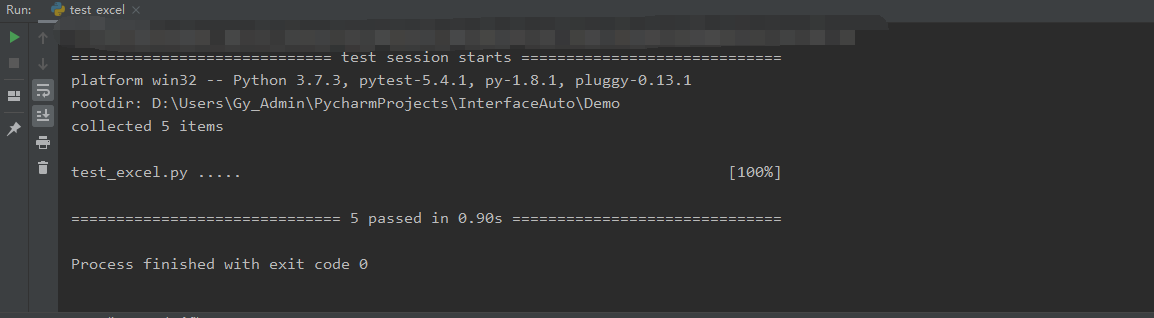
运行成功。
总结一下用参数化遇到的坑:
1.Unittest,ddt参数化,一直报错字符异常,返回值返回的为异常错误,导致断言失败。事后发现应该是中文问题。
2.Pytest,参数化中也是报错,具体错误是str没有item属性,我在Test.py里面发送请求一直正常状态,为什么使用参数化就会异常,转换思路,考虑到数据问题。打入断点,Debug寻找问题,发现Test.py里json格式数据类型都是dict,
但是参数化中属于str类型,于是知道,将数据中的{}括号放置于引号外面,发送请求,成功。

 浙公网安备 33010602011771号