


第二次博客作业
前言
四至六次的题目主要包括 Java 正则表达式的使用,日期计算,继承和多态,难度相较前三次有所提升
本文中的的代码已上传至GitHub
项目地址:https://github.com/Waterfrontflowers/myJavaAtPta
设计与分析
7-2 日期问题面向对象
本题的核心在于将年月日分别提取出来封装成类,并且给一些超限判定方法。前后n天的实现仍可以通过循环检测日期合法性来实现。
类图

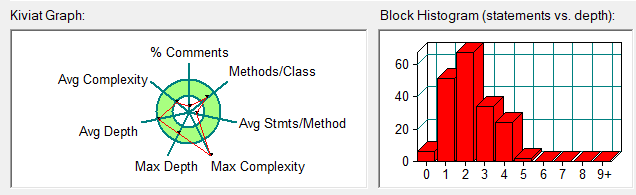
SourceMonitor 结果
| Parameter | Value |
|---|---|
| Project Directory | D:\SourceMonitorProject\ |
| Project Name | SourceMonitorProject |
| Checkpoint Name | Checkpoint1 |
| File Name | Main.java |
| Lines | 334 |
| Statements | 184 |
| Percent Branch Statements | 17.4 |
| Method Call Statements | 138 |
| Percent Lines with Comments | 2.7 |
| Classes and Interfaces | 5 |
| Methods per Class | 8.80 |
| Average Statements per Method | 2.89 |
| Line Number of Most Complex Method | 11 |
| Name of Most Complex Method | Main.main() |
| Maximum Complexity | 14 |
| Line Number of Deepest Block | 303 |
| Maximum Block Depth | 5 |
| Average Block Depth | 2.14 |
| Average Complexity | 1.95 |
| Most Complex Methods in 5 Class(es) | Complexity | Statements | Max Depth | Calls |
|---|---|---|---|---|
| DateUtil.checkInputValidity() | 1 | 1 | 2 | 3 |
| DateUtil.compareDates() | 5 | 8 | 4 | 25 |
| DateUtil.DateUtil() | 1 | 0 | 0 | 0 |
| DateUtil.DateUtil() | 1 | 1 | 2 | 0 |
| DateUtil.equalTwoDates() | 3 | 4 | 4 | 14 |
| DateUtil.getDay() | 1 | 1 | 2 | 0 |
| DateUtil.getDayOfDates() | 3 | 9 | 3 | 9 |
| DateUtil.getNextNDays() | 8 | 16 | 4 | 27 |
| DateUtil.getPreviousNDays() | 9 | 19 | 5 | 32 |
| DateUtil.setDay() | 1 | 1 | 2 | 0 |
| DateUtil.showDate() | 1 | 1 | 2 | 2 |
| Day.Day() | 1 | 0 | 0 | 0 |
| Day.Day() | 1 | 2 | 2 | 0 |
| Day.dayIncrement() | 1 | 1 | 2 | 0 |
| Day.dayReduction() | 1 | 1 | 2 | 0 |
| Day.getMonth() | 1 | 1 | 2 | 0 |
| Day.getValue() | 1 | 1 | 2 | 0 |
| Day.isLeap() | 1 | 1 | 2 | 0 |
| Day.isNotLeap() | 1 | 1 | 2 | 0 |
| Day.resetMax() | 1 | 1 | 2 | 0 |
| Day.resetMin() | 1 | 1 | 2 | 0 |
| Day.setMonth() | 1 | 1 | 2 | 0 |
| Day.setValue() | 1 | 1 | 2 | 0 |
| Day.validate() | 3 | 4 | 3 | 3 |
| Main.main() | 14 | 32 | 4 | 23 |
| Month.getValue() | 1 | 1 | 2 | 0 |
| Month.getYear() | 1 | 1 | 2 | 0 |
| Month.Month() | 1 | 0 | 0 | 0 |
| Month.Month() | 1 | 2 | 2 | 0 |
| Month.monthIncrement() | 1 | 1 | 2 | 0 |
| Month.monthReduction() | 1 | 1 | 2 | 0 |
| Month.resetMax() | 1 | 1 | 2 | 0 |
| Month.resetMin() | 1 | 1 | 2 | 0 |
| Month.setValue() | 1 | 1 | 2 | 0 |
| Month.setYear() | 1 | 1 | 2 | 0 |
| Month.validate() | 2 | 1 | 2 | 0 |
| Year.getValue() | 1 | 1 | 2 | 0 |
| Year.isLeapYear() | 3 | 1 | 2 | 0 |
| Year.setValue() | 1 | 1 | 2 | 0 |
| Year.validate() | 2 | 1 | 2 | 0 |
| Year.Year() | 1 | 0 | 0 | 0 |
| Year.Year() | 1 | 1 | 2 | 0 |
| Year.yearIncrement() | 1 | 1 | 2 | 0 |
| Year.yearReduction() | 1 | 1 | 2 | 0 |
| Block Depth | Statements |
|---|---|
| 0 | 6 |
| 1 | 51 |
| 2 | 67 |
| 3 | 34 |
| 4 | 24 |
| 5 | 2 |
| 6 | 0 |
| 7 | 0 |
| 8 | 0 |
| 9+ | 0 |
7-3 图形继承
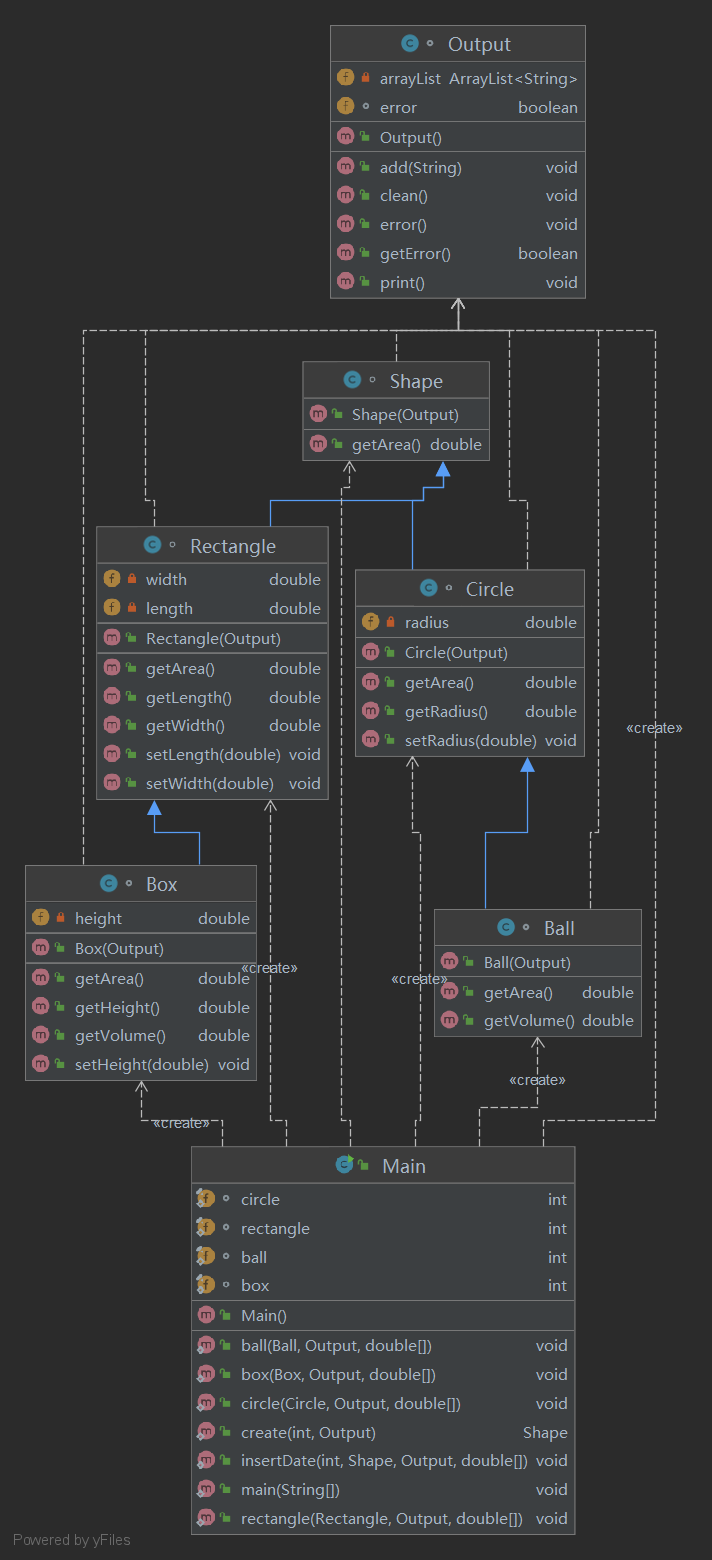
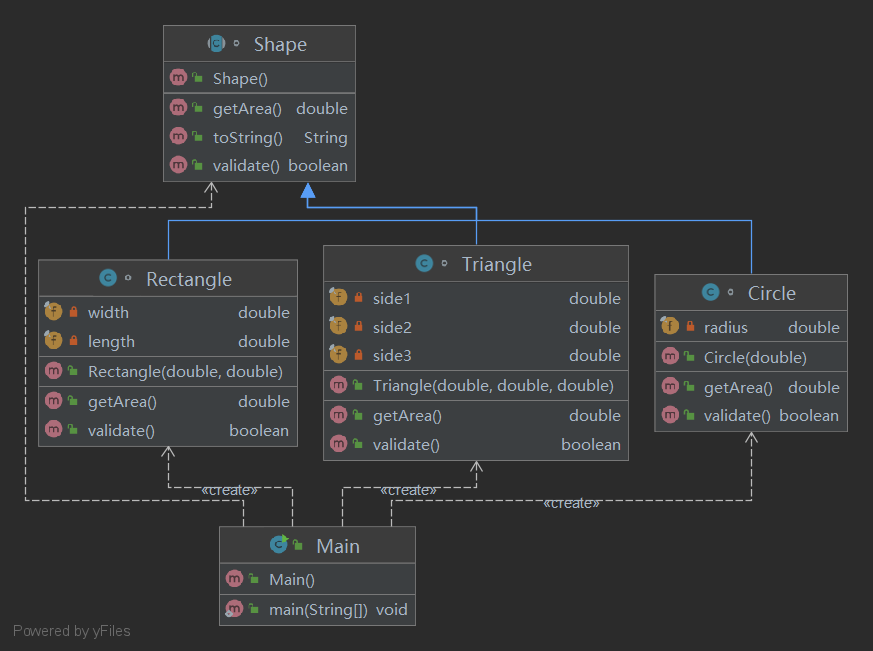
本题的实现通过继承Shape 父类,同时建立一个输出队列,有输出时将输出内容压入队列,遇到异常情况后清空输出队列,输出Wrong Format。
类图
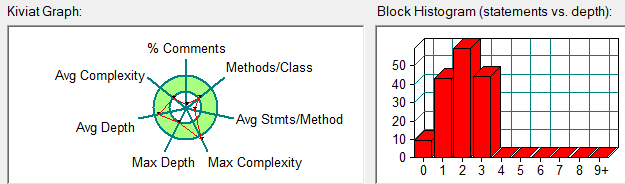
SourceMonitor 结果
| Parameter | Value |
|---|---|
| Project Directory | D:\SourceMonitorProject\ |
| Project Name | SourceMonitorProject |
| Checkpoint Name | Checkpoint1 |
| File Name | Main.java |
| Lines | 268 |
| Statements | 155 |
| Percent Branch Statements | 14.2 |
| Method Call Statements | 73 |
| Percent Lines with Comments | 1.5 |
| Classes and Interfaces | 7 |
| Methods per Class | 4.57 |
| Average Statements per Method | 3.22 |
| Line Number of Most Complex Method65 | |
| Name of Most Complex Method | Main.insertDate() |
| Maximum Complexity | 9 |
| Line Number of Deepest Block | 22 |
| Maximum Block Depth | 3 |
| Average Block Depth | 1.89 |
| Average Complexity | 1.91 |
| Most Complex Methods in 7 Class(es) | Complexity | Statements | Max Depth | Calls |
|---|---|---|---|---|
| Ball.Ball() | 1 | 2 | 2 | 2 |
| Ball.getArea() | 1 | 1 | 2 | 2 |
| Ball.getVolume() | 1 | 1 | 2 | 1 |
| Box.Box() | 1 | 2 | 2 | 2 |
| Box.getArea() | 1 | 1 | 2 | 4 |
| Box.getHeight() | 1 | 1 | 2 | 0 |
| Box.getVolume() | 1 | 1 | 2 | 1 |
| Box.setHeight() | 1 | 1 | 2 | 0 |
| Circle.Circle() | 1 | 2 | 2 | 2 |
| Circle.getArea() | 1 | 1 | 2 | 0 |
| Circle.getRadius() | 1 | 1 | 2 | 0 |
| Circle.setRadius() | 1 | 1 | 2 | 0 |
| Main.ball() | 3 | 8 | 3 | 8 |
| Main.box() | 5 | 10 | 3 | 10 |
| Main.circle() | 3 | 7 | 3 | 6 |
| Main.create() | 6 | 14 | 3 | 3 |
| Main.insertDate() | 9 | 8 | 3 | 8 |
| Main.main() | 5 | 18 | 3 | 11 |
| Main.rectangle() | 4 | 8 | 3 | 7 |
| Output.add() | 1 | 1 | 2 | 1 |
| Output.clean() | 1 | 1 | 2 | 0 |
| Output.error() | 1 | 1 | 2 | 0 |
| Output.getError() | 1 | 1 | 2 | 0 |
| Output.print() | 2 | 2 | 3 | 1 |
| Rectangle.getArea() | 1 | 1 | 2 | 0 |
| Rectangle.getLength() | 1 | 1 | 2 | 0 |
| Rectangle.getWidth() | 1 | 1 | 2 | 0 |
| Rectangle.Rectangle() | 1 | 2 | 2 | 2 |
| Rectangle.setLength() | 1 | 1 | 2 | 0 |
| Rectangle.setWidth() | 1 | 1 | 2 | 0 |
| Shape.getArea() | 1 | 1 | 2 | 0 |
| Shape.Shape() | 1 | 1 | 2 | 1 |
| Block Depth | Statements |
|---|---|
| 0 | 9 |
| 1 | 43 |
| 2 | 59 |
| 3 | 44 |
| 4 | 0 |
| 5 | 0 |
| 6 | 0 |
| 7 | 0 |
| 8 | 0 |
| 9+ | 0 |
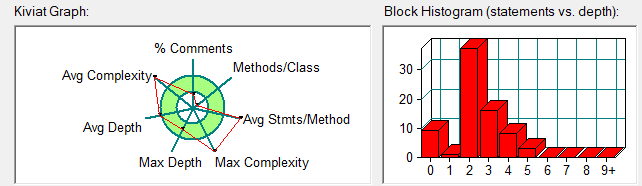
7-4 统计Java程序中关键词的出现次数
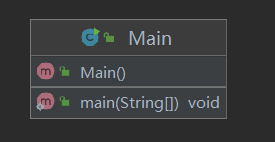
本题主要通过正则表达式实现,注释、字符串中出现的关键字不用统计。
类图
SourceMonitor 结果
| Parameter | Value |
|---|---|
| ProjectDirectory | D:\SourceMonitorProject\ |
| ProjectName | SourceMonitorProject |
| CheckpointName | Checkpoint1 |
| FileName | Main.java |
| Lines | 124 |
| Statements | 74 |
| PercentBranchStatements | 18.9 |
| MethodCallStatements | 19 |
| PercentLineswithComments | 6.5 |
| ClassesandInterfaces | 1 |
| MethodsperClass | 1.00 |
| AverageStatementsperMethod | 64.00 |
| LineNumberofMostComplexMethod | 22 |
| NameofMostComplexMethod | Main.main() |
| MaximumComplexity | 15 |
| LineNumberofDeepestBlock | 98 |
| MaximumBlockDepth | 5 |
| AverageBlockDepth | 2.30 |
| AverageComplexity | 15.00 |
| MostComplexMethodsin1Class(es) | Complexity | Statements | Max Depth | Calls |
|---|---|---|---|---|
| Main.main() | 15 | 64 | 5 | 19 |
| BlockDepth | Statements |
|---|---|
| 0 | 9 |
| 1 | 1 |
| 2 | 37 |
| 3 | 16 |
| 4 | 8 |
| 5 | 3 |
| 6 | 0 |
| 7 | 0 |
| 8 | 0 |
| 9+ | 0 |
7-5 图形继承与多态
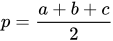
本题中出现了三角形,面积使用海伦公式实现。

类图
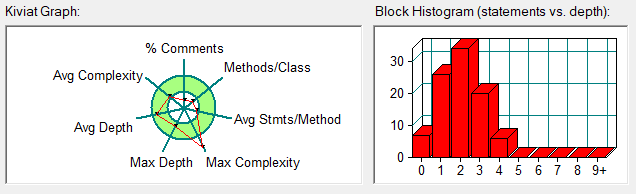
SourceMonitor 结果
| Parameter | Value |
|---|---|
| ProjectDirectory | D:\SourceMonitorProject\ |
| ProjectName | SourceMonitorProject |
| CheckpointName | Checkpoint1 |
| FileName | Main.java |
| Lines | 140 |
| Statements | 93 |
| PercentBranchStatements | 9.7 |
| MethodCallStatements | 35 |
| PercentLineswithComments | 3.6 |
| ClassesandInterfaces | 5 |
| MethodsperClass | 2.60 |
| AverageStatementsperMethod | 4.62 |
| LineNumberofMostComplexMethod | 12 |
| NameofMostComplexMethod | Main.main() |
| MaximumComplexity | 12 |
| LineNumberofDeepestBlock | 27 |
| MaximumBlockDepth | 4 |
| AverageBlockDepth | 1.91 |
| AverageComplexity | 2.31 |
| MostComplexMethodsin5Class(es) | Complexity | Statements | Max Depth | Calls |
|---|---|---|---|---|
| Circle.Circle() | 1 | 1 | 2 | 0 |
| Circle.getArea() | 1 | 1 | 2 | 0 |
| Circle.validate() | 1 | 1 | 2 | 0 |
| Main.main() | 12 | 44 | 4 | 33 |
| Rectangle.getArea() | 1 | 1 | 2 | 0 |
| Rectangle.Rectangle() | 1 | 2 | 2 | 0 |
| Rectangle.validate() | 2 | 1 | 2 | 0 |
| Shape.getArea() | 1 | 1 | 2 | 0 |
| Shape.toString() | 1 | 1 | 2 | 1 |
| Shape.validate() | 1 | 1 | 2 | 0 |
| Triangle.getArea() | 1 | 2 | 2 | 1 |
| Triangle.Triangle() | 1 | 3 | 2 | 0 |
| Triangle.validate() | 6 | 1 | 2 | 0 |
| BlockDepth | Statements |
|---|---|
| 0 | 7 |
| 1 | 26 |
| 2 | 34 |
| 3 | 20 |
| 4 | 6 |
| 5 | 0 |
| 6 | 0 |
| 7 | 0 |
| 8 | 0 |
| 9+ | 0 |
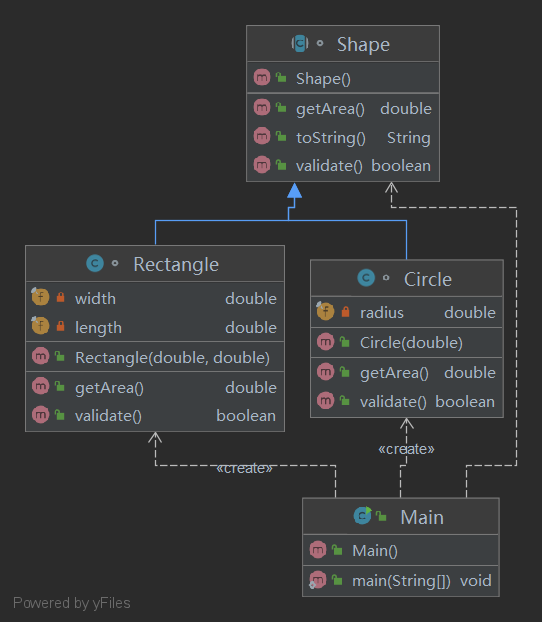
7-6 实现图形接口及多态性
多态是同一个行为具有多个不同表现形式或形态的能力。多态就是同一个接口,使用不同的实例而执行不同操作。
类图
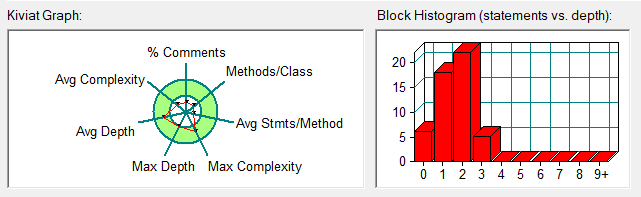
SourceMonitor 结果
| Parameter | Value |
|---|---|
| ProjectDirectory | D:\SourceMonitorProject\ |
| ProjectName | SourceMonitorProject |
| CheckpointName | Checkpoint1 |
| FileName | Main.java |
| Lines | 88 |
| Statements | 51 |
| PercentBranchStatements | 5.9 |
| MethodCallStatements | 14 |
| PercentLineswithComments | 4.5 |
| ClassesandInterfaces | 4 |
| MethodsperClass | 2.50 |
| AverageStatementsperMethod | 2.70 |
| LineNumberofMostComplexMethod | 12 |
| NameofMostComplexMethod | Main.main() |
| MaximumComplexity | 4 |
| LineNumberofDeepestBlock | 19 |
| MaximumBlockDepth | 3 |
| AverageBlockDepth | 1.51 |
| AverageComplexity | 1.40 |
| MostComplexMethodsin4Class(es) | Complexity | Statements | Max Depth | Calls |
|---|---|---|---|---|
| Circle.Circle() | 1 | 1 | 2 | 0 |
| Circle.getArea() | 1 | 1 | 2 | 0 |
| Circle.validate() | 1 | 1 | 2 | 0 |
| Main.main() | 4 | 17 | 3 | 13 |
| Rectangle.getArea() | 1 | 1 | 2 | 0 |
| Rectangle.Rectangle() | 1 | 2 | 2 | 0 |
| Rectangle.validate() | 2 | 1 | 2 | 0 |
| Shape.getArea() | 1 | 1 | 2 | 0 |
| Shape.toString() | 1 | 1 | 2 | 1 |
| Shape.validate() | 1 | 1 | 2 | 0 |
| BlockDepth | Statements |
|---|---|
| 0 | 6 |
| 1 | 18 |
| 2 | 22 |
| 3 | 5 |
| 4 | 0 |
| 5 | 0 |
| 6 | 0 |
| 7 | 0 |
| 8 | 0 |
| 9+ | 0 |
采坑心得
7-3/5/6 图形继承相关
在7-3中,由于在构造函数中输出创建语句,会导致异常数据不仅仅输出"Wrong Format"的情况,通过构造一个输出队列将语句存入队列中,当后续数据校验成功后在把队列中的数据输出出来,能有效避免输出错误。
在7-5中"arrayList"中Shape中“getArea()”的排序可以使用以下代码,更加简洁
arrayList.sort((o1, o2) -> (int) (o1.getArea() - o2.getArea()));
7-2 日期相关
在此次检测中,由于时间跨度较大,一天一天地遍历耗时过长,极其容易导致超时错误,尽管一个测试点给了 10S 的时长。通过大于一年按年优先缩减天数,直接加减年份可以有效提高运行速度。天数判断方法如下:
在向后N天中:
当年是闰年3月及以上 365天,2月及以下 366天;
下一年是闰年,月份在3月及以上 366天,2月及以下 365 天;
在向前N天中:
当年是闰年3月及以上 366天,2月及以下 365天;
前一年是闰年,月份在3月及以上 365天,2月及以下 366天;
7-4 正则表达式相关
正则表达式,主要是要熟悉正则表达式语法。
总结
继承
继承的概念
继承是java面向对象编程技术的一块基石,因为它允许创建分等级层次的类。
继承就是子类继承父类的特征和行为,使得子类对象(实例)具有父类的实例域和方法,或子类从父类继承方法,使得子类具有父类相同的行为。
需要注意的是 Java 不支持多继承,但支持多重继承。
继承的特性
- 子类拥有父类非 private 的属性、方法。
- 子类可以拥有自己的属性和方法,即子类可以对父类进行扩展。
- 子类可以用自己的方式实现父类的方法。
- Java 的继承是单继承,但是可以多重继承,单继承就是一个子类只能继承一个父类,多重继承就是,例如 B 类继承 A 类,C 类继承 B 类,所以按照关系就是 B 类是 C 类的父类,A 类是 B 类的父类,这是 Java 继承区别于 C++ 继承的一个特性。
- 提高了类之间的耦合性(继承的缺点,耦合度高就会造成代码之间的联系越紧密,代码独立性越差)。
多态
多态是同一个行为具有多个不同表现形式或形态的能力。
多态就是同一个接口,使用不同的实例而执行不同操作。
多态的优点
- 消除类型之间的耦合关系
- 可替换性
- 可扩充性
- 接口性
- 灵活性
- 简化性
正则表达式
正则表达式定义了字符串的模式。
正则表达式可以用来搜索、编辑或处理文本。
正则表达式并不仅限于某一种语言,但是在每种语言中有细微的差别。
捕获组
捕获组是把多个字符当一个单独单元进行处理的方法,它通过对括号内的字符分组来创建。
例如,正则表达式 (dog) 创建了单一分组,组里包含"d","o",和"g"。
捕获组是通过从左至右计算其开括号来编号。例如,在表达式((A)(B(C))),有四个这样的组:
- ((A)(B(C)))
- (A)
- (B(C))
- (C)
可以通过调用 matcher 对象的 groupCount 方法来查看表达式有多少个分组。groupCount 方法返回一个 int 值,表示matcher对象当前有多个捕获组。
还有一个特殊的组(group(0)),它总是代表整个表达式。该组不包括在 groupCount 的返回值中。
正则表达式语法
在其他语言中,\\ 表示:我想要在正则表达式中插入一个普通的(字面上的)反斜杠,请不要给它任何特殊的意义。
在 Java 中,\\ 表示:我要插入一个正则表达式的反斜线,所以其后的字符具有特殊的意义。
所以,在其他的语言中(如 Perl),一个反斜杠 \ 就足以具有转义的作用,而在 Java 中正则表达式中则需要有两个反斜杠才能被解析为其他语言中的转义作用。也可以简单的理解在 Java 的正则表达式中,两个 \\ 代表其他语言中的一个 \,这也就是为什么表示一位数字的正则表达式是 、\\d,而表示一个普通的反斜杠是 \\。
| 字符 | 说明 |
|---|---|
| \ | 将下一字符标记为特殊字符、文本、反向引用或八进制转义符。例如, n匹配字符 n。\n 匹配换行符。序列 \\ 匹配 \ ,\( 匹配 (。 |
| ^ | 匹配输入字符串开始的位置。如果设置了 RegExp 对象的 Multiline 属性,^ 还会与"\n"或"\r"之后的位置匹配。 |
| $ | 匹配输入字符串结尾的位置。如果设置了 RegExp 对象的 Multiline 属性,$ 还会与"\n"或"\r"之前的位置匹配。 |
| * | 零次或多次匹配前面的字符或子表达式。例如,zo* 匹配"z"和"zoo"。* 等效于 {0,}。 |
| + | 一次或多次匹配前面的字符或子表达式。例如,"zo+"与"zo"和"zoo"匹配,但与"z"不匹配。+ 等效于 {1,}。 |
| ? | 零次或一次匹配前面的字符或子表达式。例如,"do(es)?"匹配"do"或"does"中的"do"。? 等效于 {0,1}。 |
| {n} | n 是非负整数。正好匹配 n 次。例如,"o{2}"与"Bob"中的"o"不匹配,但与"food"中的两个"o"匹配。 |
| {n,} | n 是非负整数。至少匹配 n 次。例如,"o{2,}"不匹配"Bob"中的"o",而匹配"foooood"中的所有 o。"o{1,}"等效于"o+"。"o{0,}"等效于"o*"。 |
| {n,m} | m 和 n 是非负整数,其中 n <= m。匹配至少 n 次,至多 m 次。例如,"o{1,3}"匹配"fooooood"中的头三个 o。'o{0,1}' 等效于 'o?'。注意:您不能将空格插入逗号和数字之间。 |
| ? | 当此字符紧随任何其他限定符(、+、?、{n}、{n,}、{n,m*})之后时,匹配模式是"非贪心的"。"非贪心的"模式匹配搜索到的、尽可能短的字符串,而默认的"贪心的"模式匹配搜索到的、尽可能长的字符串。例如,在字符串"oooo"中,"o+?"只匹配单个"o",而"o+"匹配所有"o"。 |
| . | 匹配除"\r\n"之外的任何单个字符。若要匹配包括"\r\n"在内的任意字符,请使用诸如"[\s\S]"之类的模式。 |
| (pattern) | 匹配 pattern 并捕获该匹配的子表达式。可以使用 $0…$9 属性从结果"匹配"集合中检索捕获的匹配。若要匹配括号字符 ( ),请使用"("或者")"。 |
| (?:pattern) | 匹配 pattern 但不捕获该匹配的子表达式,即它是一个非捕获匹配,不存储供以后使用的匹配。这对于用"or"字符 (|) 组合模式部件的情况很有用。例如,'industr(?:y|ies) 是比 'industry|industries' 更经济的表达式。 |
| (?=pattern) | 执行正向预测先行搜索的子表达式,该表达式匹配处于匹配 pattern 的字符串的起始点的字符串。它是一个非捕获匹配,即不能捕获供以后使用的匹配。例如,'Windows (?=95|98|NT|2000)' 匹配"Windows 2000"中的"Windows",但不匹配"Windows 3.1"中的"Windows"。预测先行不占用字符,即发生匹配后,下一匹配的搜索紧随上一匹配之后,而不是在组成预测先行的字符后。 |
| (?!pattern) | 执行反向预测先行搜索的子表达式,该表达式匹配不处于匹配 pattern 的字符串的起始点的搜索字符串。它是一个非捕获匹配,即不能捕获供以后使用的匹配。例如,'Windows (?!95|98|NT|2000)' 匹配"Windows 3.1"中的 "Windows",但不匹配"Windows 2000"中的"Windows"。预测先行不占用字符,即发生匹配后,下一匹配的搜索紧随上一匹配之后,而不是在组成预测先行的字符后。 |
| x|y | 匹配 x 或 y。例如,'z|food' 匹配"z"或"food"。'(z|f)ood' 匹配"zood"或"food"。 |
| [xyz] | 字符集。匹配包含的任一字符。例如,"[abc]"匹配"plain"中的"a"。 |
| [^xyz] | 反向字符集。匹配未包含的任何字符。例如,"[^abc]"匹配"plain"中"p","l","i","n"。 |
| [a-z] | 字符范围。匹配指定范围内的任何字符。例如,"[a-z]"匹配"a"到"z"范围内的任何小写字母。 |
| [^a-z] | 反向范围字符。匹配不在指定的范围内的任何字符。例如,"[^a-z]"匹配任何不在"a"到"z"范围内的任何字符。 |
| \b | 匹配一个字边界,即字与空格间的位置。例如,"er\b"匹配"never"中的"er",但不匹配"verb"中的"er"。 |
| \B | 非字边界匹配。"er\B"匹配"verb"中的"er",但不匹配"never"中的"er"。 |
| \cx | 匹配 x 指示的控制字符。例如,\cM 匹配 Control-M 或回车符。x 的值必须在 A-Z 或 a-z 之间。如果不是这样,则假定 c 就是"c"字符本身。 |
| \d | 数字字符匹配。等效于 [0-9]。 |
| \D | 非数字字符匹配。等效于 [^0-9]。 |
| \f | 换页符匹配。等效于 \x0c 和 \cL。 |
| \n | 换行符匹配。等效于 \x0a 和 \cJ。 |
| \r | 匹配一个回车符。等效于 \x0d 和 \cM。 |
| \s | 匹配任何空白字符,包括空格、制表符、换页符等。与 [ \f\n\r\t\v] 等效。 |
| \S | 匹配任何非空白字符。与 [^ \f\n\r\t\v] 等效。 |
| \t | 制表符匹配。与 \x09 和 \cI 等效。 |
| \v | 垂直制表符匹配。与 \x0b 和 \cK 等效。 |
| \w | 匹配任何字类字符,包括下划线。与"[A-Za-z0-9_]"等效。 |
| \W | 与任何非单词字符匹配。与"[^A-Za-z0-9_]"等效。 |
| \xn | 匹配 n,此处的 n 是一个十六进制转义码。十六进制转义码必须正好是两位数长。例如,"\x41"匹配"A"。"\x041"与"\x04"&"1"等效。允许在正则表达式中使用 ASCII 代码。 |
| *num* | 匹配 num,此处的 num 是一个正整数。到捕获匹配的反向引用。例如,"(.)\1"匹配两个连续的相同字符。 |
| *n* | 标识一个八进制转义码或反向引用。如果 *n* 前面至少有 n 个捕获子表达式,那么 n 是反向引用。否则,如果 n 是八进制数 (0-7),那么 n 是八进制转义码。 |
| *nm* | 标识一个八进制转义码或反向引用。如果 *nm* 前面至少有 nm 个捕获子表达式,那么 nm 是反向引用。如果 *nm* 前面至少有 n 个捕获,则 n 是反向引用,后面跟有字符 m。如果两种前面的情况都不存在,则 *nm* 匹配八进制值 nm,其中 n 和 m 是八进制数字 (0-7)。 |
| \nml | 当 n 是八进制数 (0-3),m 和 l 是八进制数 (0-7) 时,匹配八进制转义码 nml。 |
| \un | 匹配 n,其中 n 是以四位十六进制数表示的 Unicode 字符。例如,\u00A9 匹配版权符号 (©)。 |

 浙公网安备 33010602011771号