

自定义控件开发5--自定义属性编辑器(Modal,DropDown)
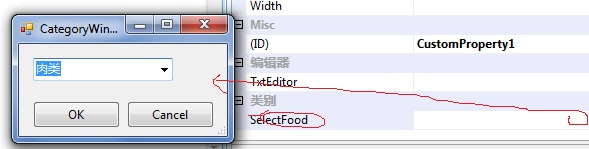
要实现这样的效果,我们只需要做2件事情。
1. 在控件类库中,添加一个WindowForm类,然后编辑相应的界面,并初始化
因为默认情况下 控件在designer.cs中定义为private,所以我们将他改为Public。
public partial class CategoryWindow : Form
{
public CategoryWindow()
{
InitializeComponent();
SetSelectData();
}
public void SetSelectData()
{
try
{
this.comboBox1.Items.Add("水果");
this.comboBox1.Items.Add("蔬菜");
this.comboBox1.Items.Add("肉类");
this.comboBox1.Items.Add("蛋类");
this.comboBox1.Items.Add("面食");
this.comboBox1.SelectedItem = comboBox1.Items[0];
}
catch (Exception eee)
{
throw eee;
}
finally
{
}
}
}
{
public CategoryWindow()
{
InitializeComponent();
SetSelectData();
}
public void SetSelectData()
{
try
{
this.comboBox1.Items.Add("水果");
this.comboBox1.Items.Add("蔬菜");
this.comboBox1.Items.Add("肉类");
this.comboBox1.Items.Add("蛋类");
this.comboBox1.Items.Add("面食");
this.comboBox1.SelectedItem = comboBox1.Items[0];
}
catch (Exception eee)
{
throw eee;
}
finally
{
}
}
}
2. 定制自己的UITypeEditor类。
public class CategoryModalEditor : System.Drawing.Design.UITypeEditor
{
public CategoryModalEditor()
{
}
public override System.Drawing.Design.UITypeEditorEditStyle GetEditStyle(System.ComponentModel.ITypeDescriptorContext context)
{
return UITypeEditorEditStyle.Modal;
}
public override object EditValue(System.ComponentModel.ITypeDescriptorContext context,
System.IServiceProvider provider, object value)
{
IWindowsFormsEditorService service =
(IWindowsFormsEditorService)provider.GetService(typeof(IWindowsFormsEditorService));
if (service == null)
{
return null;
}
CategoryWindow form = new CategoryWindow();
if (service.ShowDialog(form) == DialogResult.OK)
{
return form.comboBox1.SelectedItem;
}
return value;
}
}
{
public CategoryModalEditor()
{
}
public override System.Drawing.Design.UITypeEditorEditStyle GetEditStyle(System.ComponentModel.ITypeDescriptorContext context)
{
return UITypeEditorEditStyle.Modal;
}
public override object EditValue(System.ComponentModel.ITypeDescriptorContext context,
System.IServiceProvider provider, object value)
{
IWindowsFormsEditorService service =
(IWindowsFormsEditorService)provider.GetService(typeof(IWindowsFormsEditorService));
if (service == null)
{
return null;
}
CategoryWindow form = new CategoryWindow();
if (service.ShowDialog(form) == DialogResult.OK)
{
return form.comboBox1.SelectedItem;
}
return value;
}
}
2. 属性下拉编辑器.
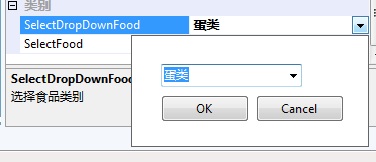
1.在ClassLibrary中,新建一个UserControl(CategoryDorpDown.cs).
2.实现自定义UITypeEditor.
3.因为WindowForm里的控件在Designer.cs声明为Private,如果声明为Public,则在自定义UITypeEditor中引用不到控件,所以我们需要
ComboBox obj = dropform.Controls[2] as ComboBox;需要找到下拉控件 并根据Value 参数赋值,但我们要判断是否控件为NULL和是否为"".
赋值为obj.Text=value as string.
public class CategoryDropDownEditor : System.Drawing.Design.UITypeEditor
{
public CategoryDropDownEditor()
{
}
public override System.Drawing.Design.UITypeEditorEditStyle
GetEditStyle(System.ComponentModel.ITypeDescriptorContext context)
{
//指定编辑样式为下拉形状, 且基于Control 类型
return UITypeEditorEditStyle.DropDown;
}
public override object EditValue(System.ComponentModel.ITypeDescriptorContext context,
System.IServiceProvider provider, object value)
{
//取得编辑器服务对象
IWindowsFormsEditorService service =
(IWindowsFormsEditorService)provider.GetService(typeof(IWindowsFormsEditorService));
if (service == null)
{
return null;
}
//定义一个用户控件对象
string original = string.Empty;
string strReturn = string.Empty;
CategoryDorpDown dropform = new CategoryDorpDown(service);
ComboBox obj = dropform.Controls[2] as ComboBox;
if (obj != null)
{
if (value != null&&value.ToString()!="")
{
obj.Text= (string)value;
}
}
service.DropDownControl(dropform);
strReturn = dropform.strReturnValue;
if (strReturn + String.Empty != String.Empty)
{
return strReturn;
}
return (string)value;
}
}
{
public CategoryDropDownEditor()
{
}
public override System.Drawing.Design.UITypeEditorEditStyle
GetEditStyle(System.ComponentModel.ITypeDescriptorContext context)
{
//指定编辑样式为下拉形状, 且基于Control 类型
return UITypeEditorEditStyle.DropDown;
}
public override object EditValue(System.ComponentModel.ITypeDescriptorContext context,
System.IServiceProvider provider, object value)
{
//取得编辑器服务对象
IWindowsFormsEditorService service =
(IWindowsFormsEditorService)provider.GetService(typeof(IWindowsFormsEditorService));
if (service == null)
{
return null;
}
//定义一个用户控件对象
string original = string.Empty;
string strReturn = string.Empty;
CategoryDorpDown dropform = new CategoryDorpDown(service);
ComboBox obj = dropform.Controls[2] as ComboBox;
if (obj != null)
{
if (value != null&&value.ToString()!="")
{
obj.Text= (string)value;
}
}
service.DropDownControl(dropform);
strReturn = dropform.strReturnValue;
if (strReturn + String.Empty != String.Empty)
{
return strReturn;
}
return (string)value;
}
}
3.
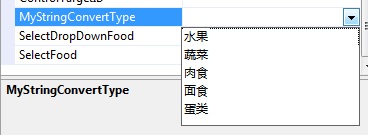
在这个自定义属性中,我继承StringConverter并通过返回一个string数组来实现下拉:

 代码
代码
public class CustomCollectionPropertyConverter : StringConverter
{
public override bool GetStandardValuesSupported(ITypeDescriptorContext
context)
{
return true;
}
public override bool GetStandardValuesExclusive(ITypeDescriptorContext
context)
{
return false;
}
public override StandardValuesCollection
GetStandardValues(ITypeDescriptorContext context)
{
string[] strArray = new string[] { "水果", "蔬菜", "肉食", "面食", "蛋类" };
StandardValuesCollection returnStandardValuesCollection = new
StandardValuesCollection(strArray);
return returnStandardValuesCollection;
}
}
{
public override bool GetStandardValuesSupported(ITypeDescriptorContext
context)
{
return true;
}
public override bool GetStandardValuesExclusive(ITypeDescriptorContext
context)
{
return false;
}
public override StandardValuesCollection
GetStandardValues(ITypeDescriptorContext context)
{
string[] strArray = new string[] { "水果", "蔬菜", "肉食", "面食", "蛋类" };
StandardValuesCollection returnStandardValuesCollection = new
StandardValuesCollection(strArray);
return returnStandardValuesCollection;
}
}
没有特别之处,只是当我们重写GetStandardValuesExclusive为true是,我们就不能手动输入字符串,只能根据下拉选择值.


 浙公网安备 33010602011771号