
C#OpenCV算子-直方图与模板匹配
 OpenSharp算子-直方图与模板匹配
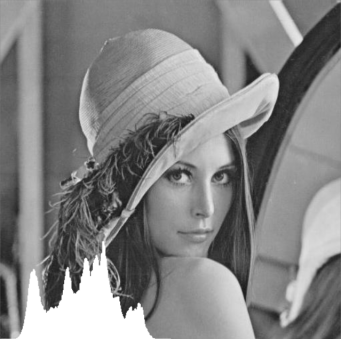
7.1 直方图
函数原型:
void CalcHist(Mat[] images, int[] channels, InputArray mask, OutputArray hist, int dims, int[] histSize, Rangef[] ranges, bool uniform = true, bool accumulate = false)
/*
参数:
    images:输入图像.
    channels:需要统计直方图的第几通道.
    mask:掩膜,计算掩膜内的直方图.
    hist:输出的直方图数组.
    dims:需要统计直方图通道的个数.
    histSize:直方图分成多少个区间,就是bin的个数.
    ranges:统计像素值的区间
    uniform:是否对得到的直方图数组进行归一化处理.
    accumulate:在多个图像时,是否累计计算像素值的个数.
功能:
    计算图像阵列的直方图。
*/
例子:
static void Main(string[] args)
{
    Mat src1 = new Mat(@"C:\Users\Administrator\Desktop\1.jpg");
    Mat[] mats = new Mat[] { src1 };
    Mat hist = new Mat();
    int[] channels = new int[] { 0 };
    int[] histsize = new int[] { 256 };
    Rangef[] range = new Rangef[1];
    range[0].Start = 0.0f;
    range[0].End = 256.0f;
    Mat mask = new Mat();
    Cv2.CalcHist(mats, channels, mask, hist, 1, histsize, range);
    for (int i = 0; i < 256; i++)
    {
        int len = (int)(hist.Get<float>(i) / 1000 * src1.Rows);
        Cv2.Line(src1, i, src1.Rows, src1.Rows - len, new Scalar(0, 0, 255), 2);
  }
    Cv2.ImShow("test", src1);
    Cv2.WaitKey();
}
例子:
static void Main(string[] args)
{
    Mat src1 = new Mat(@"C:\Users\Administrator\Desktop\1.jpg");
    Mat[] mats = new Mat[] { src1 };
    Mat hist = new Mat();
    int[] channels = new int[] { 0 };
    int[] histsize = new int[] { 256 };
    Rangef[] range = new Rangef[1];
    range[0].Start = 0.0f;
    range[0].End = 256.0f;
    Mat mask = new Mat();
    Cv2.CalcHist(mats, channels, mask, hist, 1, histsize, range);
     for (int i = 0; i < 256; i++)
    {
         int len = (int)(hist.Get<float>(i) / 1000 * src1.Rows);
        Cv2.Line(src1, i, src1.Rows, src1.Rows - len,new Scalar(0, 0, 255), 2);
    }
    Cv2.ImShow("test",src1);
    Cv2.WaitKey();
}
实验样例:
|
Src1 |
dst(二值化) |
|
|
|

7.2 模板匹配
函数原型:
void MatchTemplate(InputArray image, InputArray templ, OutputArray result, TemplateMatchModes method, InputArray? mask = null)
/*参数:
    image:输入图像.
    templ:模板图像.
    result:输出的相关系数矩阵.
    methd:匹配方法.
功能:
    匹配出和模板你冲得的图像区域
*/
例子:
static void Main(string[] args)
{
  Mat mat1 = new Mat(@"C:\Users\Administrator\Desktop\1.jpg", ImreadModes.AnyColor);
    Mat mat2 = new Mat(@"C:\Users\Administrator\Desktop\2.jpg", ImreadModes.AnyColor);
    Mat mat3 = new Mat();
    mat3.Create(mat1.Cols - mat2.Cols + 1, mat1.Rows - mat2.Cols + 1, MatType.CV_32FC1);
    Cv2.MatchTemplate(mat1, mat2, mat3, TemplateMatchModes.SqDiff);
    Cv2.Normalize(mat3, mat3, 1, 0, NormType.MinMax, -1); //归一化
    Point minLocation, maxLocation;
    Cv2.MinMaxLoc(mat3, out minLocation, out maxLocation);   //只为了利用minLocation
    CV2.Rectangle(mat1, minLocation, new Point(minLocation.X +
 mat2.Cols, minLocation.Y + mat2.Rows), Scalar.Red, 2);
    Cv2.ImShow("mat1", mat1);
    Cv2.ImShow("mat2", mat2);
    Cv2.WaitKey();
}
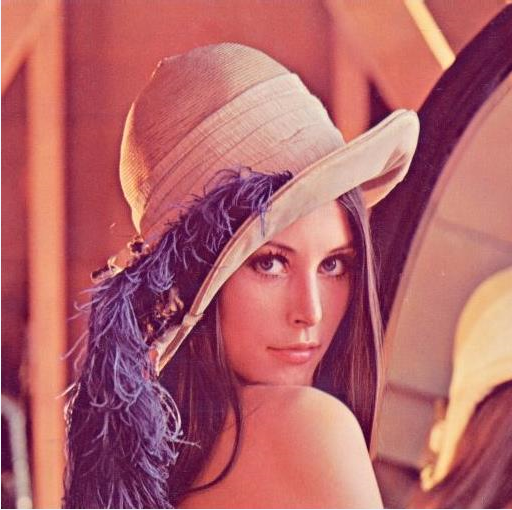
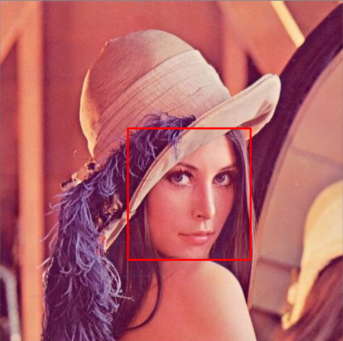
实验样例:
|
mat1 |
mat2 |
结果 |
|
|
|
|

/*-------------------------------------------------------------------------------------------------------
笔者说明:
该笔记来源于本人学习OpenCvSharp时的资料,
分享出来只是为了供大家学习,并且为了自己以后想要用的时候方便寻找。
时间:2023年3月14日
------------------------------------------------------------------------------------------------------------*/

 浙公网安备 33010602011771号