
spirngMVC注解
笔记
1.@Controller
(1)作用:表示类是一个控制器
(2)源码:作用目标 => 类
@Target({ElementType.TYPE})
@Retention(RetentionPolicy.RUNTIME)
@Documented
@Component
public @interface Controller {
    @AliasFor(
        annotation = Component.class
    )
    String value() default "";
}
value(为controller命名)
(3)使用:结合请求处理器@RequestMapper
@Controller
public class HelloController {

    @RequestMapping("/hello")
    public String hello() {
        return "hello";
    }
}
2.@RequestMapper
(1)作用:处理控制器处理的请求动作(访问的url路径)
(2)源码:作用目标 => 类,方法
@Target({ElementType.TYPE, ElementType.METHOD})
@Retention(RetentionPolicy.RUNTIME)
@Documented
@Mapping
public @interface RequestMapping {
    String name() default "";

    @AliasFor("path")
    String[] value() default {};

    @AliasFor("value")
    String[] path() default {};

    RequestMethod[] method() default {};

    String[] params() default {};

    String[] headers() default {};

    String[] consumes() default {};

    String[] produces() default {};
}
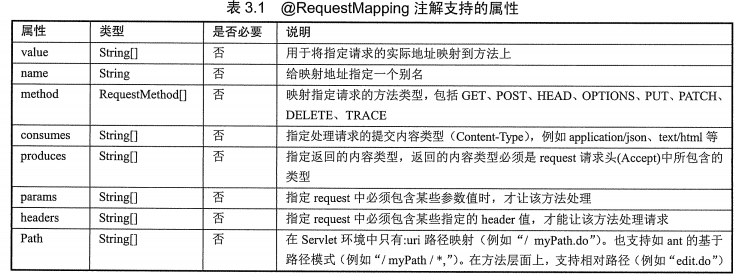
(3)使用:
value
@RequestMapping(value = "/hello")
public String hello(){
    return "hello";
}
method
@RequestMapping(value = "/hello",method = RequestMethod.GET)


所有支持的请求方法:
public enum RequestMethod {
    GET,
    HEAD,
    POST,
    PUT,
    PATCH,
    DELETE,
    OPTIONS,
    TRACE;
consumes
@RequestMapping(value = "/hello",consumes = "application/json")

支持提交的内容类型: 百度搜索=>HTTP content-type
produces
@RequestMapping(value = "/hello",produces = "application/json")
支持返回的的内容类型与content-type相同
params
@RequestMapping(value = "/hello",params = "x=9")
访问需要带上参数x=9
http://localhost:8080/hello?x=9

访问:http://localhost:8080/hello?x=2
返回400
info:Parameter conditions "x=9" not met for actual request parameters: x={2}
headers
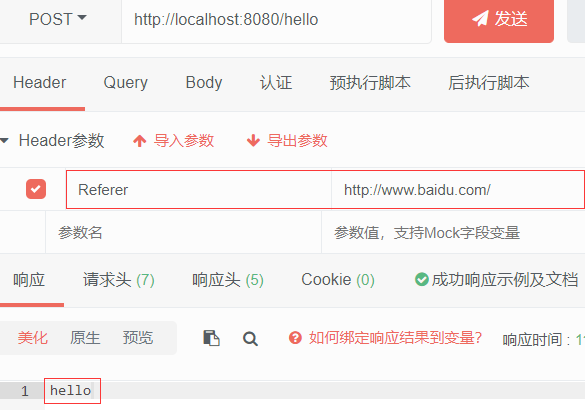
@RequestMapping(value = "/hello",headers = "Referer=http://www.baidu.com/")

页面访问:http://localhost:8080/hello
返回404

通过ApiPost发送请求添加请求头
成功返回结果
3.@ResponseBody
(1)作用:此注解标注之后不会再走视图处理器,而是直接将数据写入到输入流中
(2)源码:作用目标 => 类,方法
@Target({ElementType.TYPE, ElementType.METHOD})
@Retention(RetentionPolicy.RUNTIME)
@Documented
public @interface ResponseBody {
}
(3)使用
@Controller
public class HelloController {

    @RequestMapping("/res")
    @ResponseBody
    public String res(Model model){
        return "2";
    }
4.@RestController
(1)作用:
(2)源码:作用目标=>
@Target({ElementType.TYPE})
@Retention(RetentionPolicy.RUNTIME)
@Documented
@Controller
@ResponseBody
public @interface RestController {
    @AliasFor(
        annotation = Controller.class
    )
    String value() default "";
}
(3)使用
@RestController
public class HelloController {

    @RequestMapping("/res")
    public String res(){
        return "2";
    }


等价于

@Controller
public class HelloController {


    @RequestMapping("/res")
    @ResponseBody
    public String res(){
        return "2";
    }
5.@RequestParam
(1)作用:将指定的请求参数赋值给方法中的形参
(2)源码:作用目标 => 参数
@Target({ElementType.PARAMETER})
@Retention(RetentionPolicy.RUNTIME)
@Documented
public @interface RequestParam {
    @AliasFor("name")
    String value() default "";

    @AliasFor("value")
    String name() default "";

    boolean required() default true;

    String defaultValue() default "\n\t\t\n\t\t\n\ue000\ue001\ue002\n\t\t\t\t\n";
}

(3)使用
@GetMapping("/param")
@ResponseBody
public String param(@RequestParam(name = "name",required = false,defaultValue = "默认值") String userName){
    return userName;
}
6.@PathVariable
(1)作用:获得请求url中的动态参数
(2)源码: 作用目标 => 参数
@Target({ElementType.PARAMETER})
@Retention(RetentionPolicy.RUNTIME)
@Documented
public @interface PathVariable {
    @AliasFor("name")
    String value() default "";

    @AliasFor("value")
    String name() default "";

    boolean required() default true;
}
(3)使用
@GetMapping("/get/{name}")
    public String get(@PathVariable("name") String name) {
        return name;
    }
7.@RequestHeader
(1)作用:将请求的头信息数据映射到方法的参数上
(2)源码:作用目标 =>参数
@Target({ElementType.PARAMETER})
@Retention(RetentionPolicy.RUNTIME)
@Documented
public @interface RequestHeader {
    @AliasFor("name")
    String value() default "";

    @AliasFor("value")
    String name() default "";

    boolean required() default true;

    String defaultValue() default "\n\t\t\n\t\t\n\ue000\ue001\ue002\n\t\t\t\t\n";
}

(3)使用
@GetMapping("/get/{name}")
    @ResponseBody
    public String get(@PathVariable("name") String name,@RequestHeader("User-Agent")String userAgent) {
        return name + " [ " + userAgent + " ] ";
    }
8.@CookieValue
(1)作用:将请求的cookie数据映射到方法的参数上
(2)源码:作用目标=>参数
@Target({ElementType.PARAMETER})
@Retention(RetentionPolicy.RUNTIME)
@Documented
public @interface CookieValue {
    @AliasFor("name")
    String value() default "";

    @AliasFor("value")
    String name() default "";

    boolean required() default true;

    String defaultValue() default "\n\t\t\n\t\t\n\ue000\ue001\ue002\n\t\t\t\t\n";
}
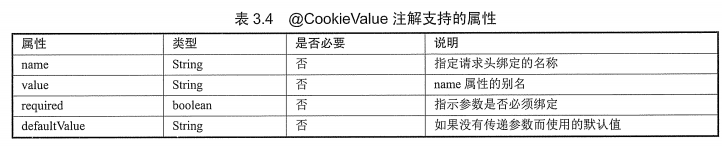
(3)使用
@GetMapping("/get")
    @ResponseBody
    public String get(@CookieValue(value = "JSESSIONID",defaultValue = "")String sessionId) {
        return sessionId;
    }
9.@SessionAttributes
(1)作用:指定Model中的哪些属性转存到HttpSession对象当中
(2)源码:作用目标=>类
@Target({ElementType.TYPE})
@Retention(RetentionPolicy.RUNTIME)
@Inherited
@Documented
public @interface SessionAttributes {
    @AliasFor("names")
    String[] value() default {};

    @AliasFor("value")
    String[] names() default {};

    Class<?>[] types() default {};
}

(3)使用
@Controller
@SessionAttributes(value = "saveName",types = String.class)
public class HelloController {

    @RequestMapping("/save")
    @ResponseBody
    public String save(Model model){
        model.addAttribute("saveName","session测试");
        return "2";
    }
10.@ModelAttribute
(1)作用:向Model对象添加参数
(2)源码:作用目标 => 参数,方法
@Target({ElementType.PARAMETER, ElementType.METHOD})
@Retention(RetentionPolicy.RUNTIME)
@Documented
public @interface ModelAttribute {
    @AliasFor("name")
    String value() default "";

    @AliasFor("value")
    String name() default "";

    boolean binding() default true;
}
(3)使用
@ModelAttribute
    public void myModel(Model model){
        model.addAttribute("name","myModel");
    }
    @RequestMapping(value = "/hello")
    @ResponseBody
    public String hello1(Model model){
        String name = (String)model.asMap().get("name");
        return name;
    }
时间花在哪里,成就就在哪里

 浙公网安备 33010602011771号