
HCNA网络技术实验指南----第1章 eNSP及VRP基础操作(一)
实验1.3熟悉常用的IP相关命令
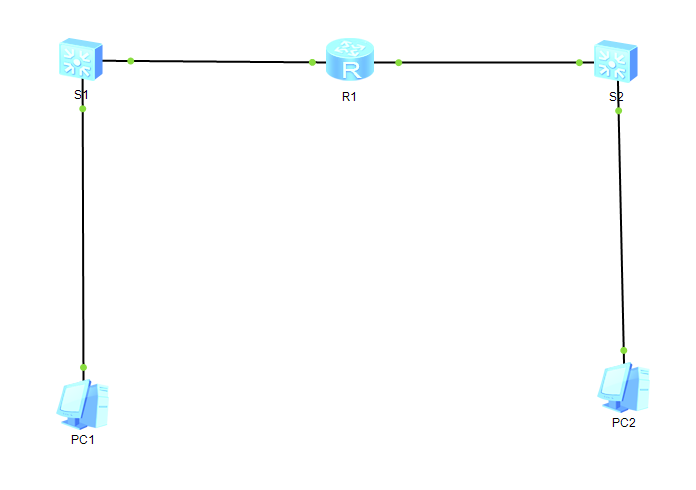
<Huawei>
Dec 23 2019 16:57:44-08:00 Huawei %%01IFPDT/4/IF_STATE(l)[1]:Interface GigabitEt
hernet0/0/1 has turned into UP state.
<Huawei>
<Huawei>system-view
Enter system view, return user view with Ctrl+Z.
[Huawei]sysname R1
[R1]display ip interface brief
*down: administratively down
^down: standby
(l): loopback
(s): spoofing
The number of interface that is UP in Physical is 3
The number of interface that is DOWN in Physical is 1
The number of interface that is UP in Protocol is 1
The number of interface that is DOWN in Protocol is 3
Interface IP Address/Mask Physical Protocol
GigabitEthernet0/0/0 unassigned up down
GigabitEthernet0/0/1 unassigned up down
GigabitEthernet0/0/2 unassigned down down
NULL0 unassigned up up(s)
[R1]interface g0/0/0
[R1-GigabitEthernet0/0/0]ip address 10.0.1.254 24
Dec 23 2019 16:59:35-08:00 R1 %%01IFNET/4/LINK_STATE(l)[2]:The line protocol IP
on the interface GigabitEthernet0/0/0 has entered the UP state.
[R1-GigabitEthernet0/0/0]interface g0/0/1
[R1-GigabitEthernet0/0/1]ip address 10.0.2.254 24
Dec 23 2019 16:59:54-08:00 R1 %%01IFNET/4/LINK_STATE(l)[3]:The line protocol IP
on the interface GigabitEthernet0/0/1 has entered the UP state.
[R1]display ip routing-table
Route Flags: R - relay, D - download to fib
------------------------------------------------------------------------------
Routing Tables: Public
Destinations : 10 Routes : 10
Destination/Mask Proto Pre Cost Flags NextHop Interface
10.0.1.0/24 Direct 0 0 D 10.0.1.254 GigabitEthernet
0/0/0
10.0.1.254/32 Direct 0 0 D 127.0.0.1 GigabitEthernet
0/0/0
10.0.1.255/32 Direct 0 0 D 127.0.0.1 GigabitEthernet
0/0/0
10.0.2.0/24 Direct 0 0 D 10.0.2.254 GigabitEthernet
0/0/1
10.0.2.254/32 Direct 0 0 D 127.0.0.1 GigabitEthernet
0/0/1
10.0.2.255/32 Direct 0 0 D 127.0.0.1 GigabitEthernet
0/0/1
127.0.0.0/8 Direct 0 0 D 127.0.0.1 InLoopBack0
127.0.0.1/32 Direct 0 0 D 127.0.0.1 InLoopBack0
127.255.255.255/32 Direct 0 0 D 127.0.0.1 InLoopBack0
255.255.255.255/32 Direct 0 0 D 127.0.0.1 InLoopBack0
[R1]ping 10.0.1.1
PING 10.0.1.1: 56 data bytes, press CTRL_C to break
Reply from 10.0.1.1: bytes=56 Sequence=1 ttl=128 time=40 ms
Reply from 10.0.1.1: bytes=56 Sequence=2 ttl=128 time=30 ms
Reply from 10.0.1.1: bytes=56 Sequence=3 ttl=128 time=40 ms
Reply from 10.0.1.1: bytes=56 Sequence=4 ttl=128 time=50 ms
Reply from 10.0.1.1: bytes=56 Sequence=5 ttl=128 time=30 ms
--- 10.0.1.1 ping statistics ---
5 packet(s) transmitted
5 packet(s) received
0.00% packet loss
round-trip min/avg/max = 30/38/50 ms

 浙公网安备 33010602011771号