#mock_data.py
import json
import random
from datetime import datetime, timedelta
import os
def generate_industrial_data(count=100):
"""生成工业设备模拟数据"""
device_names = [
'CNC-高速铣床', '3D打印工作站', '激光切割机', '工业机器人臂',
'自动化装配线', '精密测量仪', '液压冲压机', '焊接工作站',
'物料搬运系统', '质量检测仪', '热处理炉', '注塑成型机',
'数控车床', '等离子切割机', '折弯机', '喷涂机器人',
'视觉检测系统', 'AGV小车', '包装机器人', '立体仓库'
]
locations = ['A区生产线', 'B区组装线', 'C区检测站', 'D区包装区', '中央控制室', 'E区原料区', 'F区成品区']
statuses = ['online', 'warning', 'offline']
operators = ['张三', '李四', '王五', '赵六', '钱七', '孙八', '周九', '吴十']
manufacturers = ['西门子', 'ABB', '发那科', '库卡', '安川', '三菱', '欧姆龙', '施耐德']
data = []
for i in range(count):
device_id = f"DEV-{str(i+1).zfill(3)}"
status = random.choice(statuses)
# 根据状态生成合理的参数
if status == 'online':
temperature = random.uniform(20, 80)
pressure = random.uniform(50, 100)
vibration = random.uniform(0.1, 2.0)
efficiency = random.uniform(85, 99)
elif status == 'warning':
temperature = random.uniform(80, 95)
pressure = random.uniform(100, 120)
vibration = random.uniform(2.0, 5.0)
efficiency = random.uniform(60, 85)
else: # offline
temperature = random.uniform(10, 30)
pressure = 0
vibration = 0
efficiency = 0
# 生成最后维护时间(最近30天内)
days_ago = random.randint(1, 30)
last_maintenance = (datetime.now() - timedelta(days=days_ago)).strftime('%Y-%m-%d')
# 生成下次维护时间(未来7-60天)
days_next = random.randint(7, 60)
next_maintenance = (datetime.now() + timedelta(days=days_next)).strftime('%Y-%m-%d')
device = {
'id': device_id,
'name': random.choice(device_names),
'type': random.choice(['加工设备', '检测设备', '搬运设备', '包装设备', '辅助设备']),
'manufacturer': random.choice(manufacturers),
'model': f"MOD-{random.randint(1000, 9999)}",
'location': random.choice(locations),
'status': status,
'temperature': round(temperature, 1),
'pressure': round(pressure, 1),
'vibration': round(vibration, 2),
'power_consumption': round(random.uniform(5, 50), 1),
'efficiency': round(efficiency, 1),
'operator': random.choice(operators),
'uptime': f"{random.randint(70, 99)}%",
'last_maintenance': last_maintenance,
'next_maintenance': next_maintenance,
'production_count': random.randint(1000, 50000),
'fault_count': random.randint(0, 10)
}
data.append(device)
return data
def save_data_to_file(data, filename='industrial_data.json'):
"""保存数据到JSON文件"""
with open(filename, 'w', encoding='utf-8') as f:
json.dump(data, f, ensure_ascii=False, indent=2)
print(f"数据已保存到 {filename},共 {len(data)} 条记录")
return filename
def load_data_from_file(filename='industrial_data.json'):
"""从JSON文件加载数据"""
if os.path.exists(filename):
with open(filename, 'r', encoding='utf-8') as f:
data = json.load(f)
print(f"从 {filename} 加载了 {len(data)} 条记录")
return data
else:
print(f"文件 {filename} 不存在,生成新数据...")
data = generate_industrial_data(100)
save_data_to_file(data, filename)
return data
if __name__ == '__main__':
# 生成并保存示例数据
data = generate_industrial_data(150)
save_data_to_file(data)
# 打印前5条数据示例
print("\n前5条数据示例:")
for i, item in enumerate(data[:5]):
print(f"{i+1}. {item['id']} - {item['name']} ({item['status']})")
#app.py
from flask import Flask, render_template, jsonify, request
from flask_cors import CORS
import json
import os
from datetime import datetime
app = Flask(__name__)
CORS(app) # 允许跨域请求
# 数据文件路径
DATA_FILE = 'industrial_data.json'
def load_data():
"""加载数据"""
try:
if os.path.exists(DATA_FILE):
with open(DATA_FILE, 'r', encoding='utf-8') as f:
data = json.load(f)
print(f"成功加载 {len(data)} 条数据")
return data
else:
# 如果数据文件不存在,生成模拟数据
print(f"数据文件 {DATA_FILE} 不存在,生成新数据...")
from mock_data import generate_industrial_data, save_data_to_file
data = generate_industrial_data(150)
save_data_to_file(data, DATA_FILE)
return data
except Exception as e:
print(f"加载数据失败: {e}")
# 返回空列表而不是抛出异常
return []
@app.route('/')
def index():
"""渲染主页面"""
return render_template('index.html')
@app.route('/api/test', methods=['GET'])
def test_api():
"""测试API端点"""
return jsonify({
'success': True,
'message': 'API服务正常',
'timestamp': datetime.now().strftime('%Y-%m-%d %H:%M:%S'),
'request_args': dict(request.args)
})
@app.route('/api/debug', methods=['GET'])
def debug_data():
"""调试数据端点"""
try:
data = load_data()
return jsonify({
'success': True,
'total_records': len(data),
'first_record': data[0] if data else None,
'last_record': data[-1] if data else None
})
except Exception as e:
return jsonify({
'success': False,
'error': str(e)
}), 500
@app.route('/api/equipment', methods=['GET'])
def get_equipment():
"""获取设备数据"""
try:
data = load_data()
# 获取查询参数并提供默认值
try:
page = int(request.args.get('page', 1))
except ValueError:
page = 1
try:
page_size = int(request.args.get('page_size', 10))
except ValueError:
page_size = 10
search = request.args.get('search', '').strip().lower()
status_filter = request.args.get('status', '')
location_filter = request.args.get('location', '')
# 确保page和page_size在合理范围内
page = max(1, page)
page_size = max(1, min(page_size, 100)) # 限制每页最多100条
print(f"请求参数: page={page}, page_size={page_size}, search='{search}', status='{status_filter}', location='{location_filter}'")
# 应用过滤
filtered_data = data
if search:
filtered_data = [
item for item in filtered_data
if (search in item.get('id', '').lower() or
search in item.get('name', '').lower() or
search in item.get('operator', '').lower() or
search in item.get('location', '').lower())
]
if status_filter:
filtered_data = [item for item in filtered_data if item.get('status') == status_filter]
if location_filter:
filtered_data = [item for item in filtered_data if location_filter in item.get('location', '')]
# 计算分页
total = len(filtered_data)
total_pages = max(1, (total + page_size - 1) // page_size) if page_size > 0 else 1
start_idx = (page - 1) * page_size
end_idx = start_idx + page_size
paginated_data = filtered_data[start_idx:end_idx]
# 计算统计数据
if data:
stats = {
'total': total,
'online': len([item for item in data if item.get('status') == 'online']),
'warning': len([item for item in data if item.get('status') == 'warning']),
'offline': len([item for item in data if item.get('status') == 'offline']),
'average_temp': round(sum(item.get('temperature', 0) for item in data) / len(data), 1),
'average_efficiency': round(sum(item.get('efficiency', 0) for item in data) / len(data), 1)
}
else:
stats = {
'total': 0,
'online': 0,
'warning': 0,
'offline': 0,
'average_temp': 0,
'average_efficiency': 0
}
response = {
'success': True,
'data': paginated_data,
'pagination': {
'page': page,
'page_size': page_size,
'total': total,
'total_pages': total_pages
},
'stats': stats,
'timestamp': datetime.now().strftime('%Y-%m-%d %H:%M:%S')
}
print(f"响应: 返回 {len(paginated_data)} 条数据,共 {total} 条")
return jsonify(response)
except Exception as e:
import traceback
error_msg = f"API错误: {str(e)}"
print(error_msg)
print(traceback.format_exc())
return jsonify({
'success': False,
'error': error_msg
}), 500
@app.route('/api/equipment/<device_id>', methods=['GET'])
def get_equipment_detail(device_id):
"""获取单个设备详情"""
try:
data = load_data()
device = next((item for item in data if item.get('id') == device_id), None)
if device:
return jsonify({
'success': True,
'data': device
})
else:
return jsonify({
'success': False,
'error': f'设备 {device_id} 未找到'
}), 404
except Exception as e:
return jsonify({
'success': False,
'error': str(e)
}), 500
@app.route('/api/stats', methods=['GET'])
def get_system_stats():
"""获取系统统计信息"""
try:
data = load_data()
if not data:
return jsonify({
'success': True,
'status_counts': {'online': 0, 'warning': 0, 'offline': 0},
'location_counts': {},
'type_counts': {},
'averages': {'temperature': 0, 'pressure': 0, 'efficiency': 0},
'total': 0,
'timestamp': datetime.now().strftime('%Y-%m-%d %H:%M:%S')
})
# 按状态统计
status_counts = {
'online': len([item for item in data if item.get('status') == 'online']),
'warning': len([item for item in data if item.get('status') == 'warning']),
'offline': len([item for item in data if item.get('status') == 'offline'])
}
# 按位置统计
locations = {}
for item in data:
loc = item.get('location', '未知')
locations[loc] = locations.get(loc, 0) + 1
# 按类型统计
types = {}
for item in data:
device_type = item.get('type', '未知')
types[device_type] = types.get(device_type, 0) + 1
# 计算平均值
avg_temp = round(sum(item.get('temperature', 0) for item in data) / len(data), 1)
avg_pressure = round(sum(item.get('pressure', 0) for item in data) / len(data), 1)
avg_efficiency = round(sum(item.get('efficiency', 0) for item in data) / len(data), 1)
return jsonify({
'success': True,
'status_counts': status_counts,
'location_counts': locations,
'type_counts': types,
'averages': {
'temperature': avg_temp,
'pressure': avg_pressure,
'efficiency': avg_efficiency
},
'total': len(data),
'timestamp': datetime.now().strftime('%Y-%m-%d %H:%M:%S')
})
except Exception as e:
return jsonify({
'success': False,
'error': str(e)
}), 500
@app.route('/api/locations', methods=['GET'])
def get_locations():
"""获取所有位置列表"""
try:
data = load_data()
locations = list(set(item.get('location', '未知') for item in data))
return jsonify({
'success': True,
'locations': sorted(locations)
})
except Exception as e:
return jsonify({
'success': False,
'error': str(e)
}), 500
if __name__ == '__main__':
# 确保数据文件存在
if not os.path.exists(DATA_FILE):
from mock_data import generate_industrial_data, save_data_to_file
data = generate_industrial_data(150)
save_data_to_file(data, DATA_FILE)
print(f"已生成 {len(data)} 条模拟数据")
print("=" * 50)
print("工业设备监控系统启动...")
print(f"访问地址: http://127.0.0.1:5000")
print(f"API接口: http://127.0.0.1:5000/api/equipment")
print(f"测试端点: http://127.0.0.1:5000/api/test")
print(f"调试端点: http://127.0.0.1:5000/api/debug")
print("=" * 50)
# 检查初始数据
try:
data = load_data()
print(f"数据加载成功: {len(data)} 条记录")
if data:
print(f"示例数据: {data[0]}")
except Exception as e:
print(f"数据加载检查失败: {e}")
app.run(debug=True, host='0.0.0.0', port=5000)
#templates/index.html
<!DOCTYPE html>
<html lang="zh-CN">
<head>
<meta charset="UTF-8">
<meta name="viewport" content="width=device-width, initial-scale=1.0">
<title>工业设备监控系统</title>
<link rel="stylesheet" href="{{ url_for('static', filename='css/style.css') }}">
<script src="https://unpkg.com/react@18/umd/react.development.js"></script>
<script src="https://unpkg.com/react-dom@18/umd/react-dom.development.js"></script>
<script src="https://unpkg.com/@babel/standalone/babel.min.js"></script>
</head>
<body>
<div id="root"></div>
<script src="{{ url_for('static', filename='js/app.js') }}" type="text/babel"></script>
</body>
</html>
#static/css.style.css
/* 全局样式 */
* {
margin: 0;
padding: 0;
box-sizing: border-box;
}
body {
background-color: #1a1f3a;
color: #e0e0e0;
font-family: 'Segoe UI', 'Roboto Mono', 'Consolas', monospace;
padding: 0;
min-height: 100vh;
overflow-x: hidden;
}
/* 工业科技风格背景效果 */
.tech-grid {
position: fixed;
top: 0;
left: 0;
width: 100%;
height: 100%;
background-image:
linear-gradient(rgba(0, 150, 255, 0.05) 1px, transparent 1px),
linear-gradient(90deg, rgba(0, 150, 255, 0.05) 1px, transparent 1px);
background-size: 50px 50px;
z-index: -2;
pointer-events: none;
}
/* 数据流动画 */
.data-stream {
position: fixed;
top: 0;
left: 0;
width: 100%;
height: 100%;
overflow: hidden;
z-index: -1;
opacity: 0.1;
}
.data-stream::before {
content: '';
position: absolute;
width: 2px;
height: 100%;
background: linear-gradient(to bottom, transparent, #00aaff, transparent);
animation: stream 3s linear infinite;
left: 10%;
}
.data-stream::after {
content: '';
position: absolute;
width: 2px;
height: 100%;
background: linear-gradient(to bottom, transparent, #00ffcc, transparent);
animation: stream 4s linear infinite;
animation-delay: 1s;
left: 90%;
}
@keyframes stream {
0% { top: -100%; }
100% { top: 100%; }
}
/* 容器 */
.container {
max-width: 1600px;
margin: 0 auto;
padding: 20px;
}
/* 头部 */
.header {
display: flex;
justify-content: space-between;
align-items: center;
margin-bottom: 30px;
padding-bottom: 20px;
border-bottom: 1px solid rgba(0, 150, 255, 0.3);
position: relative;
}
.header::after {
content: '';
position: absolute;
bottom: -1px;
left: 0;
width: 100px;
height: 3px;
background: linear-gradient(90deg, #00aaff, #00ffcc);
}
.title-section h1 {
font-size: 2.5rem;
background: linear-gradient(90deg, #00aaff, #00ffcc);
-webkit-background-clip: text;
background-clip: text;
color: transparent;
text-shadow: 0 0 15px rgba(0, 170, 255, 0.3);
letter-spacing: 2px;
font-weight: 700;
}
.title-section .subtitle {
color: #8a9ba8;
font-size: 1rem;
margin-top: 8px;
letter-spacing: 3px;
text-transform: uppercase;
}
/* 系统状态 */
.system-status {
display: flex;
gap: 20px;
flex-wrap: wrap;
}
.status-item {
display: flex;
flex-direction: column;
align-items: center;
padding: 15px 25px;
background: rgba(0, 30, 60, 0.7);
border-radius: 8px;
border-left: 4px solid #00aaff;
min-width: 140px;
transition: transform 0.3s, box-shadow 0.3s;
backdrop-filter: blur(10px);
}
.status-item:hover {
transform: translateY(-5px);
box-shadow: 0 5px 20px rgba(0, 170, 255, 0.2);
}
.status-label {
font-size: 0.9rem;
color: #8a9ba8;
margin-bottom: 8px;
}
.status-value {
font-size: 1.8rem;
font-weight: bold;
color: #00ffcc;
font-family: 'Roboto Mono', monospace;
}
/* 控制面板 */
.control-panel {
background: rgba(10, 20, 40, 0.85);
border-radius: 12px;
padding: 25px;
border: 1px solid rgba(0, 150, 255, 0.25);
box-shadow: 0 8px 32px rgba(0, 0, 0, 0.3);
backdrop-filter: blur(10px);
margin-bottom: 25px;
}
.panel-header {
display: flex;
justify-content: space-between;
align-items: center;
margin-bottom: 25px;
padding-bottom: 15px;
border-bottom: 1px solid rgba(0, 150, 255, 0.2);
}
.panel-title {
font-size: 1.4rem;
color: #00aaff;
display: flex;
align-items: center;
gap: 12px;
font-weight: 600;
}
.panel-title::before {
content: '▶';
color: #00ffcc;
font-size: 0.9rem;
animation: blink 1.5s infinite;
}
@keyframes blink {
0%, 100% { opacity: 1; }
50% { opacity: 0.5; }
}
/* 过滤器 */
.filters {
display: flex;
gap: 20px;
flex-wrap: wrap;
align-items: center;
}
.search-box {
flex: 1;
min-width: 300px;
position: relative;
}
.search-box input {
width: 100%;
padding: 14px 15px 14px 50px;
background: rgba(0, 20, 40, 0.9);
border: 1px solid rgba(0, 150, 255, 0.4);
border-radius: 8px;
color: #e0e0e0;
font-size: 1.05rem;
transition: all 0.3s;
font-family: 'Roboto Mono', monospace;
}
.search-box input:focus {
outline: none;
border-color: #00aaff;
box-shadow: 0 0 15px rgba(0, 170, 255, 0.4);
}
.search-icon {
position: absolute;
left: 15px;
top: 50%;
transform: translateY(-50%);
color: #00aaff;
font-size: 1.2rem;
}
.filter-group {
display: flex;
gap: 15px;
align-items: center;
flex-wrap: wrap;
}
.filter-select {
padding: 12px 20px;
background: rgba(0, 20, 40, 0.9);
border: 1px solid rgba(0, 150, 255, 0.4);
border-radius: 8px;
color: #e0e0e0;
font-size: 1rem;
cursor: pointer;
transition: all 0.3s;
min-width: 150px;
}
.filter-select:focus {
outline: none;
border-color: #00aaff;
box-shadow: 0 0 10px rgba(0, 170, 255, 0.3);
}
.filter-select option {
background: #1a1f3a;
color: #e0e0e0;
}
/* 数据表格容器 */
.data-table-container {
background: rgba(10, 20, 40, 0.85);
border-radius: 12px;
overflow: hidden;
border: 1px solid rgba(0, 150, 255, 0.25);
box-shadow: 0 8px 32px rgba(0, 0, 0, 0.3);
backdrop-filter: blur(10px);
}
.table-wrapper {
overflow-x: auto;
}
/* 数据表格 */
.data-table {
width: 100%;
border-collapse: collapse;
min-width: 1200px;
}
.data-table thead {
background: linear-gradient(90deg, rgba(0, 100, 200, 0.4), rgba(0, 150, 255, 0.3));
}
.data-table th {
padding: 20px 15px;
text-align: left;
font-weight: 600;
color: #00aaff;
border-bottom: 2px solid rgba(0, 150, 255, 0.4);
font-size: 1rem;
text-transform: uppercase;
letter-spacing: 1.5px;
position: relative;
white-space: nowrap;
}
.data-table th::after {
content: '';
position: absolute;
bottom: -2px;
left: 0;
width: 0;
height: 2px;
background: #00ffcc;
transition: width 0.3s;
}
.data-table th:hover::after {
width: 100%;
}
.data-table td {
padding: 18px 15px;
border-bottom: 1px solid rgba(255, 255, 255, 0.08);
color: #c0c0c0;
transition: all 0.2s;
font-size: 0.95rem;
}
.data-table tbody tr {
border-left: 4px solid transparent;
transition: all 0.2s;
}
.data-table tbody tr:hover {
background: rgba(0, 100, 200, 0.15);
border-left-color: #00aaff;
}
/* 状态指示器 */
.status-indicator {
display: inline-flex;
align-items: center;
gap: 10px;
padding: 8px 16px;
border-radius: 20px;
font-size: 0.9rem;
font-weight: 600;
text-transform: uppercase;
letter-spacing: 1px;
font-family: 'Roboto Mono', monospace;
}
.status-indicator::before {
content: '';
width: 10px;
height: 10px;
border-radius: 50%;
display: inline-block;
}
.status-online {
background: rgba(0, 255, 136, 0.15);
color: #00ff88;
border: 1px solid rgba(0, 255, 136, 0.4);
}
.status-online::before {
background: #00ff88;
box-shadow: 0 0 10px #00ff88;
animation: pulse 2s infinite;
}
.status-warning {
background: rgba(255, 200, 0, 0.15);
color: #ffcc00;
border: 1px solid rgba(255, 200, 0, 0.4);
}
.status-warning::before {
background: #ffcc00;
box-shadow: 0 0 10px #ffcc00;
animation: pulse 1s infinite;
}
.status-offline {
background: rgba(255, 50, 50, 0.15);
color: #ff5555;
border: 1px solid rgba(255, 50, 50, 0.4);
}
.status-offline::before {
background: #ff5555;
box-shadow: 0 0 10px #ff5555;
}
@keyframes pulse {
0%, 100% { opacity: 1; }
50% { opacity: 0.5; }
}
/* 数值显示 */
.numeric-value {
font-family: 'Roboto Mono', monospace;
font-weight: bold;
color: #00ffcc;
}
/* 分页容器 */
.pagination-container {
display: flex;
justify-content: space-between;
align-items: center;
padding: 25px;
background: rgba(0, 20, 40, 0.9);
border-top: 1px solid rgba(0, 150, 255, 0.3);
flex-wrap: wrap;
gap: 20px;
}
.pagination-info {
color: #8a9ba8;
font-size: 1rem;
font-family: 'Roboto Mono', monospace;
}
/* 分页按钮 */
.pagination {
display: flex;
gap: 10px;
align-items: center;
}
.pagination-button {
padding: 10px 18px;
background: rgba(0, 30, 60, 0.9);
border: 1px solid rgba(0, 150, 255, 0.4);
border-radius: 6px;
color: #e0e0e0;
cursor: pointer;
font-size: 1rem;
transition: all 0.2s;
min-width: 45px;
text-align: center;
font-family: 'Roboto Mono', monospace;
font-weight: 500;
}
.pagination-button:hover:not(:disabled) {
background: rgba(0, 100, 200, 0.4);
border-color: #00aaff;
transform: translateY(-2px);
box-shadow: 0 5px 15px rgba(0, 170, 255, 0.2);
}
.pagination-button.active {
background: linear-gradient(135deg, #00aaff, #00ccaa);
color: #000;
border-color: #00ffcc;
font-weight: bold;
}
.pagination-button:disabled {
opacity: 0.4;
cursor: not-allowed;
}
/* 页面大小选择器 */
.page-size-selector {
display: flex;
align-items: center;
gap: 12px;
background: rgba(0, 20, 40, 0.9);
padding: 8px 20px;
border-radius: 8px;
border: 1px solid rgba(0, 150, 255, 0.4);
}
.page-size-selector select {
background: transparent;
border: none;
color: #e0e0e0;
padding: 8px;
font-size: 1rem;
cursor: pointer;
font-family: 'Roboto Mono', monospace;
}
.page-size-selector select:focus {
outline: none;
}
/* 加载指示器 */
.loading-indicator {
display: flex;
flex-direction: column;
align-items: center;
justify-content: center;
padding: 80px 20px;
color: #8a9ba8;
}
.spinner {
width: 50px;
height: 50px;
border: 4px solid rgba(0, 150, 255, 0.2);
border-top: 4px solid #00aaff;
border-radius: 50%;
animation: spin 1s linear infinite;
margin-bottom: 20px;
}
@keyframes spin {
0% { transform: rotate(0deg); }
100% { transform: rotate(360deg); }
}
/* 空状态 */
.empty-state {
text-align: center;
padding: 80px 20px;
color: #8a9ba8;
}
.empty-state h3 {
font-size: 1.8rem;
margin-bottom: 15px;
color: #00aaff;
}
.empty-state p {
font-size: 1.1rem;
}
/* 页脚 */
.footer {
text-align: center;
margin-top: 40px;
padding-top: 25px;
border-top: 1px solid rgba(0, 150, 255, 0.2);
color: #8a9ba8;
font-size: 0.9rem;
}
.footer .highlight {
color: #00ffcc;
font-weight: bold;
}
.footer .timestamp {
font-family: 'Roboto Mono', monospace;
color: #00aaff;
margin-top: 10px;
}
/* 响应式设计 */
@media (max-width: 1200px) {
.container {
padding: 15px;
}
.header {
flex-direction: column;
align-items: flex-start;
gap: 25px;
}
.system-status {
width: 100%;
justify-content: space-between;
}
.status-item {
min-width: calc(25% - 15px);
}
}
@media (max-width: 992px) {
.title-section h1 {
font-size: 2rem;
}
.status-item {
min-width: calc(50% - 10px);
margin-bottom: 10px;
}
.filters {
flex-direction: column;
align-items: stretch;
}
.search-box {
min-width: 100%;
}
.filter-group {
width: 100%;
justify-content: space-between;
}
}
@media (max-width: 768px) {
.container {
padding: 10px;
}
.control-panel, .data-table-container {
padding: 15px;
}
.pagination-container {
flex-direction: column;
align-items: center;
gap: 15px;
}
.pagination {
order: -1;
flex-wrap: wrap;
justify-content: center;
}
.status-item {
min-width: 100%;
}
.data-table th,
.data-table td {
padding: 12px 10px;
font-size: 0.9rem;
}
}
/* 工具类 */
.text-center {
text-align: center;
}
.mt-20 {
margin-top: 20px;
}
.mb-20 {
margin-bottom: 20px;
}
.highlight-text {
background: rgba(0, 170, 255, 0.3);
padding: 2px 6px;
border-radius: 4px;
color: #00ffcc;
}
#static/js/app.js
// API服务
const ApiService = {
async getEquipment(params = {}) {
const queryParams = new URLSearchParams(params);
const response = await fetch(`/api/equipment?${queryParams}`);
return await response.json();
},
async getEquipmentDetail(deviceId) {
const response = await fetch(`/api/equipment/${deviceId}`);
return await response.json();
},
async getSystemStats() {
const response = await fetch('/api/stats');
return await response.json();
},
async getLocations() {
const response = await fetch('/api/locations');
return await response.json();
}
};
// 状态指示器组件
const StatusIndicator = ({ status }) => {
const statusConfig = {
'online': { text: '在线', className: 'status-online' },
'warning': { text: '警告', className: 'status-warning' },
'offline': { text: '离线', className: 'status-offline' }
};
const config = statusConfig[status] || statusConfig.offline;
return (
<span className={`status-indicator ${config.className}`}>
{config.text}
</span>
);
};
// 表格行组件
const DataRow = ({ data, searchTerm }) => {
const highlightText = (text) => {
if (!searchTerm || searchTerm.trim() === '') return text;
const regex = new RegExp(`(${searchTerm})`, 'gi');
const parts = String(text).split(regex);
return parts.map((part, index) =>
regex.test(part) ? <span key={index} className="highlight-text">{part}</span> : part
);
};
return (
<tr>
<td><strong>{data.id}</strong></td>
<td>{highlightText(data.name)}</td>
<td>{data.type}</td>
<td>{highlightText(data.location)}</td>
<td><StatusIndicator status={data.status} /></td>
<td><span className="numeric-value">{data.temperature}°C</span></td>
<td><span className="numeric-value">{data.pressure} bar</span></td>
<td><span className="numeric-value">{data.efficiency}%</span></td>
<td>{highlightText(data.operator)}</td>
<td>{data.last_maintenance}</td>
</tr>
);
};
// 分页组件
const Pagination = ({ currentPage, totalPages, onPageChange }) => {
const pageNumbers = [];
// 创建页码数组
let startPage = Math.max(1, currentPage - 2);
let endPage = Math.min(totalPages, currentPage + 2);
if (currentPage <= 3) {
endPage = Math.min(5, totalPages);
}
if (currentPage >= totalPages - 2) {
startPage = Math.max(1, totalPages - 4);
}
for (let i = startPage; i <= endPage; i++) {
pageNumbers.push(i);
}
return (
<div className="pagination">
<button
className="pagination-button"
onClick={() => onPageChange(1)}
disabled={currentPage === 1}
title="首页"
>
首页
</button>
<button
className="pagination-button"
onClick={() => onPageChange(currentPage - 1)}
disabled={currentPage === 1}
title="上一页"
>
◀
</button>
{startPage > 1 && (
<span style={{color: '#8a9ba8', padding: '8px'}}>...</span>
)}
{pageNumbers.map(page => (
<button
key={page}
className={`pagination-button ${currentPage === page ? 'active' : ''}`}
onClick={() => onPageChange(page)}
>
{page}
</button>
))}
{endPage < totalPages && (
<span style={{color: '#8a9ba8', padding: '8px'}}>...</span>
)}
<button
className="pagination-button"
onClick={() => onPageChange(currentPage + 1)}
disabled={currentPage === totalPages}
title="下一页"
>
▶
</button>
<button
className="pagination-button"
onClick={() => onPageChange(totalPages)}
disabled={currentPage === totalPages}
title="末页"
>
末页
</button>
</div>
);
};
// 主应用组件
const IndustrialMonitor = () => {
const [equipmentData, setEquipmentData] = React.useState([]);
const [loading, setLoading] = React.useState(true);
const [error, setError] = React.useState(null);
const [pagination, setPagination] = React.useState({
page: 1,
pageSize: 10,
total: 0,
totalPages: 1
});
const [stats, setStats] = React.useState(null);
const [searchTerm, setSearchTerm] = React.useState('');
const [statusFilter, setStatusFilter] = React.useState('');
const [locationFilter, setLocationFilter] = React.useState('');
const [locations, setLocations] = React.useState([]);
const [lastUpdate, setLastUpdate] = React.useState('');
// 初始化加载
React.useEffect(() => {
fetchData();
fetchLocations();
// 每30秒自动刷新数据
const interval = setInterval(fetchData, 30000);
return () => clearInterval(interval);
}, [pagination.page, pagination.pageSize, searchTerm, statusFilter, locationFilter]);
// 修改 fetchData 函数中的 params
const fetchData = async () => {
try {
setLoading(true);
setError(null);
// 确保所有参数都有有效的值
const params = {
page: pagination.page || 1,
page_size: pagination.pageSize || 10
};
// 只有在有值的情况下才添加过滤参数
if (searchTerm && searchTerm.trim() !== '') {
params.search = searchTerm.trim();
}
if (statusFilter && statusFilter !== '') {
params.status = statusFilter;
}
if (locationFilter && locationFilter !== '') {
params.location = locationFilter;
}
console.log('请求参数:', params); // 调试用
const [equipmentResponse, statsResponse] = await Promise.all([
ApiService.getEquipment(params),
ApiService.getSystemStats()
]);
if (equipmentResponse.success && statsResponse.success) {
setEquipmentData(equipmentResponse.data);
setPagination({
...equipmentResponse.pagination,
pageSize: equipmentResponse.pagination.page_size
});
setStats(equipmentResponse.stats);
setLastUpdate(equipmentResponse.timestamp);
} else {
throw new Error(equipmentResponse.error || statsResponse.error || '数据加载失败');
}
} catch (err) {
setError(err.message);
console.error('数据加载错误:', err);
} finally {
setLoading(false);
}
};
const fetchLocations = async () => {
try {
const response = await ApiService.getLocations();
if (response.success) {
setLocations(response.locations);
}
} catch (err) {
console.error('位置加载错误:', err);
}
};
const handlePageChange = (page) => {
setPagination(prev => ({ ...prev, page }));
};
const handlePageSizeChange = (e) => {
const newSize = parseInt(e.target.value);
setPagination(prev => ({ ...prev, pageSize: newSize, page: 1 }));
};
const handleSearch = (e) => {
setSearchTerm(e.target.value);
setPagination(prev => ({ ...prev, page: 1 }));
};
const handleStatusFilterChange = (e) => {
setStatusFilter(e.target.value);
setPagination(prev => ({ ...prev, page: 1 }));
};
const handleLocationFilterChange = (e) => {
setLocationFilter(e.target.value);
setPagination(prev => ({ ...prev, page: 1 }));
};
const handleRefresh = () => {
fetchData();
};
const clearFilters = () => {
setSearchTerm('');
setStatusFilter('');
setLocationFilter('');
setPagination(prev => ({ ...prev, page: 1 }));
};
return (
<div className="container">
{/* 背景元素 */}
<div className="tech-grid"></div>
<div className="data-stream"></div>
{/* 头部 */}
<header className="header">
<div className="title-section">
<h1>工业设备监控系统</h1>
<div className="subtitle">REAL-TIME MONITORING & ANALYTICS</div>
</div>
{stats && (
<div className="system-status">
<div className="status-item">
<div className="status-label">在线设备</div>
<div className="status-value">{stats.online}</div>
</div>
<div className="status-item">
<div className="status-label">警告设备</div>
<div className="status-value">{stats.warning}</div>
</div>
<div className="status-item">
<div className="status-label">离线设备</div>
<div className="status-value">{stats.offline}</div>
</div>
<div className="status-item">
<div className="status-label">平均效率</div>
<div className="status-value">{stats.average_efficiency}%</div>
</div>
</div>
)}
</header>
{/* 控制面板 */}
<div className="control-panel">
<div className="panel-header">
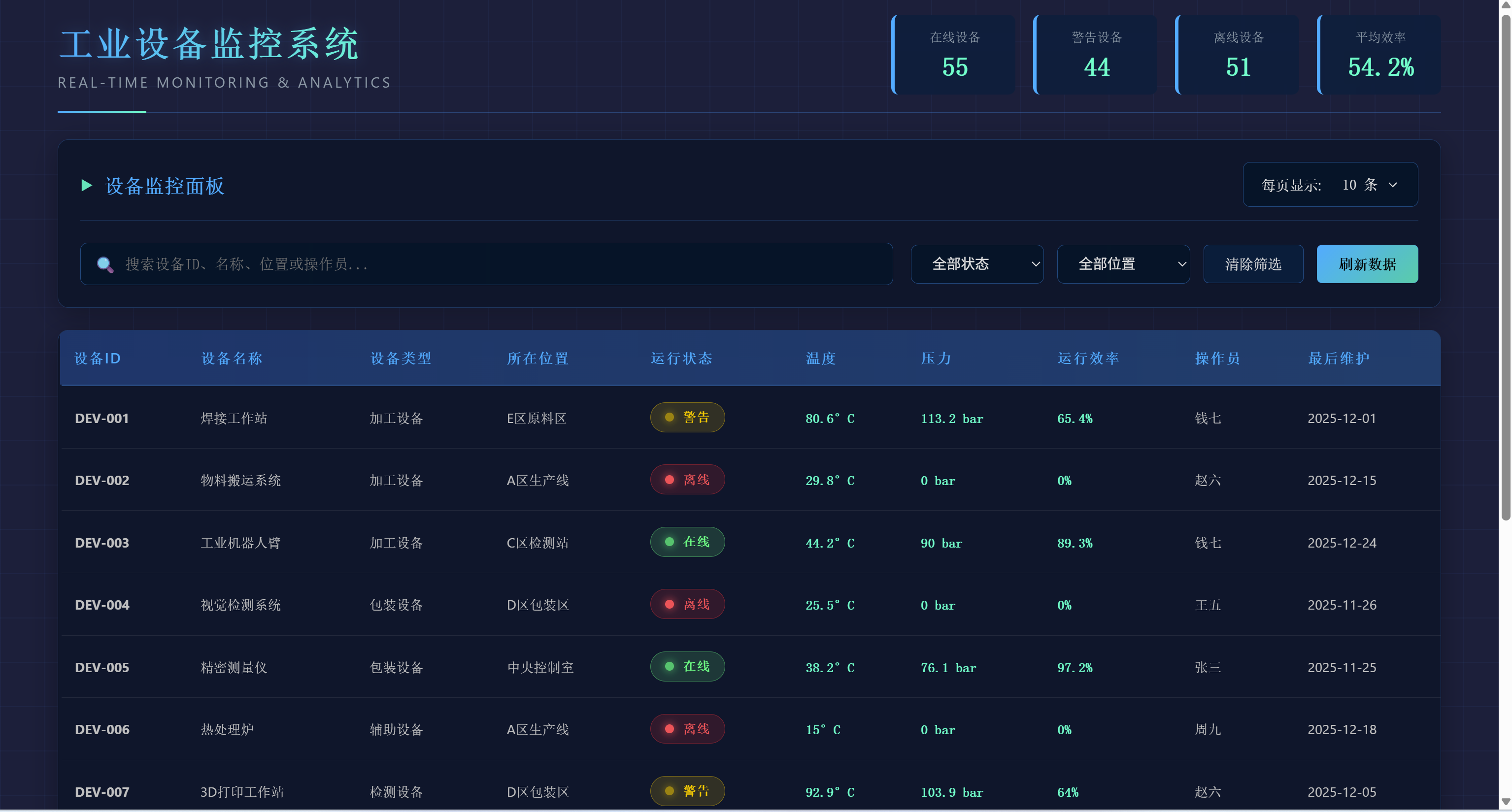
<div className="panel-title">设备监控面板</div>
<div className="page-size-selector">
<span>每页显示:</span>
<select value={pagination.pageSize} onChange={handlePageSizeChange}>
<option value="5">5 条</option>
<option value="10">10 条</option>
<option value="20">20 条</option>
<option value="50">50 条</option>
</select>
</div>
</div>
<div className="filters">
<div className="search-box">
<div className="search-icon">🔍</div>
<input
type="text"
placeholder="搜索设备ID、名称、位置或操作员..."
value={searchTerm}
onChange={handleSearch}
/>
</div>
<div className="filter-group">
<select
className="filter-select"
value={statusFilter}
onChange={handleStatusFilterChange}
>
<option value="">全部状态</option>
<option value="online">在线</option>
<option value="warning">警告</option>
<option value="offline">离线</option>
</select>
<select
className="filter-select"
value={locationFilter}
onChange={handleLocationFilterChange}
>
<option value="">全部位置</option>
{locations.map(location => (
<option key={location} value={location}>{location}</option>
))}
</select>
<button
className="pagination-button"
onClick={clearFilters}
style={{ padding: '12px 24px' }}
>
清除筛选
</button>
<button
className="pagination-button"
onClick={handleRefresh}
style={{
padding: '12px 24px',
background: 'linear-gradient(135deg, #00aaff, #00ccaa)',
color: '#000',
fontWeight: 'bold'
}}
>
刷新数据
</button>
</div>
</div>
</div>
{/* 数据表格 */}
<div className="data-table-container">
{loading ? (
<div className="loading-indicator">
<div className="spinner"></div>
<div>正在加载设备数据...</div>
</div>
) : error ? (
<div className="empty-state">
<h3>数据加载失败</h3>
<p>{error}</p>
<button
className="pagination-button mt-20"
onClick={fetchData}
style={{ padding: '12px 30px' }}
>
重试
</button>
</div>
) : equipmentData.length === 0 ? (
<div className="empty-state">
<h3>未找到匹配的设备</h3>
<p>请尝试修改搜索条件</p>
<button
className="pagination-button mt-20"
onClick={clearFilters}
style={{ padding: '12px 30px' }}
>
清除筛选
</button>
</div>
) : (
<>
<div className="table-wrapper">
<table className="data-table">
<thead>
<tr>
<th>设备ID</th>
<th>设备名称</th>
<th>设备类型</th>
<th>所在位置</th>
<th>运行状态</th>
<th>温度</th>
<th>压力</th>
<th>运行效率</th>
<th>操作员</th>
<th>最后维护</th>
</tr>
</thead>
<tbody>
{equipmentData.map(item => (
<DataRow
key={item.id}
data={item}
searchTerm={searchTerm}
/>
))}
</tbody>
</table>
</div>
<div className="pagination-container">
<div className="pagination-info">
显示 {((pagination.page - 1) * pagination.pageSize) + 1} -
{Math.min(pagination.page * pagination.pageSize, pagination.total)} 条,
共 {pagination.total} 条记录
</div>
<Pagination
currentPage={pagination.page}
totalPages={pagination.totalPages}
onPageChange={handlePageChange}
/>
<div className="pagination-info">
第 {pagination.page} 页 / 共 {pagination.totalPages} 页
</div>
</div>
</>
)}
</div>
{/* 页脚 */}
<footer className="footer">
<div>工业设备监控系统 v2.0 | 弗雷德科技工业自动化解决方案</div>
<div className="timestamp">
最后更新: {lastUpdate || new Date().toLocaleString('zh-CN')}
</div>
<div className="mt-20">
技术支持: <span className="highlight">fredacetech.com</span>
</div>
</footer>
</div>
);
};
// 渲染应用
const root = ReactDOM.createRoot(document.getElementById('root'));
root.render(<IndustrialMonitor />);




 浙公网安备 33010602011771号