
JAVA基础--String、ArrayList--2022年8月24日
第一节 String
1、String是什么,可以做什么
字符串类型,可以定义字符串变量指向字符串对象
2、String是不可变字符串的原因
String变量每次的修改都是重新指向一个新的字符串对象
原来的字符串对象都是没有改变的,多以称不可以变字符串
3、字符串对象的特点有哪些
双引号创建的字符串对象,在字符串常量池中存储同一个
通过new构造器创建的字符串对象,在堆内存中分开存储
4、java关于String的面试题
看视频吧~
5、如果是字符串比较应该使用什么方式进行比较,为什么
使用String提供的equals方法
只关心内容一样就返回true
字符串里面真正存贮的是地址,不是值
6、开发中什么时候使用==比较数据
基本数据类型的比较使用==
7、String常用API
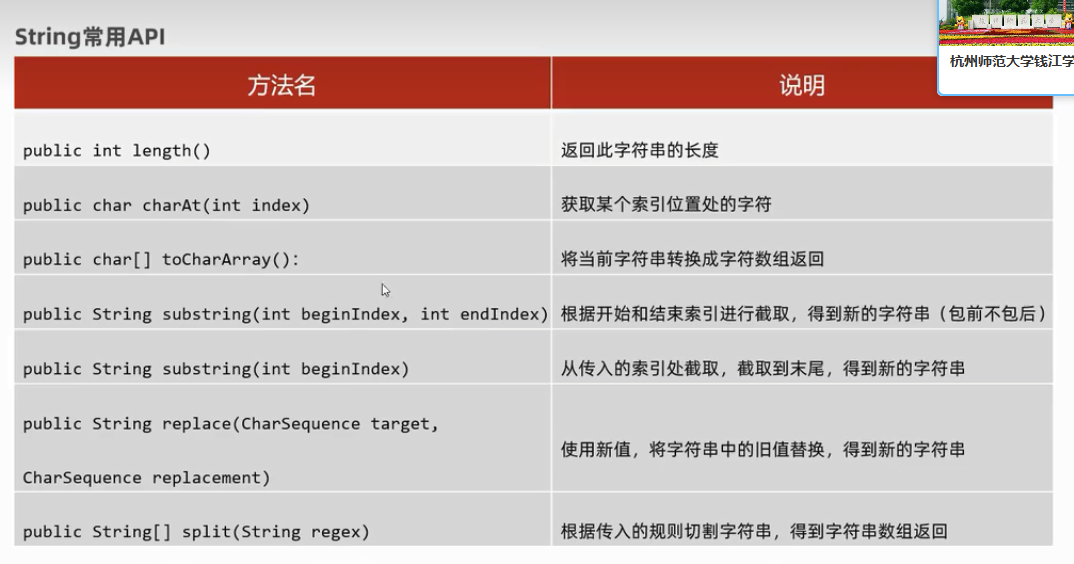
8、String常用案例
验证码功能
public static void main(String[] args){
        String st = "0123456789abcdefghijklmnopqrstuvwxyzABCDEFGHIJKLMNOPQRSTUVWXYZ";

        String code = "";
        //随机5个字符
        Random r = new Random();
        for (int i = 0; i < 5; i++) {
            int num = r.nextInt(st.length());
            char c = st.charAt(num);
            code += c;
        }

        System.out.println(code);
    }
模拟用户登录功能,最多只给三次机会
package Strings;

import java.util.Scanner;

public class Test2 {
    public static void main(String[] args){
        //模拟用户登录功能
        //1、定义正确的登录名称和密码
        String okName = "毛飞红";
        String okPassword = "123456";

        //用户输入名称和密码
        Scanner sc = new Scanner(System.in);
        for (int i = 0; i < 3; i++) {
            System.out.println("请输入用户名称:");
            String name = sc.next();
            System.out.println("请输入用户密码:");
            String password = sc.next();

            //输入正确的情况
            if(name.equals(okName) && password.equals(okPassword)) {
                System.out.println("欢迎进入");
                break;
            }else {
                if(i == 2)
                    System.out.println("用户名称或密码错误,请等待10分钟后再次输入");
                else {
                    System.out.println("用户名称或密码错误,您还有"+(2-i)+"次机会");
                }
            }
        }
    }
}
手机号码屏蔽
 public static void main(String[] args){
        //手机号码屏蔽

        //1、键盘输入一个手机号码
        Scanner sc = new Scanner(System.in);
        System.out.println("请输入您的手机号码:");
        String number = sc.next();

        //2、截取前三位和后四位
        String before = number.substring(0,3);
        String after = number.substring(7);

        String phoneNum = before + "****" + after;
        System.out.println(phoneNum);
    }
第二节 ArrayList
1、数组和集合的元素存储的个数问题?
数组定义后类型确定,长度确定
集合类型可以不固定,长度可变
2、数组和集合适合的场景
数组适合类型和长度确定的场景
集合适合做数据个数不确定的场景,且要做增删元素的场景
3、ArrayList类如何创建集合对象的,如何添加元素
ArrayList list = new ArrayList();
public boolean add();
public boolean add(int index,E element);
4、怎么去统一ArrayList集合操作的元素类型
使用泛型<数据类型>
ArrayList<String> list = new ArrayList();
5、ArrayList常用方法
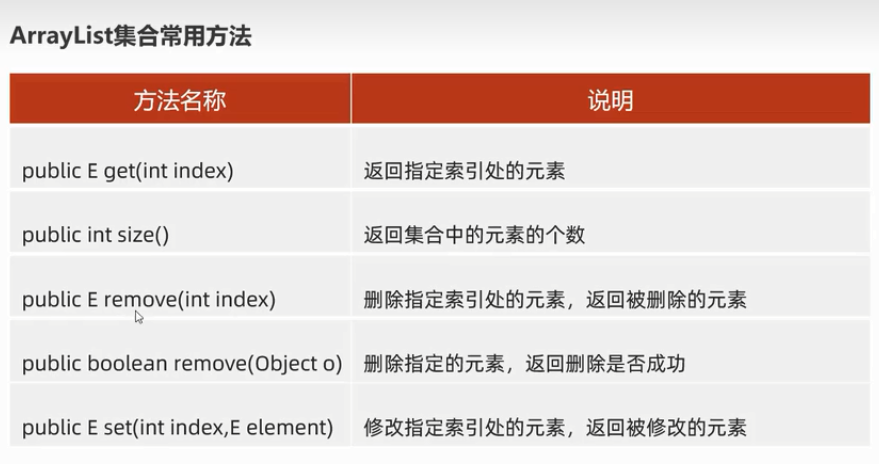
6、集合案例
集合遍历元素,然后删除它
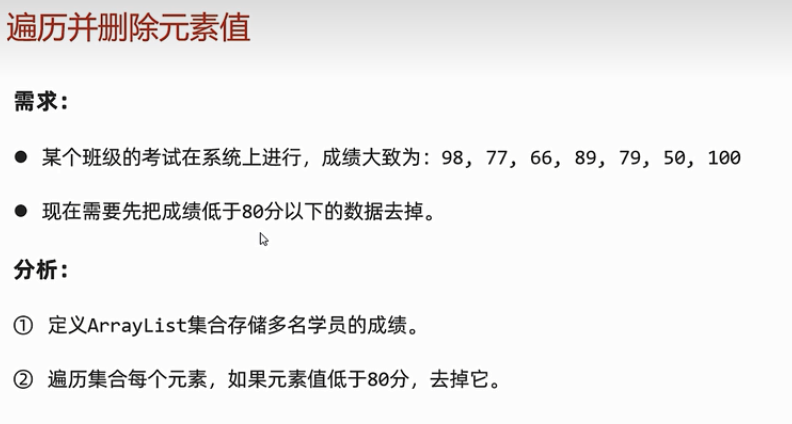
package com.flowerDance.arrayList;

import java.util.ArrayList;

public class Test1 {
    public static void main(String[] args){
        ArrayList<Integer> scores = new ArrayList<>();
        scores.add(98);
        scores.add(77);
        scores.add(66);
        scores.add(89);
        scores.add(79);
        scores.add(50);
        scores.add(100);

        //错误代码
        /*for (int i = 0; i < scores.size(); i++) {
            if(scores.get(i) < 80){
                scores.remove(i);
            }
        }
        System.out.println(scores);*/

        //完美解决方法一
        /*for (int i = 0; i < scores.size(); i++) {
            if(scores.get(i) < 80){
                scores.remove(i);
                i--;
            }
        }
        System.out.println(scores);*/

        //完美解决方法二
        for (int i = scores.size()-1; i >= 0; i--) {
            if(scores.get(i) < 80){
                scores.remove(i);
            }
        }
        System.out.println(scores);
    }
}
存储自定义类型的对象(集合存储的元素并不是对象本身,而是对象的地址)
package com.flowerDance.arrayList;

public class Movie {
    private String name;
    private double score;
    private String actor;

    public Movie() {
    }

    public Movie(String name, double score, String actor) {
        this.name = name;
        this.score = score;
        this.actor = actor;
    }

    public String getName() {
        return name;
    }

    public void setName(String name) {
        this.name = name;
    }

    public double getScore() {
        return score;
    }

    public void setScore(double score) {
        this.score = score;
    }

    public String getActor() {
        return actor;
    }

    public void setActor(String actor) {
        this.actor = actor;
    }
}
package com.flowerDance.arrayList;

import java.util.ArrayList;

public class Test2 {
    public static void main(String[] args){
        ArrayList<Movie> movies = new ArrayList<>();

        movies.add(new Movie("《肖申克的救赎》",9.7,"罗宾斯"));
        movies.add(new Movie("《霸王别姬》",9.6,"张国荣、张丰毅"));
        movies.add(new Movie("《阿甘正传》",9.5,"汤姆 汉克斯"));

        System.out.println(movies);

        for (int i = 0; i < movies.size(); i++) {
            Movie movie = movies.get(i);
            System.out.println("电影名称"+movie.getName());
            System.out.println("评分"+movie.getScore());
            System.out.println("主演"+movie.getActor());

        }
    }
}
元素搜索
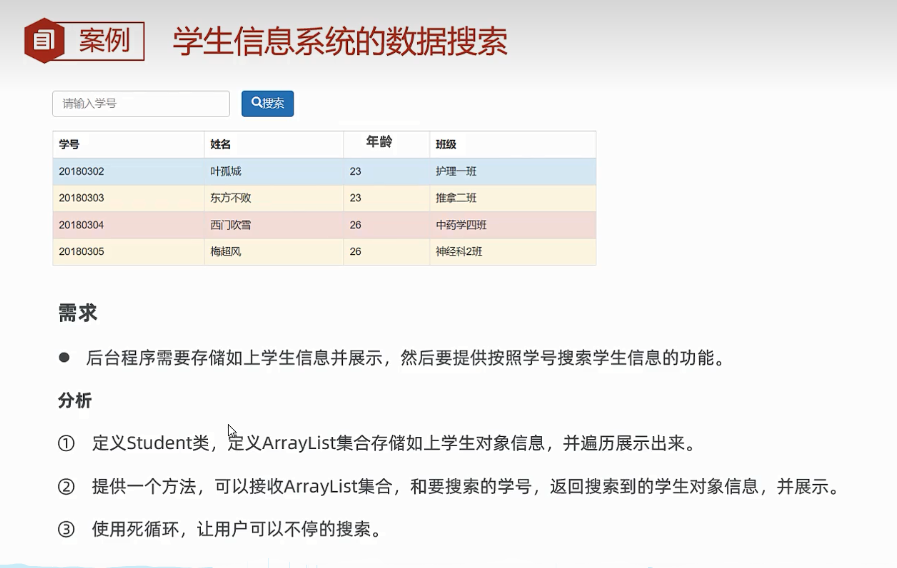
package com.flowerDance.arrayList;

public class Student {
    private String id;
    private String name;
    private int age;
    private String className;

    public Student() {
    }

    public Student(String id, String name, int age, String className) {
        this.id = id;
        this.name = name;
        this.age = age;
        this.className = className;
    }

    public String getId() {
        return id;
    }

    public void setId(String id) {
        this.id = id;
    }

    public String getName() {
        return name;
    }

    public void setName(String name) {
        this.name = name;
    }

    public int getAge() {
        return age;
    }

    public void setAge(int age) {
        this.age = age;
    }

    public String getClassName() {
        return className;
    }

    public void setClassName(String className) {
        this.className = className;
    }
}
package com.flowerDance.arrayList;

import java.util.ArrayList;
import java.util.Scanner;

public class Test3 {
    public static void main(String[] args){

        //1、创建arraylist存储student
        ArrayList<Student> students = new ArrayList<>();

        students.add(new Student("20180302","叶孤城",23,"护理一班"));
        students.add(new Student("20180303","东方不败",23,"推拿二班"));
        students.add(new Student("20180304","西门吹雪",26,"中药学四班"));
        students.add(new Student("20180305","梅超风",26,"神经科二班"));

        //2、展示学生信息
        System.out.println("学号\t\t姓名\t\t年龄\t班级");
        for (int i = 0; i < students.size(); i++) {
            Student s = students.get(i);
            System.out.println(s.getId()+"\t"+s.getName()+"\t"+s.getAge()+"\t"+s.getClassName());
        }

        //3、搜索学生
        Scanner sc = new Scanner(System.in);
        while (true){
            System.out.println("请输入学生学号:");
            String id = sc.next();

            //查无此人
            Student s = getStudentById(students,id);
            if(s == null){
                System.out.println("查无此人");
            }else{
                System.out.println(s.getId()+"\t\t"+s.getName()+"\t\t"+s.getAge()+"\t"+s.getClassName());
            }
        }
    }

    public static Student getStudentById( ArrayList<Student> students,String id){
        //查找学生
        for (int i = 0; i < students.size(); i++) {
            if(students.get(i).getId().equals(id)){
                return students.get(i);
            }
        }
        //查无此人
        return null;
    }
}

 浙公网安备 33010602011771号