

画立体柱图应该非常的简单,就是两个截面+柱体。所以我就不做多的描述了,请直接看代码吧:
1 /// <summary>
2 /// Draw Bar Chart
3 /// </summary>
4 /// <param name="g"></param>
5 /// <param name="value"></param>
6 private void DrawBarChart(Graphics g, double value)
7 {
8 double val = value > 100 ? 100 : value;
9
10 // Compute size and location
11 Point pt = new Point();
12 int width = 100;
13 int height = 16;
14 int eclipseWidth = 4;
15
16 Rectangle r1 = new Rectangle(pt, new Size(eclipseWidth, height));
17 Rectangle r2 = r1;
18 r2.X += width;
19 Rectangle r3 = r1;
20 r3.X = r1.X + (int)(width * (val / 100.0));
21
22 Rectangle r4 = r1;
23 r4.X = pt.X + (eclipseWidth / 2);
24 r4.Width = width;
25
26 Rectangle r5 = r4;
27 r5.Width = (int)(width * (val / 100.0));
28
29 Pen redPen = new Pen(Color.Red);
30 Pen greenPen = new Pen(Color.Green);
31
32 GraphicsPath gp1 = new GraphicsPath();
33 gp1.AddEllipse(r1);
34 GraphicsPath gp2 = new GraphicsPath();
35 gp2.AddEllipse(r2);
36
37 Region rgn1 = new Region(r4);
38 rgn1.Exclude(gp1);
39 rgn1.Union(gp2);
40
41
42 gp1 = new GraphicsPath();
43 gp1.AddEllipse(r1);
44 gp2 = new GraphicsPath();
45 gp2.AddEllipse(r3);
46
47 Region rgn2 = new Region(r5);
48 rgn2.Exclude(gp1);
49 rgn2.Union(gp2);
50
51 LinearGradientBrush lgb = new LinearGradientBrush(pt, new Point(pt.X, pt.Y + height), Color.Black, Color.Yellow);
52 lgb.SetBlendTriangularShape(0.5f, 1.0f);
53
54 g.FillRegion(lgb, rgn1);
55
56 lgb = new LinearGradientBrush(pt, new Point(pt.X, pt.Y + height), Color.Navy, Color.Green);
57 if (value > 100)
58 {
{
59 lgb = new LinearGradientBrush(pt, new Point(pt.X, pt.Y + height), Color.Navy, Color.Red);
60 }
}
61 lgb.SetBlendTriangularShape(0.5f, 1.0f);
62 g.FillRegion(lgb, rgn2);
63
64
65 PathGradientBrush pb = new PathGradientBrush(gp1);
66 pb.SurroundColors = new Color[] { Color.Gray };
67 pb.CenterColor = pb.CenterColor = Color.LightYellow;
68
69 g.FillEllipse(pb, r1);
70
71 Font f = new Font(FontFamily.GenericSansSerif,9.0f);
72
73 string text = string.Format("{0}%", value);
74 if (value > 100)
75 {
76 text = "过期未完成";
77 }
78
79 Color fntColor = Color.White;
80 if (val < 50)
81 {
82 fntColor = Color.Purple;
83 }
84
85 RectangleF textRect = this.ComputeTextRectangle(g, r4, f, text);
86 g.DrawString(text, f, new SolidBrush(fntColor), textRect, StringFormat.GenericTypographic);
87
88 }
/// <summary>
2
/// Draw Bar Chart3
/// </summary>4
/// <param name="g"></param>5
/// <param name="value"></param>6
private void DrawBarChart(Graphics g, double value)7
{
8
double val = value > 100 ? 100 : value;9
10
// Compute size and location11
Point pt = new Point();12
int width = 100;13
int height = 16;14
int eclipseWidth = 4;15
16
Rectangle r1 = new Rectangle(pt, new Size(eclipseWidth, height));17
Rectangle r2 = r1;18
r2.X += width;19
Rectangle r3 = r1;20
r3.X = r1.X + (int)(width * (val / 100.0));21
22
Rectangle r4 = r1;23
r4.X = pt.X + (eclipseWidth / 2);24
r4.Width = width;25
26
Rectangle r5 = r4;27
r5.Width = (int)(width * (val / 100.0));28
29
Pen redPen = new Pen(Color.Red);30
Pen greenPen = new Pen(Color.Green);31
32
GraphicsPath gp1 = new GraphicsPath();33
gp1.AddEllipse(r1);34
GraphicsPath gp2 = new GraphicsPath();35
gp2.AddEllipse(r2);36
37
Region rgn1 = new Region(r4);38
rgn1.Exclude(gp1);39
rgn1.Union(gp2);40
41
42
gp1 = new GraphicsPath();43
gp1.AddEllipse(r1);44
gp2 = new GraphicsPath();45
gp2.AddEllipse(r3);46
47
Region rgn2 = new Region(r5);48
rgn2.Exclude(gp1);49
rgn2.Union(gp2);50
51
LinearGradientBrush lgb = new LinearGradientBrush(pt, new Point(pt.X, pt.Y + height), Color.Black, Color.Yellow);52
lgb.SetBlendTriangularShape(0.5f, 1.0f);53
54
g.FillRegion(lgb, rgn1);55
56
lgb = new LinearGradientBrush(pt, new Point(pt.X, pt.Y + height), Color.Navy, Color.Green);57
if (value > 100)58
{
59
lgb = new LinearGradientBrush(pt, new Point(pt.X, pt.Y + height), Color.Navy, Color.Red);60
}61
lgb.SetBlendTriangularShape(0.5f, 1.0f);62
g.FillRegion(lgb, rgn2);63
64
65
PathGradientBrush pb = new PathGradientBrush(gp1);66
pb.SurroundColors = new Color[] { Color.Gray };67
pb.CenterColor = pb.CenterColor = Color.LightYellow;68
69
g.FillEllipse(pb, r1);70
71
Font f = new Font(FontFamily.GenericSansSerif,9.0f);72
73
string text = string.Format("{0}%", value);74
if (value > 100)75
{76
text = "过期未完成";77
}78
79
Color fntColor = Color.White;80
if (val < 50)81
{82
fntColor = Color.Purple;83
}84
85
RectangleF textRect = this.ComputeTextRectangle(g, r4, f, text);86
g.DrawString(text, f, new SolidBrush(fntColor), textRect, StringFormat.GenericTypographic); 87
88
}需要把所画的图像由页面展示出来:
1 protected void Page_Load(object sender, EventArgs e)
2 {
3 Response.Clear();
4 Response.ContentType = "image/jpeg";
5
6 string error = Request["error"];
7 string progress = Request["progress"];
8
9 MemoryStream ms = new MemoryStream();
10
11 Bitmap bmp = new Bitmap(110,17);
12 using (Graphics g = Graphics.FromImage(bmp))
13 {
14 g.Clear(Color.White);
15
16 if (string.IsNullOrEmpty(progress))
17 {
18 error = "1";
19 }
20
21 if (!string.IsNullOrEmpty(error))
22 {
23 this.DrawError(g, int.Parse(error));
24 }
25 else
26 {
27 this.DrawBarChart(g, double.Parse(progress));
28 }
29 }
30
31 bmp.Save(Response.OutputStream, ImageFormat.Jpeg);
32 }
protected void Page_Load(object sender, EventArgs e)2
{3
Response.Clear();4
Response.ContentType = "image/jpeg";5
6
string error = Request["error"];7
string progress = Request["progress"];8
9
MemoryStream ms = new MemoryStream();10
11
Bitmap bmp = new Bitmap(110,17);12
using (Graphics g = Graphics.FromImage(bmp))13
{14
g.Clear(Color.White);15
16
if (string.IsNullOrEmpty(progress))17
{18
error = "1";19
}20
21
if (!string.IsNullOrEmpty(error))22
{23
this.DrawError(g, int.Parse(error));24
}25
else26
{27
this.DrawBarChart(g, double.Parse(progress));28
}29
}30
31
bmp.Save(Response.OutputStream, ImageFormat.Jpeg);32
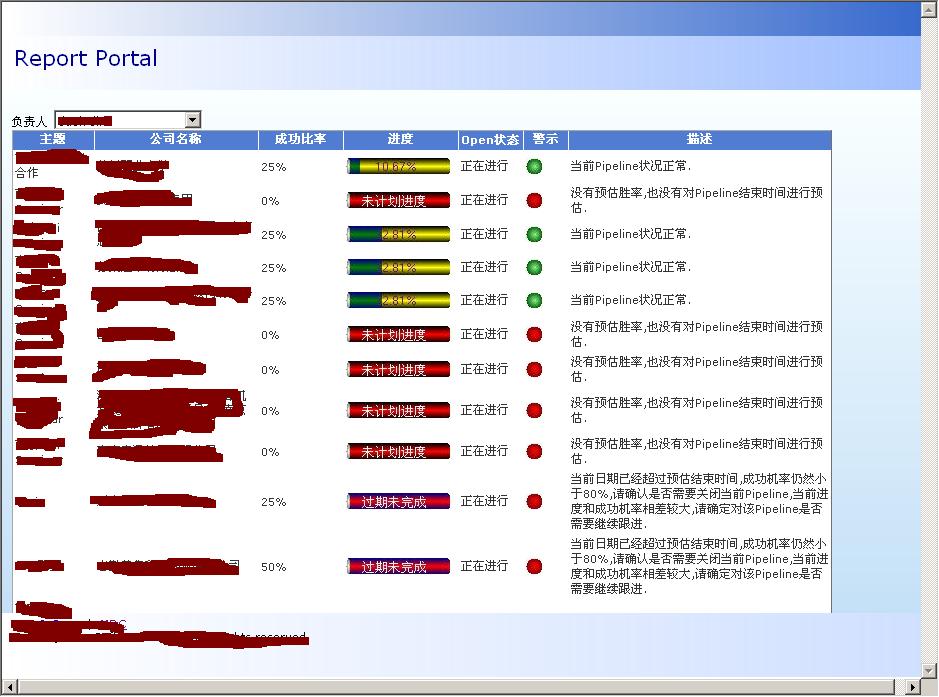
}效果图如下,里面有比较明显的锯齿,主要是所选取的位图尺寸比较小,如果取大一些再来缩小展现的话,效果应该会好些。

 浙公网安备 33010602011771号