
20241114 《Python程序设计》实验四报告
20241114 《Python程序设计》实验四报告
课程:《Python程序设计》
班级: 2411班
姓名: 陈飞达
学号:20241114
实验教师:王志强
实验日期:2024年5月14日
必修/选修: 公选课
1.实验内容
(1)为何选择做一个日程管理?
在快节奏的现代生活中,人们常常需要合理安排时间,确保能够高效地完成各项任务。一个功能完善的日程管理系统可以帮助用户更好地规划和管理自己的时间,提高生活和工作的效率。
(2)我如何一步步把他变复杂,做成一个较为成熟的程序
【1】制作一个可读写工作表的日程安排助手
【2】添加天气爬取程序
【3】变成窗口化的可用软件
2. 实验过程及结果
实验需要的库
requests:用于发送网络请求,获取网页内容。
beautifulsoup4:用于解析HTML页面,提取所需数据。
openpyxl:用于操作Excel文件,读取和写入数据。
tkinter:用于创建图形用户界面,提供用户交互功能。
(1)学习如何读写Excel工作表
在CSDN的一篇博客上,我找到了如何读写Excel工作表:
Python自带的模块中有针对xls格式的xlrd和xlwt模块,但这两个库仅仅是针对xls的操作,当我们要操作xlsx格式文件时,则需要使用到openpyxl第三方库。
所以我首先安装了相应库:
pip install openpyxl
创建每日计划:将天气信息和用户输入的计划写入Excel文件。
回顾每日计划:读取Excel文件中的计划数据,并记录完成情况。
加载工作簿:
使用 load_workbook 方法加载现有的Excel文件。
通过 workbook.active 获取当前活动的工作表,或者通过 workbook[sheet_name] 获取指定名称的工作表。
写入单元格数据:
使用 sheet.cell(row, column).value = value 设置指定单元格的数据。
使用 sheet.cell(row, column).fill 和 sheet.cell(row, column).font 设置单元格的样式。
保存工作簿:
使用 workbook.save(file_path) 保存对工作簿的修改。
读取单元格数据:
使用 sheet.cell(row, column).value 获取指定单元格的数据。
接下来,对于已确定类self可以通过以下步骤来做:
【1】定义常用的样式(包括颜色、字体等);
初始化样式
self.init_styles()
def init_styles(self):
# 定义常用样式
self.styles = {
'title': PatternFill("solid", fgColor='CDC9C9'),
'date': PatternFill("solid", fgColor='FFF68F'),
'weather': PatternFill("solid", fgColor='E066FF'),
'temp_high': PatternFill("solid", fgColor='EE5C42'),
'temp_low': PatternFill("solid", fgColor='87CEFF'),
'time': PatternFill("solid", fgColor='EEA9B8'),
'plan': PatternFill("solid", fgColor='B0E2FF'),
'completed': PatternFill("solid", fgColor='90EE90'),
'not_completed': PatternFill("solid", fgColor='EE5C42'),
'partial': PatternFill("solid", fgColor='9F79EE'),
'judge': PatternFill("solid", fgColor='D1EEEE'),
'review': [
PatternFill("solid", fgColor='FF6EB4'),
PatternFill("solid", fgColor='FFD700'),
PatternFill("solid", fgColor='B0E2FF'),
PatternFill("solid", fgColor='C1FFC1'),
PatternFill("solid", fgColor='BCD2EE'),
PatternFill("solid", fgColor='B03060'),
PatternFill("solid", fgColor='9F79EE'),
PatternFill("solid", fgColor='48D1CC'),
PatternFill("solid", fgColor='EEEE00'),
PatternFill("solid", fgColor='8B5F65')
]
}
定义字体
self.fonts = {
'header': Font(name=u'宋体', size=13, color='FF000000'),
'date': Font(name=u'宋体', size=14, color='FF000000'),
'title': Font(name=u'宋体', size=26, color='FF000000'),
'normal': Font(name='Times New Roman', size=13, color='FF000000'),
'plan': Font(name='Times New Roman', size=14, color='FF000000')
}
【2】在创建每日计划部分,分别将用户输入写入Excel表的单元格(包括合并,更换单元格,设置颜色和格式,保存等);
def create_daily_plan(self, time_slots=None):
"""创建每日计划"""
if time_slots is None:
time_slots = self.default_time_slots
if not self.fetch_weather():
self.weather_data = {'weather': '未知', 'temp_high': '未知', 'temp_low': '未知'}
try:
workbook = load_workbook(self.excel_path)
sheet = workbook.active
sheet["A1"] = "日期"
sheet["B1"] = time.strftime("%Y/%m/%d")
sheet["A2"] = "天气"
sheet["B2"] = self.weather_data['weather']
sheet["A3"] = "温度"
sheet["B3"] = f"{self.weather_data['temp_high']}℃"
sheet["C3"] = f"{self.weather_data['temp_low']}℃"
for cell in ['A1', 'A2', 'A3', 'A4', 'B4', 'C4', 'A12']:
sheet[cell].fill = self.styles['title']
sheet[cell].font = self.fonts['header']
sheet["B1"].fill = self.styles['date']
sheet["B1"].font = self.fonts['date']
sheet["B2"].fill = self.styles['weather']
sheet["B2"].font = self.fonts['date']
sheet["B3"].fill = self.styles['temp_high']
sheet["B3"].font = self.fonts['date']
sheet["C3"].fill = self.styles['temp_low']
sheet["C3"].font = self.fonts['date']
sheet["A4"] = "时间安排"
sheet["B4"] = "计划详情"
sheet["C4"] = "完成情况"
sheet["A12"] = "对今天的评价"
sheet["B12"] = ""
sheet["B12"].fill = self.styles['judge']
sheet["B12"].font = self.fonts['normal']
plans = []
for i, ti in enumerate(time_slots):
row = i + 5
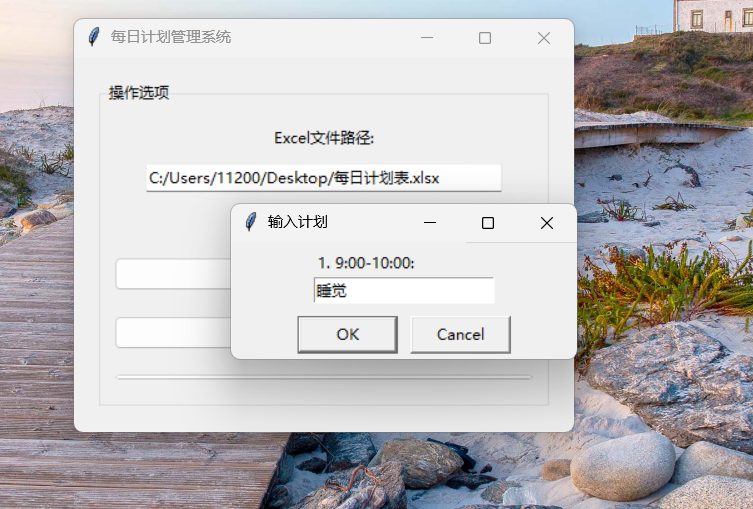
msg = simpledialog.askstring("输入计划", f"{i + 1}. {ti}: ")
plans.append(msg)
sheet.cell(row, 1).value = ti
sheet.cell(row, 1).fill = self.styles['time']
sheet.cell(row, 1).font = self.fonts['plan']
sheet.cell(row, 2).value = msg
sheet.cell(row, 2).fill = self.styles['plan']
sheet.cell(row, 2).font = self.fonts['normal']
sheet.cell(row, 3).value = ''
sheet.cell(row, 3).fill = self.styles['plan']
sheet.merge_cells('B1:C1')
sheet.merge_cells('B2:C2')
sheet.merge_cells('B12:C12')
title = time.strftime("%m-%d-%A")
sheet.title = title
workbook.save(self.excel_path)
workbook.close()
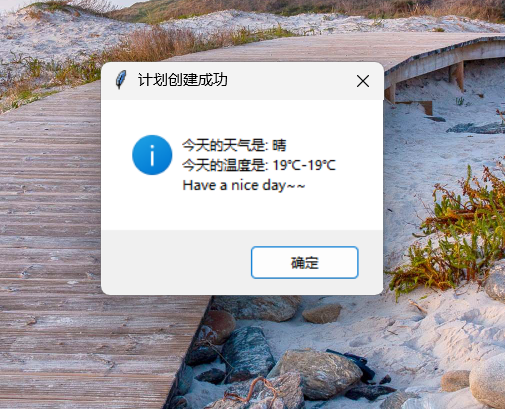
messagebox.showinfo("计划创建成功", f"今天的天气是: {self.weather_data['weather']}\n今天的温度是: {self.weather_data['temp_high']}℃-{self.weather_data['temp_low']}℃\nHave a nice day~~")
return True
except PermissionError:
messagebox.showerror("错误", "Excel软件已经打开,请关闭软件后再运行程序!")
return False
except Exception as e:
messagebox.showerror("错误", f"创建计划时出错: {e}")
return False
【3】在回顾部分也会用到一些相应的操作。
def review_daily_plan(self):
"""回顾每日计划完成情况"""
try:
workbook = load_workbook(self.excel_path)
current_sheet = workbook.active
times = []
plans = []
for i in range(7):
row = i + 5
clock = str(current_sheet.cell(row, 1).value)
plan = str(current_sheet.cell(row, 2).value)
times.append(clock)
plans.append(plan)
completed_count = 0
situations = []
for i in range(7):
row = i + 5
answer = simpledialog.askstring("完成情况", f"{i + 1}. {times[i]}: {plans[i]}\n完成情况 (1=完成, 2=未完成, 其他=部分完成并输入原因): ")
if answer == "1":
current_sheet.cell(row, 3).value = "完成"
current_sheet.cell(row, 3).fill =self.styles['completed']
current_sheet.cell(row, 3).font = self.fonts['normal']
completed_count += 1
situations.append("完成")
elif answer == "2":
current_sheet.cell(row, 3).value = "未完成"
current_sheet.cell(row, 3).fill = self.styles['not_completed']
current_sheet.cell(row, 3).font = self.fonts['normal']
situations.append("未完成")
else:
explain = simpledialog.askstring("未完成原因", "此项计划没有完成的原因: ")
current_sheet.cell(row, 3).value = explain
current_sheet.cell(row, 3).fill = self.styles['partial']
current_sheet.cell(row, 3).font = self.fonts['normal']
situations.append(explain)
completed_count += 1
if completed_count < 4:
score = "真是个笨蛋,计划完成的不达标!!!"
fill = self.styles['not_completed']
elif completed_count >= 6:
score = "真是太棒了,完美的完成了任务~"
fill = self.styles['completed']
else:
score = "反应平平,计划完成的一般。"
fill = self.styles['partial']
summary_sheet_title = "每日计划情况汇总"
if summary_sheet_title not in workbook.sheetnames:
summary_sheet = workbook.create_sheet(summary_sheet_title)
else:
summary_sheet = workbook[summary_sheet_title]
current_date = time.strftime("%m-%d")
found = False
for r in range(1, summary_sheet.max_row + 1):
for c in range(1, summary_sheet.max_column + 1):
if str(summary_sheet.cell(r, c).value) == current_date:
found = True
summary_sheet.cell(r, c + 4).value = "☆" if completed_count < 4 else "★" if completed_count >= 6 else "●_●"
summary_sheet.cell(r, c + 4).fill = fill
summary_sheet.cell(r, c + 4).font = self.fonts['title'] if completed_count < 4 or completed_count >= 6 else self.fonts['plan']
color_index = choice(range(len(self.styles['review'])))
for i in range(7):
summary_sheet.cell(r + i, c + 1).value = times[i]
summary_sheet.cell(r + i, c + 1).fill = self.styles['review'][color_index]
summary_sheet.cell(r + i, c + 2).value = plans[i]
summary_sheet.cell(r + i, c + 2).fill = self.styles['review'][color_index]
summary_sheet.cell(r + i, c + 3).value = situations[i]
if situations[i] == "未完成":
summary_sheet.cell(r + i, c + 3).fill = self.styles['not_completed']
elif situations[i] == "完成":
summary_sheet.cell(r + i, c + 3).fill = self.styles['completed']
else:
summary_sheet.cell(r + i, c + 3).fill = self.styles['partial']
break
if found:
break
judge = simpledialog.askstring("今日突破", "你今天做出了哪些突破: ")
current_sheet["B12"] = f"{score} 今天的突破:【{judge}】"
current_sheet["B12"].fill = fill
copy_sheet = workbook.copy_worksheet(current_sheet)
copy_sheet.title = time.strftime("%m-%d")
workbook.save(self.excel_path)
messagebox.showinfo("回顾完成", f"今天你完成了{completed_count}项任务,今天的评价是:{score}")
return True
except PermissionError:
messagebox.showerror("错误", "Excel软件已经打开,请关闭软件后再运行程序!")
return False
except Exception as e:
messagebox.showerror("错误", f"回顾计划时出错: {e}")
return False
(2)学习如何爬取天气信息
在一篇csdn博客上,我找到了如何去做的思路:
爬取指定网站的当日天气信息,包括天气状况、最高温度和最低温度,并将其存储在 self.weather_data 中。
爬取天气需要用一个新的库:BeautifulSoup,来从很复杂的网页源代码中找到需要的那部分。
具体步骤如下:
①发送HTTP请求:
使用 requests 库发送HTTP GET请求,获取天气页面的HTML内容。
设置请求头(headers),模拟浏览器行为,避免被网站反爬虫机制拦截。
②解析HTML内容:
使用 BeautifulSoup 库解析HTML页面,定位到包含天气信息的标签。
提取天气状况、最高温度和最低温度。
③正则表达式匹配:
使用正则表达式从HTML文本中提取数字,确保温度数据的准确性。
我按照教程从网页源代码中找到了需要的那部分:
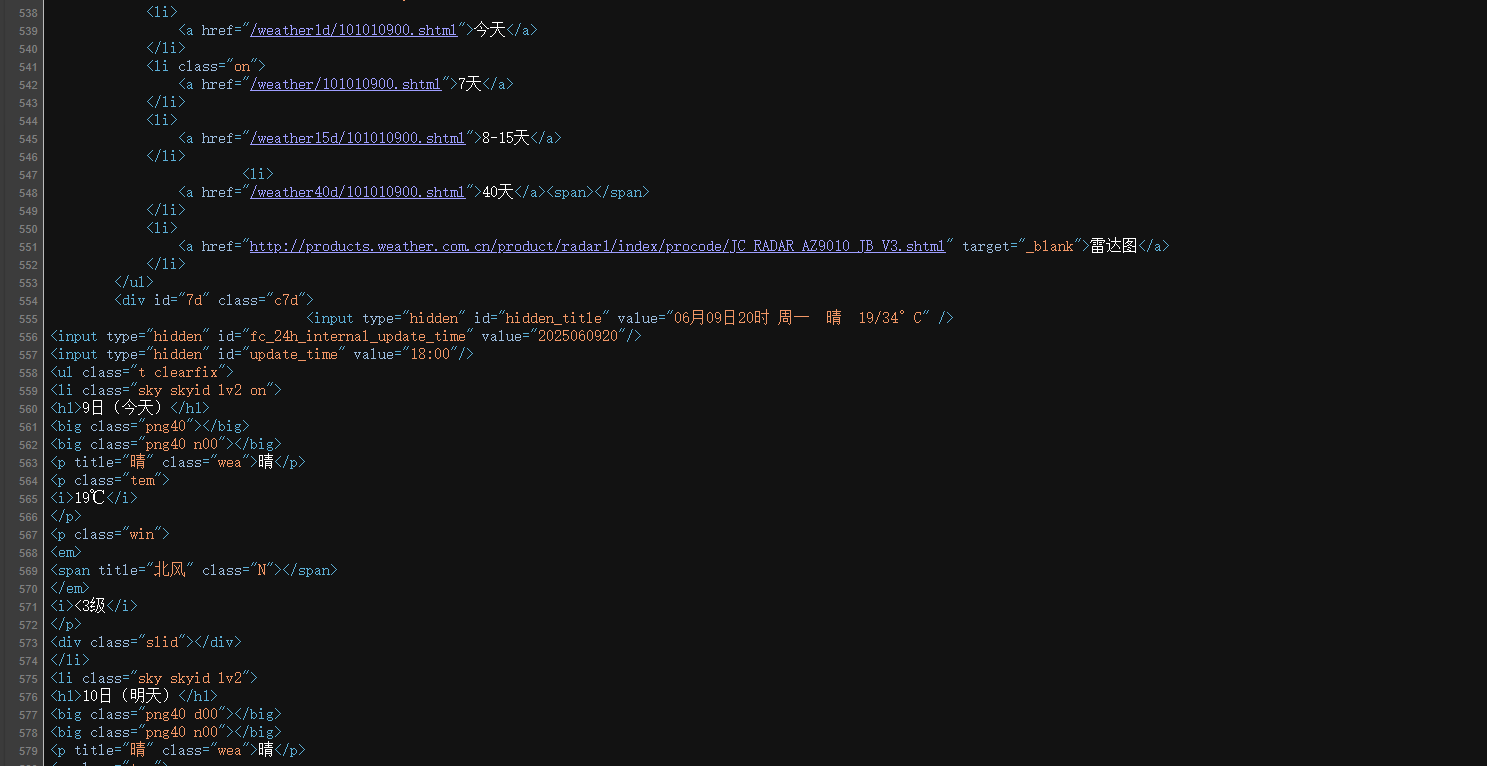
然后把需要部分的标识写上:
def fetch_weather_page(url, headers=None):
"""
发送请求获取天气页面内容
"""
try:
response = requests.get(url, headers=headers, timeout=10)
response.encoding = response.apparent_encoding
if response.status_code == 200:
return response.text
else:
print(f"请求失败,状态码: {response.status_code}")
except requests.RequestException as e:
print(f"请求天气页面时出错: {e}")
return None
def get_max_temperature(tem_p, default_temp=None):
"""
尝试从tem_p标签中抓取最高气温,抓不到时返回default_temp
"""
if tem_p:
span = tem_p.find('span')
if span and span.text.strip():
temp_str = span.text.strip().replace('℃', '')
if temp_str.lstrip('-').isdigit():
return int(temp_str)
text = tem_p.get_text()
temps = re.findall(r'(-?\d+)', text)
if temps:
return int(temps[0])
return default_temp
def parse_weather_info(html, default_max_temp=25):
"""
解析网页,提取未来几天天气信息,返回列表
"""
soup = BeautifulSoup(html, 'html.parser')
weather_data = []
ul = soup.find('ul', class_='t clearfix')
if not ul:
print("未找到天气列表")
return weather_data
lis = ul.find_all('li')
for li in lis:
date = li.find('h1').text.strip() if li.find('h1') else "未知日期"
weather = li.find('p', class_='wea').text.strip() if li.find('p', class_='wea') else "未知天气"
tem_p = li.find('p', class_='tem')
max_temp = get_max_temperature(tem_p, default_temp=default_max_temp)
min_temp = None
if tem_p:
i_tag = tem_p.find('i')
if i_tag and i_tag.text.strip():
min_temp_str = i_tag.text.strip().replace('℃', '')
if min_temp_str.lstrip('-').isdigit():
min_temp = int(min_temp_str)
if min_temp is None:
min_temp = max_temp
weather_data.append({
'date': date,
'weather': weather,
'min_temp': min_temp,
'max_temp': max_temp
})
return weather_data
虽然博客上写的是2345天气网,但由于广告太多,很难找到,我只能转投中国天气网。
(3)学习如何变为窗口化程序
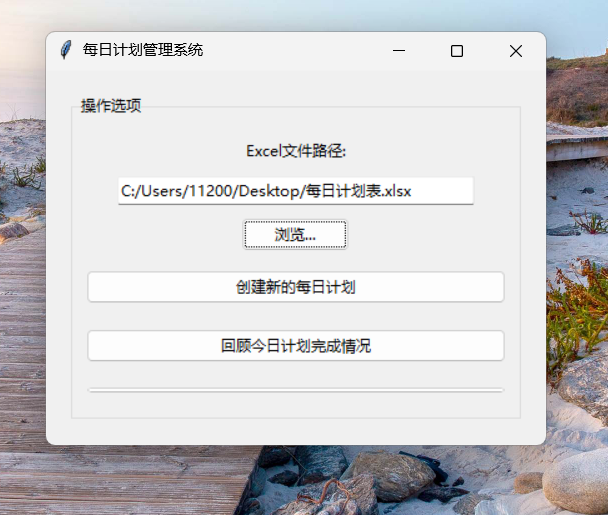
在一篇博客中,我接触到了tkinter库,在安装这个库后,我依据教程一步一步做完了这一项:
【1】设置窗口和标题
root = tk.Tk()
root.title("每日计划管理系统")
root.geometry("400x300")
root.configure(bg="#f0f0f0")
【2】创建一个LabelFrame来组织按钮
frame = ttk.LabelFrame(root, text="操作选项", padding="10 10 10 10")
frame.pack(pady=20, padx=20, fill="both", expand=True)
def select_excel_file():
file_path = filedialog.askopenfilename(
title="选择Excel文件",
filetypes=[("Excel文件", ".xlsx"), ("所有文件", ".*")]
)
if file_path:
excel_path.set(file_path)
def create_plan():
planner = DailyPlanner(excel_path.get())
planner.create_daily_plan()
def review_plan():
planner = DailyPlanner(excel_path.get())
planner.review_daily_plan()
【3】添加按钮、Excel文件路径选择
excel_path = tk.StringVar()
ttk.Label(frame, text="Excel文件路径:").pack(pady=5)
ttk.Entry(frame, textvariable=excel_path, width=40).pack(pady=5)
ttk.Button(frame, text="浏览...", command=select_excel_file).pack(pady=5)
create_button = ttk.Button(frame, text="创建新的每日计划", command=create_plan)
create_button.pack(pady=10, fill="x")
review_button = ttk.Button(frame, text="回顾今日计划完成情况", command=review_plan)
review_button.pack(pady=10, fill="x")
源代码
import requests
from bs4 import BeautifulSoup
import time
import re
from openpyxl import load_workbook
from openpyxl.styles import PatternFill, Font
from random import choice
import tkinter as tk
from tkinter import messagebox, simpledialog, ttk
from tkinter import filedialog
class DailyPlanner:
def init(self, excel_path):
self.excel_path = excel_path
self.weather_url = 'http://www.weather.com.cn/weather/101010900.shtml' # 北京天气
self.weather_data = {}
self.default_time_slots = [
'9:00-10:00', '10:00-12:00', '13:30-15:00',
'15:00-17:00', '17:00-18:00', '19:30-20:30', '20:30-22:00'
]
初始化样式
self.init_styles()
def init_styles(self):
# 定义常用样式
self.styles = {
'title': PatternFill("solid", fgColor='CDC9C9'),
'date': PatternFill("solid", fgColor='FFF68F'),
'weather': PatternFill("solid", fgColor='E066FF'),
'temp_high': PatternFill("solid", fgColor='EE5C42'),
'temp_low': PatternFill("solid", fgColor='87CEFF'),
'time': PatternFill("solid", fgColor='EEA9B8'),
'plan': PatternFill("solid", fgColor='B0E2FF'),
'completed': PatternFill("solid", fgColor='90EE90'),
'not_completed': PatternFill("solid", fgColor='EE5C42'),
'partial': PatternFill("solid", fgColor='9F79EE'),
'judge': PatternFill("solid", fgColor='D1EEEE'),
'review': [
PatternFill("solid", fgColor='FF6EB4'),
PatternFill("solid", fgColor='FFD700'),
PatternFill("solid", fgColor='B0E2FF'),
PatternFill("solid", fgColor='C1FFC1'),
PatternFill("solid", fgColor='BCD2EE'),
PatternFill("solid", fgColor='B03060'),
PatternFill("solid", fgColor='9F79EE'),
PatternFill("solid", fgColor='48D1CC'),
PatternFill("solid", fgColor='EEEE00'),
PatternFill("solid", fgColor='8B5F65')
]
}
定义字体
self.fonts = {
'header': Font(name=u'宋体', size=13, color='FF000000'),
'date': Font(name=u'宋体', size=14, color='FF000000'),
'title': Font(name=u'宋体', size=26, color='FF000000'),
'normal': Font(name='Times New Roman', size=13, color='FF000000'),
'plan': Font(name='Times New Roman', size=14, color='FF000000')
}
def fetch_weather(self):
"""从网页爬取天气数据"""
headers = {
'User-Agent': 'Mozilla/5.0 (Windows NT 10.0; Win64; x64) AppleWebKit/537.36 (KHTML, like Gecko) Chrome/114.0.0.0 Safari/537.36'
}
html = fetch_weather_page(self.weather_url, headers)
if not html:
self.weather_data = {'weather': '未知', 'temp_high': '未知', 'temp_low': '未知'}
return False
weather_list = parse_weather_info(html, default_max_temp=25)
if not weather_list:
self.weather_data = {'weather': '未知', 'temp_high': '未知', 'temp_low': '未知'}
return False
today_weather = weather_list[0]
self.weather_data = {
'weather': today_weather['weather'],
'temp_high': today_weather['max_temp'],
'temp_low': today_weather['min_temp']
}
return True
def create_daily_plan(self, time_slots=None):
"""创建每日计划"""
if time_slots is None:
time_slots = self.default_time_slots
if not self.fetch_weather():
self.weather_data = {'weather': '未知', 'temp_high': '未知', 'temp_low': '未知'}
try:
workbook = load_workbook(self.excel_path)
sheet = workbook.active
sheet["A1"] = "日期"
sheet["B1"] = time.strftime("%Y/%m/%d")
sheet["A2"] = "天气"
sheet["B2"] = self.weather_data['weather']
sheet["A3"] = "温度"
sheet["B3"] = f"{self.weather_data['temp_high']}℃"
sheet["C3"] = f"{self.weather_data['temp_low']}℃"
for cell in ['A1', 'A2', 'A3', 'A4', 'B4', 'C4', 'A12']:
sheet[cell].fill = self.styles['title']
sheet[cell].font = self.fonts['header']
sheet["B1"].fill = self.styles['date']
sheet["B1"].font = self.fonts['date']
sheet["B2"].fill = self.styles['weather']
sheet["B2"].font = self.fonts['date']
sheet["B3"].fill = self.styles['temp_high']
sheet["B3"].font = self.fonts['date']
sheet["C3"].fill = self.styles['temp_low']
sheet["C3"].font = self.fonts['date']
sheet["A4"] = "时间安排"
sheet["B4"] = "计划详情"
sheet["C4"] = "完成情况"
sheet["A12"] = "对今天的评价"
sheet["B12"] = ""
sheet["B12"].fill = self.styles['judge']
sheet["B12"].font = self.fonts['normal']
plans = []
for i, ti in enumerate(time_slots):
row = i + 5
msg = simpledialog.askstring("输入计划", f"{i + 1}. {ti}: ")
plans.append(msg)
sheet.cell(row, 1).value = ti
sheet.cell(row, 1).fill = self.styles['time']
sheet.cell(row, 1).font = self.fonts['plan']
sheet.cell(row, 2).value = msg
sheet.cell(row, 2).fill = self.styles['plan']
sheet.cell(row, 2).font = self.fonts['normal']
sheet.cell(row, 3).value = ''
sheet.cell(row, 3).fill = self.styles['plan']
sheet.merge_cells('B1:C1')
sheet.merge_cells('B2:C2')
sheet.merge_cells('B12:C12')
title = time.strftime("%m-%d-%A")
sheet.title = title
workbook.save(self.excel_path)
workbook.close()
messagebox.showinfo("计划创建成功", f"今天的天气是: {self.weather_data['weather']}\n今天的温度是: {self.weather_data['temp_high']}℃-{self.weather_data['temp_low']}℃\nHave a nice day~~")
return True
except PermissionError:
messagebox.showerror("错误", "Excel软件已经打开,请关闭软件后再运行程序!")
return False
except Exception as e:
messagebox.showerror("错误", f"创建计划时出错: {e}")
return False
def review_daily_plan(self):
"""回顾每日计划完成情况"""
try:
workbook = load_workbook(self.excel_path)
current_sheet = workbook.active
times = []
plans = []
for i in range(7):
row = i + 5
clock = str(current_sheet.cell(row, 1).value)
plan = str(current_sheet.cell(row, 2).value)
times.append(clock)
plans.append(plan)
completed_count = 0
situations = []
for i in range(7):
row = i + 5
answer = simpledialog.askstring("完成情况", f"{i + 1}. {times[i]}: {plans[i]}\n完成情况 (1=完成, 2=未完成, 其他=部分完成并输入原因): ")
if answer == "1":
current_sheet.cell(row, 3).value = "完成"
current_sheet.cell(row, 3).fill =self.styles['completed']
current_sheet.cell(row, 3).font = self.fonts['normal']
completed_count += 1
situations.append("完成")
elif answer == "2":
current_sheet.cell(row, 3).value = "未完成"
current_sheet.cell(row, 3).fill = self.styles['not_completed']
current_sheet.cell(row, 3).font = self.fonts['normal']
situations.append("未完成")
else:
explain = simpledialog.askstring("未完成原因", "此项计划没有完成的原因: ")
current_sheet.cell(row, 3).value = explain
current_sheet.cell(row, 3).fill = self.styles['partial']
current_sheet.cell(row, 3).font = self.fonts['normal']
situations.append(explain)
completed_count += 1
if completed_count < 4:
score = "真是个笨蛋,计划完成的不达标!!!"
fill = self.styles['not_completed']
elif completed_count >= 6:
score = "真是太棒了,完美的完成了任务~"
fill = self.styles['completed']
else:
score = "反应平平,计划完成的一般。"
fill = self.styles['partial']
summary_sheet_title = "每日计划情况汇总"
if summary_sheet_title not in workbook.sheetnames:
summary_sheet = workbook.create_sheet(summary_sheet_title)
else:
summary_sheet = workbook[summary_sheet_title]
current_date = time.strftime("%m-%d")
found = False
for r in range(1, summary_sheet.max_row + 1):
for c in range(1, summary_sheet.max_column + 1):
if str(summary_sheet.cell(r, c).value) == current_date:
found = True
summary_sheet.cell(r, c + 4).value = "☆" if completed_count < 4 else "★" if completed_count >= 6 else "●_●"
summary_sheet.cell(r, c + 4).fill = fill
summary_sheet.cell(r, c + 4).font = self.fonts['title'] if completed_count < 4 or completed_count >= 6 else self.fonts['plan']
color_index = choice(range(len(self.styles['review'])))
for i in range(7):
summary_sheet.cell(r + i, c + 1).value = times[i]
summary_sheet.cell(r + i, c + 1).fill = self.styles['review'][color_index]
summary_sheet.cell(r + i, c + 2).value = plans[i]
summary_sheet.cell(r + i, c + 2).fill = self.styles['review'][color_index]
summary_sheet.cell(r + i, c + 3).value = situations[i]
if situations[i] == "未完成":
summary_sheet.cell(r + i, c + 3).fill = self.styles['not_completed']
elif situations[i] == "完成":
summary_sheet.cell(r + i, c + 3).fill = self.styles['completed']
else:
summary_sheet.cell(r + i, c + 3).fill = self.styles['partial']
break
if found:
break
judge = simpledialog.askstring("今日突破", "你今天做出了哪些突破: ")
current_sheet["B12"] = f"{score} 今天的突破:【{judge}】"
current_sheet["B12"].fill = fill
copy_sheet = workbook.copy_worksheet(current_sheet)
copy_sheet.title = time.strftime("%m-%d")
workbook.save(self.excel_path)
messagebox.showinfo("回顾完成", f"今天你完成了{completed_count}项任务,今天的评价是:{score}")
return True
except PermissionError:
messagebox.showerror("错误", "Excel软件已经打开,请关闭软件后再运行程序!")
return False
except Exception as e:
messagebox.showerror("错误", f"回顾计划时出错: {e}")
return False
def fetch_weather_page(url, headers=None):
"""
发送请求获取天气页面内容
"""
try:
response = requests.get(url, headers=headers, timeout=10)
response.encoding = response.apparent_encoding
if response.status_code == 200:
return response.text
else:
print(f"请求失败,状态码: {response.status_code}")
except requests.RequestException as e:
print(f"请求天气页面时出错: {e}")
return None
def get_max_temperature(tem_p, default_temp=None):
"""
尝试从tem_p标签中抓取最高气温,抓不到时返回default_temp
"""
if tem_p:
span = tem_p.find('span')
if span and span.text.strip():
temp_str = span.text.strip().replace('℃', '')
if temp_str.lstrip('-').isdigit():
return int(temp_str)
text = tem_p.get_text()
temps = re.findall(r'(-?\d+)', text)
if temps:
return int(temps[0])
return default_temp
def parse_weather_info(html, default_max_temp=25):
soup = BeautifulSoup(html, 'html.parser')
weather_data = []
ul = soup.find('ul', class_='t clearfix')
if not ul:
print("未找到天气列表")
return weather_data
lis = ul.find_all('li')
for li in lis:
date = li.find('h1').text.strip() if li.find('h1') else "未知日期"
weather = li.find('p', class_='wea').text.strip() if li.find('p', class_='wea') else "未知天气"
tem_p = li.find('p', class_='tem')
max_temp = get_max_temperature(tem_p, default_temp=default_max_temp)
min_temp = None
if tem_p:
i_tag = tem_p.find('i')
if i_tag and i_tag.text.strip():
min_temp_str = i_tag.text.strip().replace('℃', '')
if min_temp_str.lstrip('-').isdigit():
min_temp = int(min_temp_str)
if min_temp is None:
min_temp = max_temp
weather_data.append({
'date': date,
'weather': weather,
'min_temp': min_temp,
'max_temp': max_temp
})
return weather_data
def main():
root = tk.Tk()
root.title("每日计划管理系统")
root.geometry("400x300")
root.configure(bg="#f0f0f0")
frame = ttk.LabelFrame(root, text="操作选项", padding="10 10 10 10")
frame.pack(pady=20, padx=20, fill="both", expand=True)
def select_excel_file():
file_path = filedialog.askopenfilename(
title="选择Excel文件",
filetypes=[("Excel文件", ".xlsx"), ("所有文件", ".*")]
)
if file_path:
excel_path.set(file_path)
def create_plan():
planner = DailyPlanner(excel_path.get())
planner.create_daily_plan()
def review_plan():
planner = DailyPlanner(excel_path.get())
planner.review_daily_plan()
excel_path = tk.StringVar()
ttk.Label(frame, text="Excel文件路径:").pack(pady=5)
ttk.Entry(frame, textvariable=excel_path, width=40).pack(pady=5)
ttk.Button(frame, text="浏览...", command=select_excel_file).pack(pady=5)
create_button = ttk.Button(frame, text="创建新的每日计划", command=create_plan)
create_button.pack(pady=10, fill="x")
review_button = ttk.Button(frame, text="回顾今日计划完成情况", command=review_plan)
review_button.pack(pady=10, fill="x")
exit_button = ttk.Button(frame, text="退出", command=root.quit)
exit_button.pack(pady=10, fill="x")
root.mainloop()
if name == "main":
main()
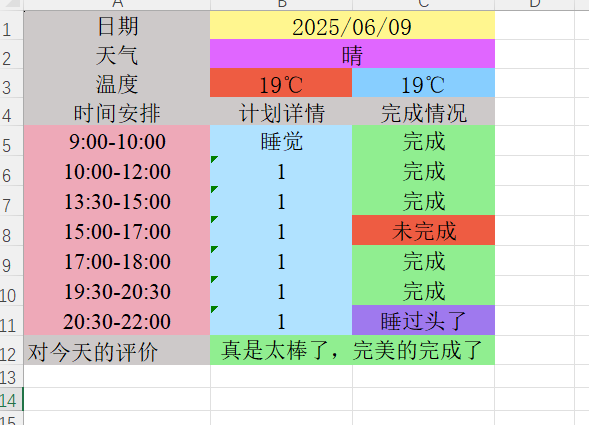
测试结果
详情可见以下的截图:
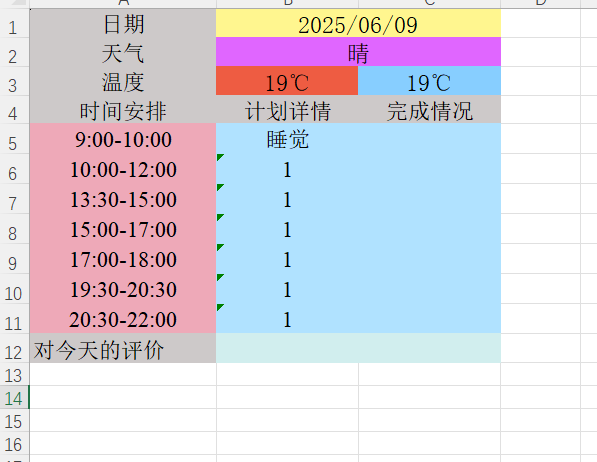
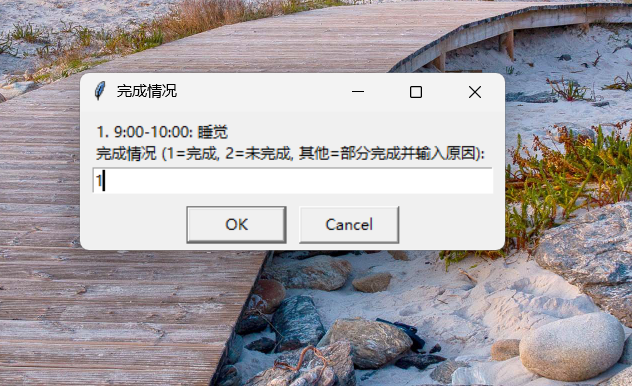
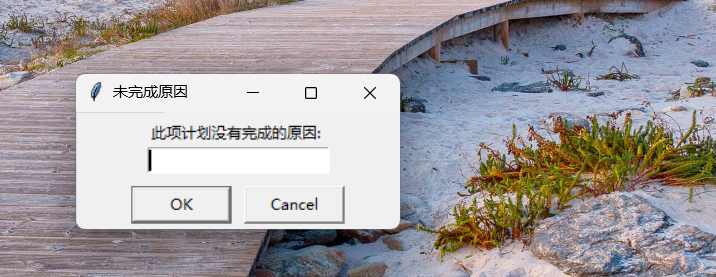
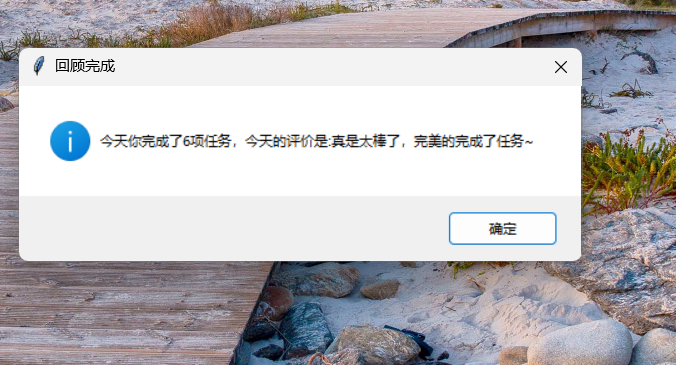
3. 实验过程中遇到的问题和解决过程
问题1:天气爬虫总是失败。
问题1解决方案:仔细查看源代码,发现找错位置了。
问题2:Excel表格没有写入。
问题2解决方案:检查代码,翻阅博客,发现忘记写保存的部分了。
问题3:窗口化不会弄。
问题3解决方案:查阅博客做出来了。
问题4:回顾的时候最后在报错。
问题3解决方案:不要打开工作表。
Git网址:
其他(感悟、思考等)
python这门语言的全能型令我惊叹,在做这个每日计划管理系统的时候,我感触挺多的。一开始,我只想着把功能做出来,让程序能跑就行。但越做越觉得,这不仅仅是个技术活,更是个细致活。天气数据要从网上爬取,得保证准确无误,这让我学会了耐心地调试代码,一点点排查问题。这个过程虽然有点辛苦,但看到程序一点点完善,心里特别有成就感。我明白了一个道理,做软件就是要站在用户的角度去想问题,用心去做,这样才能做出真正有用的东西。

 浙公网安备 33010602011771号