
tf.gather, tf.gather_nd和tf.slice
在tensorflow和pytorch中,都有一些函数是用于对张量进行索引的,因为pytorch是基于动态图的,它的张量可以动态的进行操作,不需要在对话(session)中进行,因此可能采用这些方法的必要性没有那么足,但是因为tensorflow是基于静态图的,因此如果在构建计算图的过程中需要对张量进行索引,一般是不能进行简单的slice的,因此引入这些函数就很有必要了,我们这里集中介绍下这些函数。
tf.gather
tf.gather(
    params,  # 需要被索引的张量
    indices,  # 索引
    validate_indices=None,
    name=None,
    axis=0
)
其作用很简单,就是根据提供的indices在axis这个轴上对params进行索引,拼接成一个新的张量,其示意图如下所示:
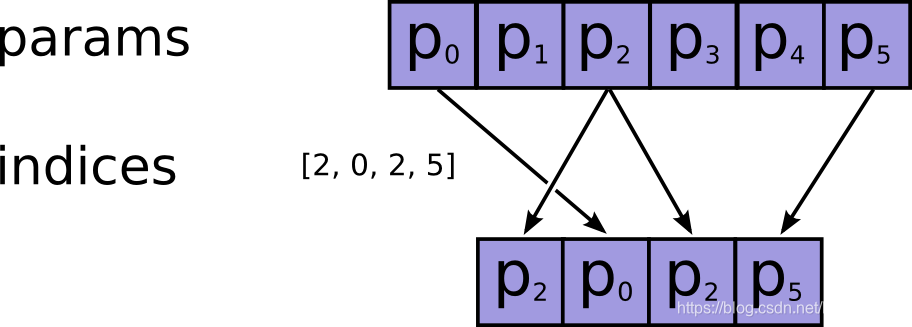
其中的indices可以是标量张量,向量张量或者是更高阶的张量,但是其元素都必须是整数类型,比如int32,int64等,而且注意检查不要越界了,因为如果越界了,如果使用的CPU,则会报错,如果在GPU上进行操作的,那么相应的输出值将会被置为0,而不会报错,因此认真检查是否越界。
(Note that on CPU, if an out of bound index is found, an error is returned. On GPU, if an out of bound index is found, a 0 is stored in the corresponding output value.)
给个代码例子:
params = tf.constant(np.random.normal(size=(5,6)))
index = tf.constant([1,3, 6])
out = tf.gather(params, index)
with tf.Session() as sess:
    print(sess.run(out).shape)
    print(out.eval())
    print('-----------------------------------------')
    print(params.eval())

# ------ output
(3, 6)
[[ 0.33662994 -0.33750725  1.5710436   0.78380586 -0.39254751  0.15269514]
 [ 0.35278309  0.59719792 -0.86332759 -0.88997637  0.18247123 -1.46388103]
 [ 0.          0.          0.          0.          0.          0.        ]]
-----------------------------------------
[[ 0.98987616 -1.62505873  0.86819471  2.3316706  -1.17362956  0.57264237]
 [ 0.33662994 -0.33750725  1.5710436   0.78380586 -0.39254751  0.15269514]
 [ 0.62367272  0.83599086  1.60433217 -1.4376806   0.61179675  2.07843436]
 [ 0.35278309  0.59719792 -0.86332759 -0.88997637  0.18247123 -1.46388103]
 [-1.76421914  0.85159247  0.18397565  0.69460119 -0.0651779   0.14643597]]
可以看到越界的地方全部置为了0。
params = tf.constant(np.random.normal(size=(5,6)))
index = tf.constant([[[0,0],[2,0]]])
out = tf.gather(params, index)
with tf.Session() as sess:
    print(sess.run(out).shape)
    print(index.eval().shape)
    print(out.eval())
    print('-----------------------------------------')
    print(params.eval())

# ----- output
(1, 2, 2, 6)
(1, 2, 2)
[[[[-1.52187772 -0.86557915  1.15487405  0.94154816 -0.55900061
     0.28165203]
   [-1.52187772 -0.86557915  1.15487405  0.94154816 -0.55900061
     0.28165203]]

  [[-0.18865467 -0.00902652  1.03637009 -1.14683883  0.20450098
     0.11977745]
   [-1.52187772 -0.86557915  1.15487405  0.94154816 -0.55900061
     0.28165203]]]]
-----------------------------------------
[[-1.52187772 -0.86557915  1.15487405  0.94154816 -0.55900061  0.28165203]
 [-1.55437505  0.1800381  -0.06461522  0.85310958 -1.25240021 -0.64335453]
 [-0.18865467 -0.00902652  1.03637009 -1.14683883  0.20450098  0.11977745]
 [-0.46992654 -0.07142709  0.35710407  0.24846814 -0.13490197 -1.31201887]
 [-0.24019091  0.54458599  0.3623213  -0.10113704 -1.15469468 -0.33837456]]
如果索引indices为矩阵或者更高阶的张量,其索引出来的尺寸就根据索引而定了,如上例子所示。
tf.gather_nd
tf.gather_nd类似于tf.gather,不过后者只能在一个维度上进行索引,而前者可以在多个维度上进行索引,其API为:
tf.gather_nd(
    params, # 待索引输入张量
    indices, # 索引
    name=None
)
例子如:
params = tf.constant(np.random.normal(size=(5,6)))
index = tf.constant([[[0,0],[2,0]]])
out = tf.gather_nd(params, index)
with tf.Session() as sess:
    print(sess.run(out).shape)
    print(index.eval().shape)
    print(out.eval())
    print('-----------------------------------------')
    print(params.eval())
# -------------- output
(1, 2)
(1, 2, 2)
[[-0.20841454 -0.12850639]]
-----------------------------------------
[[-0.20841454  0.13953242  2.26913464  1.60226729  1.51834021 -0.41044839]
 [-1.3215913  -0.15647683  0.17277501 -0.60070571  0.80504465  0.85216738]
 [-0.12850639 -0.34113574  0.16567085 -1.61315021 -0.29158798  0.03378417]
 [ 0.67928455  0.16899565  1.0065189  -1.05949544  1.87377367  0.71542472]
 [-0.2858821  -1.29338336 -0.41112208 -0.21772644  0.17873804 -0.0703971 ]]
tf.slice
用来进行切片操作,实现在python中的a[:,2:3,5:6]类似的操作,例子如:
t = tf.constant([[[1, 1, 1], [2, 2, 2]],
                 [[3, 3, 3], [4, 4, 4]],
                 [[5, 5, 5], [6, 6, 6]]])
# shape = (3,2,3)
tf.slice(t, [1, 0, 0], [1, 1, 3])  # [[[3, 3, 3]]], shape (1,1,3)
tf.slice(t, [1, 0, 0], [1, 2, 3])  # [[[3, 3, 3],
                                   #   [4, 4, 4]]] shape (1,2,3)
tf.slice(t, [1, 0, 0], [2, 1, 3])  # [[[3, 3, 3]],
                                   #  [[5, 5, 5]]] shape (2,1,3)

 浙公网安备 33010602011771号