

单点登录——CAS客户端与SpringSecurity集成
1.Spring Security测试工程搭建
(1) 建立Maven项目CASclient_demo3 ,引入spring依赖和spring secrity 相关依赖 ,tomcat端口设置为9003
(2) 建立web.xml ,添加过滤器等配置
 <context-param>
        <param-name>contextConfigLocation</param-name>
        <!-- 这其实就是spring的配置文件 -->
        <param-value>classpath:spring-security.xml</param-value>
     </context-param>
     <listener>
        <listener-class>
            org.springframework.web.context.ContextLoaderListener
        </listener-class>
     </listener>

     <!-- 过滤器 -->
     <filter>
         <!-- 这个名称是不能改的,是内置的 -->
        <filter-name>springSecurityFilterChain</filter-name>
        <!-- 这个类是一个过滤器代理类,将请求经过过滤器之后会自动的找到springSecurityFilterChain类 -->
        <filter-class>org.springframework.web.filter.DelegatingFilterProxy</filter-class>
     </filter>
     <filter-mapping>
        <filter-name>springSecurityFilterChain</filter-name>
        <url-pattern>/*</url-pattern>
     </filter-mapping>

     <servlet>
         <servlet-name>springmvc</servlet-name>
         <servlet-class>org.springframework.web.servlet.DispatcherServlet</servlet-class>

         <!-- 指定加载的配置文件, 通过参数contextConfigLocation加载 -->
         <init-param>
             <param-name>contextConfigLocation</param-name>
             <param-value>classpath:springmvc.xml</param-value>
         </init-param>
     </servlet>

     <servlet-mapping>
         <servlet-name>springmvc</servlet-name>
         <url-pattern>*.do</url-pattern>
     </servlet-mapping>
(3) 创建配置文件spring-security.xml
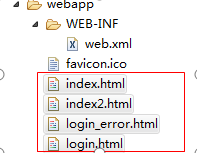
(4) 添加html页面
2. Spring Security与CAS集成
(1) 引入依赖
<dependency>
       <groupId>org.springframework.security</groupId>
       <artifactId>spring-security-cas</artifactId>
       <version>4.1.0.RELEASE</version>
</dependency>
<dependency>
        <groupId>org.jasig.cas.client</groupId>
        <artifactId>cas-client-core</artifactId>
        <version>3.3.3</version>
        <exclusions>
            <exclusion>
                <groupId>org.slf4j</groupId>
                <artifactId>log4j-over-slf4j</artifactId>
            </exclusion>
        </exclusions>
</dependency>
(2) 修改spring-security.xml
<?xml version="1.0" encoding="UTF-8"?>
<beans:beans xmlns="http://www.springframework.org/schema/security"
    xmlns:beans="http://www.springframework.org/schema/beans" xmlns:xsi="http://www.w3.org/2001/XMLSchema-instance"
    xsi:schemaLocation="http://www.springframework.org/schema/beans http://www.springframework.org/schema/beans/spring-beans.xsd
                        http://www.springframework.org/schema/security http://www.springframework.org/schema/security/spring-security.xsd">

    <http pattern="/index2.html" security="none"></http>

    <!-- entry-point-ref 入口点引用:比较抽象的概念,相当于在没有引用CAS之前,使用SpringSecurity需要自己写登录页面进行跳转,但是引入CAS就可以跳转到CAS的登陆页面 -->
    <http use-expressions="false" entry-point-ref="casProcessingFilterEntryPoint">
        <intercept-url pattern="/**" access="ROLE_USER"/>
        <csrf disabled="true"/>

        <!-- custom-filter为过滤器,postion表示将过滤器放在指定的位置上(SpringSecurity有内置的过滤器),替换原来默认的配置,before表示放在指定位置之前,after表示放在指定位置之后 -->
        <custom-filter ref="casAuthenticationFilter" position="CAS_FILTER"/>
        <custom-filter ref="requestSingleLogoutFilter" before="LOGOUT_FILTER"/>
        <custom-filter ref="singleLogoutFilter" before="CAS_FILTER"/>
    </http>

    <!-- CAS入口点开始 -->
    <beans:bean id="casProcessingFilterEntryPoint" class="org.springframework.security.cas.web.CasAuthenticationEntryPoint">
        <!-- 单点登录服务器登录URL -->
        <beans:property name="loginUrl" value="http://localhost:8083/cas/login"/>
        <beans:property name="serviceProperties" ref="serviceProperties" />
    </beans:bean>
    <beans:bean id="serviceProperties" class="org.springframework.security.cas.ServiceProperties">
        <!-- service配置自身工程的根地址+ /login/cas 这是一种固定的写法 -->
        <beans:property name="service" value="http://localhost:9090/login/cas" />
    </beans:bean>
    <!-- CAS入口点结束 -->

    <!-- 认证过滤器开始 -->
    <beans:bean id="casAuthenticationFilter" class="org.springframework.security.cas.web.CasAuthenticationFilter">
        <beans:property name="authenticationManager" ref="authenticationManager" />
    </beans:bean>

    <!-- 认证管理器 -->
    <authentication-manager alias="authenticationManager">
        <authentication-provider ref="casAuthenticationProvider"></authentication-provider>
    </authentication-manager>

    <!-- 认证提供者 -->
    <beans:bean id="casAuthenticationProvider" class="org.springframework.security.cas.authentication.CasAuthenticationProvider">
        <beans:property name="authenticationUserDetailsService">
            <beans:bean class="org.springframework.security.core.userdetails.UserDetailsByNameServiceWrapper">
                <beans:constructor-arg ref="userDetailsService" />
            </beans:bean>
        </beans:property>

        <!-- 得到CAS的客户端地址 -->
        <beans:property name="serviceProperties" ref="serviceProperties" />

        <!-- ticketValidator票据验证器 -->
        <beans:property name="ticketValidator">
            <beans:bean class="org.jasig.cas.client.validation.Cas20ServiceTicketValidator">
                <beans:constructor-arg index="0" value="http://localhost:8083/cas" />
            </beans:bean>
        </beans:property>
        <!-- 内置属性 -->
        <beans:property name="key" value="an_id_for_this_auth_provider_only"/>
    </beans:bean>

    <!-- 认证类 -->
    <beans:bean id="userDetailsService" class="com.java.demo.service.UserDetailServiceImpl"></beans:bean>

    <!-- 单点登出开始 -->

    <!-- 真正的单点登出的 -->
    <beans:bean id="singleLogoutFilter" class="org.jasig.cas.client.session.SingleSignOutFilter" />

    <!-- 请求单点登出过滤器,
    经过此配置后,当用户输入本地工程+/logout/cas就可以实现了单点登出 ,但是这只是为了让上下这两个登出的地址产生映射关系,并不是真正的登出 -->
    <beans:bean id="requestSingleLogoutFilter" class="org.springframework.security.web.authentication.logout.LogoutFilter">
        <beans:constructor-arg  value="http://localhost:8083/cas/logout?service=http://localhost:9090/index2.html"/>
        <beans:constructor-arg>
            <beans:bean class="org.springframework.security.web.authentication.logout.SecurityContextLogoutHandler"/>
        </beans:constructor-arg>
        <beans:property name="filterProcessesUrl" value="/logout/cas"/>
    </beans:bean>
    <!-- 单点登出结束 -->


</beans:beans>
(3) 创建UserDetailServiceImpl 这个类的主要作用是在登陆后得到用户名,可以根据用户名查询角色或执行一些逻辑。
public class UserDetailServiceImpl implements UserDetailsService {

    @Override
    public UserDetails loadUserByUsername(String username) throws UsernameNotFoundException {

        System.out.println("经过认证类:" + username);
        Collection<GrantedAuthority> authorities = new ArrayList<GrantedAuthority>();
        authorities.add(new SimpleGrantedAuthority("ROLE_USER"));
        return new User(username, "", authorities );
    }
}
3. 获取登录名
我们在处理后端逻辑需要获得登录名,那么如何获取单点登录的用户名呢? 其实和我们之前获得用户名的方式是完全相同的,我们下面来做个测试。
(1) 创建springmvc.xml
    <context:component-scan base-package="cn.itcast.demo" />
    <mvc:annotation-driven />
(2) 创建UserController
@RestController
public class UserController {
    @RequestMapping("/findLoginUser")
    public void  findLoginUser(){
        String name = SecurityContextHolder.getContext().getAuthentication().getName();
        System.out.println(name);
    }
}
地址栏输入http://localhost:9003/findLoginUser.do 即可在控制台看到输出的登录名。

 浙公网安备 33010602011771号