
利用自定义html元素实现支持实时修改的高亮代码块
利用自定义html元素实现支持实时修改的高亮代码块
代码块高亮是前端开发中常见的需求,尤其是在展示代码片段的博客、文档等场景中。市面上有很多成熟的代码高亮库,比如Highlight.js、Prism.js等,它们都能很好地实现代码高亮功能。
通常的高亮代码块是“静态”的,修改代码内容后需要对DOM元素重新应用高亮样式。由于涉及DOM操作,在Vue等前端框架中使用必须谨慎处理,否则会出现DOM树和虚拟DOM不一致的问题,造成很多麻烦。
那么有没有办法让代码高亮不改变DOM结构呢?答案是有的,我们可以利用自定义HTML元素和Shadow DOM来实现这一点。
Shadow DOM和自定义HTML元素
Shadow DOM允许我们创建封闭的DOM树,Shadow DOM内可以使用自己的样式,并封装复杂的逻辑,而不会影响到外部的DOM结构。现代浏览器的<input>(特别是<input type="range">、<input type="date">等复杂控件)元素就是利用Shadow DOM实现的。
要想使用Shadow DOM,我们需要创建一个自定义HTML元素,并在其中通过attachShadow方法创建Shadow DOM。
class MyElement extends HTMLElement {
    constructor() {
        super()
        const shadow = this.attachShadow({ mode: 'open' })
        shadow.innerHTML = `<p>Hello, Shadow DOM!</p>`
    }
}
customElements.define('my-element', MyElement)
之后,我们就可以在HTML中使用<my-element></my-element>来插入这个自定义元素。
<my-element></my-element>
在DevTools中,我们可以看到<my-element>的渲染结果,其中包括元素内部的Shadow DOM:
<my-element>
  #shadow-root (open)
    <p>Hello, Shadow DOM!</p>
</my-element>
在自定义元素中获取内容
我们希望在自定义元素中获取标签之间的内容。这可以通过插槽(slot)机制实现。插槽机制允许我们在自定义元素中定义占位符,外部传入的内容会被插入到这些占位符中。
为了使用插槽,我们需要在Shadow DOM中添加一个<slot>元素:
class MyElement extends HTMLElement {
    constructor() {
        super()
        const shadow = this.attachShadow({ mode: 'open' })
        shadow.innerHTML = `<slot></slot>`
        const slot = shadow.querySelector('slot')
        slot.addEventListener('slotchange', this.handleSlotChange.bind(this))
    }
    handleSlotChange(event) {
        const slot = event.target
        console.log('Slot content changed:', slot.assignedNodes({ flatten: true }))
    }
}
customElements.define('my-element', MyElement)
对于HTML片段
<my-element id="my-el"><p>This is slotted content.</p></my-element>
当页面第一次加载时,控制台会显示
Slot content changed: [p]
其中p就是元素内部的<p>节点。
如果我们动态修改<my-element>内的内容,比如通过JavaScript:
document.getElementById('my-el').innerHTML = '<pre>New slotted content1.</pre><pre>New slotted content2.</pre>'
控制台会显示
Slot content changed: (2) [pre, pre]
两个pre节点就是我们新修改的内容。
通过这种方法,我们可以在自定义元素中实时获取内容的变化。
利用自定义元素实现高亮代码块
结合前面的内容,我们可以创建一个自定义元素<pre-highlight>,用于实现高亮代码块的功能。只需要监听插槽内容的变化,将内容传递给高亮库进行处理,然后将处理后的结果显示出来即可。
class PreHighlightElement extends HTMLElement {
    constructor() {
        super()
        const shadow = this.attachShadow({ mode: 'open' })
        shadow.innerHTML = `
<link rel="stylesheet" href="https://unpkg.com/@highlightjs/cdn-assets/styles/github.min.css">
<pre id="code"></pre>
<pre hidden><slot></slot></pre>
`
        this.__code = this.shadowRoot.querySelector('#code')
        this.__slot = this.shadowRoot.querySelector('slot')
        this.__slot.addEventListener('slotchange', this.highlightContent.bind(this))
    }

    highlightContent() {
        if (typeof hljs === 'undefined') return

        let text = this.__slot.assignedNodes({ flatten: true }).map(n => n.textContent).join("")
        const code = document.createElement('code')

        const result = hljs.highlightAuto(text)
        code.innerHTML = result.value
        if (result.language) code.classList.add(`language-${result.language}`)
        this.__code.replaceChildren(code)
    }
}

customElements.define('pre-highlight', PreHighlightElement)
使用方法:
<pre-highlight id="my-el">
function helloWorld() {
    console.log("Hello, world!")
}
</pre-highlight>
渲染结果为

修改<pre-highlight>内的内容后,高亮效果会自动更新。
document.getElementById('my-el').textContent = `void helloWorld(void) {
    printf("Hello, World!");
}`
渲染结果为

一些改进
为了避免高亮库加载和高亮处理过程中的闪烁,我们可以在Shadow DOM中使用两个<pre>元素:一个用于显示原始内容,另一个用于显示高亮后的内容。初始时只显示原始内容,高亮处理完成后再切换显示。
此外,我们还可以添加一个lang属性,允许用户指定代码语言,以提高高亮的准确性。
最终结果如下:
class PreHighlightElement extends HTMLElement {
    constructor() {
        super()
        const shadow = this.attachShadow({ mode: 'open' })
        shadow.innerHTML = `
<link rel="stylesheet" href="https://unpkg.com/@highlightjs/cdn-assets/styles/github.min.css">
<pre id="raw"><slot></slot></pre>
<pre id="cooked" hidden></pre>
`
        this.__raw = this.shadowRoot.querySelector('#raw')
        this.__cooked = this.shadowRoot.querySelector('#cooked')
        this.__slot = this.shadowRoot.querySelector('slot')
        this.__slot.addEventListener('slotchange', this.highlightContent.bind(this))
    }

    highlightContent() {
        this.__raw.hidden = false
        this.__cooked.hidden = true
        if (typeof hljs === 'undefined') return

        let text = this.__slot.assignedNodes({ flatten: true }).map(n => n.textContent).join("")
        const lang = this.getAttribute('lang')
        const code = document.createElement('code')

        if (lang) {
            const result = hljs.highlight(text, { language: lang, ignoreIllegals: true })
            code.innerHTML = result.value
            code.classList.add(`language-${lang}`)
        } else {
            const result = hljs.highlightAuto(text)
            code.innerHTML = result.value
            if (result.language) code.classList.add(`language-${result.language}`)
        }
        this.__cooked.replaceChildren(code)
        this.__raw.hidden = true
        this.__cooked.hidden = false
    }
}

customElements.define('pre-highlight', PreHighlightElement)
用例:
<pre-highlight id="code" lang="html"></pre-highlight>
<input type="range" id="input" value="10" />
<script>
    const input = document.getElementById('input')
    const preHighlight = document.getElementById('code')

    input.oninput = function(e) {
        preHighlight.textContent = `<textarea rows="${this.value}" cols="50">
    Hello, world!
</textarea>`
    }
    input.oninput()
</script>
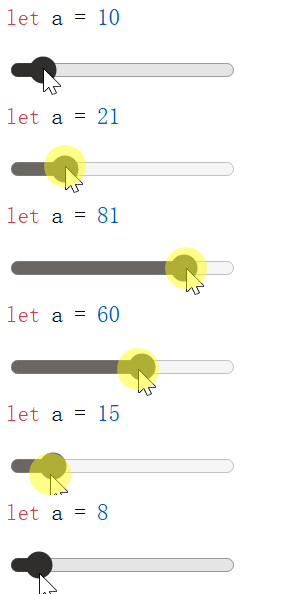
在这个例子中,我们创建了一个滑动条,可以动态修改<pre-highlight>内的代码内容,内容修改后会实时显示高亮效果。

在Vue中使用<pre-highlight>
通过自定义元素的方法,我们可以轻松地在Vue项目中使用高亮代码块,而无需担心DOM和虚拟DOM的不一致问题。
为了避免自定义元素和Vue组件名冲突,我们需要在配置中制定isCustomElement选项:
// vite.config.js
export default defineConfig({
  plugins: [
    vue({
      template: {
        compilerOptions: {
          // 将所有含"-"的标签视为自定义元素
          // Vue3中通常使用帕斯卡命名法(单词首字母大写)作为组件标签
          isCustomElement: (tag) => tag.includes('-')
        }
      }
    })
  ]
})
之后就可以在组件或页面中直接使用<pre-highlight>元素,内部可以使用Vue的数据绑定而不用担心虚拟DOM冲突的问题:
<template>
    <pre-highlight lang="javascript">
function greet({{arg}}) {
    console.log("Hello, " + {{arg}} + "!")
}
    </pre-highlight>
</template>
附:完整的单页html演示代码
原生html
<html>

<head>
    <script src="https://unpkg.com/@highlightjs/cdn-assets/highlight.min.js"></script>
    <script>
        class PreHighlightElement extends HTMLElement {
            constructor() {
                super()
                const shadow = this.attachShadow({ mode: 'open' })
                shadow.innerHTML = `
<link rel="stylesheet" href="https://unpkg.com/@highlightjs/cdn-assets/styles/github.min.css">
<pre id="raw"><slot></slot></pre>
<pre id="cooked" hidden></pre>
`
                this.__raw = this.shadowRoot.querySelector('#raw')
                this.__cooked = this.shadowRoot.querySelector('#cooked')
                this.__slot = this.shadowRoot.querySelector('slot')
                this.__slot.addEventListener('slotchange', this.highlightContent.bind(this))
            }

            highlightContent() {
                this.__raw.hidden = false
                this.__cooked.hidden = true
                if (typeof hljs === 'undefined') return

                let text = this.__slot.assignedNodes({ flatten: true }).map(n => n.textContent).join("")
                const lang = this.getAttribute('lang')
                const code = document.createElement('code')

                if (lang) {
                    const result = hljs.highlight(text, { language: lang, ignoreIllegals: true })
                    code.innerHTML = result.value
                    code.classList.add(`language-${lang}`)
                } else {
                    const result = hljs.highlightAuto(text)
                    code.innerHTML = result.value
                    if (result.language) code.classList.add(`language-${result.language}`)
                }
                this.__cooked.replaceChildren(code)
                this.__raw.hidden = true
                this.__cooked.hidden = false
            }
        }

        customElements.define('pre-highlight', PreHighlightElement)
    </script>
</head>

<body>
    <pre-highlight id="code" lang="javascript"></pre-highlight>
    <input type="range" id="input" value="10" />
    <script>
        const input = document.getElementById('input')
        const preHighlight = document.getElementById('code')

        input.oninput = function (e) {
            preHighlight.textContent = `let a = ${this.value}`
        }
        input.oninput()
    </script>
</body>

</html>
使用Vue
<html>

<head>
    <script src="https://unpkg.com/vue@3/dist/vue.global.js"></script>
    <script src="https://unpkg.com/@highlightjs/cdn-assets/highlight.min.js"></script>
    <script>
        class PreHighlightElement extends HTMLElement {
            constructor() {
                super()
                const shadow = this.attachShadow({ mode: 'open' })
                shadow.innerHTML = `
<link rel="stylesheet" href="https://unpkg.com/@highlightjs/cdn-assets/styles/github.min.css">
<pre id="raw"><slot></slot></pre>
<pre id="cooked" hidden></pre>
`
                this.__raw = this.shadowRoot.querySelector('#raw')
                this.__cooked = this.shadowRoot.querySelector('#cooked')
                this.__slot = this.shadowRoot.querySelector('slot')
                this.__slot.addEventListener('slotchange', this.highlightContent.bind(this))
            }

            highlightContent() {
                this.__raw.hidden = false
                this.__cooked.hidden = true
                if (typeof hljs === 'undefined') return

                let text = this.__slot.assignedNodes({ flatten: true }).map(n => n.textContent).join("")
                const lang = this.getAttribute('lang')
                const code = document.createElement('code')

                if (lang) {
                    const result = hljs.highlight(text, { language: lang, ignoreIllegals: true })
                    code.innerHTML = result.value
                    code.classList.add(`language-${lang}`)
                } else {
                    const result = hljs.highlightAuto(text)
                    code.innerHTML = result.value
                    if (result.language) code.classList.add(`language-${result.language}`)
                }
                this.__cooked.replaceChildren(code)
                this.__raw.hidden = true
                this.__cooked.hidden = false
            }
        }

        customElements.define('pre-highlight', PreHighlightElement)
    </script>
</head>

<body>
    <div id="app"></div>
    <script>
        const { createApp, ref } = Vue
        let app = createApp({
            data() {
                return { a: ref(10) }
            },
            template: `<pre-highlight id="code" lang="javascript">let a = \{\{a\}\}</pre-highlight>
            <input type="range" v-model="a" />`
        })
        app.config.compilerOptions.isCustomElement = (tag) => tag.includes('-')
        app.mount('#app')
    </script>
</body>

</html>
渲染效果:

 浙公网安备 33010602011771号