【SQLpassion Performance Tuning Training Plan】 - Week 9: UnderstandingExecution Plans
Welcome back to the SQLpassion Performance Tuning Training Plan. Today marks the start of the 3rd month of the training plan, which is all about Execution Plans in SQL Server. Execution Plans are the most important concept that you have to understand in SQL Server to make effective changes to improve performance for your queries. For that reason today I'm giving you a general introduction to Execution Plans in SQL Server, and how you can interpret( vt. 解释; 理解; ) and read them.
Why Execution Plans?
A lot of people are always asking me why there is a need for Execution Plans in SQL Server. We have a SQL Server query, but why does SQL Server need an Execution Plan? Why doesn't SQL Server just execute the query itself? To answer that specific question we have to talk about the SQL language in a little more detail. The SQL language (and also T-SQL in SQL Server) is a declarative( adj.宣言的,公布的;) language. You are describing in a logical way which data you want to have from your database (SELECT query), or which data you want to change in your database (INSERT, UPDATE, DELETE queries). Just look at the following query:
SELECT A.*, B.* FROM A

INNER JOIN B ON A.ID = B.ID

WHERE A.X = 'SomeValue'
With that query you are just telling your database that:
- You want to retrieve data from table A and B
- Both tables should be joined together through the column ID in both tables
- Rows in table A should be filtered out on column X
You are only describing through a SQL statement what the result of your query of your database should look like. With the SQL statement you only specify the result, nothing more. You are not telling SQL Server in any way how to execute the query itself that produces that requested data.
You are always interacting(v. 交流; 相互作用[影响],互相配合( interact的现在分词 ); 沟通; 合作;) with SQL Server in a logical way, describing what pieces of data you want to retrieve, or what pieces of data you want to change. But SQL Server itself needs a physical Execution Plan that describes step by step how to gather or change that data. The Execution Plan is just the strategy picked by the so-called Query Optimizer to process your SQL query.
There is also a very nice analogy( n. 类推; 类似,相似; ) to our real life: imagine you want to travel from one city to another. When you say that you are traveling from London to Paris, you have just defined a logical expression. Of course, that logical expression can have multiple physical permutations( n. (一组事物可能的一种) 序列,排列):
- You can walk from London to Paris
- You can go by bicycle
- You can go by car/train/airplane
It doesn't matter which option you pick here, you have for every different permutation again multiple different permutations. Your possible options are just exploding( vi. 爆[突]发,发怒; 激增,迅速扩大;). And your job is to find the option which has least associated( vt. 合伙,合营; 联合,结合; 联想;) cost with it: you will usually pick an airplane. The Query Optimizer in SQL Server has the same job: the Query Optimizer will pick that Execution Plan that indicates( vt. 表明,标示,指示; 象征,暗示,预示; ) the smallest amount of effort( n. 工作; 努力,尝试; 成就; 杰作;) that can satisfy( vt. 使满意,满足;) your query. And the challenge of the Query Optimizer is to find that good enough Execution Plan from the overall so-called Search Space - and that search space can be very huge the more tables and indexes are involved in your queries!
How to read Execution Plans
|
When you first deal with Execution Plans, you usually have a huge problem with them: you are not able to understand and interpret them correctly. Just have a look at the following Execution Plan. |
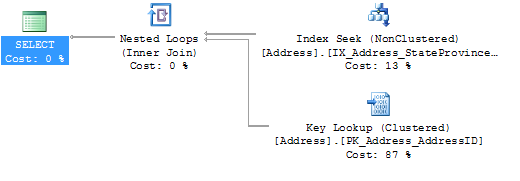 |
As you can see from the previous picture, every Execution Plan contains multiple steps, so-called Operators in SQL Server. And these operators are called one-by-one from SQL Server. This means that the execution of operators flows from the right to the left in the Execution Plan. In our case in the first step SQL Server executes the Index Seek (Non Clustered) operator on the table Address. Every record from the scan goes into theNested Loop operator, which comes after the scan. And for every retrieved record, SQL Server performs a Key Lookup (Clustered) operator (a Bookmark Lookup) on the tableAddress. If there is a matching row, the row is passed into the SELECT operator, which finally returns the result back to the application.
As you can see from this description, it's easier in the beginning to read an Execution Plan from the right side to the left side, because rows also flow in that direction through the Execution Plan. An Execution Plan is physically still executed from the left to the right side. When we follow the rows from the right to the left side we are just looking in a logical way at our Execution Plan.
I hope that this approach will help you to have a better understanding how you can read and interpret Execution Plans. If you want to have a more detailed look at the various operators that an Execution Plan supports in SQL Server, I highly recommend the free ebook Complete Showplan Operators by Fabiano Amorim.
Summary
|
In this installment of the SQLpassion Performance Tuning Training Plan I have clarified why we need Execution Plans in SQL Server, and how they can be read and interpreted by you. As you have seen, we are always communicating with SQL Server in a logical way: we describe through SQL queries which data we request from our database, or which data we want to change. And the job of the Query Optimizer is to generate a good enough Execution Plan for these SQL queries. And the Execution Plan finally describes the physical steps performed by SQL Server to satisfy and run our SQL queries. Next week we will concentrate in more detail on Execution Plan Caching in SQL Server, and why Plan Caching can be a good and also dangerous concept. Stay tuned. |

 浙公网安备 33010602011771号