【indexing-1】Unique and non-unique SQL Server indexes on a heap table
In the upcoming weblog postings I want to work out the differences between unique and non-unique indexes in SQL Server. I assume that you already know the concepts about clustered- and non clustered indexes and how they are used in SQL Server.
In the past I’ve done a lot of trainings and consulting regarding SQL Server performance tuning and it seems that some people doesn’t know the differences and implications(n.含义; 含蓄,含意,言外之意; ) between unique and non-unique indexes. And as you will see in the upcoming postings there are really big differences how SQL Server stores those two variants( n. 变种; 变型; 变体) that impact the size and the efficiency( n. 功效; 效率,效能; ) of your indexes.
Let’s start today with unique and non unique non clustered indexes on a table without a clustered index, a so-called heap table in SQL Server. The following listing shows how to create our test table and populate it with 80.000 records. Each record needs 400 bytes, therefore SQL Server can put 20 records on each data page. This means that our heap table contains 4.000 data pages and 1 IAM page.
-- Create a table with 393 length + 7 bytes overhead = 400 bytes
-- Therefore 20 records can be stored on one page (8.096 / 400) = 20,24
CREATE TABLE CustomersHeap
(
    CustomerID INT NOT NULL,
    CustomerName CHAR(100) NOT NULL,
    CustomerAddress CHAR(100) NOT NULL,
    Comments CHAR(189) NOT NULL
)
GO

-- Insert 80.000 records
DECLARE @i INT = 1
WHILE (@i <= 80000)
BEGIN
    INSERT INTO CustomersHeap VALUES
    (
        @i,
        'CustomerName' + CAST(@i AS CHAR),
        'CustomerAddress' + CAST(@i AS CHAR),
        'Comments' + CAST(@i AS CHAR)
    )
    SET @i += 1
END
GO

-- Retrieve physical information about the heap table
SELECT * FROM sys.dm_db_index_physical_stats
(
    DB_ID('NonClusteredIndexStructureHeap'),
    OBJECT_ID('CustomersHeap'),
    NULL,
    NULL,
    'DETAILED'
)
GO
After the creation of the heap table and the data loading, you can now define a unique and non-unique non-clustered index on the column CustomerID of our heap table. We will define both indexes on the same column so that we can analyze the differences between unique- and non-unique non-clustered indexes.
-- Create a unique non clustered index
CREATE UNIQUE NONCLUSTERED INDEX IDX_UniqueNCI_CustomerID
ON CustomersHeap(CustomerID)
GO

-- Create a non-unique non clustered index
CREATE NONCLUSTERED INDEX IDX_NonUniqueNCI_CustomerID
ON CustomersHeap(CustomerID)
GO
If you want to define a unique non-clustered index on a column that doesn’t contain unique data, you will get back an error message from SQL Server. Important to know is that SQL Server creates a non-unique non-clustered index if you don’t specify the UNIQUE property when creating a non-clustered index. So by default you will always get a non-unique non-clustered index!
After the creation of both indexes you can analyze their size, their index depth, their size etc( adv.等等及其他; 诸如此类;). with the DMV sys.dm_db_index_physical_stats. You can to pass in as the 3rd parameter the index-id. The IDs of all non-clustered indexes starts at 2, therefore the first non-clustered index gets the ID 2 and the second one the ID 3.
-- Create a unique non clustered index
-- Retrieve physical information about the unique non-clustered index
SELECT * FROM sys.dm_db_index_physical_stats
(
     DB_ID('PersonalSystem'),
    OBJECT_ID('CustomersHeap'),
    2,
    NULL,
    'DETAILED'
)
GO

-- Retrieve physical information about the non-unique non-clustered index
SELECT * FROM sys.dm_db_index_physical_stats
(
    DB_ID('PersonalSystem'),
    OBJECT_ID('CustomersHeap'),
    3,
    NULL,
    'DETAILED'
)
GO
As you can see from both outputs, the index root page of the unique non-clustered index is occupied( adj.已占用的,在使用的,无空闲的;) of around 24%, where the index root page of the non-unique non-clustered index is occupied of around 39%, so there must be a difference in the storage format of unique/non-unique non-clustered indexes on a heap table! In the next step we create a simple helper table that stores the output of the DBCC INDcommand. The structure of this helper table is directly taken from the excellent book SQL Server 2008 Internals.
-- Create a helper table
CREATE TABLE sp_table_pages
(
   PageFID TINYINT,
   PagePID INT,
   IAMFID TINYINT,
   IAMPID INT,
   ObjectID INT,
   IndexID TINYINT,
   PartitionNumber TINYINT,
   PartitionID BIGINT,
   iam_chain_type VARCHAR(30),
   PageType TINYINT,
   IndexLevel TINYINT,
   NextPageFID TINYINT,
   NextPagePID INT,
   PrevPageFID TINYINT,
   PrevPagePID INT,
   PRIMARY KEY (PageFID, PagePID)
)
GO
After the creation of this helper table we can dump out all pages that are belonging to our non-clustered indexes to this helper table with the following two calls to DBCC INC in combination with the INSERT INTOstatement:
-- Write everything in a table for further analysis
INSERT INTO sp_table_pages
EXEC('DBCC IND(PersonalSystem, CustomersHeap, 2)')
GO

-- Write everything in a table for further analysis
INSERT INTO sp_table_pages
EXEC('DBCC IND(PersonalSystem, CustomersHeap, 3)')
GO
Now we can start analyzing our non-clustered indexes by using the undocumented DBCC PAGE command. You can find more information about this great command on Paul Randal’s weblog. To get some information back from DBCC PAGE you have to enable the flag 3604 of DBCC:
DBCC TRACEON(3604)
GO
Let’s dump out the index root page of our unique non-clustered index by the following command:
DBCC PAGE(PersonalSystem, 1, 24304, 3)
GO
This will result in the following result in SQL Server Management Studio:
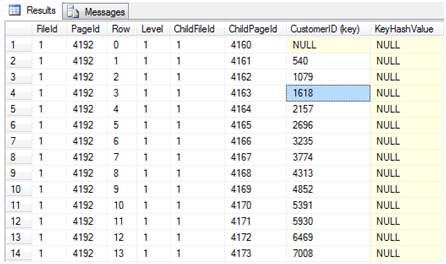
As you can see from this screenshot SQL Server stores the child page of the B-tree where the minimum key of the non-clustered index is located. The child page 4161 contains for example the record with the minimum key of 540 up to the maximum key of 1078. When you dump out the index root page with the dump option 1 you get the byte by byte representation of all index records on the index root page:
DBCC PAGE(PersonalSystem, 1, 24304, 1)
GO
SQL Server needs here 11 bytes for storing an index row. These 11 bytes are storing the following information:
- 1 byte: Status Bits
- 4 bytes: Customer ID, like 540
- 4 bytes: child PageID, like 4161
- 2 bytes: FileID, like 1
As you can see it’s up to the length of the non-clustered key how long an index row is. This also means that SQL Server is able to store more index rows on an index page if you choose a smaller non-clustered key. If you choose for example a CHAR(100) as a non-clustered index key, then SQL Server needs more index pages for your non-clustered index, which is not so efficient as using a smaller index key. The T-SQL script enclosed( adj.封闭的; 被附上的; (用墙等) 围住的; 与外界隔绝的;) to this posting shows you how you can decode those bytes from the hexadecimal( n. 十六进制(的);) representation.
Finally you can dump out the child page 4161, which is located on the leaf-level of the non-clustered index.
DBCC PAGE(NonClusteredIndexStructureHeap, 1, 4161, 3)
GO

As you can see from the figure, SQL Server stores for each index key on which data page and on which slot the corresponding( adj.相当的,对应的;) record is located. Because we have not defined a clustered index on our table, SQL Server uses here the RID (Row Identifier) to point to the correct record on the data page. Index pages on the leaf-level on a heap table are different from leaf-level index pages defined on a clustered table (a table that contains a clustered index).When you dump out the leaf-level index page of the non-clustered index you can see that SQL Server needs 13 bytes per index row:
- 1 byte: Status Bits
- 4 bytes: CustomerID, like 540
- 4 bytes: PageID, like 178,
- 2 bytes: FileID, like 1
- 2 bytes: Slot number, like 19
Finally with this information in your hand, it is very easy to locate the correct record on the data page, because you know the PageID, FileID, and also the slot number where the record on the data page is located. Easy, isn’t it?
Let’s move on now to non-unique non-clustered indexes. Earlier we have already created such an index, which gets the index-id of 3 from SQL Server, because it’s the second non-clustered index we have defined. In my case the index root page of the non-unique non-clustered index is located on page 4264, therefore I dump it out with the following command:
DBCC PAGE(NonClusteredIndexStructureHeap, 1, 4264, 3)
GO

But wait! Now the result from DBCC PAGE on the root index page on a non-unique non-clustered index is different! As you can see SQL Server returns here an additional column named “HEAP RID (key)“. The value in this column is used to make your non-unique non-clustered index unique. The HEAP RID column uses 8 additional bytes in your index row, which encodes the following information that are granted to be unique on a heap table:
- 4 bytes: PageID, like 178
- 2 bytes: FileID, like 1
- 2 bytes: Slot number, like 19
The overead of a non-unique non-clustered index on a heap table costs you 8 additional bytes per index row – on all index levels, expect the leaf-level, because SQL Server stores here always the HEAP RID as you have seen previously! So please keep this 8 bytes of additional index record overhead in mind, when you create non-clustered indexed that are NOT unique! And as I have said earlier, they are NOT unique by default!!!
In this example your non-unique non-clustered index is about 2 times bigger than the unique non-clustered index, because the unique index needs 11 bytes and the non-unique index needs 19 bytes (overhead of 8 bytes). When you look back to the output of the DMV sys.dm_db_index_physical_stats you can see that the index root page of the unique non-clustered index has a page space usage of around 24% where the index root page of the non-unique non-clustered index has a page space usage of around 39%. This will make a big difference on large non-clustered indexes!

So if you are just defining non-clustered indexes with
CREATE NONCLUSTERED INDEX ...
without thinking about the uniqueness of your data, you are wasting a lot of storage in your non-clustered indexes which also impacts the performance of your non-clustered indexes and their ongoing(adj. 不间断的,进行的; 前进的;) maintenance.
You can download the T-SQL script for this posting here.
In the next installment of this series we will have a look into the differences of unique clustered indexes and unique/non unique non-clustered indexes. Stay tuned

 浙公网安备 33010602011771号