

【SQLpassion Performance Tuning Training Plan】 - Week 1: How SQLServer executes a Query
The following pictures give you an overview about the most important components within SQL Server, that are used when we are executing a query.
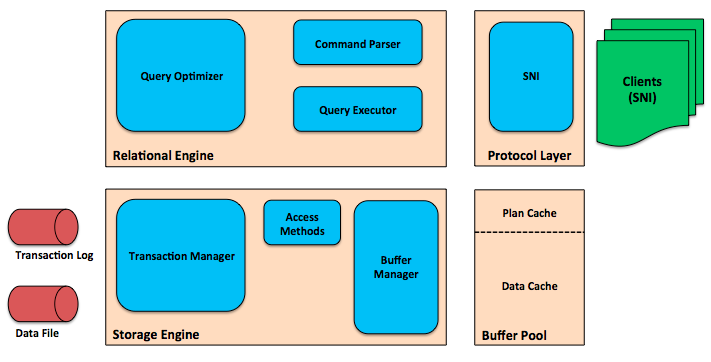 |
As you can see, SQL Server is internally split up into the Relational Engine (关系引擎)and the Storage Engine(存储引擎). The biggest component within the relational engine is the Query Optimizer(查询最优控制器). The one and only task of the query optimizer is to generate an physical execution plan for a query that we are passing in into SQL Server.
Reading Data
The query - that we are submitting to SQL Server - goes through the Protocol Layer to the Command Parser(命令解析器). The command parser just checks if we are providing a valid TSQL statement, if we are referencing tables and columns that exist in our database. The result of the command parser is a so-called Query Tree, a tree structure that represents our query. The tree structure is used by the query optimizer to generate an execution plan.
The compiled execution plan is afterwards handed over to the Query Executor. The task of the query executor is to execute the execution plan. But in the first step the compiled plan is cached in the Plan Cache for further reuse. Plan Caching is a powerful and at the same time also a very dangerous concept(n.观念,概念; 观点; 思想,设想,想法; 总的印象;) in SQL Server. We will see that in more detail in week 10 when we talk about plan caching in SQL Server.
After our execution plan is cached, the query executor communicates with the storage engine, and executes every operator in our execution plan. When we are accessing data in our execution plan (we are always doing that!), the Access Methods are asking theBuffer Manager([计] 缓冲区管理程序) for specific(adj.具体的; 明确的; 特种的;) pages that we want to read. Next week we talk a little bit more in detail about pages in SQL Server. By now you just have to know that a page is a buffer of 8kb, where our table and index data is stored. The buffer manager manages theBuffer Pool, where our pages of 8kb are stored. The buffer pool itself is the main memory consumer of SQL Server and its size can be configured through the Min/Max Server Memory Setting.
When a requested page is already stored in the buffer pool, the page is immediately returned. This is a so-called Logical Read in SQL Server. If the page is not stored in the buffer pool, the buffer manager issues an asynchronous I/O operation to read the requested page physically from our storage subsystem into the buffer pool. This is a so-called Physical Read. During the asynchronous I/O our query has to wait until the operation is completed. We will talk more about Waits and Wait Statistics in week 22.
As soon as the page is read into the buffer pool, the page is returned back to the access method that requested it. When the execution plan is finished, the produced data is returned through the protocol layer back to the application that submitted the query.
Changing Data
When we are dealing with TSQL statements that are changing data (INSERT, UPDATE, DELETE, MERGE), the storage engine also interacts with the Transaction Manager. The transaction manager writes transaction log records into the transaction log that describe the changes we have performed for the transaction. As soon as these records are written out, the transaction can commit. This also means that your SQL Server instance can be only as fast as your transaction log.
Pages that were changed in memory are written to the storage subsystem through the so-called CHECKPOINT process. By default the CHECKPOINT process runs about every minute, and requests all dirty pages from the buffer manager. A dirty page is page that was changed in memory, but hasn't yet been written to the storage. As soon as a dirty page is written out to the storage, the page is marked as a clean page.
Summary
As you can see from this first issue of the SQLpassion Performance Tuning Plan, a lot of different things are happening within SQL Server, when you execute a query. If you want to have a more detailed look at how the various components within SQL Server interact with each other, I also highly recommend reading the blog posting http://rusanu.com/2013/08/01/understanding-how-sql-server-executes-a-query/ from Remus Rusanu, who is a developer on the SQL Server team.
And the nasty thing is that every subsystem can have serious performance problems, that have to be resolved by you. See you next week, when we talk about Data Pages in SQL Server!

 浙公网安备 33010602011771号