【tag】SQL Server (共享锁/更新锁)
原文地址:https://www.sqlpassion.at/archive/2016/05/16/why-do-we-need-intent-locks-in-sql-server/
Why do we need Intent Locks in SQL Server?
I blogged 2 years ago about why we need UPDATE locks in SQL Server. Today I want to continue this discussion by talking about Intent Locks in SQL Server, and why they are needed.
The Lock Hierarchy in SQL Server
When I talked about Lock Escalations in SQL Server, I started by briefly mentioning that SQL Server uses a Lock Hierarchy when you read or change your data.
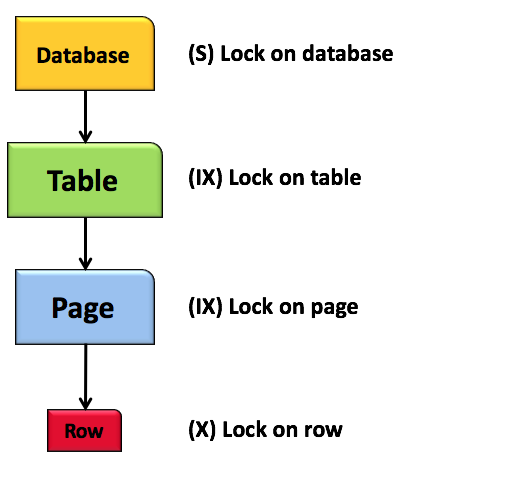
When you read a row, SQL Server always acquires by default a Shared Lock (S), and when you change a row SQL Server acquires an Exclusive Lock (X). Those Locks are incompatible with each other, and that will introduce blocking situations when you want to read/write a row concurrently.
In addition to the row level locks, SQL Server also acquires so-called Intent Locks at higher levels within the Lock Hierarchy: at the page and at the table level. SQL Server acquires the following Intent-Locks based on the requested row level lock:
- Intent Shared Lock (IS), when you have a Shared Lock at the row level
- Intent Update Lock (IU), when you have an Update Lock at the row level
- Intent Exclusive Lock (IX), when you have an Exclusive Lock at the row level
Therefore you always get the Lock Hierarchy as shown above when you read and write your records. But why is SQL Server using these Intent Locks?
Intent Locks in SQL Server
From a technical perspective the Intent Locks are not really needed by SQL Server. They have to do with performance optimization. Let’s have a look on that in more detail. With an Intent Lock SQL Server just indicates at a higher level within the Lock Hierarchy that you have acquired a Lock somewhere else. A Intent Shared Lock tells SQL Server that there is a Shared Lock somewhere else. A Intent Update or Intent Exclusive Lock does the same, but this time SQL Server knows that there is an Update Lock or an Exclusive Lock somewhere. It is just an indication, nothing more.
But how does that indication help SQL Server with performance optimization? Imagine you want to acquire an Exclusive Lock at the table level. In that case, SQL Server has to know if there is an incompatible lock (like a Shared or Update Lock) somewhere else on a record. Without Intent Locks SQL Server would have to check every record to see if an incompatible lock has been granted.
But with an Intent Shared Lock on the table level, SQL Server knows immediately that a Shared Lock has been granted somewhere else, and therefore an Exclusive Lock can’t be granted at the table level. That’s the whole reason why Intent Locks exist in SQL Server: to allow efficient checking if an incompatible lock exists somewhere within the Lock Hierarchy. Quite easy, isn’t it?
Summary
Intent Locks are technically not needed by SQL Server, because they only indicate if there is some other specific Lock Type somewhere else within the Lock Hierarchy. But based on that fact SQL Server can check in a much more efficient way if an incompatible Lock exists somewhere else if you want to acquire a specific lock at the page or table level.
Thanks for your time,
-Klaus
Why do we need UPDATE Locks in SQL Server?
原文地址:http://www.sqlpassion.at/archive/2014/07/28/why-do-we-need-update-locks-in-sql-server/
Today I want to talk about a specific question that I almost get every time when I teach about Locking & Blocking in SQL Server: Why does SQL Server need to have Update Locks? Before we go down to the details of why they are needed, I first want to give you a basic overview of when an Update (U) Lock is acquired, and how the lock itself behaves regarding its compatibility.
In general an Update Lock is used in SQL Server when performing an UPDATE statement. When you look at the underlying query plan, you can see that such a plan always consists of 3 parts:
- Reading data
- Calculating new values
- Writing data
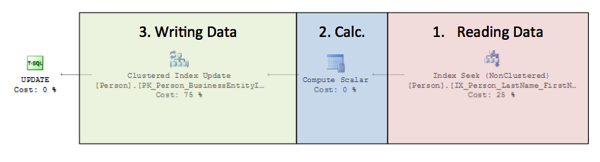
When SQL Server initially reads the data to be changed in the first part of the query plan, Update Locks are acquired on the individual records. And finally these Update Locks are converted to Exclusive (X) Locks when the data is changed in the third part of the query plan. The question that arrises with this approach is always the same: why does SQL Server acquire Update Locks instead of Shared (S) Locks in the first phase? When you normally read data through a SELECT statement, a Shared Lock is also good enough. Why is there now a different approach with UPDATE query plans? Let’s have a more detailed look at it.
Deadlock Avoidance
First of all UPDATE Locks are needed to avoid deadlock situations in UPDATE query plans. Let’s try to imagine what happens when multiple UPDATE query plans acquire Shared Locks in the first phase of the plan, and afterwards convert these Shared Locks to Exclusive Locks when the data is finally changed in the third phase of the query plan:
- The 1st query can’t convert the Shared Lock to an Exclusive Lock, because the 2nd query has already acquired a Shared Lock.
- The 2nd query can’t convert the Shared Lock to an Exclusive Lock, because the 1st query has already acquired a Shared Lock.
That approach would lead to a traditional deadlock situation in a relational database: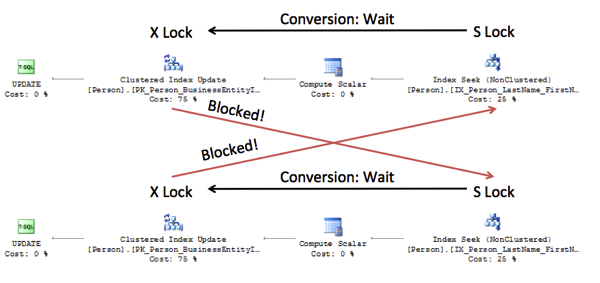
That’s one of the main reasons why implementers of relational database engines have introduced Update Locks to avoid that specific deadlock situation. An Update Lock is only compatible with a Shared Lock, but isn’t compatible with another Update or Exclusive Lock. Therefore a deadlock situation can be avoided, because 2 UPDATE query plans can’t run concurrently at the same time. The 2nd query will just wait until the Update Lock can be acquired in the 1st phase of the query plan. An unpublished study of System R also showed that this kind of deadlock was the most prominent one. System R was initially implemented without any Update Locks.
Improved Concurrency
Instead of acquiring an Update Lock during the 1st phase, it would be also a viable option to acquire an Exclusive Lock directly in that phase. This will also overcome the deadlock problem, because an Exclusive Lock is not compatible with another Exclusive Lock. But the problem with that approach is limited concurrency, because in the mean time no other SELECT query can read the data that is currently exclusively locked. Therefore there is also the need for the Update Lock, because this specific lock is compatible with the traditional Shared Lock. As a result this means that other SELECT queries can read data, as long as individual Update Locks are not yet converted to Exclusive Locks. As a side-effect this will improve the concurrency of our parallel running queries.
In traditional relational literature an Update Lock is a so-called Asymmetric Lock. In the context of the Update Lock that means that the Update Lock is compatible with the Shared Lock, but not vice-versa: the Shared Lock is not compatible with the Update Lock. But SQL Server doesn’t implement the Update Lock as an asymmetric one. The Update Lock is a symmetric one, which means that Update and Shared Locks are compatible in both directions. This will also improve the overall concurrency of the system, because it doesn’t introduce blocking situations between both lock types.
Summary
In todays blog posting I gave you an overview of Update Locks in SQL Server, and why they are needed. As you have seen there is a really strong need for Update Locks in a relational database, because otherwise it would yield to deadlock situations and decreased concurrency. I hope that you now have a better understanding of Update Locks, and how they are used in SQL Server.
Thanks for reading!
-Klaus

 浙公网安备 33010602011771号