【tag】sp_getapplock 使用例子和简介
------------------------------------sp_getapplock----------------------------
--引數

--[ @Resource= ] 'resource_name'
--這是一個字串,指定用來識別鎖定資源的名稱。 應用程式必須確定資源名稱是唯一的。
--指定的名稱會在內部雜湊成可儲存在 SQL Server 鎖定管理員中的值。
--resource_name是nvarchar (255)沒有預設值。 如果資源字串的長度超過nvarchar (255),則會截斷至nvarchar (255)。
--resource_name是二進位比較,,因此會區分大小寫,不論目前資料庫的定序設定為何。

--[ @LockMode= ] 'lock_mode'
--這是要取得的特定資源鎖定模式。 lock_mode是nvarchar (32) ,沒有預設值。
--值可以是下列任一項︰Shared共用,Update更新,Exclusive独占,IntentShared意向共享锁, IntentExclusive意向獨佔锁。

--[ @LockOwner= ] 'lock_owner'
--鎖定的擁有者lock_owner要求鎖定時的值。 lock_owner是nvarchar (32)。
--這個值可以是Transaction,Session
--如果 @LockOwner 是使用 Transaction ,則表示如果該交易 commit 或是 rollback ,就會釋放這個鎖定。
--如果 @LockOwner 是使用 Session ,則表示要明確呼叫 sp_releaseapplock 或是 Session 關閉連線才會釋放這個鎖定。

--[ @LockTimeout= ] 'value'
--這是鎖定逾時值 (以毫秒為單位)。 預設值是所傳回的值相同@LOCK_TIMEOUT。 若要指出在無法立即授與要求時,鎖定要求應該傳回錯誤,而不是等待鎖定,請指定 0。

---------------------------開2個視窗(Session)來執行以下的SQL-------------------------
--https://www.mssqltips.com/sqlservertip/3202/prevent-multiple-users-from-running-the-same-sql-server-stored-procedure-at-the-same-time/

--(回傳值的說明(MSDN))
--(>= 0 (成功) 或 < 0 (失敗))

--(0:同步授與鎖定成功。)
--(1:在等待其他不相容的鎖定釋出之後,授與鎖定成功。)
--(-1:鎖定要求逾時。)
--(-2:已取消鎖定要求。)
--(-3:已將鎖定要求選為死結犧牲者。)
--(-999:表示參數驗證或其他呼叫錯誤。)

DECLARE @RA INT
Exec @RA = sp_releaseapplock @Resource='MyLock', @LockOwner='Transaction'
select @RA

DECLARE @RC INT
Begin tran
Exec @RC =sp_getapplock @Resource='MyLock', @LockMode='Exclusive'
            , @LockOwner='Transaction', @LockTimeout = 15000
SELECT @@SPID [session_id], @RC [return code], GETDATE()
waitfor delay '00:00:08'
COMMIT
Problem
There is a stored procedure that must be run by only one user at a time. How do to I prevent multiple users from running the stored procedure at the same time?
Solution
For years I've implemented home grown solutions using a "lock" table but this always had inherent problems with either faulty code or with failures that didn't clean up the lock table. Invariably there were situations where a process died and the "lock" hung around preventing other users from running the protected code. It was always necessary to have a "Clean up the bad locks" feature as part of the application.
A better solution is available: SQL Server provides an application manageable lock mechanism through the sp_getapplock / sp_releaseapplock pair of system stored procedures. They provide a way for application code to use SQL's underlying locking mechanism, without having to lock database rows. The lock can be tied to a transaction or session ensuring lock release when the transaction COMMITs or ROLLSBACK or when the session exits and the connection is closed.
Using sp_getapplock to lock a resource
To obtain a lock, call sp_getapplock as follows:
DECLARE @RC INT
Begin tran
Exec @RC =sp_getapplock @Resource='MyLock', @LockMode='Exclusive'
            , @LockOwner='Transaction', @LockTimeout = 15000
SELECT @@SPID [session_id], @RC [return code], GETDATE()
waitfor delay '00:00:08'
commit
The sp_getapplock call takes out a lock to the resource "MyLock" and holds it as long as the transaction is alive. In this case it will wait 8 seconds and then execute the COMMIT, which will release the lock. To see how it works open a Management Studio session and executed the code above, then quickly open another Management Studio window and execute this same code again. That's what I've done in this picture:
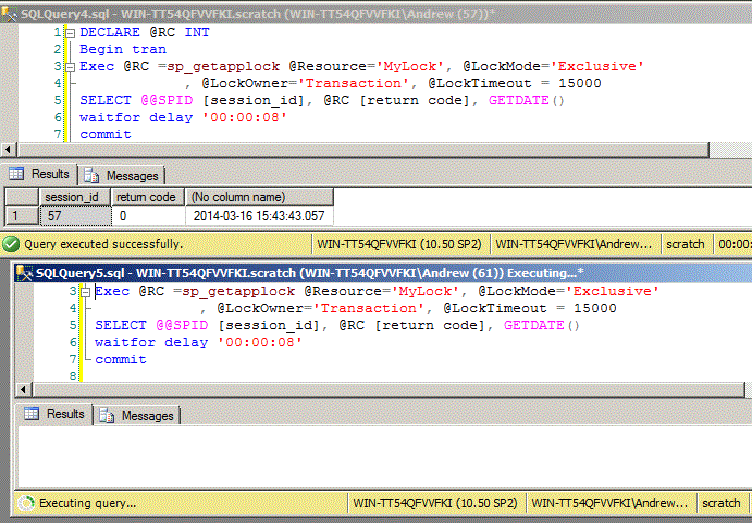
The session at the top was started first and immediately returned the resultset with the time as the last column. Then as quickly as I could I started the second session and you can see that it's executing the query. Once it's completed you'll see something like the next picture where both sessions have now completed:
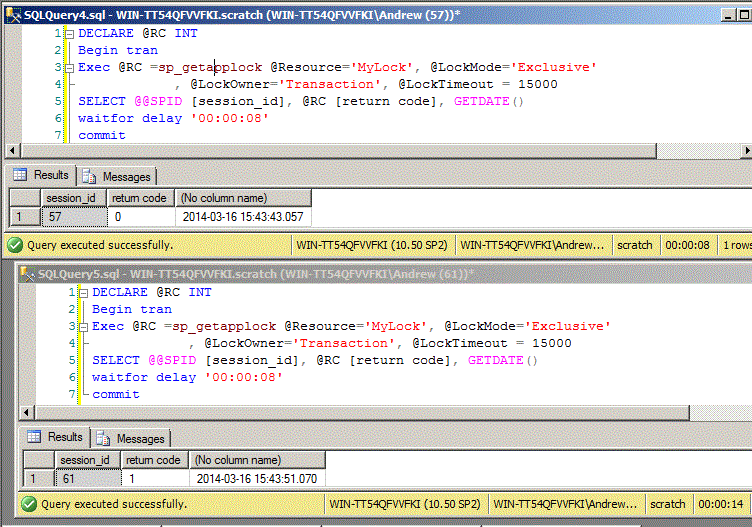
Notice that the return code for the first query is zero, which means that the lock was granted right away. The return code for the second session is one, which means that the lock was granted after waiting for another session that held the lock. There are also negative return codes such as minus one which indicates that the lock could not be granted by the timeout and other negative codes for other error situations. You should also notice the time. Session 2 returned it's result set eight seconds after session 1. That's because it had to wait those eight seconds to acquire the lock.
Once the lock is acquired releasing it depends on the @LockOwner parameter. If @LockOwner is "Session" the lock is held until it is explicitly released with a call to sp_releaseapplock or if the session ends. A session ends when the connection is closed that can be somewhat risky if the caller has a tendency to hold onto connections. If @LockOwner is "Transaction" the lock is released either with a call to sp_releaseapplock or when the transaction is committed or rolled back. Coding tends to be easier when @LockOwner is Transaction so I try and use it whenever possible but, of course, @LockOnwer='Transaction' can only be used inside a user transaction.
Using sp_releasapplock to release a resource
The call to sp_releaseapplock requires the @Resource and @LockOwner parameters and looks like this:
DECLARE @RC INT
Exec @RC = sp_releaseapplock @Resource='MyLock', @LockOwner='Transaction'
select @RC
However, if @LockOwner='Transaction' then sp_releaseapplock must be executed inside the transaction. In addition, if the lock isn't held by the transaction SQL Server doesn't just return a return code, an explicit error is thrown and the code must account for that possibility. For that reason when using @LockOwner='Transaction' I avoid calling sp_releaseapplock but instead rely on the transaction COMMIT to release the lock.
Stored Procedure Example Using sp_getapplock
Now take a look at how to use sp_getapplock in a stored procedure. The sample procedure, critical_section_worker, includes transaction control, messaging, and error handling typical of a real world procedure that uses sp_getapplock. Here's a script that creates it as a permanent procedure in tempdb.
USE [tempdb]
GO
SET ANSI_NULLS ON
SET QUOTED_IDENTIFIER ON
GO
CREATE PROC dbo.critical_section_worker  @wait_duration varchar(30) = '00:01:00' -- default one minute
/* Performs a task in a critical section of code that can only be run
   by one session at a time. The task is simulated by a WAIT  */
AS
declare @rc int = 0 -- return code
      , @msg varchar(2000)
set @msg = convert(varchar,getdate(), 114) + ' critical_section_worker starting'
raiserror (@msg, 0, 1) with nowait
Begin Try
 Begin tran
 set @msg= convert(varchar,getdate(), 114) + ' requesting lock'
 raiserror (@msg, 0, 1) with nowait
 Exec @rc = sp_getapplock @Resource='CriticalSectionWorker' -- the resource to be locked
         , @LockMode='Exclusive'  -- Type of lock
         , @LockOwner='Transaction' -- Transaction or Session
         , @LockTimeout = 15000 -- timeout in milliseconds, 15 seconds

 set @msg= convert(varchar,getdate(), 114) + ' sp_getapplock returned ' + convert(varchar(30), @rc) + ' -- '
      + case when @rc < 0 then 'Could not obtain the lock'  else 'Lock obtained'  end
 raiserror (@msg, 0, 1) with nowait

 if @rc >= 0 begin
  set @msg= convert(varchar,getdate(), 114) + ' got lock starting critical work '
  raiserror (@msg, 0, 1) with nowait

  waitfor delay @wait_duration -- Critical Work simulated by waiting

  commit tran -- will release the lock
  set @msg= convert(varchar,getdate(), 114) + ' work complete released lock'
  raiserror (@msg, 0, 1) with nowait
  end
 else begin

  rollback tran
  set @rc = 50000
 end
end try
begin catch

 set @msg = 'ERROR: ' + ERROR_MESSAGE() + ' at '
            + coalesce(ERROR_PROCEDURE(), '')
            + coalesce (' line:' + convert(varchar(30), ERROR_LINE()), '')

 RAISERROR (@msg, 0, 1) with nowait -- ensure the message gets out
 if @@Trancount > 1 rollback tran
 raiserror (@msg, 16, 1)
 end catch
 return @rc
 GO
The lock is held for the duration of the transaction and will be released either by the COMMIT at the end of the TRY block or by the ROLLBACK in the CATCH block. You might notice the use of RAIERROR... WITH NOWAIT instead of PRINT. RAISERROR with a error code of zero isn't really an error and adding the WITH NOWAIT forces the message and any preceding messages to be displayed immediately. I described this feature in detail in the this tip Using the NOWAIT option with the SQL Server RAISERROR statement.
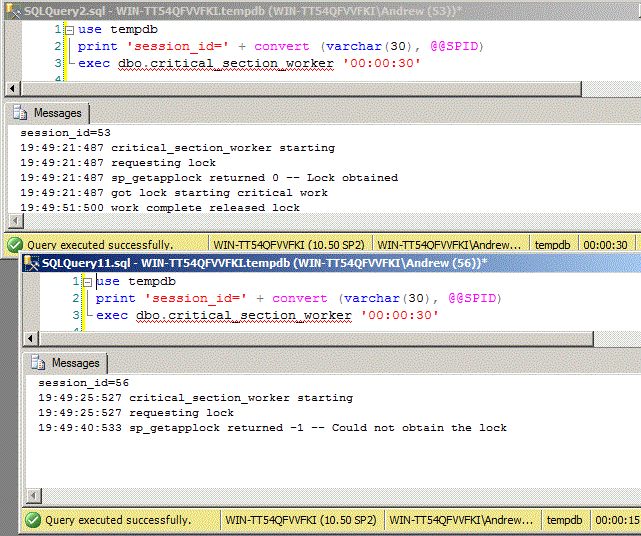
This next picture shows how I ran the query in two windows. The upper window, with session 56, was started first, at 19:15.14.413. The lower window, with session 53, was started 5 seconds later. The upper window grabbed the lock first and held it for 30 seconds. Since the timeout on the call to sp_getapplock is only 15 seconds, the lower session never got the lock and sp_getapplock returned -1.
In this last picture I ran critical_section_worker with a runtime of 10 seconds. This time the lower session got the lock before the timeout and was able to complete it's work but only after waiting for the upper session to complete.
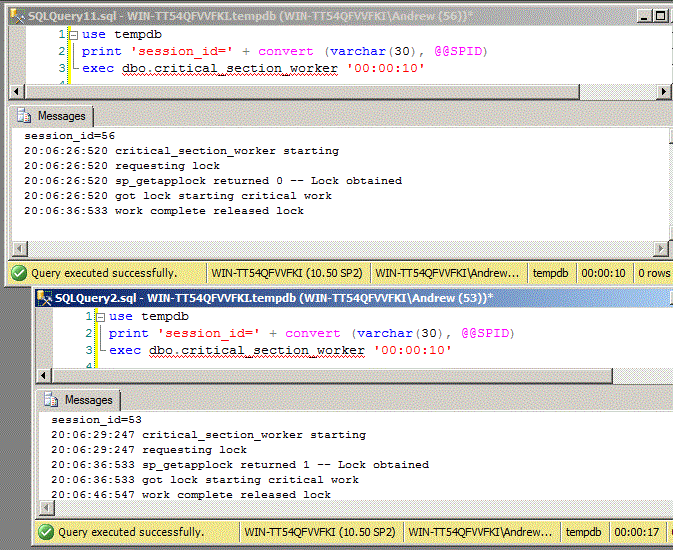
That's exactly what I wanted: only one instance of the stored procedure can enter the critical section, protected by the sp_getapplock call, at a time. It's always better to write code that allows multiple instance to run at the same time, but when that's impossible, or just would take too much effort, I use sp_getapplock to ensure that critical sections are single threaded.

 浙公网安备 33010602011771号