[Professional C# 7 and .net Core 2.0][Chapter 7] Arrays ENUMERATORS foreach/yield
ENUMERATORS
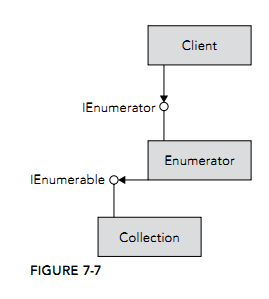
By using the foreach statement you can iterate elements of a collection (see Chapter 10) without needing to know the number of elements inside the collection. The foreach statement uses an enumerator. Figure
7-7 shows the relationship between the client invoking the foreach method and the collection. The array or collection implements the IEnumerable interface with the GetEnumerator method. The GetEnumerator
method returns an enumerator implementing the IEnumerator interface. The interface IEnumerator is then used by the foreach statement to iterate through the collection.
IEnumerator Interface
The foreach statement uses the methods and properties of the IEnumerator interface to iterate all elements in a collection. For this, IEnumerator defines the property Current to return the element where the cursor
is positioned, and the method MoveNext to move to the next element of the collection. MoveNext returns true if there’s an element, and false if no more elements are available.
foreach Statement
foreach (var p in persons)
{
  Console.WriteLine(p);
}
The foreach statement is resolved to the following code segment. First, the GetEnumerator method is invoked to get an enumerator for the array. Inside a while loop, as long as MoveNext returns true, the elements of the array are accessed using the Current property:
IEnumerator<Person> enumerator = persons.GetEnumerator();
while (enumerator.MoveNext())
{
  Person p = enumerator.Current;
  Console.WriteLine(p);
}
yield Statement
Since the first release of C#, it has been easy to iterate through collections by using the foreach statement.
With C# 1.0, it was still a lot of work to create an enumerator. C# 2.0 added the yield statement for creating enumerators easily. The yield return statement returns one element of a collection and moves the
position to the next element, and yield break stops the iteration.
The next example shows the implementation of a simple collection using the yield return statement. The class HelloCollection contains the method GetEnumerator. The implementation of the GetEnumerator
method contains two yield return statements where the strings Hello and World are returned:
using System;
using System.Collections;
namespace Wrox.ProCSharp.Arrays
{
  public class HelloCollection
  {
    public IEnumerator<string> GetEnumerator()
    {
      yield return "Hello";
      yield return "World";
    }
  }
}
A method or property that contains yield statements is also known as an iterator block. An iterator block must be declared to return an IEnumerator or
IEnumerable interface, or the generic versions of these interfaces. This block may contain multiple yield return or yield break statements; a return statement is not allowed.
Now it is possible to iterate through the collection using a foreach statement:
public void HelloWorld()
{
  var helloCollection = new HelloCollection();
  foreach (var s in helloCollection)
  {
    Console.WriteLine(s);
  }
}
With an iterator block, the compiler generates a yield type, including a state machine, as shown in the following code segment. The yield type implements the properties and methods of the interfaces
IEnumerator and IDisposable. In the example, you can see the yield type as the inner class Enumerator.
The GetEnumerator method of the outer class instantiates and returns a new yield type. Within the yield type, the variable state defines the current position of the iteration and is changed every time the method
MoveNext is invoked. MoveNext encapsulates the code of the iterator block and sets the value of the current variable so that the Current property returns an object depending on the position:
public class HelloCollection
{
  public IEnumerator GetEnumerator() => new Enumerator(0);

  public class Enumerator: IEnumerator<string>, IEnumerator, IDisposable
  {
    private int _state;
    private string _current;
    public Enumerator(int state) => _state = state;
    bool System.Collections.IEnumerator.MoveNext()
    {
      switch (state)
      {
        case 0:
          _current = "Hello";
          _state = 1;
          return true;
        case 1:
          _current = "World";
          _state = 2;
          return true;
        case 2:
          break;
      }
      return false;
    }
    void System.Collections.IEnumerator.Reset() =>
      throw new NotSupportedException();
    string System.Collections.Generic.IEnumerator<string>.Current => current;
    object System.Collections.IEnumerator.Current => current;
    void IDisposable.Dispose() { }
  }
}
Remember that the yield statement produces an enumerator, and not just a list filled with items. This enumerator is invoked by the foreach statement.
As each item is accessed from the foreach, the enumerator is accessed. This makes it possible to iterate through huge amounts of data without reading all the data into memory in one turn.
Different Ways to Iterate Through Collections
public class MusicTitles
{
  string[] names = {"Tubular Bells", "Hergest Ridge", "Ommadawn", "Platinum"};
  public IEnumerator<string> GetEnumerator()
  {
    for (int i = 0; i < 4; i++)
    {
      yield return names[i];
    }
  }

  public IEnumerable<string> Reverse()
  {
    for (int i = 3; i >= 0; i—)
    {
      yield return names[i];
    }
  }
  public IEnumerable<string> Subset(int index, int length)
  {
    for (int i = index; i < index + length; i++)
    {
      yield return names[i];
    }
  }
}
The default iteration supported by a class is the GetEnumerator method, which is defined to return IEnumerator. Named iterations return IEnumerable.
var titles = new MusicTitles();
foreach (var title in titles)
{
  Console.WriteLine(title);
}
Console.WriteLine();
Console.WriteLine("reverse");
foreach (var title in titles.Reverse())
{
  Console.WriteLine(title);
}
Console.WriteLine();
Console.WriteLine("subset");
foreach (var title in titles.Subset(2, 2))
{
  Console.WriteLine(title);
}

 浙公网安备 33010602011771号