CLR via C#, 4th -- 【线程处理】 -- 第28章I/O限制的异步操作
28.1 Windows如何执行I/O操作
Windows如何执行同步I/O操作
调用FileStream的Read方法时,你的线程从托管代码转变为本机/用户模式代码,Read内部调用Win32 ReadFile函数(1),ReadFile分配一个小的数据结构,称为I/O请求包( I/O Request Packet (IRP) )(2)
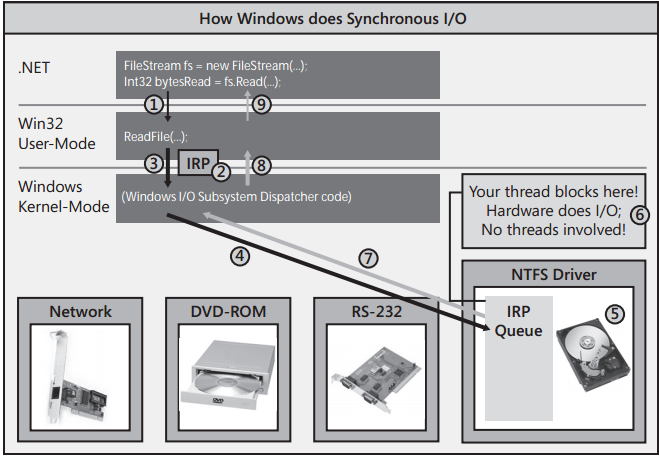
然后,ReadFile将你的线程从本机/用户模式代码转变成本机/内核模式代码,向内核传递IRP数据结构,从而调用Windows内核(3)。根据1RP中的设备句柄,Windows内核知道I/O操作要传送给哪个硬件设备。因此,Windows将IRP传送给恰当的设备驱动程序的1RP队列(④),每个设备驱动程序都维护着自己的IRP队列,其中包含了机器上运行的所有进程发出的I/O请求。IRP数据包到达时,设备驱动程序将IRP信息传给物理硬件设备上安装的电路板。现在,硬件设备将执行请求的I/O操作(5)。
在硬件设备执行10操作期间,发出了10请求的线程将无事可收,所以Windows将线程变成睡眠状态,防止它浪费CPU时间(6)。
最终,硬件设备会完成1/0操作。然后,Windows会唤醒你的线程,把它调度给一个CPU,使它从内核模式返回用户模式,再返回至托管代码(7,8和9)。
Windows如何执行异步I/O操作
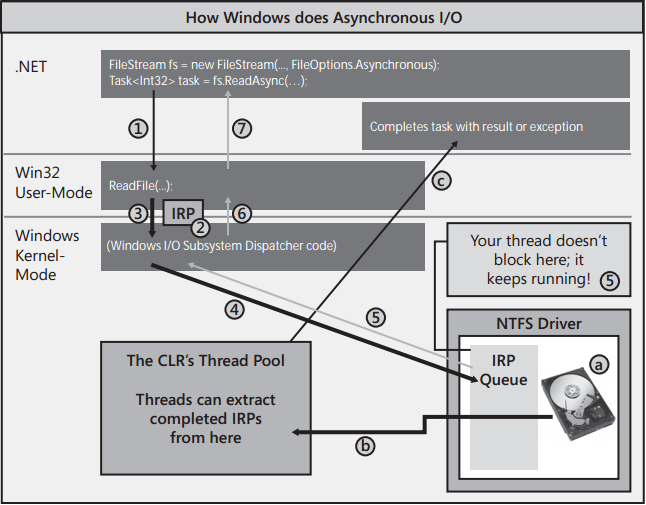
现在调用ReadAsync而不是Read从文件中读取数据。ReadAsync内部分配一个Task<Int32>对象来代表用于完成读取操作的代码。然后,ReadAsync调用Win32 ReadFile函数(1),ReadFile分配IRP,和前面的同步操作一样初始化它(2),然后把它传给Windows内核(3),Windows把IRP添加到硬盘驱动程序的IRP队列中(4),但线程不再阻塞,而是允许返回至你的代码。所以,线程能立即从ReadAsync调用中返回(5,6和7)。
那么,什么时候以及用什么方式处理最终读取的数据呢?
注意,调用ReadAsync返回的是一个Task<Int32>对象。可在该对象上调用ContinueWith来登记任务完成时执行的回调方法,然后在回调方法中处理数据。当然,也可利用C#的异步函数功能简化编码,以顺序方式写代码(感觉就像是执行同步I/O)。
异步方式执行I/O操作好处
除了将资源利用率降到最低,并减少上下文切换,以异步方式执行I/O操作还有其他许多好处。每开始一次垃圾回收,CLR都必须挂起进程中的所有线程。所以,线程越少,垃圾回收器运行的速度越快。此外,一次垃圾回收发生时,CLR必须遍历所有线程的栈来查找根。同样,线程越少,栈的数量越少,使垃圾回收速度变得更快。如果线程在处理工作项时没有阻塞,线程大多数时间都是在线程池中等待。所以,当垃圾回收发生时,线程在它们的栈顶(无事可做,自然在栈顶),遍历每个线程的栈来查找根只需很少的时间。
执行多个同步I/O操作,获得所有结果的时间是获得每个单独结果所需时间之和。但执行多个异步I/O操作,获得所有结果的时间是表现最差的那个操作所需的时间。
对于GUI应用程序,异步操作还有另一个好处,即用户界面不会挂起,一直都能灵敏地响应用户的操作。
28.2 C#的异步函数
private static async Task<String> IssueClientRequestAsync(String serverName, String message) {
   using (var pipe = new NamedPipeClientStream(serverName, "PipeName", PipeDirection.InOut,
      PipeOptions.Asynchronous | PipeOptions.WriteThrough)) {

      pipe.Connect(); // Must Connect before setting ReadMode
      pipe.ReadMode = PipeTransmissionMode.Message;

      // Asynchronously send data to the server
      Byte[] request = Encoding.UTF8.GetBytes(message);
      await pipe.WriteAsync(request, 0, request.Length);

      // Asynchronously read the server's response
      Byte[] response = new Byte[1000];
      Int32 bytesRead = await pipe.ReadAsync(response, 0, response.Length);
      return Encoding.UTF8.GetString(response, 0, bytesRead);
   }  // Close the pipe
}
一旦将方法标记为async,编译器就会将方法的代码转换成实现了状态机的一个类型(状态机的详情在下一节讨论)。
WriteAsync内部分配一个Task对象并把它返回给IssueClientRequestAsync。此时,C# await操作符实际会在Task对象上调用ContinueWith,向它传递用于恢复状态机的方法。
将来某个时候,网络设备驱动程序会结束向管道的写入,一个线程池线程会通知Task对象,后者激活ContinueWith回调方法,造成一个线程恢复状态机。更具体地说,一个线程会重新进入IssueCientRequestAsyne方法,但这次是从await操作符的位置开始。
ReadAsync内部创建一个Task<Int3>对象并返回它。同样地,await操作符实际会在Task<Int32>对象上调用Continuewith,向其传递用于恢复状态机的方法。然后线程再次从IssueClientRequestAsync返回。
将来某个时候,服务器向客户机发送一个响应,网络设备驱动程序获得这个响应,一个线程池线程通知Task<Int32>对象,后者恢复状态机。await操作符造成编译器生成代码来查询Task对象的Result属性(一个Int32)并将结果赋给局部变量bytesRead:如果操作失败,则抛出异常。然后执行IssueClientRequestAsync剩余的代码,返回结果字符串并关闭管道。此时,状态机执行完毕,垃圾回收器会回收任何内存。
一旦将方法标记为async,编译器会自动生成代码,在状态机开始执行时创建一个Task对象。该Task对象在状态机执行完毕时自动完成。
异步函数存在以下限制
- 不能将应用程序的Main方法转变成异步函数。另外,构造器、属性访问器方法和事件访问器方法不能转变成异步函数。
- 异步函数不能使用任何out或ref参数。
- 不能在catch,finally或unsafe块中使用await操作符。
- 不能在await操作符之前获得一个支持线程所有权或递归的锁,并在await操作符之后释放它。这是因为await之前的代码由一个线程执行,之后的代码则可能由另一个线程执行。在C#lock语句中使用await,编译器会报错。如果显式调用Monitor的Enter和Exit方法,那么代码虽然能编译,但Monitor.Exit会在运行时抛出一个SynchronizationLockException.
- 在查询表达式中,await操作符只能在初始from子句的第一个集合表达式中使用,或者在join子句的集合表达式中使用。
28.3 编译器如何将异步函数转换成状态机
internal sealed class Type1 { }
internal sealed class Type2 { }
private static async Task<Type1> Method1Async() {
   /* Does some async thing that returns a Type1 object */
}
private static async Task<Type2> Method2Async() {
   /* Does some async thing that returns a Type2 object */
}
private static async Task<String> MyMethodAsync(Int32 argument) {
   Int32 local = argument;
   try {
      Type1 result1 = await Method1Async();
      for (Int32 x = 0; x < 3; x++) {
         Type2 result2 = await Method2Async();
      }
   }
   catch (Exception) {
      Console.WriteLine("Catch");
   }
   finally {
      Console.WriteLine("Finally");
   }
   return "Done";
}
编译上述代码,对IL代码进行逆向工程以转换回C#源代码。然后,我对代码进行了一些简化,并添加了大量注释,帮助你理解编译器对异步函数做的事情。下面展示的是编译器转换后的精华代码,我展示了转换的MyMethodAsyne方法及其依赖的状态机结构。


// AsyncStateMachine attribute indicates an async method (good for tools using reflection); // the type indicates which structure implements the state machine [DebuggerStepThrough, AsyncStateMachine(typeof(StateMachine))] private static Task<String> MyMethodAsync(Int32 argument) { // Create state machine instance & initialize it StateMachine stateMachine = new StateMachine() { // Create builder returning Task<String> from this stub method // State machine accesses builder to set Task completion/exception m_builder = AsyncTaskMethodBuilder<String>.Create(), m_state = 1, // Initialize state machine location m_argument = argument // Copy arguments to state machine fields }; // Start executing the state machine stateMachine.m_builder.Start(ref stateMachine); return stateMachine.m_builder.Task; // Return state machine's Task } // This is the state machine structure [CompilerGenerated, StructLayout(LayoutKind.Auto)] private struct StateMachine : IAsyncStateMachine { // Fields for state machine's builder (Task) & its location public AsyncTaskMethodBuilder<String> m_builder; public Int32 m_state; // Argument and local variables are fields now: public Int32 m_argument, m_local, m_x; public Type1 m_resultType1; public Type2 m_resultType2; // There is 1 field per awaiter type. // Only 1 of these fields is important at any time. That field refers // to the most recently executed await that is completing asynchronously: private TaskAwaiter<Type1> m_awaiterType1; private TaskAwaiter<Type2> m_awaiterType2; // This is the state machine method itself void IAsyncStateMachine.MoveNext() { String result = null; // Task's result value // Compilerinserted try block ensures the state machine’s task completes try { Boolean executeFinally = true; // Assume we're logically leaving the 'try' block if (m_state == 1) { // If 1st time in state machine method, m_local = m_argument; // execute start of original method } // Try block that we had in our original code try { TaskAwaiter<Type1> awaiterType1; TaskAwaiter<Type2> awaiterType2; switch (m_state) { case 1: // Start execution of code in 'try' // Call Method1Async and get its awaiter awaiterType1 = Method1Async().GetAwaiter(); if (!awaiterType1.IsCompleted) { m_state = 0; // 'Method1Async' is completing // asynchronously m_awaiterType1 = awaiterType1; // Save the awaiter for when we come back // Tell awaiter to call MoveNext when operation completes m_builder.AwaitUnsafeOnCompleted(ref awaiterType1, ref this); // The line above invokes awaiterType1's OnCompleted which approximately // calls ContinueWith(t => MoveNext()) on the Task being awaited. // When the Task completes, the ContinueWith task calls MoveNext executeFinally = false; // We're not logically leaving the 'try' // block return; // Thread returns to caller } // 'Method1Async' completed synchronously break; case 0: // 'Method1Async' completed asynchronously awaiterType1 = m_awaiterType1; // Restore mostrecent awaiter break; case 1: // 'Method2Async' completed asynchronously awaiterType2 = m_awaiterType2; // Restore mostrecent awaiter goto ForLoopEpilog; } // After the first await, we capture the result & start the 'for' loop m_resultType1 = awaiterType1.GetResult(); // Get awaiter's result ForLoopPrologue: m_x = 0; // 'for' loop initialization goto ForLoopBody; // Skip to 'for' loop body ForLoopEpilog: m_resultType2 = awaiterType2.GetResult(); m_x++; // Increment x after each loop iteration // Fall into the 'for' loop’s body ForLoopBody: if (m_x < 3) { // 'for' loop test // Call Method2Async and get its awaiter awaiterType2 = Method2Async().GetAwaiter(); if (!awaiterType2.IsCompleted) { m_state = 1; // 'Method2Async' is completing asynchronously m_awaiterType2 = awaiterType2; // Save the awaiter for when we come back // Tell awaiter to call MoveNext when operation completes m_builder.AwaitUnsafeOnCompleted(ref awaiterType2, ref this); executeFinally = false; // We're not logically leaving the 'try' block return; // Thread returns to caller } // 'Method2Async' completed synchronously goto ForLoopEpilog; // Completed synchronously, loop around } } catch (Exception) { Console.WriteLine("Catch"); } finally { // Whenever a thread physically leaves a 'try', the 'finally' executes // We only want to execute this code when the thread logically leaves the 'try' if (executeFinally) { Console.WriteLine("Finally"); } } result = "Done"; // What we ultimately want to return from the async function } catch (Exception exception) { // Unhandled exception: complete state machine's Task with exception m_builder.SetException(exception); return; } // No exception: complete state machine's Task with result m_builder.SetResult(result); } }
任何时候使用await操作符,编译器都会获取操作数,并尝试在它上面调用GetAwaiter方法。这可能是实例方法或扩展方法。调用GetAwaiter方法所返回的对象称为awaiter(等待者),正是它将被等待的对象与状态机粘合起来。
28.4 异步函数扩展性
在扩展性方面,能用Task对象包装一个将来完成的操作,就可以用await操作符来等待该操作。
TaskLogger类
public static class TaskLogger { public enum TaskLogLevel { None, Pending } public static TaskLogLevel LogLevel { get; set; } public sealed class TaskLogEntry { public Task Task { get; internal set; } public String Tag { get; internal set; } public DateTime LogTime { get; internal set; } public String CallerMemberName { get; internal set; } public String CallerFilePath { get; internal set; } public Int32 CallerLineNumber { get; internal set; } public override string ToString() { return String.Format("LogTime={0}, Tag={1}, Member={2}, File={3}({4})", LogTime, Tag ?? "(none)", CallerMemberName, CallerFilePath, CallerLineNumber); } } private static readonly ConcurrentDictionary<Task, TaskLogEntry> s_log = new ConcurrentDictionary<Task, TaskLogEntry>(); public static IEnumerable<TaskLogEntry> GetLogEntries() { return s_log.Values; } public static Task<TResult> Log<TResult>(this Task<TResult> task, String tag = null, [CallerMemberName] String callerMemberName = null, [CallerFilePath] String callerFilePath = null, [CallerLineNumber] Int32 callerLineNumber = 1) { return (Task<TResult>) Log((Task)task, tag, callerMemberName, callerFilePath, callerLineNumber); } public static Task Log(this Task task, String tag = null, [CallerMemberName] String callerMemberName = null, [CallerFilePath] String callerFilePath = null, [CallerLineNumber] Int32 callerLineNumber = 1) { if (LogLevel == TaskLogLevel.None) return task; var logEntry = new TaskLogEntry { Task = task, LogTime = DateTime.Now, Tag = tag, CallerMemberName = callerMemberName, CallerFilePath = callerFilePath, CallerLineNumber = callerLineNumber }; s_log[task] = logEntry; task.ContinueWith(t => { TaskLogEntry entry; s_log.TryRemove(t, out entry); }, TaskContinuationOptions.ExecuteSynchronously); return task; } }
以下代码演示了如何使用该类。
public static async Task Go() {
#if DEBUG
   // Using TaskLogger incurs a memory and performance hit; so turn it on in debug builds
   TaskLogger.LogLevel = TaskLogger.TaskLogLevel.Pending;
#endif

   // Initiate 3 task; for testing the TaskLogger, we control their duration explicitly
   var tasks = new List<Task> {
      Task.Delay(2000).Log("2s op"),
      Task.Delay(5000).Log("5s op"),
      Task.Delay(6000).Log("6s op")
   };

   try {
      // Wait for all tasks but cancel after 3 seconds; only 1 task should complete in time
      // Note: WithCancellation is my extension method described later in this chapter
      await Task.WhenAll(tasks).
         WithCancellation(new CancellationTokenSource(3000).Token);
   }
   catch (OperationCanceledException) { }

   // Ask the logger which tasks have not yet completed and sort
   // them in order from the one that’s been waiting the longest
   foreach (var op in TaskLogger.GetLogEntries().OrderBy(tle => tle.LogTime))
      Console.WriteLine(op);
}
除了增强使用Task时的灵活性,异步函数另一个对扩展性有利的地方在于编译器可以在await的任何操作数上调用GetAwaiter。所以操作数不一定是Task对象。可以是任意类型,只要提供了一个可以调用的GetAwaiter方法。
public sealed class EventAwaiter<TEventArgs> : INotifyCompletion {
   private ConcurrentQueue<TEventArgs> m_events = new ConcurrentQueue<TEventArgs>();
   private Action m_continuation;

   #region Members invoked by the state machine
   // The state machine will call this first to get our awaiter; we return ourself
   public EventAwaiter<TEventArgs> GetAwaiter() { return this; }

   // Tell state machine if any events have happened yet
   public Boolean IsCompleted { get { return m_events.Count > 0; } }

   // The state machine tells us what method to invoke later; we save it
   public void OnCompleted(Action continuation) {
      Volatile.Write(ref m_continuation, continuation);
   }

   // The state machine queries the result; this is the await operator's result
   public TEventArgs GetResult() {
      TEventArgs e;
      m_events.TryDequeue(out e);
      return e;
   }
   #endregion

   // Potentially invoked by multiple threads simultaneously when each raises the event
   public void EventRaised(Object sender, TEventArgs eventArgs) {
      m_events.Enqueue(eventArgs);   // Save EventArgs to return it from GetResult/await

      // If there is a pending continuation, this thread takes it
      Action continuation = Interlocked.Exchange(ref m_continuation, null);
      if (continuation != null) continuation();   // Resume the state machine
   }
}
private static async void ShowExceptions() {
   var eventAwaiter = new EventAwaiter<FirstChanceExceptionEventArgs>();
   AppDomain.CurrentDomain.FirstChanceException += eventAwaiter.EventRaised;

   while (true) {
      Console.WriteLine("AppDomain exception: {0}",
         (await eventAwaiter).Exception.GetType());
   }
}
public static void Go() {
   ShowExceptions();

   for (Int32 x = 0; x < 3; x++) {
      try {
         switch (x) {
            case 0: throw new InvalidOperationException();
            case 1: throw new ObjectDisposedException("");
            case 2: throw new ArgumentOutOfRangeException();
         }
      }
      catch { }
   }
}
28.5 异步函数和事件处理程序
异步函数的返回类型一般是Task或Task<TResul>,它们代表函数的状态机完成。但异步函数是可以返回void的。
void EventHandlerCallback(Object sender, EventArgs e);
28.6 FCL的异步函数
在FCL中,支持I/O操作的许多类型都提供了XxxAsync方法,例如下面例子:
- System.IO.Stream的所有派生类都提供了ReadAsync,WriteAsync,FlushAsync和CopyToAsync方法。
- System.IO.TextReader的所有派生类都提供了ReadAsync,ReadLineAsync,ReadToEndAsync和ReadBlockAsync方法。System.IO.TextWriter的派生类提供了WriteAsync,WriteLineAsync和FlushAsync方法。
- System.Net.Http.HttpClient类提供了GetAsyne,GetStreamAsyne,GetByteArrayAsyne,PostAsync,PutAsync,DeleteAsync和其他许多方法。
- System.Net.WebRequest的所有派生类(包括FileWebRequest,FtpWebRequest和HttpWebRequest)都提供了GetRequestStreamAsync和GetResponseAsync方法。
- System.Data.SqIClient.SqICommand类提供了 ExecuteDbDataReaderAsync ExecuteNonQueryAsync,ExecuteReaderAsync,ExecuteScalarAsync和ExecuteXmlReaderAsync方法。
- 生成Web服务代理类型的工具(比如SvcUtil.exe)也生成XxxAsync方法。
private static async void StartServer() { while (true) { var pipe = new NamedPipeServerStream(c_pipeName, PipeDirection.InOut, 1, PipeTransmissionMode.Message, PipeOptions.Asynchronous | PipeOptions.WriteThrough); // Asynchronously accept a client connection // NOTE: NamedPipServerStream uses the old Asynchronous Programming Model (APM) // I convert the old APM to the new Task model via TaskFactory's FromAsync method await Task.Factory.FromAsync(pipe.BeginWaitForConnection, pipe.EndWaitForConnection, null); // Start servicing the client, which returns immediately because it is asynchronous ServiceClientRequestAsync(pipe); } }
NamedPipeServerStream类定义了Begin WaitForConnection和EndWaitForConnection方法,但没有定义WaitForConnectionAsync方法。FCL未来的版本有望添加该方法。但不是说在此之前就没有希望了。如上述代码所示,我调用TaskFactory的FromAsync方法,向它传递BeginXxx和EndXxx方法的名称。然后,FromAsync内部创建一个Task对象来包装这些方法。现在就可以随同await操作符使用Task对象了。
FCL没有提供任何辅助方法将旧的、基于事件的编程模型改编成新的、基于Task的模型。
所以只能采用硬编码的方式。以下代码演示如何用TaskCompletionSource包装使用了“基于事件的编程模型”的WebClient,以便在异步函数中等待它。
private static async Task<String> AwaitWebClient(Uri uri) { // The System.Net.WebClient class supports the Eventbased Asynchronous Pattern var wc = new System.Net.WebClient(); // Create the TaskCompletionSource and its underlying Task object var tcs = new TaskCompletionSource<String>(); // When a string completes downloading, the WebClient object raises the // DownloadStringCompleted event, which completes the TaskCompletionSource wc.DownloadStringCompleted += (s, e) => { if (e.Cancelled) tcs.SetCanceled(); else if (e.Error != null) tcs.SetException(e.Error); else tcs.SetResult(e.Result); }; // Start the asynchronous operation wc.DownloadStringAsync(uri); // Now, we can the TaskCompletionSource’s Task and process the result as usual String result = await tcs.Task; // Process the resulting string (if desired)... return result; }
28.7 异步函数和异常处理
Task对象通常抛出一个AggregateException,可查询该异常的InnerExceptions属性来查看真正发生了什么异常。但将await用于Task时,抛出的是第一个内部异常而不是AggregateException。
28.8 异步函数的其他功能
如果调试器在await操作符上停止,“逐过程”(F10)会在异步操作完成后,在抵达下一个语句时重新由调试器接管。在这个时候,执行代码的线程可能已经不是当初发起异步操作的线程。
如果不小心对异步函数执行“逐语句”(功能键F1)操作,可以“跳出”(组合键Shift+F11函数并返回至调用者;但必须在位于异步函数的起始大括号的时候执行这个操作。一旦越过起始大括号,除非异步函数完成,否则“跳出”(组合键Shift+F1)操作无法中断异步函数。
// Task.Run is called on the GUI thread Task.Run(async () => { // This code runs on a thread pool thread // TODO: Do intensive computebound processing here... await XxxAsync(); // Initiate asynchronous operation // Do more processing here... });
不能只在普通的lambda表达式主体中添加await操作符完事,因为编译器不知道如何将方法转换成状态机。但同时在lambda表达式前面添加async,编译器就能将lambda表达式转换成状态机方法来返回一个Task或Task<TResultp,并可赋给返回类型为Task或Task<TResult>的任何Func委托变量。
static async Task OuterAsyncFunction() {
   InnerAsyncFunction();  // Oops, forgot to put the await operator on this line!

   // Code here continues to execute while InnerAsyncFunction also continues to execute...
}

static async Task InnerAsyncFunction() { /* Code in here not important */ }
写代码时,很容易发生调用异步函数但忘记使用await操作符的情况。
幸好,C#编译器会针对这种情况显示以下警告:
由于此调用不会等待,因此在此调用完成之前将会继续执行当前方法。请考虑将"await"运算符应用于调用结果。
可以取消警告,只需将InnerAsyncFunction返回的Task赋给一个变量,然后忽略该变量。
static async Task OuterAsyncFunction() {
   var noWarning = InnerAsyncFunction(); // I intend not to put the await operator on this line.

   // Code here continues to execute while InnerAsyncFunction also continues to execute...
}
也可以定义如下所示的扩展方法。
[MethodImpl(MethodImplOptions.AggressiveInlining)]  // Causes compiler to optimize the call away
public static void NoWarning(this Task task) { /* No code goes in here */ }
And then I can use it like this.
static async Task OuterAsyncFunction() {
   InnerAsyncFunction().NoWarning();   // I intend not to put the await operator on this line.

   // Code here continues to execute while InnerAsyncFunction also continues to execute...
}
异步I/O操作最好的一个地方是可以同时发起许多这样的操作,让它们并行执行,从而显著提升应用程序的性能。以下代码启动我的命名管道服务器,然后向它发起大量的客户端请求。
public static async Task Go() { // Start the server, which returns immediately because // it asynchronously waits for client requests StartServer(); // This returns void, so compiler warning to deal with // Make lots of async client requests; save each client's Task<String> List<Task<String>> requests = new List<Task<String>>(10000); for (Int32 n = 0; n < requests.Capacity; n++) requests.Add(IssueClientRequestAsync("localhost", "Request #" + n)); // Asynchronously wait until all client requests have completed // NOTE: If 1+ tasks throws, WhenAll rethrows the lastthrow exception String[] responses = await Task.WhenAll(requests); // Process all the responses for (Int32 n = 0; n < responses.Length; n++) Console.WriteLine(responses[n]); }
如果希望收到一个响应就处理一个,而不是在全部完成后再处理,那么用Task的静态WhenAny方法可以轻松地实现,下面是修改后的代码。
public static async Task Go() {
   // Start the server, which returns immediately because
   // it asynchronously waits for client requests
   StartServer();

   // Make lots of async client requests; save each client's Task<String>
   List<Task<String>> requests = new List<Task<String>>(10000);

   for (Int32 n = 0; n < requests.Capacity; n++)
      requests.Add(IssueClientRequestAsync("localhost", "Request #" + n));

   // Continue AS EACH task completes
   while (requests.Count > 0) {
      // Process each completed response sequentially
      Task<String> response = await Task.WhenAny(requests);
      requests.Remove(response);  // Remove the completed task from the collection

      // Process a single client's response
      Console.WriteLine(response.Result);
   }
}
上述代码创建while循环,针对每个客户端请求都迭代一次。循环内部等待Task的WhenAny方法,该方法一次返回一个Task<String>对象,代表由服务器响应的一个客户端请求。获得这个Task<String>对象后,就把它从集合中删除,然后查询它的结果以进行处理(把它传经Console.WriteLine)。
28.9 应用程序及其线程处理模型
.NET Framework支持几种不同的应用程序模型,而每种模型都可能引入了它自己的线程处理模型。控制台应用程序和Windows服务(实际也是控制台应用程序;只是看不见控制台而已)没有引入任何线程处理模型;换言之,任何线程可在任何时候做它想做的任何事情。
但GUI应用程序(包括Windows窗体、WPF,Silverlight和Windows Store应用程序)引入了一个线程处理模型。在这个模型中,UI元素只能由创建它的线程更新。在GUI线程中,经常都需要生成一个异步操作,使GUI线程不至于阻塞并停止响应用户输入(比如鼠标、按键、手写笔和触控事件)。但当异步操作完成时,是由一个线程池线程完成Task对象并恢复状态机。
ASP.NET应用程序允许任何线程做它想做的任何事情。线程池线程开始处理一个客户端的请求时,可以对客户端的语言文化(System.Globalization.Culturelnfo)做出假定,从而允许Web服务器对返回的数字、日期和时间进行该语言文化特有的格式化处理。此外,Web服务器还可对客户端的身份标识(System.Security.Principal.IPrincipal)做出假定,确保只能访问客户端有权访问的资源。线程池线程生成一个异步操作后,它可能由另一个线程池线程完成,该线程将处理异步操作的结果。代表原始客户端执行工作时,语言文化和身份标识信息需要“流向”新的线程池线程。这样一来,代表客户端执行的任何额外的工作才能使用客户端的语言文化和身份标识信息。
FCL定义了一个名System.Threading.SynchronizationContext的基类,它解决了所有这些问题。简单地说,SynchronizationContext派生对象将应用程序模型连接到它的线程处理模型。FCL定义了几个SynchronizationContext派生类,但你一般不直接和这些类打交道:
等待一个Task时会获取调用线程的SynchronizationContext对象。线程池线程完成Task后,会使用该SynchronizationContext对象,确保为应用程序模型使用正确的线程处理模型。所以,当GUI线程等待一个Task时,await操作符后面的代码保证在GUI线程上执行,使代码能更新U1元素。"对于ASP.NET应用程序,await后面的代码保证在关联了客户端语言文化和身份标识信息的线程池线程上执行。
private sealed class MyWpfWindow : Window { public MyWpfWindow() { Title = "WPF Window"; } protected override void OnActivated(EventArgs e) { // Querying the Result property prevents the GUI thread from returning; // the thread blocks waiting for the result String http = GetHttp().Result; // Get the string synchronously! base.OnActivated(e); } private async Task<String> GetHttp() { // Issue the HTTP request and let the thread return from GetHttp HttpResponseMessage msg = await new HttpClient().GetAsync("http://Wintellect.com/"); // We never get here: The GUI thread is waiting for this method to finish but this method // can't finish because the GUI thread is waiting for it to finish > DEADLOCK! return await msg.Content.ReadAsStringAsync(); } }
由于许多类库代码都要求不依赖于特定的应用程序模型,所以要避免因为使用SynchronizationContext对象而产生的额外开销。此外,类库开发人员要竭尽全力帮助应用程序开发人员防止死锁。为了解决这两方面的问题,Task和Task<TResult>类提供了一个ConfigureAwait方法
// Task defines this method:
public ConfiguredTaskAwaitable ConfigureAwait(Boolean continueOnCapturedContext);

// Task<TResult> defines this method:
public ConfiguredTaskAwaitable<TResult> ConfigureAwait(Boolean continueOnCapturedContext);
向方法传递true相当于根本没有调用方法。但如果传递false,await操作符就不查询调用线程的SynchronizationContext对象。当线程池线程结束Task时会直接完成它,await操作符后面的代码通过线程池线线程执行。
private async Task<String> GetHttp() {
   // Issue the HTTP request and let the thread return from GetHttp
   HttpResponseMessage msg = await new HttpClient().GetAsync("http://Wintellect.com/")
      .ConfigureAwait(false);
   // We DO get here now because a thread pool can execute this code
   // as opposed to forcing the GUI thread to execute it.

   return await msg.Content.ReadAsStringAsync().ConfigureAwait(false);
}
private Task<String> GetHttp() {
   return Task.Run(async () => {
      // We run on a thread pool thread now that has no SynchronizationContext on it
      HttpResponseMessage msg = await new HttpClient().GetAsync("http://Wintellect.com/");
      // We DO get here because some thread pool can execute this code

      return await msg.Content.ReadAsStringAsync();
   });
}
注意,此版本的GetHttp不再是异步函数;我从方法签名中删除了async关键字,因为方法中没有了await操作符。但是,传给Task.Run的lambda表达式是异步函数。
28.10 以异步方式实现服务器
- 要构建异步ASP.NET Web窗体,在.aspx文件中添加Async="true"网页指令,并参考System.Web.UI.Page的RegisterAsyncTask方法。
- 要构建异步ASP.NET MVC控制器,使你的控制器类从System.WebMvc.AsyncController派生,让操作方法返回一个Task<ActionResult即可
- 要构建异步ASPNET处理程序,使你的类从System.Web.HtpTaskAsyncHandler派生,重写其抽象ProcessRequestAsync方法。
- 要构建异步WCF服务,将服务作为异步函数实现,让它返回Task或Task<TResult>。
28.11 取消I/O操作
Windows一般没有提供取消未完成I/O操作的途径。
如果向服务器请求了1000个字节,然后决定不再需要这些字节,那么其实没有办法告诉服务器忘掉你的请求。在这种情况下,只能让字节照常返回,再将它们丢弃。此外,这里还会发生竟态条件-取消请求的请求可能正好在服务器发送响应的时候到来。这时应该怎么办?所以,要在代码中处理这种潜在的竞态条件,决定是丢弃还是使用数据。
为此,我建议实现一个withCancellation扩展方法来扩展Task<TResult>(需要类似的重载版本来扩展Task),如下所示:
private struct Void { } // Because there isn't a nongeneric TaskCompletionSource class. private static async Task<TResult> WithCancellation<TResult>(this Task<TResult> originalTask, CancellationToken ct) { // Create a Task that completes when the CancellationToken is canceled var cancelTask = new TaskCompletionSource<Void>(); // When the CancellationToken is canceled, complete the Task using (ct.Register( t => ((TaskCompletionSource<Void>)t).TrySetResult(new Void()), cancelTask)) { // Create a Task that completes when either the original or // CancellationToken Task completes Task any = await Task.WhenAny(originalTask, cancelTask.Task); // If any Task completes due to CancellationToken, throw OperationCanceledException if (any == cancelTask.Task) ct.ThrowIfCancellationRequested(); } // await original task (synchronously); if it failed, awaiting it // throws 1st inner exception instead of AggregateException return await originalTask; }
Now, you can call this extension method as follows.
public static async Task Go() {
   // Create a CancellationTokenSource that cancels itself after # milliseconds
   var cts = new CancellationTokenSource(5000); // To cancel sooner, call cts.Cancel()
   var ct = cts.Token;

   try {
      // I used Task.Delay for testing; replace this with another method that returns a Task
      await Task.Delay(10000).WithCancellation(ct);
      Console.WriteLine("Task completed");
   }
   catch (OperationCanceledException) {
      Console.WriteLine("Task cancelled");
   }
}
28.12 有的I/O操作必须同步进行
Win32 CreateFile方法(由FileStream的构造器调用),总是以同步方式执行。
Windows也没有提供函数以异步方式访问注册表、访问事件日志、获取目录的文件/子目录或者更改文件/目录的属性等等。
FileStream特有的问题
创建FileStream对象时,可通过FileOptions.Asynchronous标志指定以同步还是异步方式进行通信。对于你的应用程序,操作表面上异步执行,但FileStream类是在内部用另一个线程模拟异步行为。这个额外的线程纯属浪费,而且会影响到性能。
可在创建FileStream对象时指定FileOptions.Asynchronous标志。然后,可以调用FileStream的Read方法执行一个同步操作。在内部,FileStream类会开始一个异步操作,然后立即使调用线程进入睡眠状态,直至操作完成才会唤醒,从而模拟同步行为。这同样效率低下。但相较于不指定FileOptions.Asynchronous标志来构造一个FileStream并调用ReadAsync,它的效率还是要高上那么一点点的。
使用Filestream时必须先想好是同步还是异步执行文件I/O,并指定(或不指定)FileOptions.Asynchronous标志来指明自己的选择。如果指定了该标志,就总是调用ReadAsync。如果没有指定这个标志,就总是调用Read。
注意,System.IO.File类提供了辅助方法(Create,Open和OpenWrite)来创建并返回FileStream对象。但所有这些方法都没有在内部指定FileOptions.Asynchronous标志,所以为了实现响应灵敏的、可伸缩的应用程序,应避免使用这些方法。
28.13 I/O请求优先级
由于I/O请求一般需要时间来执行,所以一个低优先级线程可能挂起高优先级线程,使后者不能快速完成工作,从而严重影响系统的总体响应能力。
internal static class ThreadIO { public static BackgroundProcessingDisposer BeginBackgroundProcessing( Boolean process = false) { ChangeBackgroundProcessing(process, true); return new BackgroundProcessingDisposer(process); } public static void EndBackgroundProcessing(Boolean process = false) { ChangeBackgroundProcessing(process, false); } private static void ChangeBackgroundProcessing(Boolean process, Boolean start) { Boolean ok = process ? SetPriorityClass(GetCurrentWin32ProcessHandle(), start ? ProcessBackgroundMode.Start : ProcessBackgroundMode.End) : SetThreadPriority(GetCurrentWin32ThreadHandle(), start ? ThreadBackgroundgMode.Start : ThreadBackgroundgMode.End); if (!ok) throw new Win32Exception(); } // This struct lets C#'s using statement end the background processing mode public struct BackgroundProcessingDisposer : IDisposable { private readonly Boolean m_process; public BackgroundProcessingDisposer(Boolean process) { m_process = process; } public void Dispose() { EndBackgroundProcessing(m_process); } } // See Win32’s THREAD_MODE_BACKGROUND_BEGIN and THREAD_MODE_BACKGROUND_END private enum ThreadBackgroundgMode { Start = 0x10000, End = 0x20000 } // See Win32’s PROCESS_MODE_BACKGROUND_BEGIN and PROCESS_MODE_BACKGROUND_END private enum ProcessBackgroundMode { Start = 0x100000, End = 0x200000 } [DllImport("Kernel32", EntryPoint = "GetCurrentProcess", ExactSpelling = true)] private static extern SafeWaitHandle GetCurrentWin32ProcessHandle(); [DllImport("Kernel32", ExactSpelling = true, SetLastError = true)] [return: MarshalAs(UnmanagedType.Bool)] private static extern Boolean SetPriorityClass( SafeWaitHandle hprocess, ProcessBackgroundMode mode); [DllImport("Kernel32", EntryPoint = "GetCurrentThread", ExactSpelling = true)] private static extern SafeWaitHandle GetCurrentWin32ThreadHandle(); [DllImport("Kernel32", ExactSpelling = true, SetLastError = true)] [return: MarshalAs(UnmanagedType.Bool)] private static extern Boolean SetThreadPriority( SafeWaitHandle hthread, ThreadBackgroundgMode mode); // http://msdn.microsoft.com/enus/library/aa480216.aspx [DllImport("Kernel32", SetLastError = true, EntryPoint = "CancelSynchronousIo")] [return: MarshalAs(UnmanagedType.Bool)] private static extern Boolean CancelSynchronousIO(SafeWaitHandle hThread); }
And here is code showing how to use it.
public static void Main () { using (ThreadIO.BeginBackgroundProcessing()) { // Issue low priority I/O requests in here (eg: calls to ReadAsync/WriteAsync) } }
要调用ThreadIO的BeginBackgroundProcessing方法,告诉Windows你的线程要发出低优先级I/O请求。注意,这同时会降低线程的CPU调度优先级。可调用EndBackgroundProcessing,或者在BeginBackgroundProcessing返回的值上调用Dispose(如以上C#的using语句所示),使线程恢复为发出普通优先级的I/O请求(以及普通的CPU调度优先级)。线程只能影响它自己的后台处理模式;Windows不允许线程更改另一个线程的后台处理模式。
如果希望一个进程中的所有线程都发出低优先级I/O请求和进行低优先级的CPU调度,可调用BeginBackgroundProcessing,为它的process参数传递true值。一个进程只能影响它自己的后台处理模式;Windows不允许一个线程更改另一个进程的后台处理模式。

 浙公网安备 33010602011771号