
Linux(CentOS) 安装 Docker
文章地址:https://docs.docker.com/install/linux/docker-ce/centos/#install-docker-ce
Install Docker CE
Install using the repository
Before you install Docker CE for the first time on a new host machine, you need to set up the Docker repository. Afterward, you can install and update Docker from the repository.
SET UP THE REPOSITORY
-
Install required packages.
yum-utilsprovides theyum-config-managerutility, anddevice-mapper-persistent-dataandlvm2are required by thedevicemapperstorage driver.$ sudo yum install -y yum-utils $ sudo yum install device-mapper-persistent-data $ sudo yum install lvm2
- Use the following command to set up the stable repository.
$ sudo yum-config-manager --add-repo https://download.docker.com/linux/centos/docker-ce.repo
INSTALL DOCKER CE
-
Install the latest version of Docker CE and containerd, or go to the next step to install a specific version:
$ sudo yum install docker-ce docker-ce-cli containerd.io
- To install a specific version of Docker CE, list the available versions in the repo, then select and install: a. List and sort the versions available in your repo. This example sorts results by version number, highest to lowest, and is truncated:
$ yum list docker-ce --showduplicates | sort -r

docker-ce.x86_64  3:18.09.1-3.el7                     docker-ce-stable
docker-ce.x86_64  3:18.09.0-3.el7                     docker-ce-stable
docker-ce.x86_64  18.06.1.ce-3.el7                    docker-ce-stable
docker-ce.x86_64  18.06.0.ce-3.el7                    docker-ce-stable
The list returned depends on which repositories are enabled, and is specific to your version of CentOS (indicated by the
.el7suffix in this example).b. Install a specific version by its fully qualified package name, which is the package name (
docker-ce) plus the version string (2nd column) starting at the first colon (:), up to the first hyphen, separated by a hyphen (-). For example,docker-ce-18.09.1.Docker is installed but not started. The$ sudo yum install docker-ce-<VERSION_STRING> docker-ce-cli-<VERSION_STRING> containerd.io
dockergroup is created, but no users are added to the group. - Start Docker.
$ sudo systemctl start docker
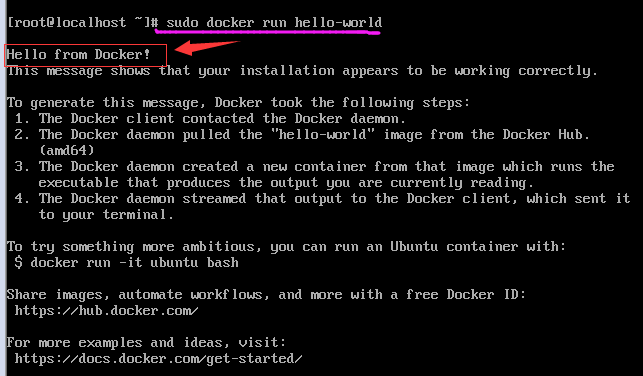
- Verify that Docker CE is installed correctly by running the
hello-worldimage.$ sudo docker run hello-world
![]()

 浙公网安备 33010602011771号