【Redis Tutorial console-1】Set/Get command
Redis is what is called a key-value store, often referred to as a NoSQL database. The essence of a key-value store is the ability to store some data, called a value, inside a key. This data can later be retrieved only if we know the exact key used to store it. We can use the command SET to store the value "fido" at key "server:name":
SET server:name "fido"
Redis will store our data permanently, so we can later ask "What is the value stored at key server:name?" and Redis will reply with "fido":
GET server:name => "fido"
Tip: You can click the commands above to automatically execute them. The text after the arrow (=>) shows the expected output.
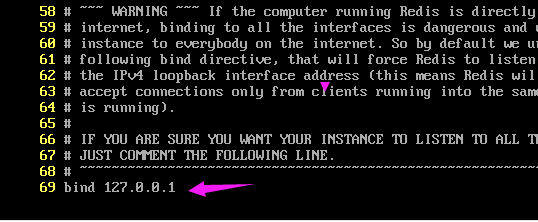
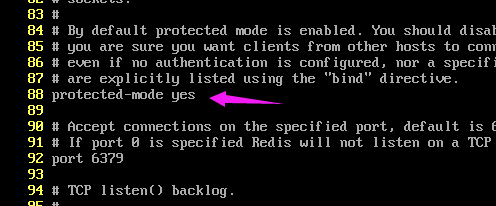
firewall-cmd --query-port=6379/tcp
如果返回结果为no,那么证明6379端口确实没有开启。
将6379端口开启
firewall-cmd --add-port=6379/tcp --permanent
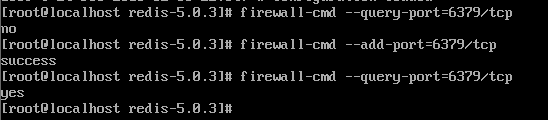
其中--permanent的作用是使设置永久生效,不加的话机器重启之后失效
重新载入一下防火墙设置,使设置生效
firewall-cmd --reload
Other common operations provided by key-value stores are DEL to delete a given key and associated value, SET-if-not-exists (called SETNX on Redis) that sets a key only if it does not already exist, and INCR to atomically increment a number stored at a given key:
    SET connections 10
    INCR connections => 11 (这里输入的是"INCR connections",返回11)
    INCR connections => 12
    DEL connections
    INCR connections => 1
There is something special about INCR. Why do we provide such an operation if we can do it ourself with a bit of code? After all it is as simple as:
x = GET count
x = x + 1
SET count x
The problem is that doing the increment in this way will only work as long as there is a single client using the key. See what happens if two clients are accessing this key at the same time:
- Client A reads count as 10.
- Client B reads count as 10.
- Client A increments 10 and sets count to 11.
- Client B increments 10 and sets count to 11.
We wanted the value to be 12, but instead it is 11! This is because incrementing the value in this way is not an atomic(adj. 原子的,原子能的;微粒子的) operation. Calling the INCR command in Redis will prevent this from happening, because it is an atomic operation. Redis provides many of these atomic operations on different types of data.
Redis can be told that a key should only exist for a certain length of time. This is accomplished with the EXPIRE and TTL commands.
    SET resource:lock "Redis Demo"
    EXPIRE resource:lock 120
This causes the key resource:lock to be deleted in 120 seconds. You can test how long a key will exist with the TTL command. It returns the number of seconds until it will be deleted.
    TTL resource:lock => 113
    // after 113s
    TTL resource:lock => -2
The -2 for the TTL of the key means that the key does not exist (anymore). A -1 for the TTL of the key means that it will never expire. Note that if you SET a key, its TTL will be reset.
    SET resource:lock "Redis Demo 1"
    EXPIRE resource:lock 120
    TTL resource:lock => 119
    SET resource:lock "Redis Demo 2"
    TTL resource:lock => -1
 浙公网安备 33010602011771号