
移动端实现浮窗随手移动
来吧做个记录,好记性不如烂笔头。
思路:
1.移动端触摸事件
a.当按下手指时,触发ontouchstart;
b. 当移动手指时,触发ontouchmove;
c. 当移走手指时,触发ontouchend;
当有级别比这些事件级别更高的时候,会取消当前的touch操作,即触发ontouchcancel。一般会在ontouchcancel时暂停游戏等
2.div随手移动的本质是:鼠标移动改变位置,随即改变div的left、top
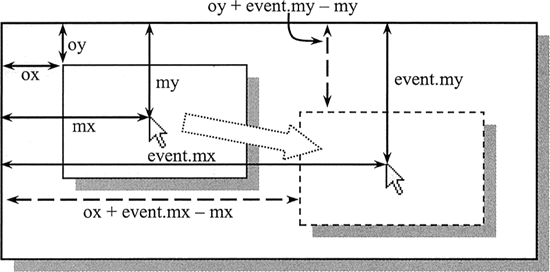
3.注意边界值,0 < left <clientWidth
核心:
1.从my移动到event.my位置,获取鼠标点击div位置。为event.x
2.实际距离移动位置event.mx' 即 event.mx'-event.mx , event.my'-event.my
3.移动时不变量,disX = event.my - div.offsetTop 、disY = event.mx - div.offsetLeft
4.移动后的top、left值为,top:event.my' - disY 、left = event.mx’ - disX ,
那么核心代码如下:
  onTouchStart(e) {
       // 手指按下时的坐标
        this.starX = e.touches[0].clientX;
        this.starY = e.touches[0].clientY;
        this.disX =  this.starX- this.oDiv.offsetLeft;
        this.disY = this.starY - this.oDiv.offsetTop;
}

   onTouchMove(e) {
        e.preventDefault(); //防止移动穿透
        this.L = e.touches[0].clientX - this.disX;
        this.T = e.touches[0].clientY - this.disY;

        // 限制拖拽的X范围,不能拖出屏幕
        if (this.L < 0) {
            this.L = 0;
        }
        if (this.L > document.documentElement.clientWidth - this.oDiv.offsetWidth) {
            this.L = document.documentElement.clientWidth - this.oDiv.offsetWidth;
        }
        // 限制拖拽的Y范围,不能拖出屏幕
        if (this.T < 0) {
            this.T = 0;
        }
       if (this.T > document.documentElement.clientHeight - this.oDiv.offsetHeight) {
            this.T = document.documentElement.clientHeight - this.oDiv.offsetHeight;
        }

        this.moveX = this.L;
        this.moveY = this.T;

        this.setState({
            offsetLeft: this.moveX,
            offsetTop: this.moveY
        });
    }

onTouchEnd(e) {
        // 计算结束的位置是靠左还是靠右
        let oLeft = this.state.offsetLeft;
        if (oLeft < (document.documentElement.clientWidth - this.oDiv.offsetWidth) / 2) {
            oLeft = 0;
        } else {
            oLeft = document.documentElement.clientWidth - this.oDiv.offsetWidth;
        }
        this.setState({
            offsetLeft: oLeft
        });
    }
欢迎转载~,请标注来源~,觉得有用的话,帮忙点个赞👍吧~,谢谢观看嗷 希望对你有帮助

 浙公网安备 33010602011771号