

2019.11.21
数据库上机作业
1、调试P370例【20.5】(40分)
老师的简单代码:
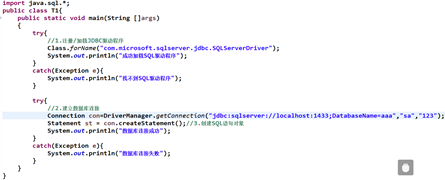
代码:
package MySql;
import java.sql.*;
public class Example_sql {
	public static void main(String []args) {
		String forname="com.microsoft.sqlserver.jdbc.SQLServerDriver";
		try {
			Class.forName(forname);
			System.out.println("成功加载SQL驱动程序");
		}catch(Exception e) {
			System.out.println("找不到SQL驱动程序");
		}
		try {
			String url="jdbc:sqlserver://127.0.0.1:1433;DatabaseName=ZQ";
			Connection conn = DriverManager.getConnection(url, "sa", "2723365710");
			Statement st=conn.createStatement();
			System.out.println("数据库连接成功");
			ResultSet rs=st.executeQuery("select*from 学生信息");
			while(rs.next()){
				String id=rs.getString("id");
				String name=rs.getString("name");
				String sex=rs.getString("sex");
				System.out.println("id:"+id+"name:"+name+"sex:"+sex);
			}
			if(rs!=null) {
				rs.close();
			}
			if(st!=null) {
				st.close();
			}
			if(conn!=null) {
				conn.close();
			}
		}catch (Exception e) {
			System.out.println("数据库连接失败");
		}
	}
}
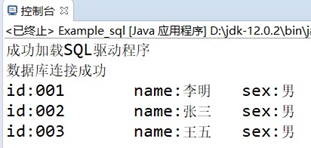
运行截图:
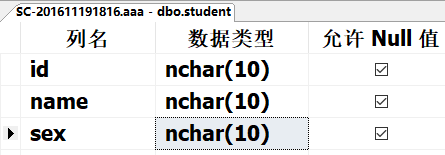
2、(60分)调试以下数据库访问代码(老师上课讲过的test1.java程序)。大家统一数据库名字是 aaa,数据表是 student。其中,数据表student的结构设计如下:
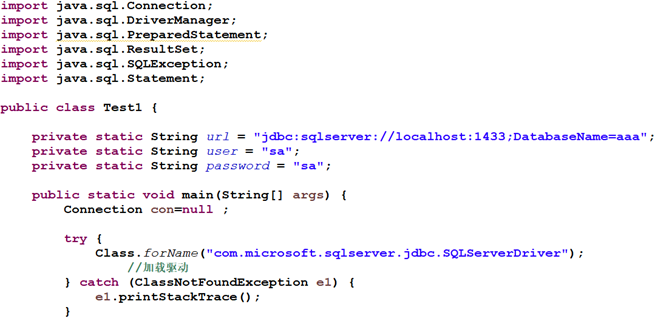
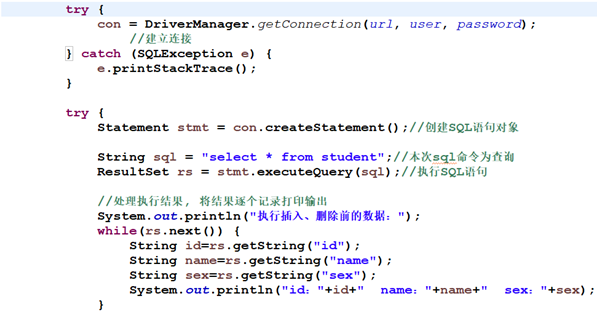
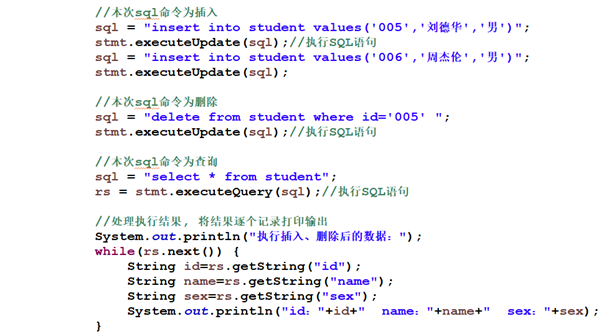
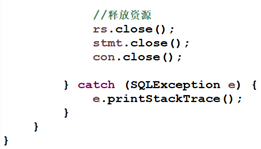
代码:
package MySql;
import java.sql.*;
public class Example_sql1 {
	static String url="jdbc:sqlserver://localhost:1433;DatabaseName=aaa";
	static String user="sa";
	static String password="2723365710";
	public static void main(String[] args){
		Connection con=null;
		try{
			Class.forName("com.microsoft.sqlserver.jdbc.SQLServerDriver");
			System.out.println("驱动加载成功!");
		}catch(Exception e){
			e.printStackTrace();
		}
		try{
			con=DriverManager.getConnection(url, user, password);
			System.out.println("数据库链接成功!");
		}catch(Exception e){
			e.printStackTrace();
		}
		try{
			Statement stmt=con.createStatement();
			String sql="select*from student";
			ResultSet rs=stmt.executeQuery(sql);
			System.out.println("执行插入,删除前的数据:");
			while(rs.next()){
				String id=rs.getString("id");
				String name=rs.getString("name");
				String sex=rs.getString("sex");
				System.out.println("id:"+id+"name:"+name+"sex:"+sex);
			}
			sql="insert into student values('005','刘德华','男')";
			stmt.executeUpdate(sql);
			sql="insert into student values('006','周杰伦','男')";
			stmt.executeUpdate(sql);
			sql="delete from student where id='006'";
			stmt.executeUpdate(sql);
			sql="select*from student";
			rs=stmt.executeQuery(sql);
			System.out.println("执行插入,删除后的数据:");
			while(rs.next()){
				String id=rs.getString("id");
				String name=rs.getString("name");
				String sex=rs.getString("sex");
				System.out.println("id:"+id+"name:"+name+"sex:"+sex);
			}
			rs.close();
			stmt.close();
			con.close();
		}catch(Exception e){
			e.printStackTrace();
		}
	}
}
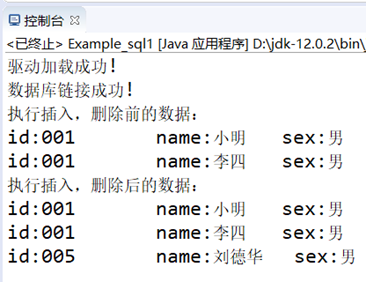
运行截图:
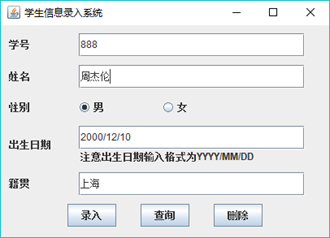
3、(提高题,20分)以下代码的功能是通过JDBC实现对数据库aaa中的数据表是student的查询、增加、删除。请将其调试通过,并试着加上前端界面(含存入、删除、查询按钮,至少含存入按钮),界面可以参考下图:

代码:
package MySql;
import javax.swing.*;
import java.awt.Font;
import java.awt.event.ActionEvent;
import java.awt.event.ActionListener;
import java.sql.*;
public class Example_sql2 implements ActionListener{
	JFrame f;
	JPanel p;
	JLabel l1,l2,l3,l4,l5,l6;
	JTextField t1,t2,t3,t4;
	JButton b1,b2,b3;
	JRadioButton rb1,rb2;
	ButtonGroup bg;
	String url;
	Connection con;
	Statement st;
	ResultSet rs;
	public Example_sql2() {
		f=new JFrame("学生信息操作界面");
		p=new JPanel();
		l1=new JLabel("学号");
		l2=new JLabel("姓名");
		l3=new JLabel("性别");
		l4=new JLabel("出生日期");
		l5=new JLabel("籍贯");
		l6=new JLabel("注意:格式为YYYY/MM/DD");
		t1=new JTextField(15);
		t2=new JTextField(15);
		t3=new JTextField(15);
		t4=new JTextField(15);
		rb1=new JRadioButton("男");
		rb1.setSelected(true);
		rb2=new JRadioButton("女");
		bg=new ButtonGroup();
		bg.add(rb1);
		bg.add(rb2);
		b1=new JButton("录入");
		b1.addActionListener(this);
		b2=new JButton("查询");
		b2.addActionListener(this);
		b3=new JButton("删除");
		b3.addActionListener(this);
		t1.setFont(new Font("",Font.BOLD,15));
		t2.setFont(new Font("",Font.BOLD,15));
		t3.setFont(new Font("",Font.BOLD,15));
		t4.setFont(new Font("",Font.BOLD,15));
		l1.setFont(new Font("",Font.BOLD,20));
		l2.setFont(new Font("",Font.BOLD,20));
		l3.setFont(new Font("",Font.BOLD,20));
		l4.setFont(new Font("",Font.BOLD,20));
		l5.setFont(new Font("",Font.BOLD,20));
		l6.setFont(new Font("",Font.BOLD,15));
		rb1.setFont(new Font("",Font.BOLD,20));
		rb2.setFont(new Font("",Font.BOLD,20));
		b1.setFont(new Font("",Font.BOLD,15));
		b2.setFont(new Font("",Font.BOLD,15));
		b3.setFont(new Font("",Font.BOLD,15));
		Box box1=Box.createHorizontalBox();
		box1.add(l1);
		box1.add(Box.createHorizontalStrut(50));
		box1.add(t1);
		Box box2=Box.createHorizontalBox();
		box2.add(l2);
		box2.add(Box.createHorizontalStrut(50));
		box2.add(t2);
		Box box3=Box.createHorizontalBox();
		box3.add(l3);
		box3.add(Box.createHorizontalGlue());
		box3.add(rb1);
		box3.add(Box.createHorizontalGlue());
		box3.add(rb2);
		box3.add(Box.createHorizontalGlue());
		Box box4=Box.createHorizontalBox();
		Box box6=Box.createVerticalBox();
		box4.add(l4);
		box4.add(Box.createHorizontalStrut(10));
		box6.add(t3);
		box6.add(Box.createVerticalStrut(5));
		box6.add(l6);
		box4.add(box6);
		Box box5=Box.createHorizontalBox();
		box5.add(l5);
		box5.add(Box.createHorizontalStrut(50));
		box5.add(t4);
		Box box7=Box.createHorizontalBox();
		box7.add(b1);
		box7.add(Box.createHorizontalStrut(50));
		box7.add(b2);
		box7.add(Box.createHorizontalStrut(50));
		box7.add(b3);
		Box boxv=Box.createVerticalBox();
		boxv.add(Box.createVerticalStrut(15));
		boxv.add(box1);
		boxv.add(Box.createVerticalStrut(15));
		boxv.add(box2);
		boxv.add(Box.createVerticalStrut(15));
		boxv.add(box3);
		boxv.add(Box.createVerticalStrut(15));
		boxv.add(box4);
		boxv.add(Box.createVerticalStrut(15));
		boxv.add(box5);
		boxv.add(Box.createVerticalStrut(20));
		boxv.add(box7);
		p.add(boxv);
		f.add(p);
		f.setVisible(true);
		f.setSize(420, 380);
		f.setLocationRelativeTo(null);
		f.setDefaultCloseOperation(JFrame.EXIT_ON_CLOSE);
	}
	public void connectionsql() {
		String forname="com.microsoft.sqlserver.jdbc.SQLServerDriver";
		try {
			Class.forName(forname);
			System.out.println("成功加载SQL驱动程序");
		}catch(Exception e) {
			System.out.println("找不到SQL驱动程序");
		}
		try {
			url="jdbc:sqlserver://127.0.0.1:1433;DatabaseName=aaa";
			con = DriverManager.getConnection(url, "sa", "2723365710");
			st=con.createStatement();
			System.out.println("数据库连接成功");
		}catch (Exception e) {
			System.out.println("数据库连接失败");
		}
	}
	public static void main(String[] args) {
		Example_sql2 mysql=new Example_sql2();
		mysql.connectionsql();
	}
	public void actionPerformed(ActionEvent e) {
		String command=e.getActionCommand();
		if(command.equals("查询")) {
			try {
				rs=st.executeQuery("select*from student");
				if(rs.next()) {
					System.out.println("已存入的数据=  =》》");
				while(true){
					String id=rs.getString("id");
					String name=rs.getString("name");
					String sex=rs.getString("sex");
					String birthday=rs.getString("birthday");
					String birthplace=rs.getString("place");
					System.out.println("学号:"+id+"姓名:"+name+"性别:"+sex+"出生日期:"+birthday+"\t籍贯:"+birthplace);
					if(!rs.next()) {
						break;
						}
					}
				}else{
					JOptionPane.showMessageDialog(f, "无数据,请录入后再试!");
				}
			}catch(Exception e1) {
				e1.printStackTrace();
			}
		}else if(command.equals("录入")) {
			String sql="insert into student values(?,?,?,?,?)";
			try {
				if(t1.getText().equals("")||t2.getText().equals("")) {
					JOptionPane.showMessageDialog(f, "学号和姓名不能为空!");
				}else {
					PreparedStatement pstmt=con.prepareStatement(sql);
					pstmt.setString(1, t1.getText());
					pstmt.setString(2, t2.getText());
					if(rb1.isSelected()) {
						pstmt.setString(3, "男");
					}else {
						pstmt.setString(3, "女");
					}
					if(t3.getText().equals("")) {
						pstmt.setString(4, "null");
					}else {
						pstmt.setString(4, t3.getText());
					}
					if(t4.getText().equals("")) {
						pstmt.setString(5, "null");
					}else {
						pstmt.setString(5, t4.getText());
					}
					pstmt.executeUpdate();
					JOptionPane.showMessageDialog(f, "录入成功!");
					t1.setText("");
					t2.setText("");
					t3.setText("");
					t4.setText("");
				}
			} catch (SQLException e1) {
				e1.printStackTrace();
			}
		}else if(command.equals("删除")) {
			String getid=JOptionPane.showInputDialog(f, "请输入需要删除的学号:", "删除", JOptionPane.YES_OPTION);
			String sql="delete from student where id=?";
			try {
				PreparedStatement pstmt=con.prepareStatement(sql);
				pstmt.setString(1, getid);
				if(pstmt.executeUpdate()==1) {
					JOptionPane.showMessageDialog(f, "删除成功!");
				}else {
					JOptionPane.showMessageDialog(f, "请输入正确的学号!");
				}
			} catch (SQLException e1) {
				e1.printStackTrace();
			}
		}
	}
}
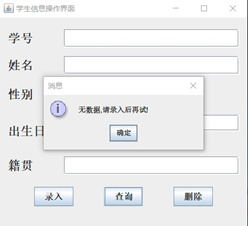
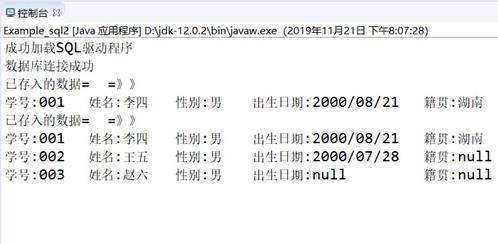
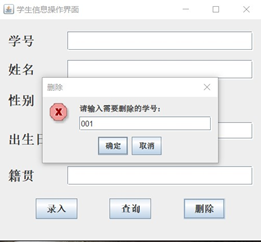
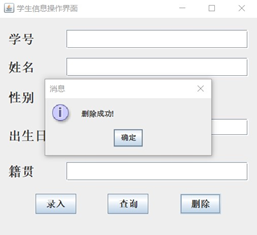
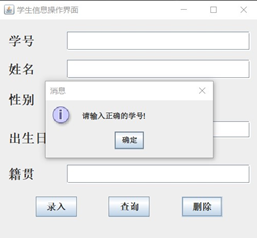
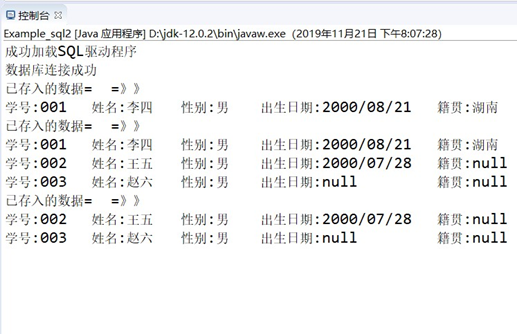
运行截图:



 浙公网安备 33010602011771号