

2019.9.15
1.按照封装模式,编写“电费管理类”Manager。包含:
1)2个私有属性:上月电表读数pre,本月电表读数cur。
2)2个构造方法:无参(初始化pre、cur均为0);2个参数(初始化pre、cur的值)。
3)main方法
代码:
	package class1;

import java.util.Scanner;
public class Manager {
	private double pre,cur;
	public Manager() {
		pre=0;
		cur=0;
	}
	public Manager(double pre,double cur) {
		this.pre=pre;
		this.cur=cur;
	}
	public float f() {
		return (float)(cur-pre);
	}
	public static void main(String[] args) {
		Scanner sc=new Scanner(System.in);
		double a,b;
		System.out.print("请输入上个月电表读数:");
		a=sc.nextDouble();
		System.out.print("请输入本月电表读数:");
		b=sc.nextDouble();
		Manager m=new Manager(a,b);
		System.out.print("本月用了"+m.f()+"度电");
	}
}
运行截图:
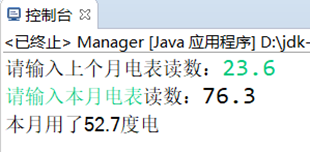
- 编码实现如下图所示界面及功能:
![]()
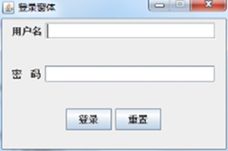
代码:
package class1;

import java.awt.*;
import java.awt.event.ActionEvent;
import java.awt.event.ActionListener;
import javax.swing.*;
public class MyFrame implements ActionListener{
	JFrame f;
	JPanel p;
	JLabel l1,l2,l3;
	JButton b1,b2;
	JTextField t1;
	JPasswordField w1;
	public MyFrame() {
		f=new JFrame("登入界面");
		p=new JPanel();
		l1=new JLabel("用户名");
		l2=new JLabel("密    码");
		l3=new JLabel();
		b1=new JButton("登入");
		b2=new JButton("重置");
		t1=new JTextField(20);
		w1=new JPasswordField(20);
		f.setSize(280, 150);
		f.setVisible(true);
		f.setLayout(new BorderLayout());
		f.add(p,BorderLayout.CENTER);
		p.add(l1);
		p.add(t1);
		p.add(l2);
		p.add(w1);
		p.add(b1);
		b1.addActionListener(this);
		p.add(b2);
		b2.addActionListener(this);
		f.add(l3,BorderLayout.SOUTH);
	}
	public static void main(String[] args) {
		new MyFrame();
	}
	@Override
	public void actionPerformed(ActionEvent e) {
		// TODO 自动生成的方法存根
		if(e.getSource()==b1) {
			if(t1.getText().equals("1234")&&w1.getText().equals("1234")) {
				l3.setText("                                  登入成功!");
			}else {
				l3.setText("                用户名或密码输入错误,请重试!");
			}
		}else {
			t1.setText("");
			w1.setText("");
			l3.setText(null);
		}
	}
}
运行截图:
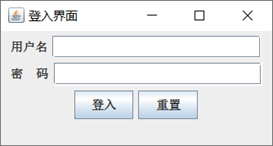
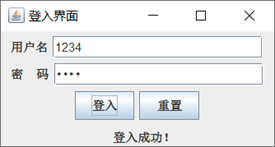
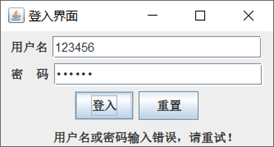
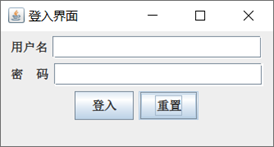
3.按以下要求编写程序:
1)编写Animal接口,接口中声明run( ) 方法
2)定义Bird类和Fish类实现Animal接口
3)编写Bird类和Fish类的测试程序,并调用其中的run( )方法
代码:
	package class1;

interface Animal {
		void run();
}
class Bird implements Animal{
	public void run() {
		System.out.println("这是Bird中的run方法");
	}
}

class Fish implements Animal{
	public void run() {
		System.out.println("这是Fish中的run方法");
	}
}

public class Animals{
	public static void main(String[] args) {
		Bird b=new Bird();
		Fish f=new Fish();
		b.run();
		f.run();
	}
}
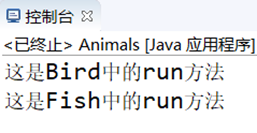
运行截图:
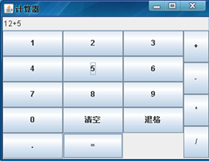
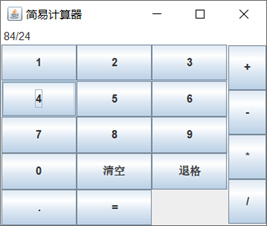
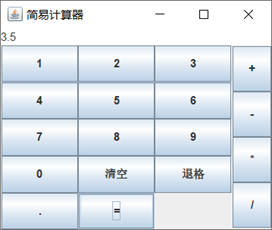
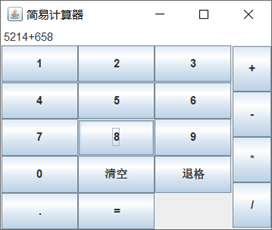
- 计算器程序
![]()
![]()
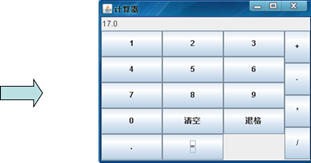
代码:
package class1;

import java.awt.*;
import java.awt.event.ActionEvent;
import java.awt.event.ActionListener;
import javax.swing.*;

public class MyJFrame implements ActionListener{
	String str1="",str2="",str3="",temp1,temp;
	int n1=0,judge;
	float f1,f2,f3;
	JFrame f;
	JPanel p1,p2;
	JTextArea ta;
	JButton[]b1;
	JButton[]b2;
	String[]b11= {"1","2","3",
			      "4","5","6",
			      "7","8","9",
			      "0","清空","退格",
			      ".","="};
	String[]b22= {"+","-","*","/"};
	public MyJFrame() {
		f=new JFrame("简易计算器");
		p1=new JPanel();
		p2=new JPanel();
		ta=new JTextArea();
		b1=new JButton[b11.length];
		for(int i=0;i<b11.length;i++) {
			b1[i]=new JButton(b11[i]);
			b1[i].addActionListener(this);
			p1.add(b1[i]);
		}
		b2=new JButton[b22.length];
		for(int i=0;i<b22.length;i++) {
			b2[i]=new JButton(b22[i]);
			b2[i].addActionListener(this);
			p2.add(b2[i]);
		}
		f.setSize(300,250);
		f.setLayout(new BorderLayout());
		f.setVisible(true);
		f.add(ta,BorderLayout.NORTH);
		f.add(p1,BorderLayout.CENTER);
		f.add(p2,BorderLayout.EAST);

		p1.setLayout(new GridLayout(5,3));
		p2.setLayout(new GridLayout(4,1));
	}
	public static void main(String[] args) {
		new MyJFrame();
	}
	@Override
	public void actionPerformed(ActionEvent e) {
		// TODO 自动生成的方法存根
		if(e.getActionCommand()=="0") {
			ta.append("0");
		}
		else if(e.getActionCommand()=="1") {
			ta.append("1");
		}
		else if(e.getActionCommand()=="2") {
			ta.append("2");
		}
		else if(e.getActionCommand()=="3") {
			ta.append("3");
		}
		else if(e.getActionCommand()=="4") {
			ta.append("4");
		}
		else if(e.getActionCommand()=="5") {
			ta.append("5");
		}
		else if(e.getActionCommand()=="6") {
			ta.append("6");
		}
		else if(e.getActionCommand()=="7") {
			ta.append("7");
		}
		else if(e.getActionCommand()=="8") {
			ta.append("8");
		}
		else if(e.getActionCommand()=="9") {
			ta.append("9");
		}
		else if(e.getActionCommand()==".") {
			ta.append(".");
		}
		else if(e.getActionCommand()=="清空") {
			ta.setText(" ");
		}
		else {
			while(e.getActionCommand()=="+") {
				str1=ta.getText();
				n1=str1.length();
				ta.append("+");
				judge=1;
				break;
			}
			while(e.getActionCommand()=="-") {
				str1=ta.getText();
				n1=str1.length();
				ta.append("-");
				judge=2;
				break;
			}
			while(e.getActionCommand()=="*") {
				str1=ta.getText();
				n1=str1.length();
				ta.append("*");
				judge=3;
				break;
			}
			while(e.getActionCommand()=="/") {
				str1=ta.getText();
				n1=str1.length();
				ta.append("/");
				judge=4;
				break;
			}
			while(e.getActionCommand()=="=") {
				if(judge==1) {
					str2=ta.getText();
					str3=str2.substring(n1+1, str2.length());
					f1=Float.parseFloat(str1);
					f2=Float.parseFloat(str3);
					f3=f1+f2;
					ta.setText("");
					ta.append(f3+"");
					break;
				}
				else if(judge==2) {
					str2=ta.getText();
					str3=str2.substring(n1+1, str2.length());
					f1=Float.parseFloat(str1);
					f2=Float.parseFloat(str3);
					f3=f1-f2;
					ta.setText("");
					ta.append(f3+"");
					break;
				}
				else if(judge==3) {
					str2=ta.getText();
					str3=str2.substring(n1+1, str2.length());
					f1=Float.parseFloat(str1);
					f2=Float.parseFloat(str3);
					f3=f1*f2;
					ta.setText("");
					ta.append(f3+"");
					break;
				}
				else if(judge==4) {
					str2=ta.getText();
					str3=str2.substring(n1+1, str2.length());
					f1=Float.parseFloat(str1);
					f2=Float.parseFloat(str3);
					f3=f1/f2;
					ta.setText("");
					ta.append(f3+"");
					break;
				}
			}
		}
		temp1=ta.getText();
		temp=temp1.substring(0, temp1.length()-1);
		if(e.getActionCommand()=="退格") {
			ta.setText(temp);
		}
	}
}
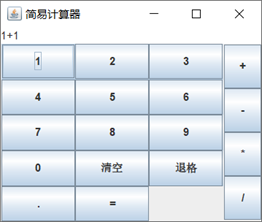
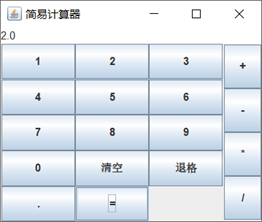
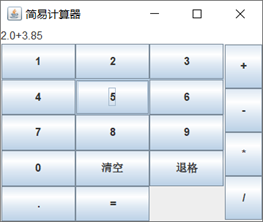
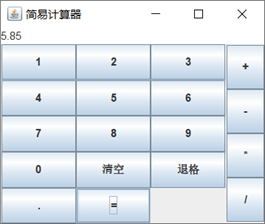
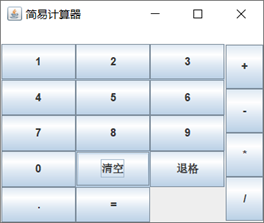
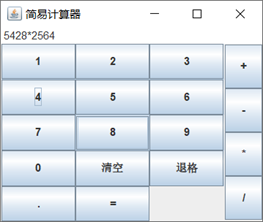
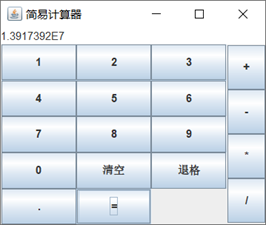
运行截图:

 浙公网安备 33010602011771号