

2019.05.31
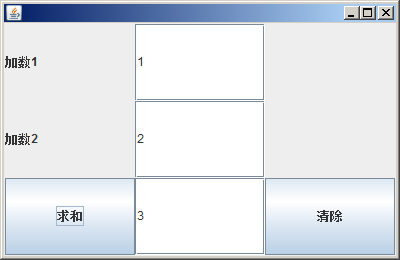
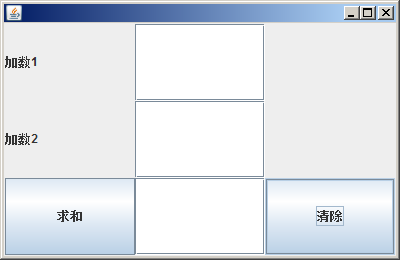
2、 绘制如图所示的界面。
要求:当单击“求和”按钮时,把“和”显示在“求和”按钮后的文本行中,当单击“清除”按钮后,
3个文本行的内容全部被清除,当单击窗口右上角的关闭按钮时,结束该程序。

package bbb;

import java.awt.*;
import java.awt.event.ActionEvent;
import java.awt.event.ActionListener;
import javax.swing.*;
public class ccc implements ActionListener{
	JFrame f;
	JPanel p1,p2,p3;
	JLabel l1,l2,l3,l4;
	JButton b1,b2;
	JTextField t1,t2,t3;
	GridLayout g1,g2,g3,g4;
	public ccc(){
		f=new JFrame();
		p1=new JPanel();
		p2=new JPanel();
		p3=new JPanel();
		g1=new GridLayout(1,3);
		g2=new GridLayout(3,1);
		g3=new GridLayout(3,1);
		g4=new GridLayout(3,1);
		l1=new JLabel("加数1");
		l2=new JLabel("加数2");
		l3=new JLabel();
		l4=new JLabel();
		b1=new JButton("求和");
		b1.addActionListener(this);
		b2=new JButton("清除");
		b2.addActionListener(this);
		t1=new JTextField(5);
		t2=new JTextField(5);
		t3=new JTextField(5);
		f.setSize(400,260);
		f.setVisible(true);
		f.add(p1);
		f.add(p2);
		f.add(p3);
		f.setLayout(g1);
		p1.setLayout(g2);
		p2.setLayout(g3);
		p3.setLayout(g4);
		p1.add(l1);
		p2.add(t1);
		p1.add(l2);
		p2.add(t2);
		p1.add(b1);
		p2.add(t3);
		p3.add(l3);
		p3.add(l4);
		p3.add(b2);
	}
	public static void main(String[] args){
		new ccc();
	}
	@Override
	public void actionPerformed(ActionEvent e) {
		// TODO 自动生成的方法存根
		if(e.getActionCommand().equals(b1.getText())){
			int a,b,c;
			a=Integer.parseInt(t1.getText());
			b=Integer.parseInt(t2.getText());
			c=a+b;
			t3.setText(c+"");
		}
		if(e.getActionCommand().equals(b2.getText())){
			t1.setText(null);
			t2.setText(null);
			t3.setText(null);
		}
	}
}


 浙公网安备 33010602011771号