


前言
在应用程序开发的过程中,常常需要用到批量提交到数据库的功能。而常用的批量提交有几种方式,下面分别就几种方式在批量提交中的性能表现进行对比,并作为知识碎片记录一下,方便以后的查找。这边暂时不比较Sql Server 2005和Sql Server 2008 分别提供的SqlBulkCopy和表变量参数的方式导入数据,只关注SQL的批量提交和执行。
- 第一种:单条提交SQL语句;
- 第二种:SqlCommandSet;
- 第三中:把多条SQL语句拼凑在一起提交;
测试环境
操作系统:Win7
开发工具:vs2008
数据库:Sql Server 2008(虚拟机:内存-764MB)
处理器:Pentium(R) Dual-Core T4300 @ 2.10GHz
内存:2GB
测试步骤
-
创建测试表
/****** Object:  Table [dbo].[Product]    Script Date: 04/09/2010 15:47:53 ******/
IF  EXISTS (SELECT * FROM sys.objects WHERE object_id = OBJECT_ID(N'[dbo].[Product]') AND type in (N'U'))
DROP TABLE [dbo].[Product]
GO

USE [testing]
GO

/****** Object:  Table [dbo].[Product]    Script Date: 04/09/2010 15:47:53 ******/
SET ANSI_NULLS ON
GO

SET QUOTED_IDENTIFIER ON
GO

CREATE TABLE [dbo].[Product](
    [Id] [uniqueidentifier] NOT NULL,
    [Name] [nvarchar](255) NULL,
    [Category] [nvarchar](255) NULL,
    [Discontinued] [bit] NULL,
PRIMARY KEY CLUSTERED
(
    [Id] ASC
)WITH (PAD_INDEX  = OFF, STATISTICS_NORECOMPUTE  = OFF, IGNORE_DUP_KEY = OFF, ALLOW_ROW_LOCKS  = ON, ALLOW_PAGE_LOCKS  = ON) ON [PRIMARY]
) ON [PRIMARY]

GO
-
测试用例编写及测试
1、逐条提交
static void ExecuteBatchOneByOne()
{
    string sqlString = @"insert into product(name, category, discontinued, id) values(@p1, @p2, @p3, @p4) ";
    totalEffected = 0;
    using (SqlConnection conn = new SqlConnection(ConnectionString))
    {
        conn.Open();
        SqlTransaction trans = conn.BeginTransaction(System.Data.IsolationLevel.ReadUncommitted);

        try
        {
            CCodeTimer.Time("execute insert one by one", iterations * batchSize,
                () =>
                {
                    SqlCommand cmd = conn.CreateCommand();
                    cmd.Transaction = trans;
                    cmd.CommandText = sqlString;
                    cmd.CommandType = System.Data.CommandType.Text;
                    cmd.Parameters.AddWithValue("@p1", "test1");
                    cmd.Parameters.AddWithValue("@p2", "test1");
                    cmd.Parameters.AddWithValue("@p3", 0);
                    cmd.Parameters.AddWithValue("@p4", Guid.NewGuid());
                    totalEffected += cmd.ExecuteNonQuery();
                });
            trans.Commit();
        }
        catch (Exception e)
        {
            trans.Rollback();
            Console.WriteLine(e.ToString());
        }
    }
}
2、使用SqlClient.SqlCommandSet批量提交
static void ExecuteBatchByCommandSet()
{
    string sqlString = @"insert into product(name, category, discontinued, id) values(@p1, @p2, @p3, @p4)";
    totalEffected = 0;

    using (SqlConnection conn = new SqlConnection(ConnectionString))
    {
        conn.Open();
        SqlTransaction trans = conn.BeginTransaction(System.Data.IsolationLevel.ReadUncommitted);

        try
        {
            CCodeTimer.Time("execute insert by SqlClient.SqlCommandSet", iterations,
                () =>
                {
                    SqlCommandSet commandSet = new SqlCommandSet();
                    commandSet.Connection = conn;
                    commandSet.Transaction = trans;

                    for (int i = 0; i < batchSize; i++)
                    {
                        SqlCommand cmd = conn.CreateCommand();
                        cmd.CommandText = sqlString;
                        cmd.CommandType = System.Data.CommandType.Text;
                        cmd.Parameters.AddWithValue("@p1", "test2");
                        cmd.Parameters.AddWithValue("@p2", "test2");
                        cmd.Parameters.AddWithValue("@p3", 0);
                        cmd.Parameters.AddWithValue("@p4", Guid.NewGuid());
                        commandSet.Append(cmd);
                    }
                    totalEffected += commandSet.ExecuteNonQuery();
                });
            trans.Commit();
        }
        catch (Exception e)
        {
            trans.Rollback();
            Console.WriteLine(e.ToString());
        }
    }

}
3、使用多条SQL拼凑后批量提交
static void ExecuteBatchByCommandStrings()
{
    totalEffected = 0;

    using (SqlConnection conn = new SqlConnection(ConnectionString))
    {
        conn.Open();
        SqlTransaction trans = conn.BeginTransaction(System.Data.IsolationLevel.ReadUncommitted);

        try
        {
            CCodeTimer.Time("execute insert by Command String", iterations,
                () =>
                {
                    SqlCommand cmd = conn.CreateCommand();
                    cmd.Transaction = trans;
                    cmd.CommandType = System.Data.CommandType.Text;
                    StringBuilder sqlBuilder = new StringBuilder();

                    for (int i = 0; i < batchSize; i++)
                    {
                        sqlBuilder.Append("insert into product(name, category, discontinued, id) ")
                            .Append("values(")
                            .AppendFormat("@p{0}_0, @p{0}_1, @p{0}_2, @p{0}_3", i)
                            .Append(");");
                        cmd.Parameters.AddWithValue(string.Format("@p{0}_0", i), "test3");
                        cmd.Parameters.AddWithValue(string.Format("@p{0}_1", i), "test3");
                        cmd.Parameters.AddWithValue(string.Format("@p{0}_2", i), 0);
                        cmd.Parameters.AddWithValue(string.Format("@p{0}_3", i), Guid.NewGuid());
                    }
                    cmd.CommandText = sqlBuilder.ToString();

                    totalEffected += cmd.ExecuteNonQuery();
                });
            trans.Commit();
        }
        catch (Exception e)
        {
            trans.Rollback();
            Console.WriteLine(e.ToString());
        }
    }
}
4、执行测试
static void ExecuteBatchPerformanceTests()
{
    CTestUtil.TestName();

    Console.WriteLine("Iterations: {0}", iterations);
    Console.WriteLine("Batch Size: {0}\r\n", batchSize);

    ExecuteBatchOneByOne();
    Console.WriteLine("Total effected rows: {0}\r\n", totalEffected);

    ExecuteBatchByCommandSet();
    Console.WriteLine("Total effected rows: {0}\r\n", totalEffected);

    ExecuteBatchByCommandStrings();
    Console.WriteLine("Total effected rows: {0}\r\n", totalEffected);
}
-
测试结果
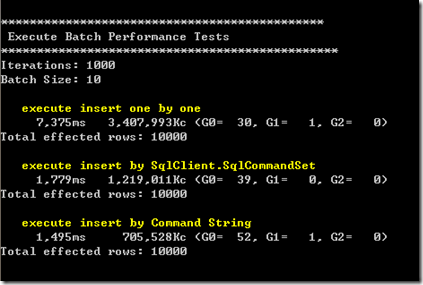
1、BatchSize为10的情况:
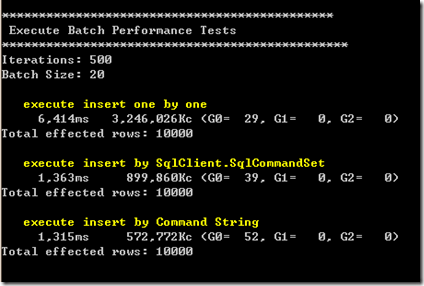
2、BatchSize为20的情况:
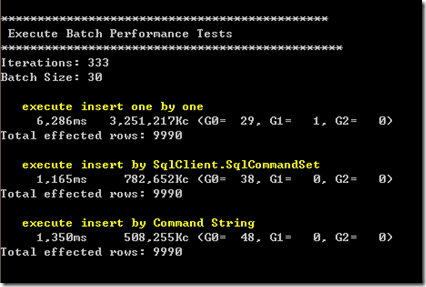
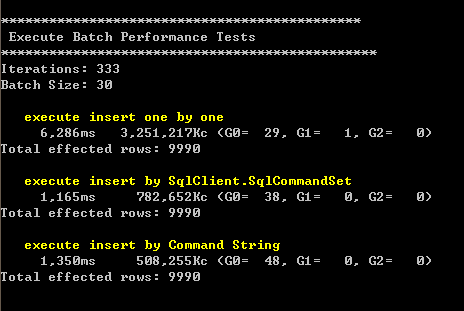
3、BatchSize为30的情况:
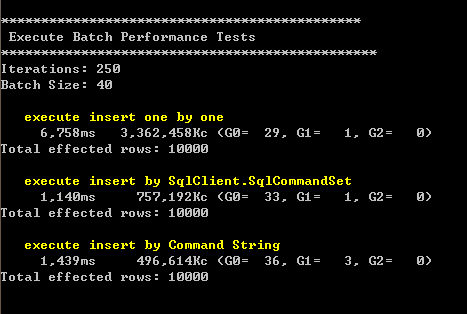
4、BatchSize为40的情况:
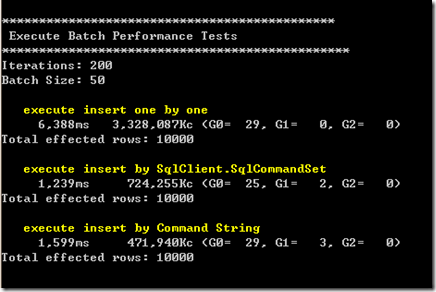
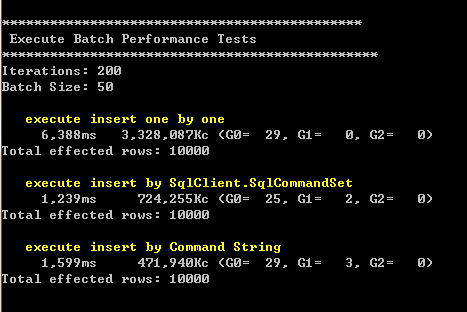
5、BatchSize为50的情况:
-
结论
- 使用ADO.NET 2.0提供的SqlCommandSet(这个类没有对外发布,可以通过反射自己封装)在执行性能上表现优越,在新增1万条数据的情况下提升了70%~80%;
- 使用拼凑SQL语句后批量提交的性能表现与SqlCommandSet相当,但随着Batch Size 的增大(大于25,这个值和SQL 语句的长度和参数个数有关),性能相较于SqlCommandSet呈下降趋势,同时这种方式有个缺点,当命令参数达到一定数量的时候会执行失败,我测试的结果有的4000个参数以上就无法成功执行,有的3000个参数就无法执行,怀疑和SQL SERVER的硬件环境和某些配置有关,具体还有待查阅,如果有知道的人可以直接告诉我:)
- 最近在研究NHibernate的时候发现它采用的是SqlCommandSet的方式进行批处理的,很多地方可以借鉴一下。
Technorati 标签: 性能;批处理;Performance

 浙公网安备 33010602011771号