
java网络编程之IO
一、概念
Socket通信
Socket(套接字)不是协议,工作在OSI七层协议的第五层会话层(TCP协议工作在第四层传输层),是应用层与TCP/IP协议组通信的中间软件抽象层,它是一组接口(门面设计模式)。它把复杂的TCP/IP协议隐藏在socket接口后面,对用户来说,一组简单的接口就是全部,让socket去组织数据,以符合指定的协议。
Http协议和Websocket协议
Websocket是为了满足web日益增长的实时通信需求产生的,解决了客户端发布多个http请求到服务器资源浏览器必须经过长时间的轮询问题。
相同:
建立在TCP之上,通过TCP协议来传输数据。
都是可靠性传输协议。
都是应用层协议。
差异:
WebSocket是HTML5中的协议,支持持久连接,HTTP不支持持久连接
HTTP是单向协议,只能由客户端发起,做不到服务器主动向客户端推送信息。
长连接和短连接的区别:
- HTTP1.0默认使用短连接。也就是说,客户端和服务器每进行一次HTTP操作,就建立一次连接,任务结束中断连接。HTTP的生命周期通过request来界定,也就是一个request、一个response在HTTP1.0中Http请求就结束了。
- 从HTTP1.1起默认使用长连接,长连接是指在一次HTTP请求之后,底层的TCP连接不会立即中断,会保持连接一定的时间。客户端再次访问服务器会继续使用这个连接,在这个连接上可以传输多个request和response。
阻塞和非阻塞
- 阻塞:应用程序获取网络数据时阻塞等待直到数据传输完毕。
- 非阻塞:应用程序直接获取已经准备就绪的数据,无需等待
同步和异步
- 同步:同步时应用程序直接参与IO读写,应用程序阻塞到某个方法上等待数据准备就绪,或者采用轮训的策略检查数据是否准备就绪,就绪后获取数据。
- 异步:所有的IO操作交给操作系统处理,我们不需关心IO读写,当操作系统完成IO读写之后会给程序发送通知,应用程序拿走数据即可。
二、java网络编程IO
BIO
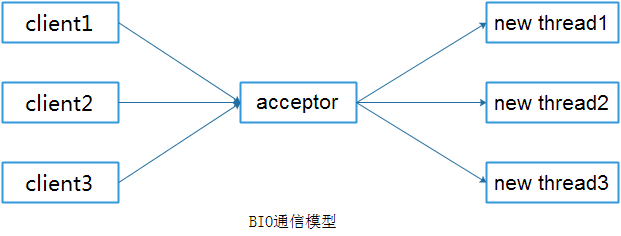
网络编程的基本模式是CS模式,即客户端和服务端两个进程进行通信。服务端提供IP和端口号,客户端根据IP+端口向服务端发送请求,经过三次握手(请求+服务端ACK+客户端ACK)双方建立连接,然后进行套接字通信。BIO通信模型通常服务端通过一个独立的accept线程进行监听客户端连接,当接收到客户端的请求之后创建一个新的线程进行处理,处理完成之后线程销毁。
//client端
public class Client {
	final static String ADDRESS="127.0.0.1";
	final static int PORT=8765;
	public static void main(String args[])
	{
		Socket socket=null;
		BufferedReader in=null;
		PrintWriter out=null;
		try {
			socket=new Socket(ADDRESS, PORT);
			//获取读数据流对象
			in=new BufferedReader(new InputStreamReader(socket.getInputStream()));
			//获取写数据流对象
			out =new PrintWriter(socket.getOutputStream(),true);
			out.println("接收到客户端请求。。");
			String response=in.readLine();
			System.out.println(response);
		} catch (Exception e) {
			e.printStackTrace();
		}
	}
}
//Server
public class Server {
	final static int PROT=8765;
	public static void main(String args[])
	{
		ServerSocket server=null;
		try {
			server=new ServerSocket(PROT);
			System.out.println("Server start ..");
			//阻塞等待请求,一般while(true)来监听
			//本例中值监听第一次请求进行试验
			Socket socket=server.accept();
			System.out.println("socket receive ..");
			//接收到请求之后创建新线程来处理,也可以使用线程池处理
			new Thread(new ServerHandler(socket)).start();
		} catch (Exception e) {
			e.printStackTrace();
		}
	}
}
public class ServerHandler implements Runnable{

	private Socket  socket;
	public ServerHandler(Socket  socket) {
		System.out.println("ServerHandler init ..");
		this.socket=socket;
	}
	@Override
	public void run() {
		System.out.println("ServerHandler run ..");
		BufferedReader in=null;
		PrintWriter out=null;
		try {
			in=new BufferedReader(new InputStreamReader(socket.getInputStream()));
			out =new PrintWriter(socket.getOutputStream(),true);
			System.out.println("接收到客户端请求。。");
			String body=null;
			while(true)
			{
				//读取数据
				body=in.readLine();
				if(body==null)
					break;
				System.out.println("Server:"+body);
				out.println("服务端回送响应数据");
			}
		} catch (Exception e) {
			e.printStackTrace();
		}
	}

}
NIO
NIO避免了原始TCP建立连接使用3次握手,减少了连接开销。
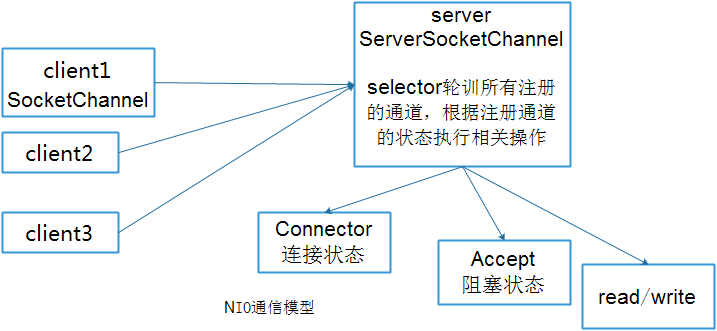
- Buffer对象:本质上是数组,NIO中所有数据都是通过缓冲区(Buffer)进行读写,避免了直接操作数据流Stream
- Channel:NIO网络数据通过双向管道来读取和写入,管道注册到多路复用器Selector上,有多种状态位,方便复用器来识别。
- Selector:多路复用器类似于一个管理者,管理注册在其上的所有通道,提供选择已经就绪任务的能力。Selector不断去轮训注册在其上的通道,如果通道发生了读写操作,这个通道处于就绪状态,就会被selector轮训出来,然后通过selectorKey就可以取得就绪的Channel集合,从而进行后续IO操作。
![]()
//client
public class Client {
	public static void main(String args[]) throws IOException
	{
		InetSocketAddress address=new InetSocketAddress("127.0.0.1", 8765);
		SocketChannel sChannel=null;
		//声明BUffer,并分配1024内存空间
		ByteBuffer buffer=ByteBuffer.allocate(1024);
		//打开通道
		sChannel=SocketChannel.open();
		//注册到selector
		sChannel.connect(address);
		while (true) {
			byte[] bytes=new byte[1024];
			//控制台读取输入
			System.in.read(bytes);
			//加入Buffer
			buffer.put(bytes);
			//buffer复位,不复位服务端无法获得元素
			buffer.flip();
			//写入管道
			sChannel.write(buffer);
			//buffer清空
			buffer.clear();
		}
	}
}
public class Server implements Runnable{
	//声明多路复用器管理所有通道
	private Selector selector;
	//建立读写缓存区
	private ByteBuffer readBuf=ByteBuffer.allocate(1024);
	private ByteBuffer writeBuf=ByteBuffer.allocate(1024);

	public Server(int port) throws IOException
	{
		//打开多路复用器
		this.selector=Selector.open();
		//打开服务器通道
		ServerSocketChannel ssc=ServerSocketChannel.open();
		//设置服务器通道为非阻塞模式
		ssc.configureBlocking(false);
		//绑定地址
		ssc.bind(new InetSocketAddress(port));
		//服务器通道注册到多路复用器上,监听客户端连接请求
		ssc.register(this.selector, SelectionKey.OP_ACCEPT);
		System.out.println("Server start port:"+port);
	}

	@Override
	public void run() {
		while(true)
		{
			//可以通过while(true)不停监听读写操作
			try {
				//多路复用器开始监听,阻塞监听只有发生读写操作时才继续执行
				this.selector.select();
				//返回多路复用器已经选择的结果集,拿到所有通道的key值
				Iterator<SelectionKey>keys=this.selector.selectedKeys().iterator();
				while(keys.hasNext())
				{
					//选择一个元素
					SelectionKey key=keys.next();
					//直接从容器中移除
					keys.remove();
					//如果是有效的
					if(key.isValid())
					{
						//如果为阻塞状态
						if(key.isAcceptable())
						{
							//执行注册操作
							this.accept(key);
						}
						//如果为可读状态
						if(key.isReadable())
						{
							this.read(key);
						}
						//如果为可写状态
						if(key.isWritable())
						{

						}
					}

				}
			} catch (IOException e) {
				e.printStackTrace();
			}
		}
	}

	//通过ServerChannel获取到客户端通道,并注册标识位read
	public void accept(SelectionKey key) throws IOException
	{
		//获取服务通道
		ServerSocketChannel ssc=(ServerSocketChannel)key.channel();
		//执行阻塞方法
		SocketChannel sc=ssc.accept();
		//设置阻塞模式
		sc.configureBlocking(false);
		//注册到多路复用器上,并设置读取标识
		sc.register(this.selector, SelectionKey.OP_READ);
	}
	public void read(SelectionKey key) throws IOException
	{
		//清空缓冲区旧的数据
		this.readBuf.clear();
		//获取之前注册的通道对象
		SocketChannel sc=(SocketChannel)key.channel();
		//读取数据
		int count=sc.read(this.readBuf);
		//判断
		if(count==-1)
		{
			key.channel().close();
			key.cancel();
			return;
		}
		//如果有数据,先进行复位
		this.readBuf.flip();
		//根据缓冲区长度
		byte[] bytes=new byte[this.readBuf.remaining()];
		//接收缓冲区数据
		this.readBuf.get(bytes);

		String body=new String(bytes).trim();
		System.out.println("Server:"+body);
		//可以给客户端回复数据
	}

	public static void main(String args[]) throws IOException
	{
		new Thread(new Server(8765)).start();
	}
}
AIO
在NIO的基础上引入了异步通道的概念,并提供了异步文件和异步套接字通道的实现,真正意义上实现了异步非阻塞。也称之为NIO2.0。
public class Server {
	//线程池
	private ExecutorService executorService;
	//线程组
	private AsynchronousChannelGroup threadGroup;
	//创建服务器通道
	public AsynchronousServerSocketChannel assc;
	public Server(int port) throws IOException, InterruptedException
	{
		//实例化线程池
		this.executorService=Executors.newCachedThreadPool();
		//创建线程组
		this.threadGroup=AsynchronousChannelGroup.withCachedThreadPool(executorService, 1);
		//创建服务器通道
		assc =AsynchronousServerSocketChannel.open(threadGroup);
		//绑定监听
		assc.bind(new InetSocketAddress(port));
		System.out.println("server start ,port:"+port);
		//当前accept非阻塞
		assc.accept(this,new ServerCompletionHandler());
		System.out.println("非阻塞!");
		//程序阻塞于此,由于AIO是非阻塞的
		Thread.sleep(Integer.MAX_VALUE);
	}

	public static void main(String args[]) throws IOException, InterruptedException
	{
		Server server= new Server(8765);
	}
}

public class ServerCompletionHandler implements CompletionHandler<AsynchronousSocketChannel, Server> {

	@Override
	public void completed(AsynchronousSocketChannel result, Server attachment) {
		//当有下一个客户端接入的时候,直接调用server的accept方法接收,反复执行类似于递归
		attachment.assc.accept(attachment,this);
		read(result);
	}

	@Override
	public void failed(Throwable exc, Server attachment) {
		exc.printStackTrace();
	}

	private void read(final AsynchronousSocketChannel asc)
	{
		ByteBuffer buf=ByteBuffer.allocate(1024);
		//异步读取数据
		asc.read(buf,buf,new CompletionHandler<Integer, ByteBuffer>() {

			@Override
			public void completed(Integer result, ByteBuffer attachment) {
				//复位
				attachment.flip();
				System.out.println("server->收到客户端数据长度:"+result);
				//读取数据
				String resultData=new String(attachment.array()).trim();
				System.out.println("Server->手动客户端数据信息为:"+resultData);
				String response="服务器响应,收到客户端数据:"+resultData;
				//写入数据
				write(asc,response);
			}

			@Override
			public void failed(Throwable exc, ByteBuffer attachment) {
				exc.printStackTrace();
			}

		});
	}

	private void write(AsynchronousSocketChannel asc,String response)
	{
		ByteBuffer buffer=ByteBuffer.allocate(1024);
		buffer.put(response.getBytes());
		buffer.flip();
		try {
			//write()方法返回的是Future对象,调用get方法看是否写入成功
			asc.write(buffer).get();
		} catch (InterruptedException e) {
			e.printStackTrace();
		} catch (ExecutionException e) {
			e.printStackTrace();
		}
	}
}

 浙公网安备 33010602011771号