
VScode-插件
PicGo -图库工具
教程:在VS Code中使用 Picgo + jsDelivr + Github搭建高速稳定图床
总结:打开设置,自上而下分别填入
master
https://cdn.jsdelivr.net/gh/**UserName/PicBed**(换成你的仓库)
imgs_for_blogs/(文件夹)
Edge-coordinates/PicBed(仓库)
token
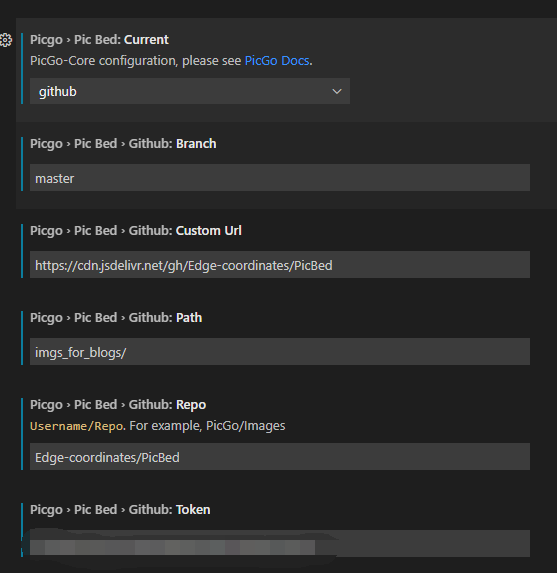
还要将 Pic Bed:Uploader 设置为 github
快捷键:
-
uploading an image from clipoard:
Ctrl + Alt + U -
uploading images from explorer:
Ctrl + Alt + E -
uploading an image from input box:
Ctrl + Alt + O

 浙公网安备 33010602011771号