


Git配置多SSH,使Github、Gitee同时存在。git 命令
效果:不同账号配置不同的密钥,不同账号配置不同密钥
生成不同的SSH私钥
// 生成GitHub
ssh-keygen -t rsa -C "xxx@qq.com" -f "github_id_rsa"
ssh-keygen -t rsa -C "xxx@qq.com" -f "gitee_id_rsa"
多账号必须配置config文件
# gitee
Host gitee.com
HostName gitee.com
PreferredAuthentications publickey
IdentityFile ~/.ssh/id_rsa.gitee

# github
Host github.com
HostName github.com
PreferredAuthentications publickey
IdentityFile ~/.ssh/id_rsa.github
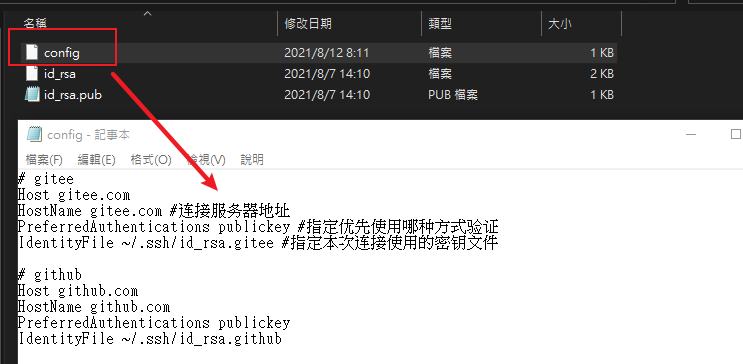
测试是否连接正常
ssh -T git@github.com
ssh -T git@gitee.com
git命令
- 查看全部分支:git branch
- 创建分支:git branch branchName
- 从已有分支创建新的分支:git checkout -b newBranchName (注意此刻的分支的位置)
- 删除本地分支:git branch -D(-d) branchName
- 删除远程分支:git push origin --delete branchName
- 切换分支:git checkout branchName
- 提交数据到分支:git push origin <local_branch_name>:<remote_branch_name>, git push --set-upstream origin branchName
版本回退
查看 log 信息:
git log
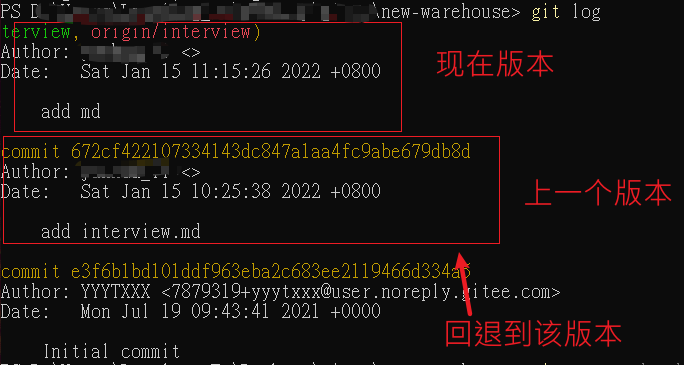
git reset --hard 672cf422107334143dc847a1aa4fc9abe679db8d

参考:https://www.cnblogs.com/ryanliag/p/13036433.html
https://www.cnblogs.com/qianxiaox/p/13700327.html

 浙公网安备 33010602011771号