ComfyUI极速流:z_image_turbo秒级出图+SRT自动配音全攻略
 本文实测z_image_turbo模型实现低显存秒级出图。重点演示利用TTS Audio Suite将剪映SRT字幕直接转为克隆语音,实现视频自动配音与时间对齐。文内附完整工作流及数字识别报错的解决技巧,助你高效制作AI视频。
ComfyUI极速流:z_image_turbo秒级出图+SRT自动配音全攻略

阅读原文
建议阅读原文,始终查看最新文档版本,获得最佳阅读体验:《ComfyUI极速流:z_image_turbo秒级出图+SRT自动配音全攻略》
https://docs.dingtalk.com/i/nodes/9E05BDRVQ2jl5Xjgcp0n6GgkJ63zgkYA
前言
近期,z_image_turbo很火,主要是这个文生图大模型出图很快,对GPU要求也不是很高,同时生成的图片的质量也是很高的,我也打算玩一玩。另外向大家演示我是如何利用TTS Audio Suite高效地为视频进行配音的(语言合成)。
ComfyUI workflow
我使用的GPU是NVIDIA Quadro RTX 5000 16GB
ComfyUI内置模板,直接打开就行
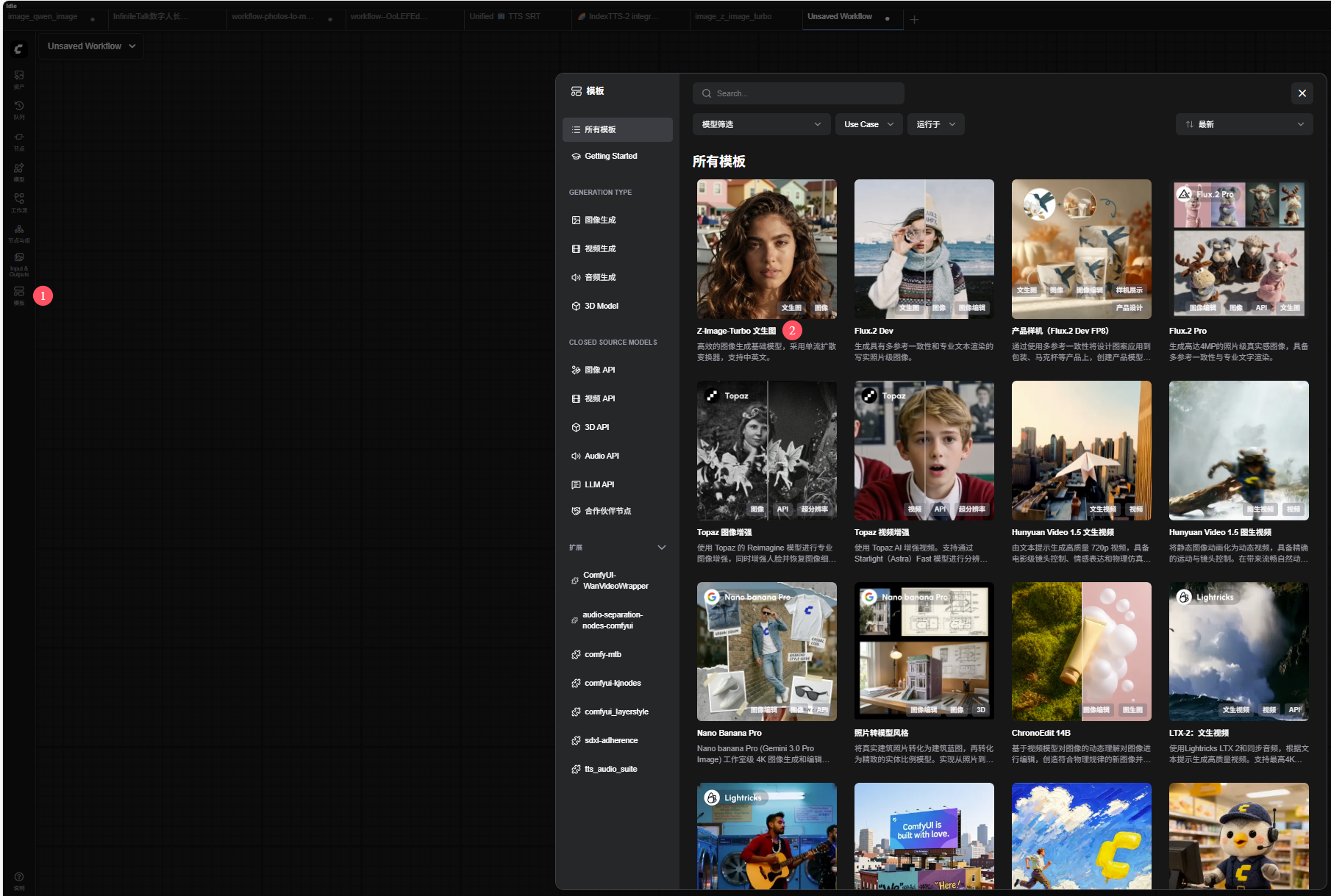
根据workflow中的注释下载好模型文件,
然后输入提示词,我用的是这段提示词:
young Asian woman, selfie, upper body, facing camera, waving hand,
round glasses, natural makeup, soft pink lips, clear skin,

curvy body, feminine figure, full bust, voluptuous chest,
well-proportioned cleavage, natural anatomy,

long dark hair in twin braids,
wearing low-cut pink sleeveless top, deep neckline,
summer outfit, elegant yet attractive,

on a yacht deck, ocean background, calm sea, blue sky,
daylight, natural lighting, soft sunlight,

photorealistic, ultra high detail, sharp focus,
realistic skin texture, natural shadows,
cinematic composition, shallow depth of field,
DSLR photography, influencer style, 4k, high resolution
我将批量大小设置为了2,所以一次性生成了两张图片,效果还是很不错的。

出图还是很快的,第一次167秒,第二次104秒

视频演示
用剪映剪辑视频
这部分关键是说明我是如何利用剪映和TTS Audio Suite,实现将SRT(字幕文件)直接转换为音频的(利用克隆的音色),并且要保持时间对齐。
将素材导入到剪映中,我用到的就是几张图片
添加字幕
直接添加字幕就行,调整好时间。
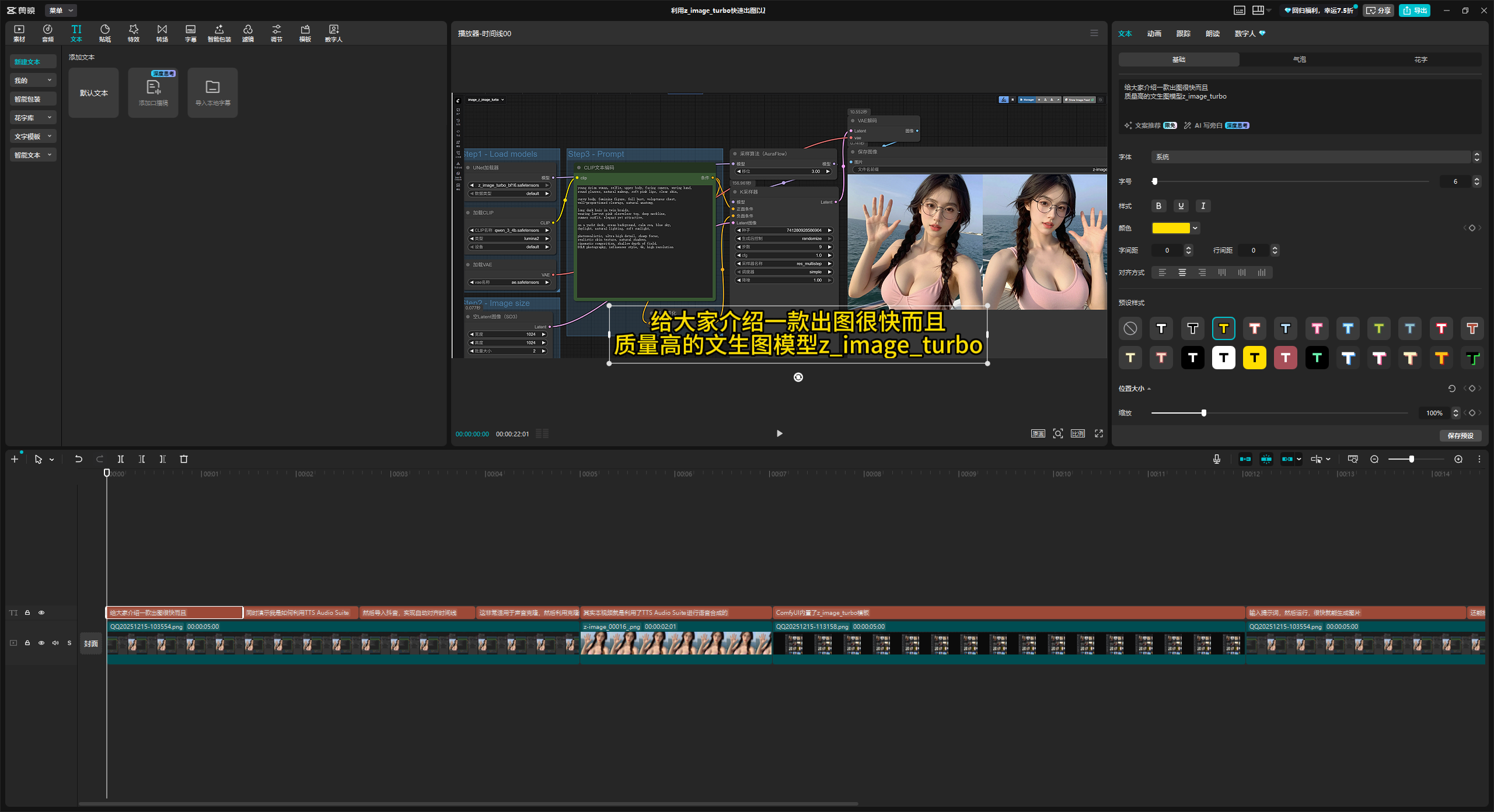
导出字幕文件(srt)
剪映并不支持导出手工添加的字幕,只能导出从视频或音频中识别到的字幕。
准备好需要克隆的声音
首先要准备一个要克隆的音频,我用的是这个音频(小萝莉音色)
请至钉钉文档查看附件《904fda31-1b37-43a9-815e-40c6677ff9c4.wav》
克隆声音并将SRT转换为音频的ComfyUI workflow
这是我用到的ComfyUI workflow
请至钉钉文档查看附件《TTS Audio Suite利用IndexTTS2模型进行语音克隆并将SRT字幕转换为语音.json》
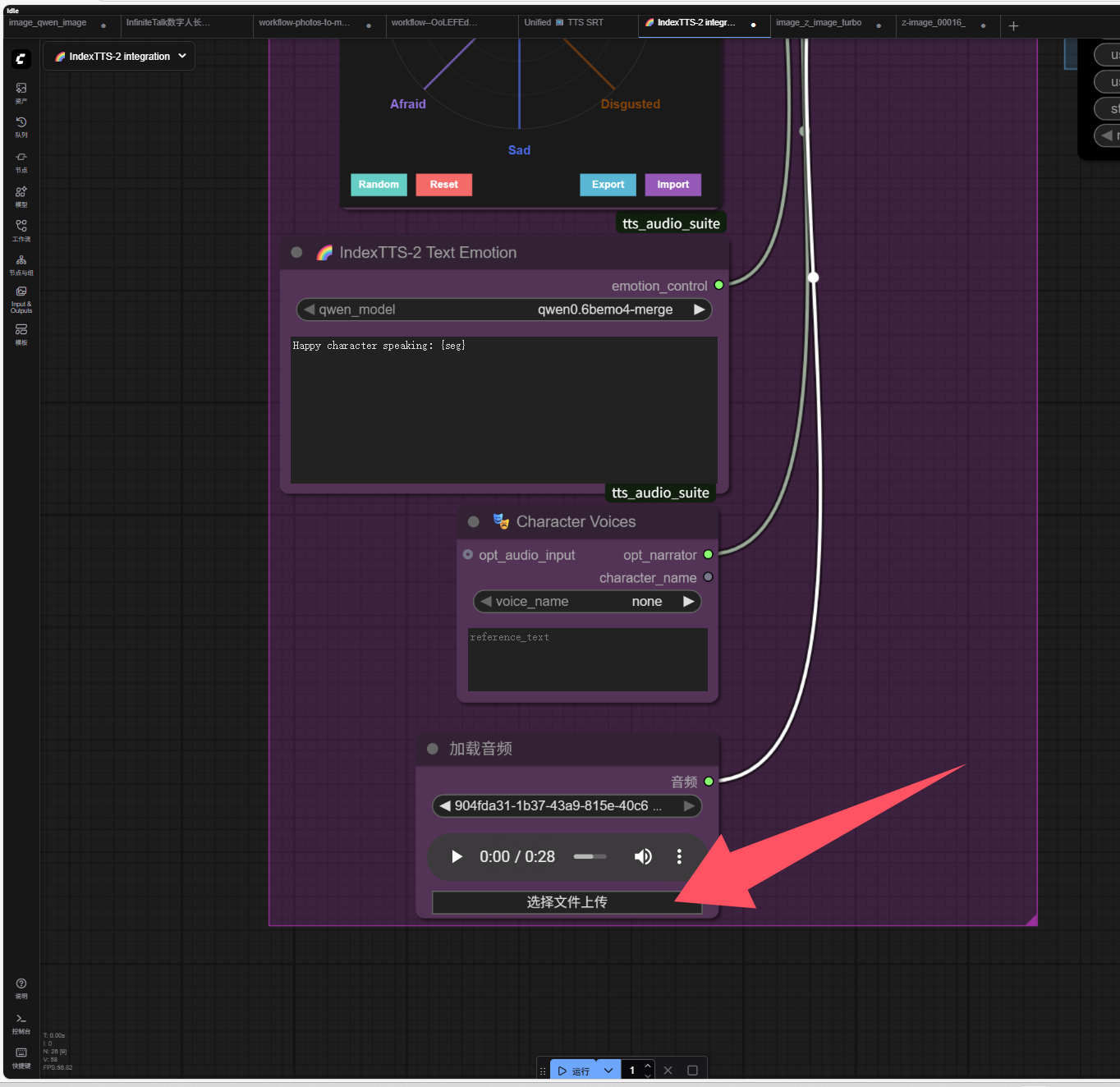
上传需要克隆的音频文件
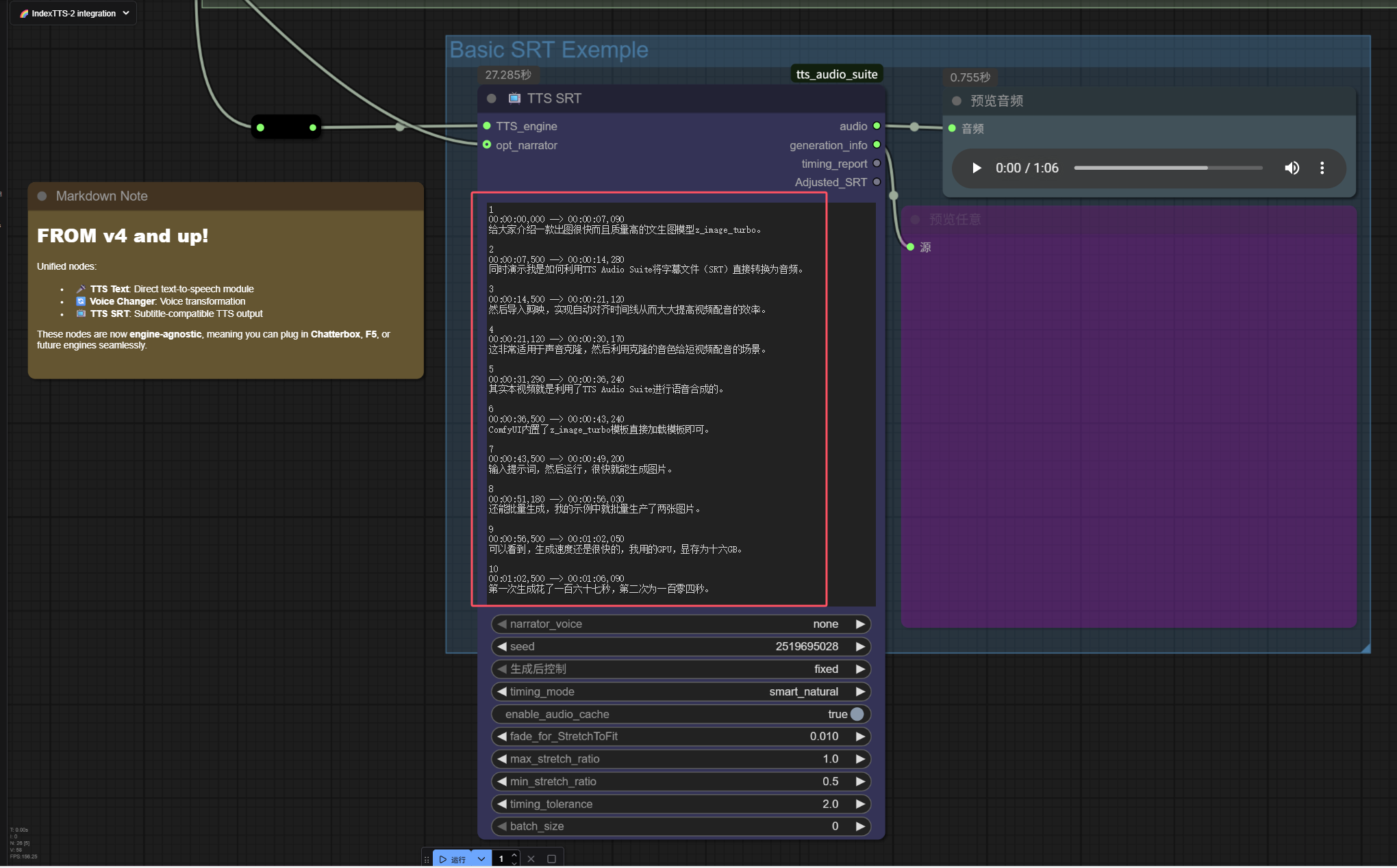
编辑SRT字幕
由于剪映并不支持导出手工添加的字幕,只能导出从视频或音频中识别到的字幕。所以需要在ComfyUI中手工编辑字幕。
注意:注意控制时长,要是时长过短,则语速会非常快,而且可能会截断,如果时长过长,则语速太慢,也不好。
下载合成好的语音

请至钉钉文档查看附件《ComfyUI_temp_rnrvo_00006_.flac》
将合成的音频导入到剪映

ComfyUI日志
从日志可以看出,模型运行是很快的,只27秒就完成了。
got prompt
🎭 Emotion control connected to SRT generation
📺 TTS SRT: Starting index_tts SRT generation
📺 TTS SRT: Using direct audio input (narrator)
⚠️ TTS SRT: Direct audio input has no reference text - F5-TTS engines will fail
🔄 Reusing cached index_tts SRT engine instance (updated with new generation parameters)
🚀 IndexTTS-2 SRT: Processing 10 subtitles with emotion control
🎭 IndexTTS-2 SRT Subtitle 1/10 (Seq 1): Processing '给大家介绍一款出图很快而且质量高的文生图模型z_image_turbo。...'
🤖 IndexTTS-2: Processing text with emotion support
📝 IndexTTS-2: Using native token chunking (120 tokens), disabling character chunking
🎭 IndexTTS-2: Processing 1 character segment(s) - narrator
📖 Using connected narrator voice | Ref: '...'
🎭 Using connected engine emotion audio for simple text segment
💾 Using cached IndexTTS-2 audio for 'narrator': '给大家介绍一款出图很快而且质量高的文生图模型z_image_...'
🎭 IndexTTS-2 SRT Subtitle 2/10 (Seq 2): Processing '同时演示我是如何利用TTS Audio Suite将字幕文件(SRT)直接转换为音频。...'
🤖 IndexTTS-2: Processing text with emotion support
📝 IndexTTS-2: Using native token chunking (120 tokens), disabling character chunking
🎭 IndexTTS-2: Processing 1 character segment(s) - narrator
📖 Using connected narrator voice | Ref: '...'
🎭 Using connected engine emotion audio for simple text segment
💾 Using cached IndexTTS-2 audio for 'narrator': '同时演示我是如何利用TTS Audio Suite将字幕文件...'
🎭 IndexTTS-2 SRT Subtitle 3/10 (Seq 3): Processing '然后导入剪映,实现自动对齐时间线从而大大提高视频配音的效率。...'
🤖 IndexTTS-2: Processing text with emotion support
📝 IndexTTS-2: Using native token chunking (120 tokens), disabling character chunking
🎭 IndexTTS-2: Processing 1 character segment(s) - narrator
📖 Using connected narrator voice | Ref: '...'
🎭 Using connected engine emotion audio for simple text segment
💾 Using cached IndexTTS-2 audio for 'narrator': '然后导入剪映,实现自动对齐时间线从而大大提高视频配音的效率。...'
🎭 IndexTTS-2 SRT Subtitle 4/10 (Seq 4): Processing '这非常适用于声音克隆,然后利用克隆的音色给短视频配音的场景。...'
🤖 IndexTTS-2: Processing text with emotion support
📝 IndexTTS-2: Using native token chunking (120 tokens), disabling character chunking
🎭 IndexTTS-2: Processing 1 character segment(s) - narrator
📖 Using connected narrator voice | Ref: '...'
🎭 Using connected engine emotion audio for simple text segment
💾 Using cached IndexTTS-2 audio for 'narrator': '这非常适用于声音克隆,然后利用克隆的音色给短视频配音的场景。...'
🎭 IndexTTS-2 SRT Subtitle 5/10 (Seq 5): Processing '其实本视频就是利用了TTS Audio Suite进行语音合成的。...'
🤖 IndexTTS-2: Processing text with emotion support
📝 IndexTTS-2: Using native token chunking (120 tokens), disabling character chunking
🎭 IndexTTS-2: Processing 1 character segment(s) - narrator
📖 Using connected narrator voice | Ref: '...'
🎭 Using connected engine emotion audio for simple text segment
💾 Using cached IndexTTS-2 audio for 'narrator': '其实本视频就是利用了TTS Audio Suite进行语音合...'
🎭 IndexTTS-2 SRT Subtitle 6/10 (Seq 6): Processing 'ComfyUI内置了z_image_turbo模板直接加载模板即可。...'
🤖 IndexTTS-2: Processing text with emotion support
📝 IndexTTS-2: Using native token chunking (120 tokens), disabling character chunking
🎭 IndexTTS-2: Processing 1 character segment(s) - narrator
📖 Using connected narrator voice | Ref: '...'
🎭 Using connected engine emotion audio for simple text segment
💾 Using cached IndexTTS-2 audio for 'narrator': 'ComfyUI内置了z_image_turbo模板直接加载模...'
🎭 IndexTTS-2 SRT Subtitle 7/10 (Seq 7): Processing '输入提示词,然后运行,很快就能生成图片。...'
🤖 IndexTTS-2: Processing text with emotion support
📝 IndexTTS-2: Using native token chunking (120 tokens), disabling character chunking
🎭 IndexTTS-2: Processing 1 character segment(s) - narrator
📖 Using connected narrator voice | Ref: '...'
🎭 Using connected engine emotion audio for simple text segment
💾 Using cached IndexTTS-2 audio for 'narrator': '输入提示词,然后运行,很快就能生成图片。...'
🎭 IndexTTS-2 SRT Subtitle 8/10 (Seq 8): Processing '还能批量生成,我的示例中就批量生产了两张图片。...'
🤖 IndexTTS-2: Processing text with emotion support
📝 IndexTTS-2: Using native token chunking (120 tokens), disabling character chunking
🎭 IndexTTS-2: Processing 1 character segment(s) - narrator
📖 Using connected narrator voice | Ref: '...'
🎭 Using connected engine emotion audio for simple text segment
💾 Using cached IndexTTS-2 audio for 'narrator': '还能批量生成,我的示例中就批量生产了两张图片。...'
🎭 IndexTTS-2 SRT Subtitle 9/10 (Seq 9): Processing '可以看到,生成速度还是很快的,我用的GPU,显存为十六GB。...'
🤖 IndexTTS-2: Processing text with emotion support
📝 IndexTTS-2: Using native token chunking (120 tokens), disabling character chunking
🎭 IndexTTS-2: Processing 1 character segment(s) - narrator
📖 Using connected narrator voice | Ref: '...'
🎭 Using connected engine emotion audio for simple text segment
✅ Reloaded Index-TTS via existing ComfyUI wrapper
>> starting inference...
Using basic text processing (no advanced normalization available)
Use the specified emotion vector
100%|████████████████████████████████████████████████████████████████████████████████████████████████████████████████████████████████████████████████████████████████████████████████████████████████████████████████████████████████████████████████| 25/25 [00:06<00:00,  3.87it/s]
torch.Size([1, 153600])
>> gpt_gen_time: 6.38 seconds
>> gpt_forward_time: 0.02 seconds
>> s2mel_time: 6.47 seconds
>> bigvgan_time: 0.77 seconds
>> Total inference time: 14.41 seconds
>> Generated audio length: 6.97 seconds
>> RTF: 2.0683
🎭 IndexTTS-2 SRT Subtitle 10/10 (Seq 10): Processing '第一次生成花了一百六十七秒,第二次为一百零四秒。...'
🤖 IndexTTS-2: Processing text with emotion support
📝 IndexTTS-2: Using native token chunking (120 tokens), disabling character chunking
🎭 IndexTTS-2: Processing 1 character segment(s) - narrator
📖 Using connected narrator voice | Ref: '...'
🎭 Using connected engine emotion audio for simple text segment
✅ Reloaded Index-TTS via existing ComfyUI wrapper
>> starting inference...
Using basic text processing (no advanced normalization available)
Use the specified emotion vector
100%|████████████████████████████████████████████████████████████████████████████████████████████████████████████████████████████████████████████████████████████████████████████████████████████████████████████████████████████████████████████████| 25/25 [00:05<00:00,  4.19it/s]
torch.Size([1, 119296])
>> gpt_gen_time: 4.92 seconds
>> gpt_forward_time: 0.02 seconds
>> s2mel_time: 5.97 seconds
>> bigvgan_time: 0.68 seconds
>> Total inference time: 12.31 seconds
>> Generated audio length: 5.41 seconds
>> RTF: 2.2755
Smart natural mode: Trying FFmpeg stretcher...
Smart natural mode: Using FFmpeg stretcher
   No next subtitle to shift or excess consumed by gap.
   No next subtitle to shift.
✅ TTS SRT: index_tts SRT generation successful
Prompt executed in 27.36 seconds
心得
看到这里,就完成了整个视频配音的过程了,其实这种方法还是比较麻烦,主要是剪映不支持导出手工添加的字幕,所以在编辑字幕的时候还是要花一些时间的,如果想更快一些,可以直接录音,然后利用Microsoft climpchap识别字幕并导出为SRT格式的字幕文件,这样就无需手工编辑字幕了。
当然最简单的办法是直接购买剪映会员,剪映本身就支持声音克隆,字幕朗读等功能,使用非常方便。
故障诊断
Warning: input text contains 2 unknown tokens
>> RTF: 2.5450
🎭 IndexTTS-2 SRT Subtitle 10/10 (Seq 10): Processing '第一次生成花了167秒,第二次为104秒。...'
🤖 IndexTTS-2: Processing text with emotion support
📝 IndexTTS-2: Using native token chunking (120 tokens), disabling character chunking
🎭 IndexTTS-2: Processing 1 character segment(s) - narrator
📖 Using connected narrator voice | Ref: '...'
🎭 Using connected engine emotion audio for simple text segment
✅ Reloaded Index-TTS via existing ComfyUI wrapper
>> starting inference...
Using basic text processing (no advanced normalization available)
  >> Warning: input text contains 2 unknown tokens (id=2):
     Tokens which can't be encoded:  ['167', '104']
     Consider updating the BPE model or modifying the text to avoid unknown tokens.
出现上面的警告,我发现是因为提供的字幕中,有阿拉伯数字(167和104),似乎indexTTS2无法识别阿拉伯数字,改为中文就可以了(一百六十七秒,一百零四秒。)。
关于作者和DreamAI
关注微信公众号“AI发烧友”,获取更多IT开发运维实用工具与技巧,还有很多AI技术文档!


 浙公网安备 33010602011771号