
View和ViewModel的绑定
原生:
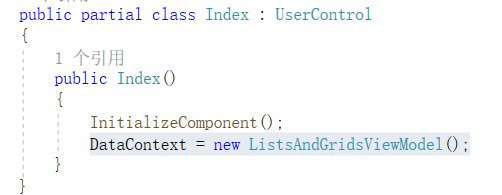
DataContext = new xxxViewModel();
MVVMLight:
使用NUGET安装MVVMLight包后,会自动生成ViewModel文件夹,里面包含一个ViewModelLocator,在这个文件中,使用依赖注入的方式,添加对ViewModel的注册,然后在.xaml文件中引入。这样做的好处,
1:一个view可以注册多个viewmodel,
2:从.XAML文件中引入,在界面会及时显示出绑定的数据,友好界面调整。
3:切换页面的时候,数据可以缓存的,因为在ViewModelLocator中,ServiceLocator.Current.GetInstance(class)这个方法是通过单例模式注册获取的。就是说,ViewModel类中定义的属性值是一直存在。
如果是在.cs文件中通过 DataContext=new xxxViewModel();关联ViewModel类,每次都会new一个新的初始化的类。


 public class ViewModelLocator
    {
        /// <summary>
        /// Initializes a new instance of the ViewModelLocator class.
        /// </summary>
        public ViewModelLocator()
        {
            ServiceLocator.SetLocatorProvider(() => SimpleIoc.Default);

            ////if (ViewModelBase.IsInDesignModeStatic)
            ////{
            ////    // Create design time view services and models
            ////    SimpleIoc.Default.Register<IDataService, DesignDataService>();
            ////}
            ////else
            ////{
            ////    // Create run time view services and models
            ////    SimpleIoc.Default.Register<IDataService, DataService>();
            ////}

            SimpleIoc.Default.Register<MainViewModel>();
            SimpleIoc.Default.Register<WelcomeViewModel>();
            SimpleIoc.Default.Register<BothWayBindViewModel>();
        }

        public MainViewModel Main
        {
            get
            {
                return ServiceLocator.Current.GetInstance<MainViewModel>();
            }
        }

        public WelcomeViewModel Welcome
        {
            get
            {
                return ServiceLocator.Current.GetInstance<WelcomeViewModel>();
            }
        }
        public BothWayBindViewModel BothWayBind
        {
            get
            {
                return ServiceLocator.Current.GetInstance<BothWayBindViewModel>();
            }
        }


        public static void Cleanup()
        {
            // TODO Clear the ViewModels
        }
    }
<Window x:Class="WPF_MVVMLight.BothWayBindView"
        xmlns="http://schemas.microsoft.com/winfx/2006/xaml/presentation"
        xmlns:x="http://schemas.microsoft.com/winfx/2006/xaml"
        xmlns:d="http://schemas.microsoft.com/expression/blend/2008"
        xmlns:mc="http://schemas.openxmlformats.org/markup-compatibility/2006"
        xmlns:local="clr-namespace:WPF_MVVMLight"
         DataContext="{Binding Source={StaticResource Locator},Path=BothWayBind}"
        mc:Ignorable="d"
        Title="BothWayBindView" Height="450" Width="800">
    <Window.Resources>
数据绑定
原生:
实现INotifyPropertyChanged接口的基类
 public abstract class ViewModelBase : INotifyPropertyChanged
    {
        public event PropertyChangedEventHandler PropertyChanged;

        /// <summary>
        /// Sets property if it does not equal existing value. Notifies listeners if change occurs.
        /// </summary>
        /// <typeparam name="T">Type of property.</typeparam>
        /// <param name="member">The property's backing field.</param>
        /// <param name="value">The new value.</param>
        /// <param name="propertyName">Name of the property used to notify listeners.  This
        /// value is optional and can be provided automatically when invoked from compilers
        /// that support <see cref="CallerMemberNameAttribute"/>.</param>
        protected virtual bool SetProperty<T>(ref T member, T value, [CallerMemberName] string propertyName = null)
        {
            if (EqualityComparer<T>.Default.Equals(member, value))
            {
                return false;
            }

            member = value;
            OnPropertyChanged(propertyName);
            return true;
        }

        /// <summary>
        /// Notifies listeners that a property value has changed.
        /// </summary>
        /// <param name="propertyName">Name of the property, used to notify listeners.</param>
        protected void OnPropertyChanged([CallerMemberName] string propertyName = null)
            => PropertyChanged?.Invoke(this, new PropertyChangedEventArgs(propertyName));
    }
model绑定
 public class SelectableViewModel : ViewModelBase
    {
        private bool _isSelected;
        private string _name;
        private string _description;
        private char _code;
        private double _numeric;
        private string _food;
        private string _visibility;


        public bool IsSelected
        {
            get => _isSelected;
            set => SetProperty(ref _isSelected, value);
        }

        public string Visibility
        {
            get => _visibility;
            set => SetProperty(ref _visibility, value);
        }

        public char Code
        {
            get => _code;
            set => SetProperty(ref _code, value);
        }

        public string Name
        {
            get => _name;
            set => SetProperty(ref _name, value);
        }

        public string Description
        {
            get => _description;
            set => SetProperty(ref _description, value);
        }

        public double Numeric
        {
            get => _numeric;
            set => SetProperty(ref _numeric, value);
        }

        public string Food
        {
            get => _food;
            set => SetProperty(ref _food, value);
        }
    }
MVVMLight
调用MVVMLight的ObservableObject,自动实现INotifyPropertyChanged,在属性中添加 RaisePropertyChanged(() => “属性名”);
  public class WelcomeModel : ObservableObject
    {
        private String introduction;
        /// <summary>
        /// 欢迎词
        /// </summary>
        public String Introduction
        {
            get { return introduction; }
            set
            {
                introduction = value; RaisePropertyChanged(() => Introduction);

            }
        }
    }
注意:对于数组集合类的,一定使用ObservableCollection声明(原生和MVVMLight两者都适用)
 public ObservableCollection<MovieCategory> MovieCategories { get; }
  MovieCategories = new ObservableCollection<MovieCategory>
            {
                new MovieCategory("一号货架",
                    new Movie("一排一号", "1001"),
                    new Movie("二排一号", "1002"),
                    new Movie("三排一号", "1003")),
                new MovieCategory("二号货架",
                    new Movie("一排一号", "2001"),
                    new Movie("二排一号", "2002")
                )
            };
因为ObservableCollection实现了接口Collection<T>, INotifyCollectionChanged, INotifyPropertyChanged,而List没有实现INotifyCollectionChanged, INotifyPropertyChanged。
  [TypeForwardedFrom("WindowsBase, Version=3.0.0.0, Culture=Neutral, PublicKeyToken=31bf3856ad364e35")]
    public class ObservableCollection<T> : Collection<T>, INotifyCollectionChanged, INotifyPropertyChanged
    {
        public ObservableCollection();
        //
        // 摘要:
        //     Initializes a new instance of the System.Collections.ObjectModel.ObservableCollection`1
        //     class that contains elements copied from the specified list.
        //
        // 参数:
        //   list:
        //     The list from which the elements are copied.
        //
        // 异常:
        //   T:System.ArgumentNullException:
        //     The list parameter cannot be null.
        public ObservableCollection(List<T> list);
        public ObservableCollection(IEnumerable<T> collection);

        public event NotifyCollectionChangedEventHandler CollectionChanged;
        protected event PropertyChangedEventHandler PropertyChanged;

        public void Move(int oldIndex, int newIndex);
        protected IDisposable BlockReentrancy();
        protected void CheckReentrancy();
        protected override void ClearItems();
        protected override void InsertItem(int index, T item);
        protected virtual void MoveItem(int oldIndex, int newIndex);
        protected virtual void OnCollectionChanged(NotifyCollectionChangedEventArgs e);
        protected virtual void OnPropertyChanged(PropertyChangedEventArgs e);
        protected override void RemoveItem(int index);
        protected override void SetItem(int index, T item);
    }
命令
原生
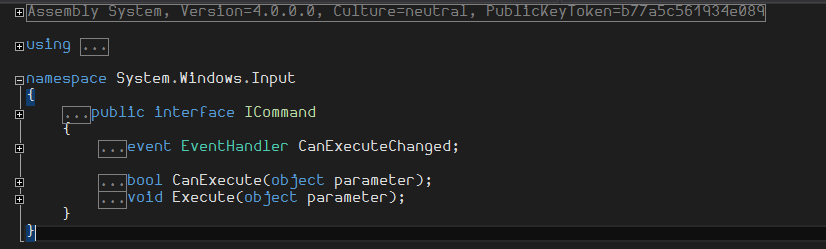
实现ICommand接口
/// <summary>
    /// No WPF project is complete without it's own version of this.
    /// </summary>
    public class AnotherCommandImplementation : ICommand
    {
        private readonly Action<object> _execute;
        private readonly Func<object, bool> _canExecute;

        public AnotherCommandImplementation(Action<object> execute)
            : this(execute, null)
        { }

        public AnotherCommandImplementation(Action<object> execute, Func<object, bool> canExecute)
        {
            if (execute is null) throw new ArgumentNullException(nameof(execute));

            _execute = execute;
            _canExecute = canExecute ?? (x => true);
        }

        public bool CanExecute(object parameter) => _canExecute(parameter);

        public void Execute(object parameter) => _execute(parameter);

        public event EventHandler CanExecuteChanged
        {
            add
            {
                CommandManager.RequerySuggested += value;
            }
            remove
            {
                CommandManager.RequerySuggested -= value;
            }
        }

        public void Refresh() => CommandManager.InvalidateRequerySuggested();
    }
 public AnotherCommandImplementation AddCommand { get; }

        public AnotherCommandImplementation RemoveSelectedItemCommand { get; }


            AddCommand = new AnotherCommandImplementation(
                _ =>
                {
                    if (!MovieCategories.Any())
                    {
                        MovieCategories.Add(new MovieCategory(GenerateString(15)));
                    }
                    else
                    {
                        var index = new Random().Next(0, MovieCategories.Count);

                        MovieCategories[index].Movies.Add(
                            new Movie(GenerateString(15), GenerateString(20)));
                    }
                });

            RemoveSelectedItemCommand = new AnotherCommandImplementation(
                _ =>
                {
                    var movieCategory = SelectedItem as MovieCategory;
                    if (movieCategory != null)
                    {
                        MovieCategories.Remove(movieCategory);
                    }
                    else
                    {
                        var movie = SelectedItem as Movie;
                        if (movie == null) return;
                        MovieCategories.FirstOrDefault(v => v.Movies.Contains(movie))?.Movies.Remove(movie);
                    }
                },
                _ => SelectedItem != null);
MVVMLight
using GalaSoft.MvvmLight;
using GalaSoft.MvvmLight.CommandWpf;
using MVVMLightDemo.Model;
using System.Collections.ObjectModel;

namespace MVVMLightDemo.ViewModel
{
    public class CommandViewModel:ViewModelBase
    {
        public CommandViewModel()
        {
            //构造函数
            ValidateUI = new ValidateUserInfo();
            List = new ObservableCollection<ValidateUserInfo>();
        }

        #region 全局属性
        private ObservableCollection<ValidateUserInfo> list;
        /// <summary>
        /// 用户数据列表
        /// </summary>
        public ObservableCollection<ValidateUserInfo> List
        {
            get { return list; }
            set { list = value; }
        }

        private ValidateUserInfo validateUI;
        /// <summary>
        /// 当前操作的用户信息
        /// </summary>
        public ValidateUserInfo ValidateUI
        {
            get { return validateUI; }
            set
            {
                validateUI = value;
                RaisePropertyChanged(() => ValidateUI);
            }
        }
        #endregion

        #region 全局命令
        private RelayCommand submitCmd;
        /// <summary>
        /// 执行提交命令的方法
        /// </summary>
        public RelayCommand SubmitCmd
        {
            get
            {
                if (submitCmd == null) return new RelayCommand(() => ExcuteValidForm(),CanExcute);
                return submitCmd;
            }
            set { submitCmd = value; }
        }
        #endregion

        #region 附属方法
        /// <summary>
        /// 执行提交方法
        /// </summary>
        private void ExcuteValidForm()
        {
            List.Add(new ValidateUserInfo(){ UserEmail= ValidateUI.UserEmail, UserName = ValidateUI.UserName, UserPhone = ValidateUI.UserPhone });
        }

        /// <summary>
        /// 是否可执行(这边用表单是否验证通过来判断命令是否执行)
        /// </summary>
        /// <returns></returns>
        private bool CanExcute()
        {
            return ValidateUI.IsValidated;
        }
        #endregion

    }
}
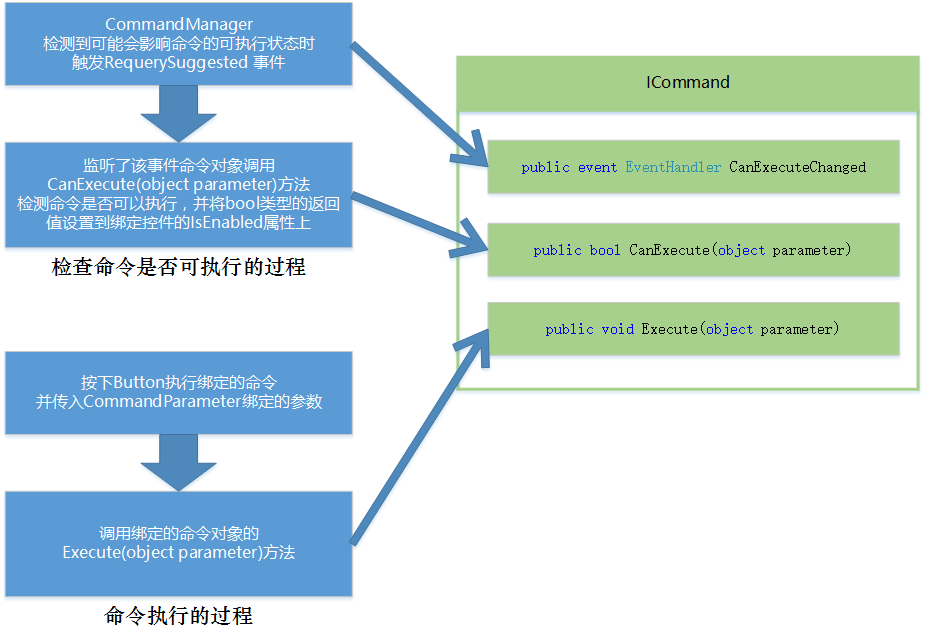
注意:CanExecuteChanged,CanExecute,Execute的说明
Messenger消息注册
如果需要某张视图页面弹出对话框、弹出子窗体、处理界面元素,播放动画等。如果这些操作都放在ViewModel中,就会导致ViewModel还是要去处理View级别的元素,造成View和ViewModel的依赖。
最好的办法就是ViewModel通知View应该做什么,而View监听接收到命令,并去处理这些界面需要处理的事情。
2、ViewModel和ViewModel之间也需要通过消息传递来完成一些交互。
而MVVM Light 的 Messenger类,提供了解决了上述两个问题的能力:
Messenger类用于应用程序的通信,接受者只能接受注册的消息类型,另外目标类型可以被指定,用Send<TMessage, TTarget>(TMessage message) 实现,
public partial class NessagerForView : Window
    {
        public NessagerForView()
        {
            InitializeComponent();

            //消息标志token:ViewAlert,用于标识只阅读某个或者某些Sender发送的消息,并执行相应的处理,所以Sender那边的token要保持一致
            //执行方法Action:ShowReceiveInfo,用来执行接收到消息后的后续工作,注意这边是支持泛型能力的,所以传递参数很方便。
            Messenger.Default.Register<String>(this, "ViewAlert", ShowReceiveInfo);
            this.DataContext = new MessengerRegisterForVViewModel();
            //卸载当前(this)对象注册的所有MVVMLight消息
            this.Unloaded += (sender, e) => Messenger.Default.Unregister(this);
        }

        /// <summary>
        /// 接收到消息后的后续工作:根据返回来的信息弹出消息框
        /// </summary>
        /// <param name="msg"></param>
        private void ShowReceiveInfo(String msg)
        {
            MessageBox.Show(msg);
        }
    }
public class MessengerRegisterForVViewModel:ViewModelBase
    {

        public MessengerRegisterForVViewModel()
        {

        }

        #region 命令

        private RelayCommand sendCommand;
        /// <summary>
        /// 发送命令
        /// </summary>
        public RelayCommand SendCommand
        {
            get
            {
                if (sendCommand == null)
                    sendCommand = new RelayCommand(() => ExcuteSendCommand());
                return sendCommand;

            }
            set { sendCommand = value; }
        }

        private void ExcuteSendCommand()
        {
            Messenger.Default.Send<String>("ViewModel通知View弹出消息框", "ViewAlert"); //注意:token参数一致
        }

        #endregion
    }
比如弹出框,可以在ViewMode中使用,但是需要引入using System.Windows;如果是子页面,就脱了了View和ViewModel解耦的初衷。

 浙公网安备 33010602011771号