vue实现T型二维表格

  • 图片

868dd558e34542ef8c11447ea08f186b

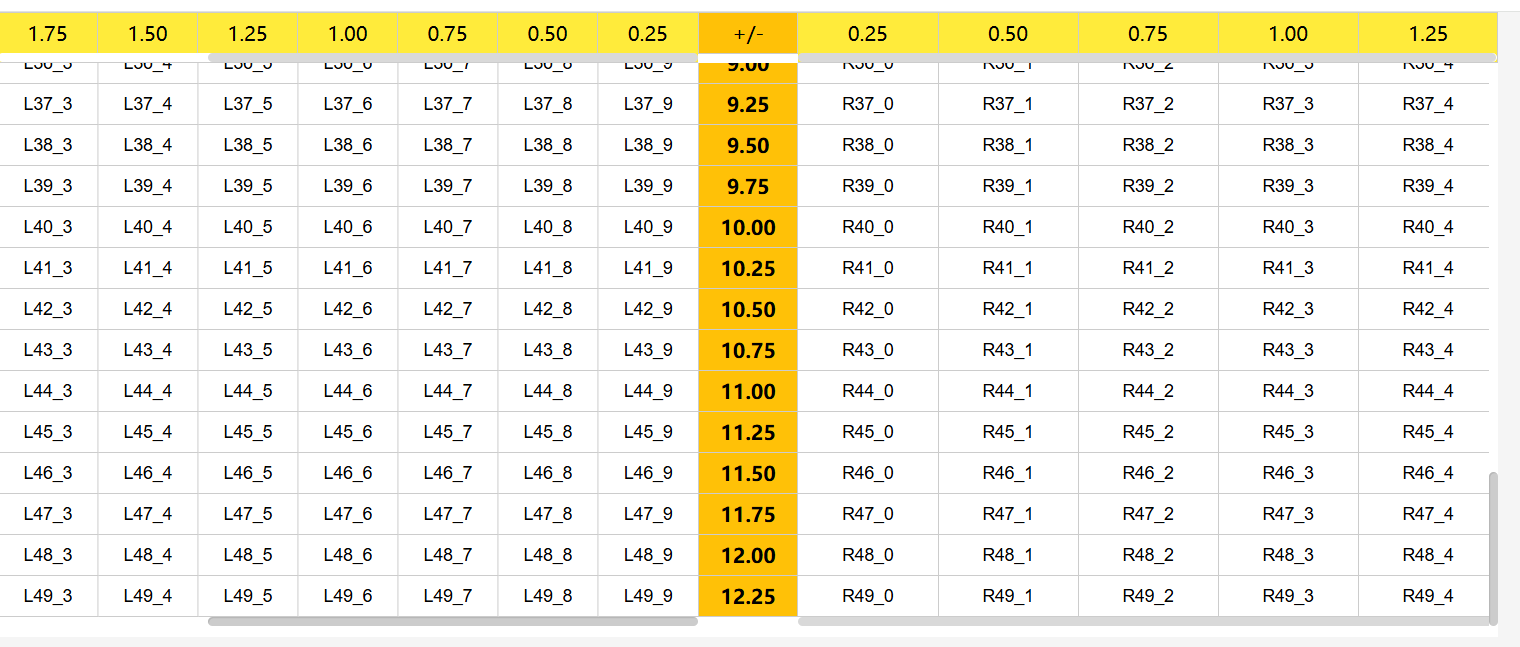
  • 实现T形2维表,上下滚动,T形左右可以各自水平滚动

  • 底部和顶部水平滚动保持一致

  • 实现excle复制粘贴

  • T形左右宽度各自撑开

  • 代码如下

      <template>
        <div class="fixed-table-container"
            ref="tableContainer">
          <!-- 顶部固定表头 -->
          <div class="top-header">
            <!-- 左侧表头滚动区(可手动滚动) -->
            <div class="top-left-scroll"
                :style="leftAreaStyle"
                ref="topLeftScroll">
              <table>
                <thead>
                  <tr>
                    <th v-for="(item, index) in leftHeaders"
                        :style="leftCellStyle"
                        :key="'t-l-' + index">
                      {{ item }}
                    </th>
                  </tr>
                </thead>
              </table>
            </div>
            <!-- 中间固定轴表头 -->
            <div class="top-middle-axis"
                :style="middleAxisStyle">
              <table>
                <thead>
                  <tr>
                    <th :style="middleCellStyle">{{ middleAxisText }}</th>
                  </tr>
                </thead>
              </table>
            </div>
            <!-- 右侧表头滚动区(可手动滚动) -->
            <div class="top-right-scroll"
                :style="rightAreaStyle"
                ref="topRightScroll">
              <table>
                <thead>
                  <tr>
                    <th v-for="(item, index) in rightHeaders"
                        :style="rightCellStyle"
                        :key="'t-r-' + index">
                      {{ item }}
                    </th>
                  </tr>
                </thead>
              </table>
            </div>
          </div>
          <!-- 垂直滚动容器 -->
          <div class="vertical-scroll-container">
            <!-- 中间内容区域 -->
            <div class="content-container">
              <!-- 左侧内容滚动区 -->
              <div class="content-left-scroll"
                  ref="contentLeftScroll"
                  :style="leftAreaStyle"
                  @paste="(e) => handleTablePaste('left',e)"
                  @scroll="syncLeftHorizontalScroll">
                <table>
                  <tbody>
                    <tr v-for="(row, rowIdx) in tableData"
                        :key="rowIdx">
                      <td v-for="(val, colIdx) in row.left"
                          :style="leftCellStyle"
                          @click.stop="setActiveCell(rowIdx, colIdx, 'left')"
                          :key="'l-' + rowIdx + '-' + colIdx">
                        <input type="text"
                              @click.stop="setActiveCell(rowIdx, colIdx, 'left')"
                              v-model="tableData[rowIdx].left[colIdx]"
                              class="content-input" />
                      </td>
                    </tr>
                  </tbody>
                </table>
              </div>
              <!-- 中间固定轴 -->
              <div class="content-middle-axis"
                  :style="middleAxisStyle">
                <table>
                  <tbody>
                    <tr v-for="(row, rowIdx) in tableData"
                        :key="rowIdx">
                      <td :style="middleCellStyle">{{ row.middle }}</td>
                    </tr>
                  </tbody>
                </table>
              </div>
              <!-- 右侧内容滚动区 -->
              <div class="content-right-scroll"
                  ref="contentRightScroll"
                  :style="rightAreaStyle"
                  @paste="(e) => handleTablePaste('right',e)"
                  @scroll="syncRightHorizontalScroll">
                <table>
                  <tbody>
                    <tr v-for="(row, rowIdx) in tableData"
                        :key="rowIdx">
                      <td v-for="(val, colIdx) in row.right"
                          :style="rightCellStyle"
                          @click="setActiveCell(rowIdx, colIdx, 'right')"
                          :key="'r-' + rowIdx + '-' + colIdx">
                        <input type="text"
                              @click.stop="setActiveCell(rowIdx, colIdx, 'right')"
                              v-model="tableData[rowIdx].right[colIdx]"
                              class="content-input" />
                      </td>
                    </tr>
                  </tbody>
                </table>
              </div>
            </div>
          </div>
        </div>
      </template>
    
      <script lang="ts">
        import { Component, Vue } from "vue-property-decorator";
    
        @Component({ name: "", components: {} })
        export default class extends Vue {
          $refs = {
            tableContainer: null,
            topLeftScroll: null,
            topRightScroll: null,
            contentLeftScroll: null,
            contentRightScroll: null,
          };
          middleAxisText = "+/-";
          columnCount = 10; // 每侧列数
          columnCount1 = 5; // 每侧列数
          rowCount = 50; // 行数
    
          // 生成顶部左侧表头(倒序)
          leftHeaders = Array.from({ length: this.columnCount }, (_, i) =>
            ((i + 1) * 0.25).toFixed(2)
          ).reverse();
    
          // 生成顶部右侧表头(正序)
          rightHeaders = Array.from({ length: this.columnCount1 }, (_, i) =>
            ((i + 1) * 0.25).toFixed(2)
          );
    
          // 生成表格内容数据
          tableData = Array.from({ length: this.rowCount }, (_, rowIdx) => ({
            left: Array.from(
              { length: this.columnCount },
              (_, colIdx) => `L${rowIdx}_${colIdx}`
            ),
            middle: (rowIdx * 0.25).toFixed(2),
            right: Array.from(
              { length: this.columnCount1 },
              (_, colIdx) => `R${rowIdx}_${colIdx}`
            ),
          }));
    
          isSyncing = false; // 防重复触发的同步锁
          containerWidth = 0; // 容器实际宽度(用于计算均分)
          middleAxisWidth = 100; // 中间固定轴宽度
          headerHeight = 40; // 表头高度
          cellHeight = 40; // 单元格高度
    
          // 新增:记录当前激活的单元格(粘贴起始位置)
          activeCell = {
            tableType: "left", // 当前激活的表格(left/right)
            rowIdx: 0, // 激活行索引
            colIdx: 0, // 激活列索引
          };
          mounted() {
            // 初始化容器宽度
            this.updateContainerWidth();
            // 监听窗口大小变化,重新计算宽度
            window.addEventListener("resize", this.updateContainerWidth);
            // 初始化滚动位置对齐
            this.syncInitialScroll();
            // 页面加载后左侧滚动区自动滚动到最右侧
            this.scrollLeftToRight();
            // 绑定顶部表头滚动事件(Vue 2 兼容写法)
            this.bindTopScrollEvents();
          }
          beforeDestroy() {
            window.removeEventListener("resize", this.updateContainerWidth);
    
            // 销毁时移除事件监听,避免内存泄漏(Vue 2 生命周期)
            this.unbindTopScrollEvents();
          }
          // 记录当前激活的单元格(点击单元格时触发)
          setActiveCell(rowIdx, colIdx, tableType: "left" | "right") {
            this.activeCell = { tableType, rowIdx, colIdx };
          }
          // 辅助函数:判断是否为数字(含小数)
          isNumber(str: string): boolean {
            return /^-?\d+(\.\d+)?$/.test(str.trim());
          }
    
      // 处理表格粘贴事件
      handleTablePaste(tableType, e) {
        e.preventDefault(); // 阻止默认粘贴行为(避免直接粘贴到输入框)
    
        // 1. 获取粘贴板内容
        const clipboardData = e.clipboardData || (window as any).clipboardData;
            if (!clipboardData) {
              return;
            }
        const pastedText = clipboardData.getData("text");
              if (!pastedText.trim()) {
              return;
            }
    
        // 2. 解析粘贴内容为二维数组(Excel格式:\t分隔列,\n分隔行)
        const pastedRows = pastedText
          .split(/\r?\n/) // 兼容 Windows(\r\n) 和 Mac(\n) 换行
          .filter(row => row.trim() !== "") // 过滤空行
          .map(row => row.split("\t").map(cell => cell.trim())); // 按制表符分割列,去除单元格首尾空格
    
        // 3. 获取当前激活的起始位置和目标表格数据
        const { rowIdx: startRow, colIdx: startCol } = this.activeCell;
        const targetData = this.tableData; // 直接操作原表格数据数组
        const maxRows = targetData.length;
        if (maxRows === 0) {
          return
        }
    
        // 4. 循环赋值到表格(从起始单元格开始,超出范围忽略)
        pastedRows.forEach((pastedRow, rowOffset) => {
          const currentRow = startRow + rowOffset;
          // 超出表格行数,停止当前行粘贴
          if (currentRow >= maxRows) {
            return
          }
    
          pastedRow.forEach((pastedValue, colOffset) => {
            const currentCol = startCol + colOffset;
            const targetRow = targetData[currentRow];
            const targetColumn = targetRow[tableType]; // 定位到 left/right 列数组
    
            // 超出当前列数,忽略该单元格
            if (currentCol >= targetColumn.length) {
              return
            }
    
            // 5. 处理数值格式(保留数字,限制1位小数,空值设为""避免显示0)
            let finalValue = "";
            if (pastedValue) {
              // 过滤非数字字符(保留负号和小数点)
              const cleanedValue = pastedValue.replace(/[^-0-9.]/g, "");
              // 验证是否为有效数字
              if (this.isNumber(cleanedValue)) {
                // 限制1位小数
                finalValue = Number(cleanedValue).toFixed(1);
                // 去除末尾多余的 .0(可选,根据需求调整)
                finalValue = finalValue.endsWith(".0") ? finalValue.slice(0, -2) : finalValue;
              } else {
                // 非数字保持原值(可选,也可设为"")
                finalValue = pastedValue;
              }
            }
    
            // 6. 响应式更新表格数据(Vue 2 兼容写法)
            this.$set(targetColumn, currentCol, finalValue);
          });
        });
    
        // 7. 触发自定义事件,通知父组件数据变化
        this.$emit("table-pasted", {
          tableType,
          startRow,
          startCol,
          pastedRows,
          updatedData: [...this.tableData] // 传递更新后的数据副本
        });
      }
          // 更新容器宽度(关键:用于计算均分)
          updateContainerWidth() {
            const container = this.$refs.tableContainer;
            if (container) {
              this.containerWidth = container.offsetWidth;
            }
          }
          // 初始化滚动位置对齐
          syncInitialScroll() {
            if (this.$refs.contentLeftScroll && this.$refs.topLeftScroll) {
              this.$refs.topLeftScroll.scrollLeft =
                this.$refs.contentLeftScroll.scrollLeft;
            }
            if (this.$refs.contentRightScroll && this.$refs.topRightScroll) {
              this.$refs.topRightScroll.scrollLeft =
                this.$refs.contentRightScroll.scrollLeft;
            }
          }
    
          // 左侧滚动区(顶部+内容)滚动到最右侧
          scrollLeftToRight() {
            this.$nextTick(() => {
              // 顶部左侧滚动区
              const topLeftScroll = this.$refs.topLeftScroll;
              if (topLeftScroll) {
                topLeftScroll.scrollLeft =
                  topLeftScroll.scrollWidth - topLeftScroll.clientWidth;
              }
    
              // 内容左侧滚动区
              const contentLeftScroll = this.$refs.contentLeftScroll;
              if (contentLeftScroll) {
                contentLeftScroll.scrollLeft =
                  contentLeftScroll.scrollWidth - contentLeftScroll.clientWidth;
              }
            });
          }
    
          // 绑定顶部表头滚动事件(实现表头→表体同步)
          bindTopScrollEvents() {
            this.$nextTick(() => {
              const topLeftScroll = this.$refs.topLeftScroll;
              if (topLeftScroll) {
                // Vue 2 兼容的事件绑定方式
                topLeftScroll.addEventListener("scroll", this.handleTopLeftScroll);
              }
    
              const topRightScroll = this.$refs.topRightScroll;
              if (topRightScroll) {
                topRightScroll.addEventListener("scroll", this.handleTopRightScroll);
              }
            });
          }
    
          // 移除顶部表头滚动事件
          unbindTopScrollEvents() {
            const topLeftScroll = this.$refs.topLeftScroll;
            if (topLeftScroll) {
              topLeftScroll.removeEventListener("scroll", this.handleTopLeftScroll);
            }
    
            const topRightScroll = this.$refs.topRightScroll;
            if (topRightScroll) {
              topRightScroll.removeEventListener("scroll", this.handleTopRightScroll);
            }
          }
    
          // 顶部左侧滚动 → 同步内容左侧滚动
          handleTopLeftScroll(e) {
            if (this.isSyncing) {
              return;
            }
            this.isSyncing = true;
    
            const scrollLeft = e.target.scrollLeft;
            if (this.$refs.contentLeftScroll) {
              this.$refs.contentLeftScroll.scrollLeft = scrollLeft;
            }
    
            this.isSyncing = false;
          }
    
          // 顶部右侧滚动 → 同步内容右侧滚动
          handleTopRightScroll(e) {
            if (this.isSyncing) {
              return;
            }
            this.isSyncing = true;
    
            const scrollLeft = e.target.scrollLeft;
            if (this.$refs.contentRightScroll) {
              this.$refs.contentRightScroll.scrollLeft = scrollLeft;
            }
    
            this.isSyncing = false;
          }
    
          // 内容左侧滚动 → 同步顶部左侧滚动
          syncLeftHorizontalScroll(e) {
            if (this.isSyncing) {
              return;
            }
            this.isSyncing = true;
    
            const scrollLeft = e.target.scrollLeft;
            if (this.$refs.topLeftScroll) {
              this.$refs.topLeftScroll.scrollLeft = scrollLeft;
            }
    
            this.isSyncing = false;
          }
    
          // 内容右侧滚动 → 同步顶部右侧滚动
          syncRightHorizontalScroll(e) {
            if (this.isSyncing) {
              return;
            }
            this.isSyncing = true;
    
            const scrollLeft = e.target.scrollLeft;
            if (this.$refs.topRightScroll) {
              this.$refs.topRightScroll.scrollLeft = scrollLeft;
            }
    
            this.isSyncing = false;
          }
    
          // 左侧区域样式(固定宽度,确保左右侧宽度一致)
          get leftAreaStyle() {
            const sideWidth = (this.containerWidth - this.middleAxisWidth) / 2;
            return {
              width: `${sideWidth}px`,
              minWidth: `${sideWidth}px`,
            };
          }
          // 右侧区域样式(与左侧宽度一致)
          get rightAreaStyle() {
            const sideWidth = (this.containerWidth - this.middleAxisWidth) / 2;
            return {
              width: `${sideWidth}px`,
              minWidth: `${sideWidth}px`,
            };
          }
          // 左侧单元格样式(均分宽度)
          get leftCellStyle() {
            if (this.leftHeaders.length < 8) {
              const sideWidth = (this.containerWidth - this.middleAxisWidth) / 2;
              const cellWidth = sideWidth / this.leftHeaders.length;
    
              return {
                width: `${cellWidth}px`,
                minWidth: `${cellWidth}px`,
                height: `${this.cellHeight}px`,
                lineHeight: `${this.cellHeight}px`,
              };
            } else {
              return {
                width: `${this.middleAxisWidth}px`,
                minWidth: `${this.middleAxisWidth}px`,
                height: `${this.cellHeight}px`,
                lineHeight: `${this.cellHeight}px`,
              };
            }
          }
          // 右侧单元格样式(均分宽度)
          get rightCellStyle() {
            if (this.rightHeaders.length < 8) {
              const sideWidth = (this.containerWidth - this.middleAxisWidth) / 2;
              const cellWidth = sideWidth / this.rightHeaders.length;
              return {
                width: `${cellWidth}px`,
                minWidth: `${cellWidth}px`,
                height: `${this.cellHeight}px`,
                lineHeight: `${this.cellHeight}px`,
              };
            } else {
              return {
                width: `${this.middleAxisWidth}px`,
                minWidth: `${this.middleAxisWidth}px`,
                height: `${this.cellHeight}px`,
                lineHeight: `${this.cellHeight}px`,
              };
            }
          }
          // 中间单元格样式(高度统一,宽度与轴一致)
          get middleCellStyle() {
            return {
              width: `${this.middleAxisWidth}px`,
              height: `${this.cellHeight}px`,
              lineHeight: `${this.cellHeight}px`,
            };
          }
          // 中间固定轴样式(宽度固定)
          get middleAxisStyle() {
            return {
              width: `${this.middleAxisWidth}px`,
              height: `100%`,
            };
          }
        }
      </script>
    
      <style scoped  lang="scss">
        .fixed-table-container {
          width: 100%;
          max-width: 1200px;
          height: 500px;
          overflow: hidden;
          box-sizing: border-box;
          background: #fff;
    
          /* 顶部固定表头 */
          .top-header {
            display: flex;
            position: relative;
            z-index: 2;
            box-sizing: border-box;
          }
    
          /* 顶部左侧滚动区 */
          .top-left-scroll {
            background-color: #ffeb3b;
            height: 100%;
            overflow-x: auto;
            overflow-y: hidden;
            -ms-overflow-style: none;
            border-top: 1px solid #ccc;
            border-bottom: 1px solid #ccc;
            flex-shrink: 0; /* 固定宽度,不伸缩 */
            tr {
              th {
                &:first-child {
                  border-left: 1px solid #ccc;
                }
              }
            }
          }
    
          /* 顶部右侧滚动区 */
          .top-right-scroll {
            background-color: #ffeb3b;
            border-right: 1px solid #ccc;
            border-top: 1px solid #ccc;
            border-bottom: 1px solid #ccc;
            height: 100%;
            overflow-x: auto;
            overflow-y: hidden;
            -ms-overflow-style: none;
            flex-shrink: 0; /* 固定宽度,不伸缩 */
          }
    
          /* 顶部中间固定轴 */
          .top-middle-axis {
            height: 100%;
            background-color: #ffc107;
            border-left: 1px solid #ccc;
            border-top: 1px solid #ccc;
            border-bottom: 1px solid #ccc;
            flex-shrink: 0;
            box-sizing: border-box;
          }
    
          /* 表头表格样式 - 关键对齐设置 */
          .top-header table {
            width: auto;
            border-collapse: collapse;
            border-spacing: 0;
            margin: 0;
            padding: 0;
          }
    
          .top-header th {
            border-right: 1px solid #ccc;
            text-align: center;
            padding: 0 8px;
            font-weight: normal;
            margin: 0;
            overflow: hidden;
            text-overflow: ellipsis;
            white-space: nowrap;
            box-sizing: border-box;
          }
    
          /* 最后一列去除右边框,避免与中间轴边框重叠 */
          .top-left-scroll th:last-child,
          .top-right-scroll th:last-child {
            border-right: none;
          }
    
          /* 垂直滚动容器 */
          .vertical-scroll-container {
            height: calc(100% - 50px);
            overflow-y: auto; /* 仅垂直滚动 */
            overflow-x: hidden; /* 隐藏水平滚动条 */
          }
    
          /* 内容区域容器(禁止水平滚动,仅左右子元素可滚动) */
          .content-container {
            display: flex;
            min-height: 100%;
            width: 100%;
            overflow-x: hidden; /* 关键:父容器禁止水平滚动 */
          }
    
          /* 左侧内容滚动区 */
          .content-left-scroll {
            overflow-x: auto; /* 显示左侧水平滚动条 */
            overflow-y: hidden;
            flex-shrink: 0;
            tr {
              td {
                &:first-child {
                  border-left: 1px solid #ccc;
                  box-sizing: border-box;
                }
              }
            }
          }
          /* 中间固定轴内容区 */
          .content-middle-axis {
            box-sizing: border-box;
            background-color: #ffc107;
    
            border-right: 1px solid #ccc;
            border-left: 1px solid #ccc;
            flex-shrink: 0;
            height: 100%;
          }
    
          /* 右侧内容滚动区 */
          .content-right-scroll {
            overflow-x: auto; /* 显示右侧水平滚动条 */
            overflow-y: hidden;
            flex-shrink: 0;
          }
    
          /* 内容区表格样式 - 关键对齐设置 */
          .content-left-scroll table,
          .content-middle-axis table,
          .content-right-scroll table {
            width: auto;
            border-collapse: collapse;
            border-spacing: 0;
            margin: 0;
            padding: 0;
          }
    
          .content-left-scroll td,
          .content-middle-axis td,
          .content-right-scroll td {
            box-sizing: border-box;
            border-right: 1px solid #ccc;
            border-bottom: 1px solid #ccc;
            text-align: center;
            padding: 0; /* 移除内边距避免宽度偏差 */
            margin: 0;
          }
    
          .content-left-scroll td:last-child {
            border-right: none;
          }
    
          .content-middle-axis td {
            border-right: none;
            font-weight: bold;
          }
    
          /* 内容区输入框样式 */
          .content-input {
            width: 100%;
            height: 100%;
            padding: 0 8px;
            border: none;
            box-sizing: border-box;
            text-align: center;
            background: transparent;
            vertical-align: top;
            font-size: 14px;
          }
          .content-input:disabled {
            background-color: #f5f7fa;
            color: #c0c4cc;
            cursor: not-allowed;
          }
    
          .content-input:focus {
            outline: none;
            background-color: #f0f7ff;
          }
    
          /* 修复第一行顶部边框与表头底部边框对齐 */
    
          .content-left-scroll tr:first-child td,
          .content-middle-axis tr:first-child td,
          .content-right-scroll tr:first-child td {
            border-top: none; /* 移除第一行顶部边框,避免与表头底部边框重叠 */
          }
        }
    
        /* 响应式适配 */
        @media (max-width: 768px) {
          .fixed-table-container {
            height: 100%;
          }
    
          .middleAxisWidth {
            width: 60px !important;
          }
    
          .top-middle-axis,
          .content-middle-axis {
            width: 60px !important;
          }
    
          .top-left-scroll,
          .top-right-scroll {
            width: calc((100% - 60px) / 2) !important;
          }
        }
      </style>
    
posted @ 2025-11-10 17:39  不完美的完美  阅读(12)  评论(0)    收藏  举报