

JS实现购物车全选和取消效果---使用checkbox复选框
一、需求说明
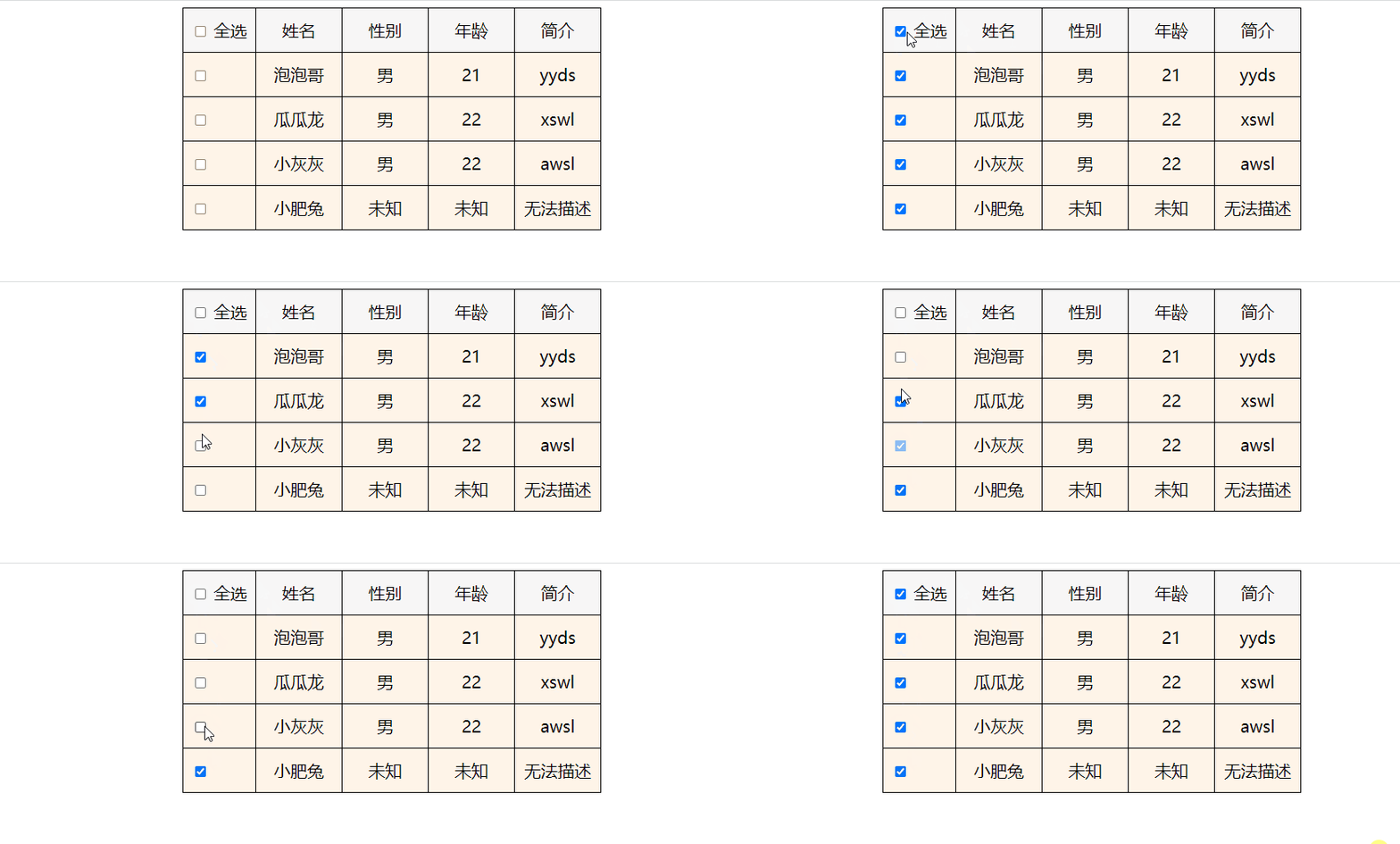
1、全选按钮需求
选中全选按钮,下面的所有按钮都会被选中;
取消选中全选按钮,下面的所有按钮也会被取消选中。
2、除全选按钮之外的其他按钮需求
其他按钮全部被选中,全选按钮也跟着被选中;
其他按钮只要有一个没有被选中,全选按钮也不会被选中。
二、功能演示
三、核心代码
<script>
	// 1、获取我们所需的标签对象
	// 获取表示全选的input标签
	var inputAll = document.querySelector('[name="all"]');
	//获取其他所有的input标签,存储在一个伪数组中
	var inputOther = document.querySelectorAll('[name="other"]');

	// 2、给表示全选的input标签添加点击事件
	inputAll.addEventListener('click', function () {
		// 循环遍历伪数组中存储的其他的所有input标签对象
		inputOther.forEach(function (item) {
			// item中存储的是伪数组中的每一个 name="other" 的input标签
			// 将全选input标签的checked属性值赋值给其他的input标签
			item.checked = inputAll.checked;
		});
	});

	// 3、循环遍历伪数组, 给所有其他的input标签添加点击事件
	inputOther.forEach(function (item) {
	item.addEventListener('click', function () {
		// 定义一个变量存储原始值
		var res = true;
		// 循环遍历每一个其他input标签对象, 判断checked属性值
		for (var i = 0; i < inputOther.length; i++) {
			// 如果其他的input标签里面有checked属性值是false的
			if (inputOther[i].checked === false) {
				// 给变量赋值false
				res = false;
				// 只要有一个其他input没有选中,全选input就不会选中
				// 伪数组中之后的其他input也就不用循环判断了,使用break跳出当前整个循环
				break;
			}
		}
		// 循环结束,  res存储的true或者false, 就是全选input标签checked属性的属性值
		// 将res作为属性值赋值给全选input标签的checked属性
		inputAll.checked = res;
		})
	})
</script>
四、原理及步骤说明
一、全选按钮需求
1、需求说明
全选按钮选中 其他按钮选中
全选按钮取消选中 其他按钮取消选中
2、原理
通过
input标签的checked属性值(true/false)来实现。 如果表示全选的
input标签的checked属性值为true,其他的input标签的checked属性值也为true。 如果表示全选的
input标签的checked属性值为false,其他的input标签checked属性值为也为false。3、步骤
3 - 1 使用
querySelector方法获取表示全选的input标签; 使用
querySelectorAll方法获取所有其他的input标签,将它们存储在一个伪数组中。 3 - 2 给表示全选的
input标签添加点击事件。 3 - 3 循环遍历伪数组中存储的其他的所有
input标签对象,将全选input标签的checked属性值赋值给其他input标签的checked属性。二、除全选按钮之外的其他按钮需求
1、需求说明
其他的所有按钮都选中 全选按钮选中
有一个其他按钮取消选中 全选按钮选中取消选中
2、原理
所有其他
input标签的checked属性值都是true,全选input标签的checked属性值是true。 所有其他
input标签的checked属性值有一个是false, 全选input标签的checked属性值是false。 我们可以定义一个变量,根据变量储存的最终结果给全选
input标签的checked属性值赋值 。3、步骤
3 - 1 循环遍历所有其他的
input标签,为它们绑定点击事件。 3 - 2 定义一个变量,赋值
true。 3 - 3 循环遍历所有其他
input标签,判断其他input标签的checked属性值是不是false; 如果是false, 给变量赋值false, 使用break终止循环。 3 - 4 将变量储存的数值赋值给全选
input标签的checked属性。
五、完整代码下载
<!DOCTYPE html>
<html lang="en">
<head>
<meta charset="UTF-8">
<meta http-equiv="X-UA-Compatible" content="IE=edge">
<meta name="viewport" content="width=device-width, initial-scale=1.0">
<title>Document</title>
<style>
table {
border-collapse: collapse;
}
td {
width: 100px;
height: 50px;
border: 1px solid #000;
text-align: center;
font-size: 20px;
}
tr td:first-of-type {
text-align: left;
padding-left: 10px;
width: 75px;
}
thead {
background-color: #f7f7f7;
}
tbody {
background-color: #fff4e8;
}
</style>
</head>
<body>
<table align="center">
<thead>
<tr>
<td><input type="checkbox" name="all"> 全选</td>
<td>姓名</td>
<td>性别</td>
<td>年龄</td>
<td>简介</td>
</tr>
</thead>
<tbody>
<tr>
<td><input type="checkbox" name="other"></td>
<td>泡泡哥</td>
<td>男</td>
<td>21</td>
<td>yyds</td>
</tr>
<tr>
<td><input type="checkbox" name="other"></td>
<td>瓜瓜龙</td>
<td>男</td>
<td>22</td>
<td>xswl</td>
</tr>
<tr>
<td><input type="checkbox" name="other"></td>
<td>小灰灰</td>
<td>男</td>
<td>22</td>
<td>awsl</td>
</tr>
<tr>
<td><input type="checkbox" name="other"></td>
<td>小肥兔</td>
<td>未知</td>
<td>未知</td>
<td>无法描述</td>
</tr>
</tbody>
</table>
<script>
// 1、获取我们所需的标签对象
// 获取表示全选的input标签
var inputAll = document.querySelector('[name="all"]');
//获取其他所有的input标签,存储在一个伪数组中
var inputOther = document.querySelectorAll('[name="other"]');
// 2、给表示全选的input标签添加点击事件
inputAll.addEventListener('click', function () {
// 循环遍历伪数组中存储的其他的所有input标签对象
inputOther.forEach(function (item) {
// item中存储的是伪数组中的每一个 name="other" 的input标签
// 将全选input标签的checked属性值赋值给其他的input标签
item.checked = inputAll.checked;
});
});
// 3、循环遍历伪数组, 给所有其他的input标签添加点击事件
inputOther.forEach(function (item) {
item.addEventListener('click', function () {
// 定义一个变量存储原始值
var res = true;
// 循环遍历每一个其他input标签对象, 判断checked属性值
for (var i = 0; i < inputOther.length; i++) {
// 如果其他的input标签里面有checked属性值是false的
if (inputOther[i].checked === false) {
// 给变量赋值false
res = false;
// 只要有一个其他input没有选中,全选input就不会选中
// 伪数组中之后的其他input也就不用循环判断了,使用break跳出当前整个循环
break;
}
}
// 循环结束, res存储的true或者false, 就是全选input标签checked属性的属性值
// 将res作为属性值赋值给全选input标签的checked属性
inputAll.checked = res;
})
})
</script>
</body>
</html>

 浙公网安备 33010602011771号