


SpringCloud+Eureka+Seata1.3.0分布式事务部署及应用
背景
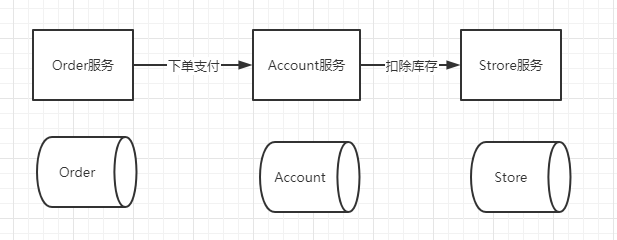
在微服务架构下,每个服务都可以有各自的数据库,我的公司项目就是从单体架构转为SpringCloud+Eureka的架构,所以在一个订单系统中,需要调用账户服务完成支付,账户支付完成后又需要调库存服务去维护库存数据。这里是通过Feign接口调用的服务,所以如果我在扣库存的时候出现异常事务回滚了,只有订单服务知道库存服务出现问题,订单服务可以回滚,但是账户那边的事务不能回滚,因为它是被调用者,不知道其他服务事务是否提交成功。这就是分布式事务的问题了,后来我们引入了Seata分布式事务来解决这个问题。
概念
- XID:一个全局事务的唯一标识,由ip:port:sequence组成
- Transaction Coordinator (TC): 事务协调器,维护全局事务的运行状态,负责协调并驱动全局事务的提交或回滚。
- Transaction Manager (TM): 控制全局事务的边界,负责开启一个全局事务,并最终发起全局提交或全局回滚的决议。
- Resource Manager (RM): 控制分支事务,负责分支注册、状态汇报,并接收事务协调器的指令,驱动分支(本地)事务的提交和回滚。
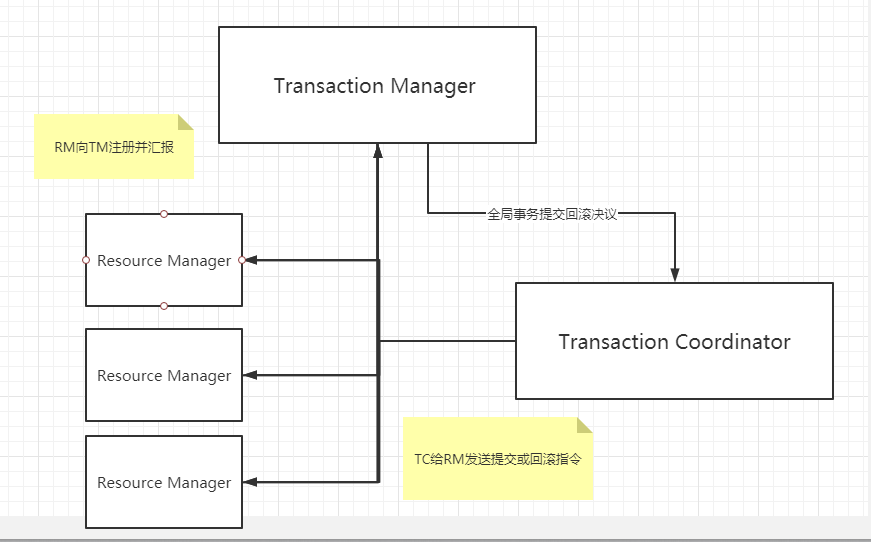
全局事务生命周期
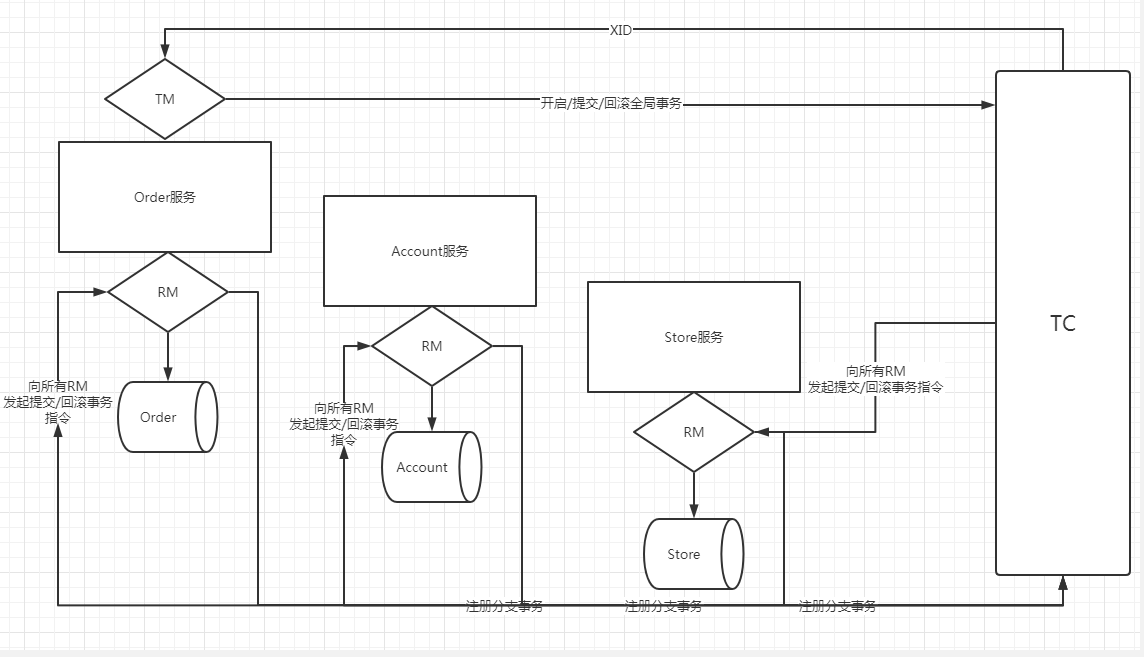
1.TM向TC申请开启一个全局事务并生成一个全局XID;
2.XID在微服务链路的上下文传播;
3.RM向TC注册分支事务,纳入全局XID的管辖下;
4.TM向TC发起全局事务提交/回滚决议;
5.TC调度XID管辖下的所有分支事务完成提交/回滚。
实战
下载地址:https://github.com/seata/seata/releases
找到1.3.0包下载,我这里是linux环境部署,所以下载tar.gz。
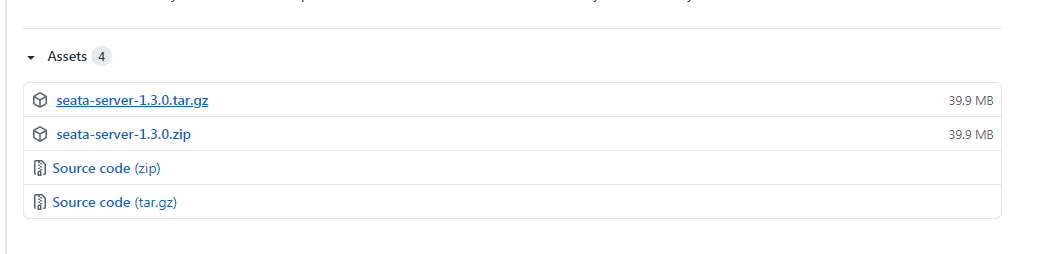
解压完之后进入/seata/conf目录,打开file.conf文件配置。
transaction log store, only used in seata-server
service{
##取一个名字
vgroup_mapping.fsp_tx_group = "seata-server-ta"
##服务器地址
default.grouplist = "127.0.0.1:8091"
disableGlobalTransaction = false
}
store {
## store mode: file、db、redis
mode = "db"
file store property
file {
## store location dir
dir = "sessionStore"
# branch session size , if exceeded first try compress lockkey, still exceeded throws exceptions
maxBranchSessionSize = 16384
# globe session size , if exceeded throws exceptions
maxGlobalSessionSize = 512
# file buffer size , if exceeded allocate new buffer
fileWriteBufferCacheSize = 16384
# when recover batch read size
sessionReloadReadSize = 100
# async, sync
flushDiskMode = async
}
database store property
配置你的数据库
db {
## the implement of javax.sql.DataSource, such as DruidDataSource(druid)/BasicDataSource(dbcp)/HikariDataSource(hikari) etc.
datasource = "druid"
## mysql/oracle/postgresql/h2/oceanbase etc.
dbType = "mysql"
driverClassName = "com.mysql.jdbc.Driver"
url = "jdbc:mysql://127.0.0.1:3306/seata?useUnicode=true&useSSL=false&characterEncoding=utf8&serverTimezone=Asia/Shanghai"
user = "root"
password = "root"
minConn = 5
maxConn = 30
globalTable = "global_table"
branchTable = "branch_table"
lockTable = "lock_table"
queryLimit = 100
maxWait = 5000
}
redis store property
redis {
host = "127.0.0.1"
port = "6379"
password = ""
database = "0"
minConn = 1
maxConn = 10
queryLimit = 100
接着配置registry.conf:
registry {
# file 、nacos 、eureka、redis、zk、consul、etcd3、sofa
# 这里用eureka
type = "eureka"
nacos {
application = "seata-server"
serverAddr = "127.0.0.1:8848"
group = "SEATA_GROUP"
namespace = ""
cluster = "default"
username = ""
password = ""
}
# 配置你的eureka
eureka {
serviceUrl = "http://root:root@192.168.1.120:18000/eureka/"
application = "seata-server-ta"
weight = "1"
}
redis {
serverAddr = "localhost:6379"
db = 0
password = ""
cluster = "default"
timeout = 0
}
zk {
cluster = "default"
serverAddr = "127.0.0.1:2181"
sessionTimeout = 6000
connectTimeout = 2000
username = ""
password = ""
}
consul {
cluster = "default"
serverAddr = "127.0.0.1:8500"
}
etcd3 {
cluster = "default"
serverAddr = "http://localhost:2379"
}
sofa {
serverAddr = "127.0.0.1:9603"
application = "default"
region = "DEFAULT_ZONE"
datacenter = "DefaultDataCenter"
cluster = "default"
group = "SEATA_GROUP"
addressWaitTime = "3000"
}
# 配置file.conf
file {
name = "file.conf"
}
}
然后我们要建一个叫"seata-server"的数据库,执行下列脚本建表。
SET NAMES utf8mb4;
SET FOREIGN_KEY_CHECKS = 0;
-- ----------------------------
-- Table structure for branch_table
-- ----------------------------
DROP TABLE IF EXISTS branch_table;
CREATE TABLE branch_table (
branch_id bigint(20) NOT NULL,
xid varchar(128) CHARACTER SET utf8 COLLATE utf8_general_ci NOT NULL,
transaction_id bigint(20) NULL DEFAULT NULL,
resource_group_id varchar(32) CHARACTER SET utf8 COLLATE utf8_general_ci NULL DEFAULT NULL,
resource_id varchar(256) CHARACTER SET utf8 COLLATE utf8_general_ci NULL DEFAULT NULL,
lock_key varchar(128) CHARACTER SET utf8 COLLATE utf8_general_ci NULL DEFAULT NULL,
branch_type varchar(8) CHARACTER SET utf8 COLLATE utf8_general_ci NULL DEFAULT NULL,
status tinyint(4) NULL DEFAULT NULL,
client_id varchar(64) CHARACTER SET utf8 COLLATE utf8_general_ci NULL DEFAULT NULL,
application_data varchar(2000) CHARACTER SET utf8 COLLATE utf8_general_ci NULL DEFAULT NULL,
gmt_create datetime(0) NULL DEFAULT NULL,
gmt_modified datetime(0) NULL DEFAULT NULL,
PRIMARY KEY (branch_id) USING BTREE,
INDEX idx_xid(xid) USING BTREE
) ENGINE = InnoDB CHARACTER SET = utf8 COLLATE = utf8_general_ci ROW_FORMAT = Dynamic;
-- ----------------------------
-- Table structure for global_table
-- ----------------------------
DROP TABLE IF EXISTS global_table;
CREATE TABLE global_table (
xid varchar(128) CHARACTER SET utf8 COLLATE utf8_general_ci NOT NULL,
transaction_id bigint(20) NULL DEFAULT NULL,
status tinyint(4) NOT NULL,
application_id varchar(32) CHARACTER SET utf8 COLLATE utf8_general_ci NULL DEFAULT NULL,
transaction_service_group varchar(32) CHARACTER SET utf8 COLLATE utf8_general_ci NULL DEFAULT NULL,
transaction_name varchar(128) CHARACTER SET utf8 COLLATE utf8_general_ci NULL DEFAULT NULL,
timeout int(11) NULL DEFAULT NULL,
begin_time bigint(20) NULL DEFAULT NULL,
application_data varchar(2000) CHARACTER SET utf8 COLLATE utf8_general_ci NULL DEFAULT NULL,
gmt_create datetime(0) NULL DEFAULT NULL,
gmt_modified datetime(0) NULL DEFAULT NULL,
PRIMARY KEY (xid) USING BTREE,
INDEX idx_gmt_modified_status(gmt_modified, status) USING BTREE,
INDEX idx_transaction_id(transaction_id) USING BTREE
) ENGINE = InnoDB CHARACTER SET = utf8 COLLATE = utf8_general_ci ROW_FORMAT = Dynamic;
-- ----------------------------
-- Table structure for lock_table
-- ----------------------------
DROP TABLE IF EXISTS lock_table;
CREATE TABLE lock_table (
row_key varchar(128) CHARACTER SET utf8 COLLATE utf8_general_ci NOT NULL,
xid varchar(96) CHARACTER SET utf8 COLLATE utf8_general_ci NULL DEFAULT NULL,
transaction_id mediumtext CHARACTER SET utf8 COLLATE utf8_general_ci NULL,
branch_id mediumtext CHARACTER SET utf8 COLLATE utf8_general_ci NULL,
resource_id varchar(256) CHARACTER SET utf8 COLLATE utf8_general_ci NULL DEFAULT NULL,
table_name varchar(32) CHARACTER SET utf8 COLLATE utf8_general_ci NULL DEFAULT NULL,
pk varchar(36) CHARACTER SET utf8 COLLATE utf8_general_ci NULL DEFAULT NULL,
gmt_create datetime(0) NULL DEFAULT NULL,
gmt_modified datetime(0) NULL DEFAULT NULL,
PRIMARY KEY (row_key) USING BTREE
) ENGINE = InnoDB CHARACTER SET = utf8 COLLATE = utf8_general_ci ROW_FORMAT = Dynamic;
SET FOREIGN_KEY_CHECKS = 1;
然后在你参与全局事务的所有数据库中加入undo_log这张表(order,account,store):
-- 注意此处0.3.0+ 增加唯一索引 ux_undo_log
CREATE TABLE undo_log (
id bigint(20) NOT NULL AUTO_INCREMENT,
branch_id bigint(20) NOT NULL,
xid varchar(100) NOT NULL,
context varchar(128) NOT NULL,
rollback_info longblob NOT NULL,
log_status int(11) NOT NULL,
log_created datetime NOT NULL,
log_modified datetime NOT NULL,
ext varchar(100) DEFAULT NULL,
PRIMARY KEY (id),
UNIQUE KEY ux_undo_log (xid,branch_id)
) ENGINE=InnoDB AUTO_INCREMENT=1 DEFAULT CHARSET=utf8;
然后就是去bin目录执行“seata-server.sh”命令启动我们的seata服务器了,启动完就可以在Eureka注册表上看到它了。

接着我们就要到项目中使用它了,首先要引入以下依赖:
接着在项目的resource目录加入file.conf和registry.conf两个文件:
file.conf:
transport {
# tcp udt unix-domain-socket
type = "TCP"
#NIO NATIVE
server = "NIO"
#enable heartbeat
heartbeat = true
#thread factory for netty
thread-factory {
boss-thread-prefix = "NettyBoss"
worker-thread-prefix = "NettyServerNIOWorker"
server-executor-thread-prefix = "NettyServerBizHandler"
share-boss-worker = false
client-selector-thread-prefix = "NettyClientSelector"
client-selector-thread-size = 1
client-worker-thread-prefix = "NettyClientWorkerThread"
# netty boss thread size,will not be used for UDT
boss-thread-size = 1
#auto default pin or 8
worker-thread-size = 8
}
shutdown {
# when destroy server, wait seconds
wait = 3
}
serialization = "seata"
compressor = "none"
}
service {
#vgroup->rgroup
// 你配置的名字
vgroupMapping.fsp_tx_group = "seata-server-ta"
#only support single node
// seata服务器地址
default.grouplist = "192.168.1.196:8091"
#degrade current not support
enableDegrade = false
#disable
disable = false
#unit ms,s,m,h,d represents milliseconds, seconds, minutes, hours, days, default permanent
max.commit.retry.timeout = "-1"
max.rollback.retry.timeout = "-1"
disableGlobalTransaction = false
}
client {
async.commit.buffer.limit = 10000
lock {
retry.internal = 10
retry.times = 30
}
report.retry.count = 5
tm.commit.retry.count = 1
tm.rollback.retry.count = 1
}
transaction {
undo.data.validation = true
undo.log.serialization = "jackson"
undo.log.save.days = 7
#schedule delete expired undo_log in milliseconds
undo.log.delete.period = 86400000
undo.log.table = "undo_log"
}
support {
## spring
spring {
# auto proxy the DataSource bean
datasource.autoproxy = false
}
}
registry.conf:
registry {
type = "eureka"
eureka {
// eureka地址
serviceUrl = "http://root:root@192.168.1.120:18000/eureka/"
application = "payment"
weight = "1"
}
file {
name = "file.conf"
}
}
config {
# file、nacos 、apollo、zk
type = "file"
file {
name = "file.conf"
}
}
接着我们还要配置数据源代理,因为seata是有自己的代理,所以我们这里要配置seata代理:
/**
* 数据源代理
* @author wangzhongxiang
*/
@Configuration
public class DataSourceConfiguration {
@Bean
@ConfigurationProperties(prefix = "spring.datasource")
public DataSource druidDataSource(){
DruidDataSource druidDataSource = new DruidDataSource();
return druidDataSource;
}
@Primary
@Bean("dataSource")
public DataSourceProxy dataSource(DataSource druidDataSource){
return new DataSourceProxy(druidDataSource);
}
@Bean
public SqlSessionFactory sqlSessionFactory(DataSourceProxy dataSourceProxy)throws Exception{
SqlSessionFactoryBean sqlSessionFactoryBean = new SqlSessionFactoryBean();
sqlSessionFactoryBean.setDataSource(dataSourceProxy);
sqlSessionFactoryBean.setMapperLocations(new PathMatchingResourcePatternResolver()
.getResources("classpath:/mapper/.xml"));
sqlSessionFactoryBean.setTransactionFactory(new SpringManagedTransactionFactory());
return sqlSessionFactoryBean.getObject();
}
}
然后在启动类上把数据源自动配置过滤掉:
@SpringBootApplication(exclude = DataSourceAutoConfiguration.class)
参与全局事务的服务都要按照以上配置,也就是order,account,store都要配置。
然后到这里我们就可以使用我们的@GlobalTransactional开启全局事务啦!
按照这里,我们直接在Order服务的业务接口加上“@GlobalTransactional(name = "fsp-create-order",rollbackFor = Exception.class)”,name一般命名按你的业务来,只要添加了这个注解,就从这里开启了全局事务了。

 浙公网安备 33010602011771号