
Java调用第三方http接口_通过apache common封装好的HttpClient
httpClient的get或post请求方式步骤:
生成一个HttpClient对象并设置相应的参数;
生成一个GetMethod对象或PostMethod并设置响应的参数;
用HttpClient生成的对象来执行GetMethod生成的Get方法;
处理响应状态码;
若响应正常,处理HTTP响应内容;
释放连接。
导入如下jar包
<!--HttpClient-->
<dependency>
    <groupId>commons-httpclient</groupId>
    <artifactId>commons-httpclient</artifactId>
    <version>3.1</version>
</dependency>

<!--fastjson-->
<dependency>
    <groupId>com.alibaba</groupId>
    <artifactId>fastjson</artifactId>
    <version>1.2.32</version>
</dependency>
代码如下:
import com.alibaba.fastjson.JSONObject;
import java.io.IOException;
import org.apache.commons.httpclient.DefaultHttpMethodRetryHandler;
import org.apache.commons.httpclient.methods.GetMethod;
import org.apache.commons.httpclient.methods.PostMethod;
import org.apache.commons.httpclient.params.HttpMethodParams;
import org.apache.commons.httpclient.*;
import org.junit.Test;

public class HttpDemo2 {

  public static String doGet(String url, String charset) {
    //1.生成HttpClient对象并设置参数
    HttpClient httpClient = new HttpClient();
    //设置Http连接超时为5秒
    httpClient.getHttpConnectionManager().getParams().setConnectionTimeout(5000);
    //2.生成GetMethod对象并设置参数
    GetMethod getMethod = new GetMethod(url);
    //设置get请求超时为5秒
    getMethod.getParams().setParameter(HttpMethodParams.SO_TIMEOUT, 5000);
    //设置请求重试处理,用的是默认的重试处理:请求三次
    getMethod.getParams()
        .setParameter(HttpMethodParams.RETRY_HANDLER, new DefaultHttpMethodRetryHandler());
    String response = "";
    //3.执行HTTP GET 请求
    try {
      int statusCode = httpClient.executeMethod(getMethod);
      //4.判断访问的状态码
      if (statusCode != HttpStatus.SC_OK) {
        System.err.println("请求出错:" + getMethod.getStatusLine());
      }
      //5.处理HTTP响应内容
      //HTTP响应头部信息,这里简单打印
      Header[] headers = getMethod.getResponseHeaders();
      for (Header h : headers) {
        System.out.println(h.getName() + "---------------" + h.getValue());
      }
      //读取HTTP响应内容,这里简单打印网页内容
      //读取为字节数组
      byte[] responseBody = getMethod.getResponseBody();
      response = new String(responseBody, charset);
      System.out.println("-----------response:" + response);
      //读取为InputStream,在网页内容数据量大时候推荐使用
      //InputStream response = getMethod.getResponseBodyAsStream();
    } catch (HttpException e) {
      //发生致命的异常,可能是协议不对或者返回的内容有问题
      System.out.println("请检查输入的URL!");
      e.printStackTrace();
    } catch (IOException e) {
      //发生网络异常
      System.out.println("发生网络异常!");
    } finally {
      //6.释放连接
      getMethod.releaseConnection();
    }
    return response;
  }

  /**
   * post请求
   */
  public static String doPost(String url, JSONObject json) {
    HttpClient httpClient = new HttpClient();
    PostMethod postMethod = new PostMethod(url);

    postMethod.addRequestHeader("accept", "*/*");
    postMethod.addRequestHeader("connection", "Keep-Alive");
    //设置json格式传送
    postMethod.addRequestHeader("Content-Type", "application/json;charset=GBK");
    //必须设置下面这个Header
    postMethod.addRequestHeader("User-Agent",
        "Mozilla/5.0 (Windows NT 10.0; Win64; x64) AppleWebKit/537.36 (KHTML, like Gecko) Chrome/58.0.3029.81 Safari/537.36");
    //添加请求参数
    postMethod.addParameter("commentId", json.getString("commentId"));

    String res = "";
    try {
      int code = httpClient.executeMethod(postMethod);
      if (code == 200) {
        res = postMethod.getResponseBodyAsString();
        System.out.println(res);
      }
    } catch (IOException e) {
      e.printStackTrace();
    }
    return res;
  }

  @Test
  public void test() {
    System.out.println(doGet("http://www.baidu.com", "UTF-8"));
    System.out.println("-----------分割线------------");

    JSONObject jsonObject = new JSONObject();
    jsonObject.put("commentId", "13026194071");
    System.out.println(doPost("http://www.baidu.com", jsonObject));
  }
}
运行结果如下:
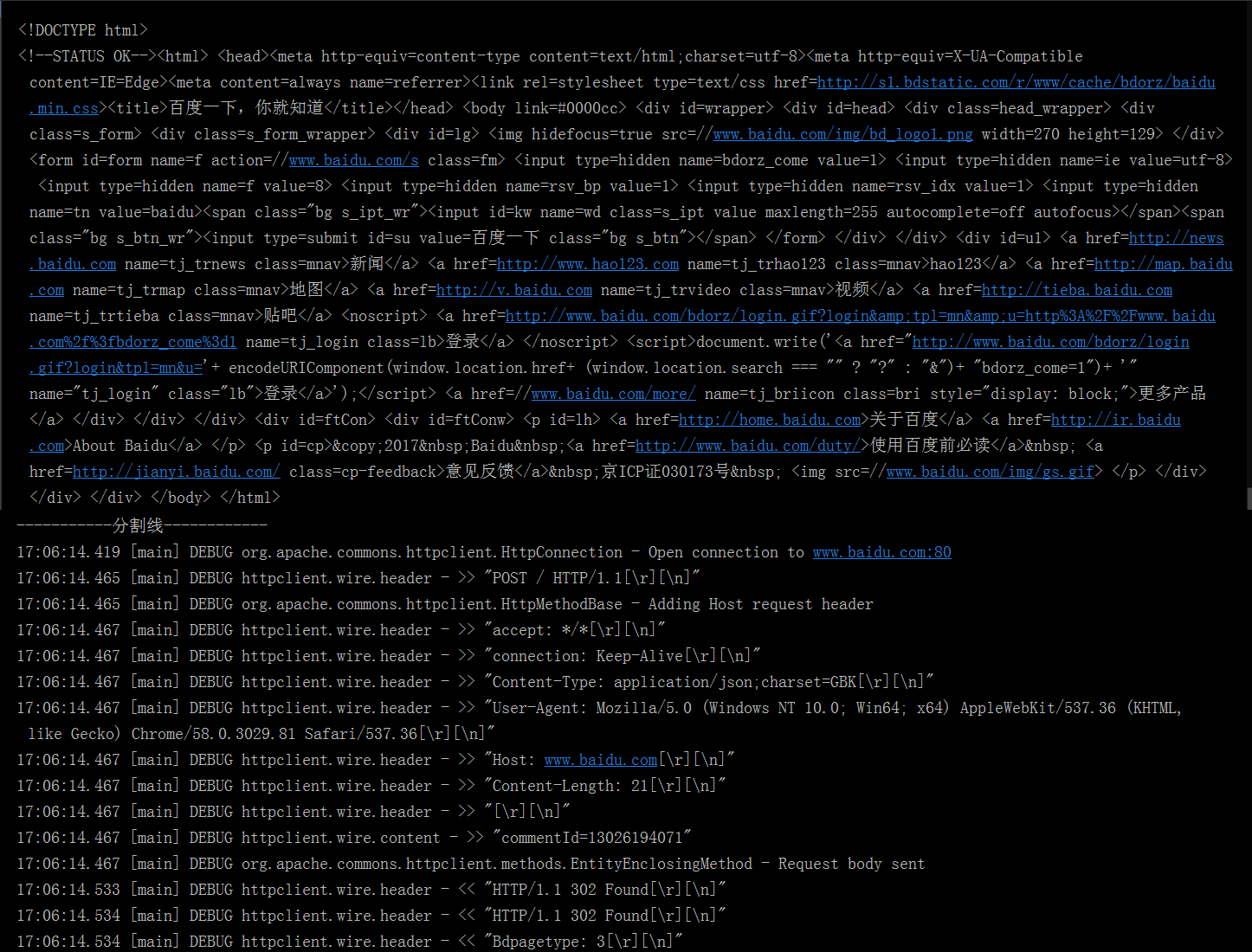
但使用httpClient会产生大量的无效日志信息,不利于查看结果,可以在资源目录下创建logback.xml来取消打印
<configuration>
  <logger name="org.apache" level="WARN" />
  <logger name="httpclient" level="WARN" />
</configuration>

 浙公网安备 33010602011771号