
MSSQL基础学习--查询
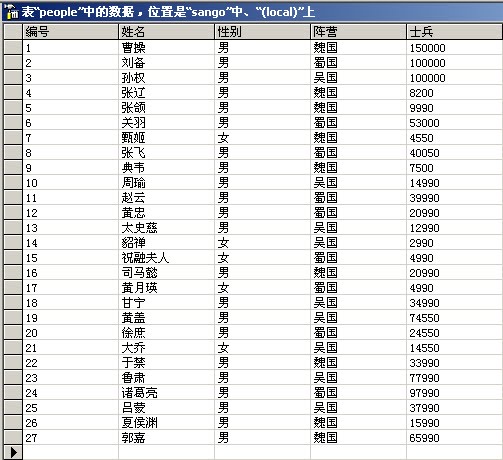
人物表:
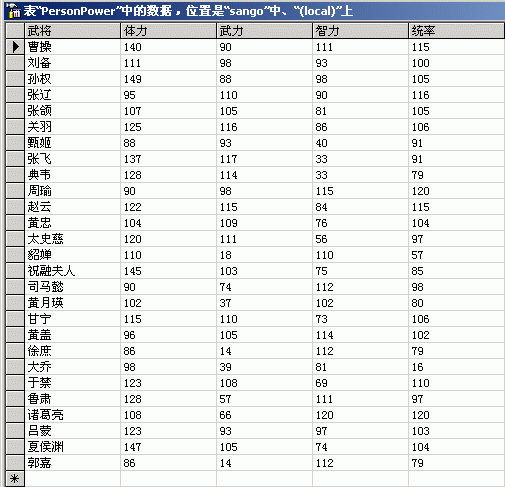
能力表:
1.Select
select all 性别 from people   --将返回27个值,虽然内容都是"男"和"女"

select distinct 性别 from people   --只会显示两个值"男"和"女"

select top 5 性别 from people   --只显示前5条检索到的信息

select top 30 percent 性别 from people   --显示前30%检索到的信息
2.Into
--将people表中的姓名列检索出,并放在tempTable里,如果不存在tempTable表,则新建

select 姓名 into tempTable from people
3.From
--我们要看看不同的统率力下的带兵数量,而统率和士兵并不在同一个表中

select PersonPower.统率,people.士兵
from PersonPower join People
on People.姓名 = PersonPower.武将
4.Where
select 武将 from PersonPower where 武力!>90  --查询武力不大于90的武将

--查询条件为智力不在70--100之间
select 武将,智力 from PersonPower where 智力 not between 70 and 100

--查询条件是否为空值
select * from People where 姓名 is not null

--查询是否为枚举中的值
select 姓名 from People where 姓名 not in('曹操','刘备','孙权')

--查询姓氏为"黄"的两个字名字,这里结果为'黄忠'和'黄盖'
select 姓名 from People where 姓名 like('黄_')

--查询姓氏为"黄"的所有名字,这里结果为'黄忠'、'黄盖'、'黄月瑛'
select 姓名 from People where 姓名 like('黄%')

--查询以H-Z字母开头的记录,这里以pubs数据库为例,结果为Thomas
select lname from Employee where lname like('[H-Z]homas')

--查询不以字母T开头的记录
select lname from Employee where lname like('[^T]%')

--假如数据中本身带有通配符,如:My_Name@163.com,则使用逃逸字符'Escape'来说明
select eMail from Mail where eMail like ('My#_Name%') escape '#'
5.Group by
--统计各个阵营的带兵总数

select 阵营,性别,sum(士兵) as 士兵总数 from People group by 性别,阵营
|
阵营
|
性别
|
士兵总数
|
|
蜀国
|
男
|
376570
|
|
蜀国
|
女
|
9980
|
|
魏国
|
男
|
312650
|
|
魏国
|
女
|
4550
|
|
吴国
|
男
|
353500
|
|
吴国
|
女
|
17540
|
--Cube的用法,显示所有的组合

select 阵营,性别,sum(士兵) as 士兵总数 from People group by 阵营,性别 with cube
|
阵营
|
性别
|
士兵总数
|
|
蜀国
|
男
|
376570
|
|
蜀国
|
女
|
9980
|
|
蜀国
|
NULL
|
386550
|
|
魏国
|
男
|
312650
|
|
魏国
|
女
|
4550
|
|
魏国
|
NULL
|
317200
|
|
吴国
|
男
|
353500
|
|
吴国
|
女
|
17540
|
|
吴国
|
NULL
|
371040
|
|
NULL
|
NULL
|
1074790
|
|
NULL
|
男
|
1042720
|
|
NULL
|
女
|
32070
|
--Rollup的用法,只匹配Group by第一分组条件

select 阵营,性别,sum(士兵) as 士兵总数 from People group by 阵营,性别 with rollup
|
阵营
|
性别
|
士兵总数
|
|
蜀国
|
男
|
376570
|
|
蜀国
|
女
|
9980
|
|
蜀国
|
NULL
|
386550
|
|
魏国
|
男
|
312650
|
|
魏国
|
女
|
4550
|
|
魏国
|
NULL
|
317200
|
|
吴国
|
男
|
353500
|
|
吴国
|
女
|
17540
|
|
吴国
|
NULL
|
371040
|
|
NULL
|
NULL
|
1074790
|
6.Having
--Having子句作用于组,而Where子句作用于表和视图,Having主要用来对计算的结果进一步筛选

--这个将最后结果筛选掉了只有一个女将的魏国
select 性别,count(*) from People where 性别='女' group by 性别 having count(*)>1
7.Compute 与 Compute by
--Compute将在最后添加一行表示计算结果的数据,而Compute by与Group by功能类似,也是用于计算,但Compute by能产生多个结果集

select 姓名,士兵 from People Compute sum(士兵) --最后有一行sum为1074790

--按阵营分成三组结果集,然后每组结果集最后都有一行总和值
select 姓名,士兵,阵营 from People Order by 阵营 Compute sum(士兵) by 阵营
8.Union
--Union用于联合多个查询结果集,且默认为删除重复记录,如要显示全部,加上all

--假设我们要得到多个表的所有姓名

select 姓名 from People

union   --这里如果加上all的话,将显示出相同记录

select 武将 from PersonPower
9.Join On
--Join用于连接两个不同的表,On用于给出这两个表之间的连接条件

insert into People values(28,'胡晓伟','男','中国',88888)  --People中插入一条新记录

--内联接:默认联接形式,返回两个表中所有匹配的行
select * from People Join PersonPower On People.姓名 = PersonPower.武将

--左向外联接:匹配join左边的表,如果在右边并没有相应记录,则置为NULL
--这个例子里,'胡晓伟'将被显示,personPower里的记录为NULL
select * from People left Join PersonPower On People.姓名 = PersonPower.武将

--右向外联接:同上,匹配join右边的表
select * from PersonPower right Join People On People.姓名 = PersonPower.武将

--完整外联接:同时匹配两个表
select * from People full Join PersonPower On People.姓名 = PersonPower.武将

--交叉连接:返回两个表中记录的笛卡儿乘积,这里On关键字不能用
select * from People cross Join PersonPower
10.嵌套查询
--单值比较

select 武将 from PersonPower
where 武将 = (select 姓名 from People where 姓名='曹操')

--In

--查询魏国武将的属性值
select * from PersonPower
where 武将 in (select 姓名 from People where 阵营='魏国')

--All

--查询统率力最小的武将
select 武将,统率 from PersonPower
where 统率 <= all(select 统率 from PersonPower)

--Some(任意一个值)

--查询统率力不是最小的武将(最小的那个记录不满足>关系,其它的至少能比一个值大)
select 武将,统率 from PersonPower
where 统率 > some(select 统率 from PersonPower)

--Exists(表之间的关系,不必对应到具体列,这是和In的最大区别)

--查询蜀国武将的姓名及武力
select 武将,武力 from PersonPower
where exists(select * from people where PersonPower.武将=People.姓名 and 阵营='蜀国')

--Not Exists

--查询非蜀国武将的姓名及武力
select 武将,武力 from PersonPower
where not exists(select * from people where PersonPower.武将=People.姓名 and 阵营='蜀国')

 浙公网安备 33010602011771号