
首先有耐心的同学请看官网
https://docs.mongodb.com/manual/tutorial/install-mongodb-enterprise-on-red-hat-tarball/
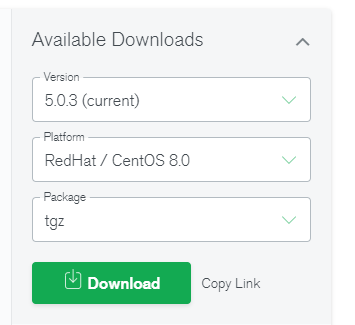
首先官网下载最新版
https://www.mongodb.com/try/download
CentOS8依赖环境安装:
yum install cyrus-sasl cyrus-sasl-gssapi cyrus-sasl-plain krb5-libs libcurl net-snmp openldap openssl xz-libs
wget -P /usr/local/ https://downloads.mongodb.com/linux/mongodb-linux-x86_64-enterprise-rhel80-5.0.3.tgz
tar -xvf mongodb-linux-x86_64-enterprise-rhel80-5.0.3.tgz
mv mongodb-mms-5.0.3.100.20211005T2044Z-1.x86_64 /usr/local/mongodbent5
useradd mongo
[root@CentOS-8 data_mongdbmms5]# passwd mongo
Changing password for user mongo.
New password:
Retype new password:
passwd: all authentication tokens updated successfully.
##自定义配置文件
dbpath = /dbdata/data_mongdbent5 #数据文件存放目录
logpath =/dbdata/log_mongdbent5/mongod.log #日志文件存放地址
port = 27025 #端口
fork = true #以守护程序的方式启用,即在后台运行
#auth=true #需要认证。如果放开注释,就必须创建MongoDB的账号,使用账号与密码才可>远程访问,第一次安装建议注释
bind_ip=0.0.0.0 #允许远程访问,或者直接注释,127.0.0.1是只允许本地访问
chown -R mongo: /dbdata /usr/local/mongodbent5
su - mongo

 浙公网安备 33010602011771号