
PIP-GUI精简版——用Python编写pip图形化脚本
如题:
用Python编写pip图形化脚本
有一天,
我正在安装py的第三方库(安装的什么我忘了),由于官方的网速太慢,我就去用清华的镜像来安装,
我突然想起来,闲着也是闲着,不然写一个GUI的“pip”,而且是用国内镜像站来安装,那不就事半功倍了吗!
说干就干!
我用的python的Tkinter来编写的GUI窗口
1.首先我去找了找国内的pypi镜像站,找到了这几个比较热门的:
# 清华大学镜像站 https://pypi.tuna.tsinghua.edu.cn/simple
# 中国科学技术大学镜像站 : https://pypi.mirrors.ustc.edu.cn/simple
# 豆瓣镜像站:http://pypi.douban.com/simple/
# 阿里云镜像站:http://mirrors.aliyun.com/pypi/simple/
2.首先先导入所需的库:
from os import system
import tkinter as tk
from webbrowser import open as web_open
咱们来看看这些东西,
首先os模块里的system()方法,咱们都知道是执行shell命令的(后面用来执行pip命令的)
然后就是tkinter模块,咱们GUI窗口编写的主力工具
至于webbrowse里的open()方法,也就是打开网页滴~
3.接下来编写GUI窗口:
win = tk.Tk()
win.geometry("320x200+620+400")
win.title("镜像站安装PY模块 GUI")
win.resizable(False, False)

tk.Label(win, text="请输入需要安装的模块名或库名").pack(pady=15)
ent = tk.Entry(win)
ent.pack(pady=10)

tk.Button(win, text="安装", command=install).pack(ipadx=20)
installing = tk.Label(text="")
installing.pack(ipady=6)
4.然后再写绑定的下载功能:
其实也就是每一个镜像站都试着安装一下,上一个镜像站里如果找不到,就试着下一个镜像站,直到最后一个官方的镜像站
def install():
    if ent.get() == "":
        print("请输入要安装的模块名或库名")
        installing.config(text="请输入要安装的模块名或库名")
        return 0
    installing.config(text='安装中...')
    win.update()
    print("——" * 10 + "Installing 开始安装" + "——" * 10 + "\n")
    system("python -m pip install -i https://pypi.tuna.tsinghua.edu.cn/simple --upgrade pip")
    system(f"pip --default-timeout=100 install {ent.get()} -i https://pypi.tuna.tsinghua.edu.cn/simple ")
    system(f"pip --default-timeout=100 install {ent.get()} -i https://pypi.mirrors.ustc.edu.cn/simple ")
    system(f"pip --default-timeout=100 install {ent.get()} -i http://pypi.douban.com/simple/ ")
    system(f"pip --default-timeout=100 install {ent.get()} -i http://mirrors.aliyun.com/pypi/simple/ ")
    system(f"pip --default-timeout=500 install {ent.get()}")
    print("\n" + "——" * 10 + "Install-over 安装结束" + "——" * 10)
    installing.config(text='安装结束')
5.写到一半,我突然想起来,咱用别人的镜像,咱得把它标出来对吧:
tk.Label(text="镜像来源:").pack()

Mirror_station = tk.Frame(win)

link1 = tk.Label(Mirror_station, text="清华镜像站", foreground="blue")
link1.pack(side=tk.LEFT)

link2 = tk.Label(Mirror_station, text="北外镜像站", foreground="blue")
link2.pack(side=tk.LEFT)

link3 = tk.Label(Mirror_station, text="豆瓣镜像站", foreground="blue")
link3.pack(side=tk.LEFT)

link4 = tk.Label(Mirror_station, text="阿里云镜像站", foreground="blue")
link4.pack(side=tk.LEFT)

Mirror_station.pack(fill=tk.X, padx=20)
6.标出来好像还不够,那我就整一个跳转链接吧:
首先,我们先写跳转到每个镜像站的功能:
也就是Label控件上绑定鼠标左键点击然后执行跳转功能
def install_bind(event):
    install()

def web_link_tuna_tsinghua(event):
    web_open("https://mirrors.tuna.tsinghua.edu.cn/help/pypi/")  # 打开清华大学镜像站


def web_link_mirrors_ustc(event):
    web_open("https://mirrors.bfsu.edu.cn/pypi/web/")  # 打开北外的镜像站


def web_link_tuna_douban(event):
    web_open("https://www.douban.com/")  # 打开豆瓣官网


def web_link_mirrors_aliyun(event):
    web_open("https://developer.aliyun.com/mirror/")  # 打开阿里镜像站
然后再把该绑定事件都绑定一下:
ent.bind("<Return>", install_bind)
link1.bind("<Button-1>", web_link_tuna_tsinghua)
link2.bind("<Button-1>", web_link_mirrors_ustc)
link3.bind("<Button-1>", web_link_tuna_douban)
link4.bind("<Button-1>", web_link_mirrors_aliyun)
最后,把窗口主循环给敲上去——
win.mainloop()
好啦,一个GUI的国内镜像PIP就写完了——
最后的最后,把完整的代码奉上:
# coding = utf-8

from os import system
import tkinter as tk
from webbrowser import open as web_open


# 清华大学镜像站 https://pypi.tuna.tsinghua.edu.cn/simple
# 中国科学技术大学镜像站 : https://pypi.mirrors.ustc.edu.cn/simple
# 豆瓣镜像站:http://pypi.douban.com/simple/
# 阿里云镜像站:http://mirrors.aliyun.com/pypi/simple/


def install():
    if ent.get() == "":
        print("请输入要安装的模块名或库名")
        installing.config(text="请输入要安装的模块名或库名")
        return 0
    installing.config(text='安装中...')
    win.update()
    print("——" * 10 + "Installing 开始安装" + "——" * 10 + "\n")
    system("python -m pip install -i https://pypi.tuna.tsinghua.edu.cn/simple --upgrade pip")
    system(f"pip --default-timeout=100 install {ent.get()} -i https://pypi.tuna.tsinghua.edu.cn/simple ")
    system(f"pip --default-timeout=100 install {ent.get()} -i https://pypi.mirrors.ustc.edu.cn/simple ")
    system(f"pip --default-timeout=100 install {ent.get()} -i http://pypi.douban.com/simple/ ")
    system(f"pip --default-timeout=100 install {ent.get()} -i http://mirrors.aliyun.com/pypi/simple/ ")
    system(f"pip --default-timeout=500 install {ent.get()}")
    print("\n" + "——" * 10 + "Install-over 安装结束" + "——" * 10)
    installing.config(text='安装结束')


def install_bind(event):
    install()


def web_link_tuna_tsinghua(event):
    web_open("https://mirrors.tuna.tsinghua.edu.cn/help/pypi/")


def web_link_mirrors_ustc(event):
    web_open("https://mirrors.bfsu.edu.cn/pypi/web/")


def web_link_tuna_douban(event):
    web_open("https://www.douban.com/")


def web_link_mirrors_aliyun(event):
    web_open("https://developer.aliyun.com/mirror/")


print("\n\n请勿关闭此窗口,否则脚本无法运行\n\n")
win = tk.Tk()
win.geometry("320x200+620+400")
win.title("镜像站安装PY模块 GUI")
win.resizable(False, False)

tk.Label(win, text="请输入需要安装的模块名或库名").pack(pady=15)
ent = tk.Entry(win)
ent.pack(pady=10)

tk.Button(win, text="安装", command=install).pack(ipadx=20)
installing = tk.Label(text="")
installing.pack(ipady=6)

tk.Label(text="镜像来源:").pack()

Mirror_station = tk.Frame(win)

link1 = tk.Label(Mirror_station, text="清华镜像站", foreground="blue")
link1.pack(side=tk.LEFT)

link2 = tk.Label(Mirror_station, text="北外镜像站", foreground="blue")
link2.pack(side=tk.LEFT)

link3 = tk.Label(Mirror_station, text="豆瓣镜像站", foreground="blue")
link3.pack(side=tk.LEFT)

link4 = tk.Label(Mirror_station, text="阿里云镜像站", foreground="blue")
link4.pack(side=tk.LEFT)

Mirror_station.pack(fill=tk.X, padx=20)

ent.bind("<Return>", install_bind)
link1.bind("<Button-1>", web_link_tuna_tsinghua)
link2.bind("<Button-1>", web_link_mirrors_ustc)
link3.bind("<Button-1>", web_link_tuna_douban)
link4.bind("<Button-1>", web_link_mirrors_aliyun)

win.mainloop()
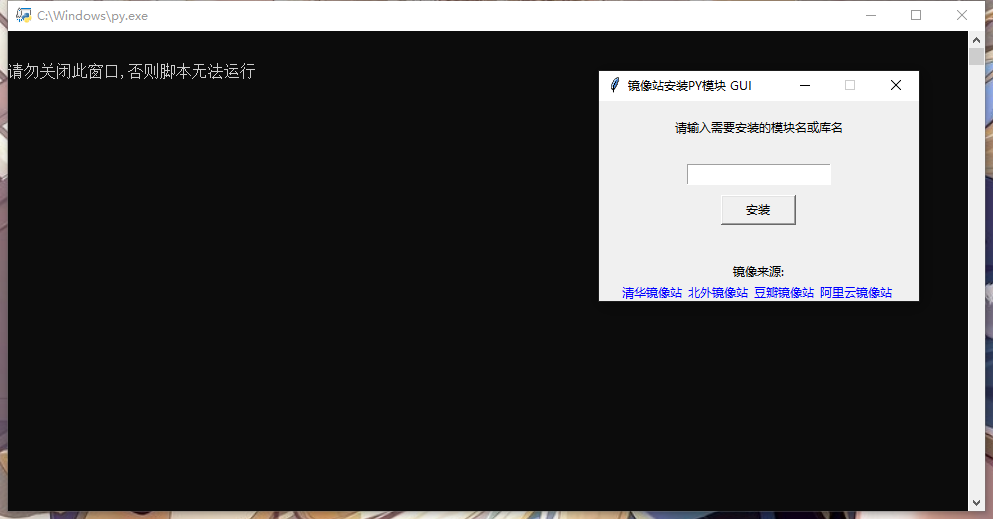
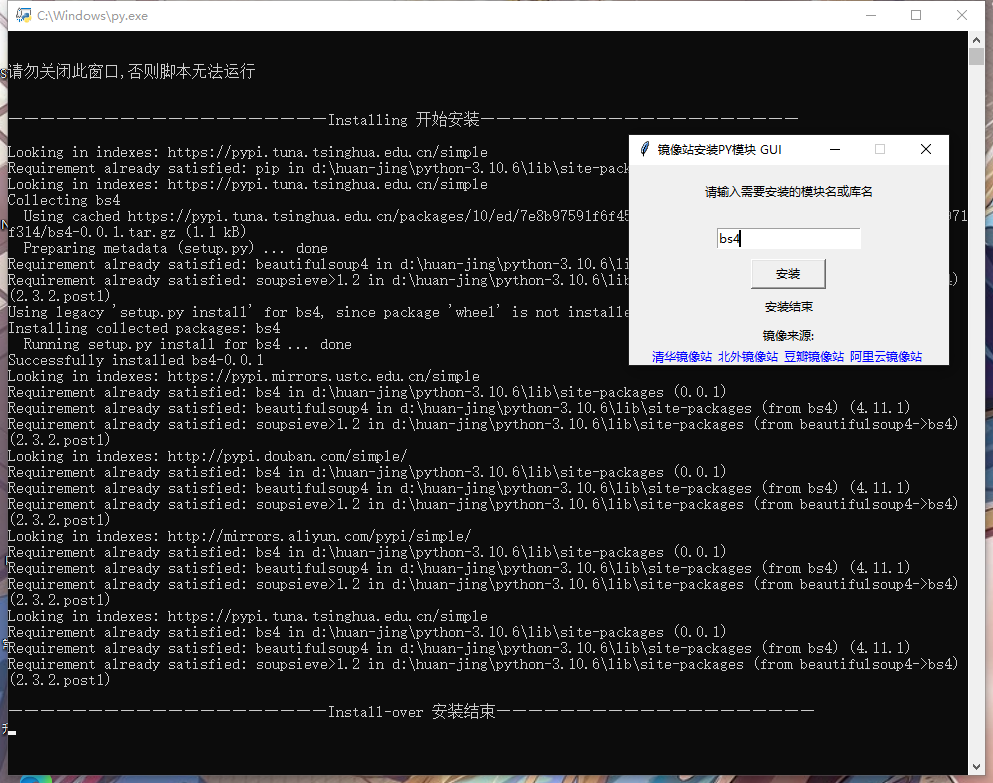
还有运行截图:

 浙公网安备 33010602011771号