
GitHub项目仓库地址:https://github.com/Chavy1/WordCount
代码在dev分支下
项目描述
wc.exe 是一个常见的工具,它能统计文本文件的字符数、单词数和行数。这个项目要求写一个命令行程序,模仿已有wc.exe 的功能,并加以扩充,给出某程序设计语言源文件的字符数、单词数和行数。
实现一个统计程序,它能正确统计程序文件中的字符数、单词数、行数,以及还具备其他扩展功能,并能够快速地处理多个文件。
具体功能要求:
程序处理用户需求的模式为:
wc.exe [parameter] [file_name]
项目需求
基本功能
- 支持 -c 参数:统计文件中的字符数
- 支持 -w 参数:统计文件中的词的数目
- 支持 -l 参数:统计文件中的行数
需求分析:
wc.exe -c file.c //返回文件 file.c 的字符数
wc.exe -w file.c //返回文件 file.c 的词的数目
wc.exe -l file.c //返回文件 file.c 的行数
扩展功能
- 支持 -s 参数:递归处理目录下符合条件的文件
- 支持 -a 参数:返回更复杂的数据(代码行/空行/注释行)
- 支持通配符
空行:本行全部是空格或格式控制字符,如果包括代码,则只有不超过一个可显示的字符,例如“{”。
代码行:本行包括多于一个字符的代码。
注释行:本行不是代码行,并且本行包括注释。一个有趣的例子是有些程序员会在单字符后面加注释:
} //注释
在这种情况下,这一行属于注释行。
[file_name]: 文件或目录名,可以处理一般通配符。
高级功能
- 支持 -x 参数:显示图形界面
- 基本的Windows GUI 程序操作
- 支持通过图形界面选取文件
- 支持通过图形界面展现文件的信息
-x 参数。这个参数单独使用。如果命令行有这个参数,则程序会显示图形界面,用户可以通过界面选取单个文件,程序就会显示文件的字符数、行数等全部统计信息。
需求举例:
wc.exe -s -a *.c
返回当前目录及子目录中所有*.c 文件的代码行数、空行数、注释行数。
已实现功能
基本功能
- -c
- -w
- -l
扩展功能
- -s
- -a
PSP
|
PSP |
Personal Software Process Stages |
预估耗时(分钟) |
实际耗时(分钟) |
|
Planning |
计划 |
|
|
|
|
12*60 |
|
|
Development |
开发 |
|
|
|
|
5 |
5 |
|
|
10 |
15 |
|
|
10 |
10 |
|
|
5 |
0 |
|
|
10 |
5 |
|
|
2*60 |
60 |
|
|
30 |
20 |
|
|
30 |
15 |
| Reporting | 报告 |
|
|
|
|
30 |
15 |
|
|
5 |
5 |
|
|
20 |
20 |
|
|
合计 |
4*60+35 |
2*60+50 |
解题思路
刚拿到题目之后,看完需求,类似于cmd或者linux下的命令行系统,以命令+参数来运行相关的功能。
使用语言和技术栈:使用Java编程,并且决定使用SpringBoot技术栈,主要是开发便捷快速。
分析题目:由于使用到文件的io操作,因此主要知识点便是Java I/O,使用到基本的输入输出流,配合api一些功能就能实现。界面采用控制台打印,即控制台程序,无需JavaFX,使用SpringBoot整合控制台程序,实现CommandLineRunner即可运行。
设计方案
技术栈
该项目基于Java语言开发,使用Spring Boot框架进行控制台程序开发。
具体设计
采用Service-Controller-View三层设计,Service层实现主要的业务逻辑,Controller层作为Service和View层的数据传输层,View层为界面显示层,做控制台的输出显示控制,与用户交互。
采用面向接口编程方式,Service层设计了接口并使用实现类实现其功能。
view层由一主要页面类实现主要界面的显示,与用户的交互逻辑,并且向controller层发起请求调用service层的服务。
接口文档
Service层 业务逻辑
- 获取文件字符数 FileService.getCharNum
- 判断路径是否为空
- 判断是否存在该文件
- 计算文件内字符数,返回数据
- 获取文件单词数 FileService.getWordNum
- 判断路径是否为空
- 判断是否存在该文件
- 使用正则判断,提取除非字符之外的字符串
- 计算词个数,返回数据
- 获取文件行数 FileService.getLineNum
- 判断路径是否为空
- 判断是否存在该文件
- 计算文件长度,跳转最后一行,读取行号,+1,返回数据
- 获取文件空行数 FileService.getEmptyLineNum
- 判断路径是否为空
- 判断是否存在该文件
- 计算文件内空行数,返回数据
- 获取文件注释行数 FileService.getAnnotationLineNum
- 判断路径是否为空
- 判断是否存在该文件
- 使用正则判断每一行,计算,返回数据
- 获取当前目录及其子目录下所有文件字符数 FolderService.getCharNumOfFolder
- 判断路径是否为空
- 遍历夫目录,将所有子目录放入集合
- 处理所有当前目录下的文件,计算字符数
- 遍历子目录,同上操作
- 返回总数
- 获取当前目录及其子目录下所有文件单词数 FolderService.getWordNumOfFolder
- 判断路径是否为空
- 遍历父目录,保存子目录
- 处理当前目录下文件,计算单词数
- 遍历子目录,同上操作
- 返回总数
- 获取当前目录及其子目录下所有文件行数 FolderService.getLineNumOfFolder
- 判断路径是否为空
- 遍历父目录,保存子目录
- 处理当前目录下文件,计算行数
- 遍历子目录,同上操作
- 返回总数
- 获取当前目录及其子目录下所有文件空行数 FolderService.getEmptyLineNumOfFolder
- 判断路径是否为空
- 遍历父目录,保存子目录
- 处理当前目录下文件,计算空行数
- 遍历子目录,同上操作
- 返回总数
- 获取当前目录及其子目录下所有文件注释行数 FolderService.getAnnotationLineNumOfFolder
- 判断路径是否为空
- 遍历父目录,保存子目录
- 处理当前目录下文件,计算注释行数
- 遍历子目录,同上操作
- 返回总数
View层 界面逻辑
- 主界面欢迎提示信息 MainPage.welcome
- 分行输出欢迎信息以及所有权
- 主界面主要展示方法 MainPage.show
- 显示主界面欢迎信息
- 无限循环等待输入,直到接收到q退出程序
- 若输入内容包含wc,判断为命令,执行命令
- 命令判断 MainPage.list
- 处理字符串,检测其中参数
- 按不同参数调用不同方法
- 计算文件字符数服务显示信息 FilePage.getCharNum
- 路径判空
- 路径进行正则判断,对文件后缀判断
- 调用controller服务,接收返回结果Bean,处理输出对应信息
- 计算文件词数服务显示信息 FilePage.getWordNum
- 路径判空
- 路径进行正则判断,对文件后缀判断
- 调用controller服务,接收返回结果Bean,处理输出对应信息
- 计算文件行数服务显示信息 FilePage.getLineNum
- 路径判空
- 路径进行正则判断,对文件后缀判断
- 调用controller服务,接收返回结果Bean,处理输出对应信息
- 计算文件空行和注释行数服务显示信息 FilePage.getEmptyLineAndAnnotationLineNum
- 路径判空
- 路径进行正则判断,对文件后缀判断
- 调用controller服务,接收返回结果Bean,处理输出对应信息
- 计算文件夹字符数服务显示信息 FilePage.getFolderCharNum
- 路径判空
- 字符串处理,提取路径
- 调用controller服务,接收返回结果Bean,处理输出对应信息
- 计算文件夹词数服务显示信息 FilePage.getFolderWordNum
- 路径判空
- 字符串处理,提取路径
- 调用controller服务,接收返回结果Bean,处理输出对应信息
- 计算文件夹行数服务显示信息 FilePage.getFolderLineNum。
- 路径判空
- 字符串处理,提取路径
- 调用controller服务,接收返回结果Bean,处理输出对应信息
- 计算文件夹空行和注释行数服务显示信息 FilePage.getEmptyAndAnnotationLineNumOfFolder。
- 路径判空
- 字符串处理,提取路径
- 调用controller服务,接收返回结果Bean,处理输出对应信息
代码说明
程序启动入口
@SpringBootApplication
public class WordcountApplication implements CommandLineRunner {

    @Autowired
    MainPage mainPage;

    @Override
    public void run(String... args) throws Exception {
    		//由该方法下调用主界面展示信息
        mainPage.show();
    }

    public static void main(String[] args) {
        SpringApplication.run(WordcountApplication.class, args);
    }

}
主要界面代码
/**
 *
 * @author Chavy
 * @date 2020/3/6 16:52
 */
@Component
public class MainPage {

    private static final String EXIT = "q";

    @Resource
    FilePage filePage;

    /**
     * 界面欢迎页面
     */
    public void welcome(){
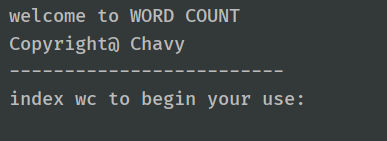
        System.out.println("welcome to WORD COUNT");
        System.out.println("Copyright@ Chavy");
        System.out.println("-------------------------");
        System.out.println("index wc to begin your use:");
    }

    /**
     * 主展示界面方法
     */
    public void show(){
        Scanner scanner = new Scanner(System.in);
        String index = "";
        welcome();
        while(!EXIT.equals(index)){
            index = scanner.nextLine();
            if(index.contains("wc")){
                list(index);
            }
        }
    }

    /**
     * 命令判断列表
     * @param index 命令
     */
    public void list(String index){
        if(index.contains(Constant.COMMAND_GET_CHAR_NUM)){
            //选择了-c参数
            if(index.contains(Constant.COMMAND_GET_FOLDER)){
                //选择了-s参数
                filePage.getFolderCharNum(index);
            }else {
                filePage.getCharNum(index);
            }
        }else if(index.contains(Constant.COMMAND_GET_WORD_NUM)){
            //选择了-w参数
            if(index.contains(Constant.COMMAND_GET_FOLDER)){
                //选择了-s参数
                filePage.getFolderWordNum(index);
            }else {
                filePage.getWordNum(index);
            }
        }else if(index.contains(Constant.COMMAND_GET_LINE_NUM)){
            //选择了-l参数
            if(index.contains(Constant.COMMAND_GET_FOLDER)){
                //选择了-s参数
                filePage.getFolderLineNum(index);
            }else {
                filePage.getLineNum(index);
            }
        }else if(index.contains(Constant.COMMAND_GET_EMPTY_AND_ANNOTATION_LINE_NUM)) {
            //选择了-a参数
            if(index.contains(Constant.COMMAND_GET_FOLDER)){
                //选择了-s参数
                filePage.getEmptyAndAnnotationLineNumOfFolder(index);
            }else {
                filePage.getEmptyLineAndAnnotationLineNum(index);
            }
        }else if(Constant.COMMAND_HELP.equals(index)) {
            helpList();
        }else if(EXIT.equals(index)){
            //退出
            System.out.println("bye!");
        }else {
            System.out.println("Error : invalid command");
        }
    }

    /**
     * 帮助界面显示
     */
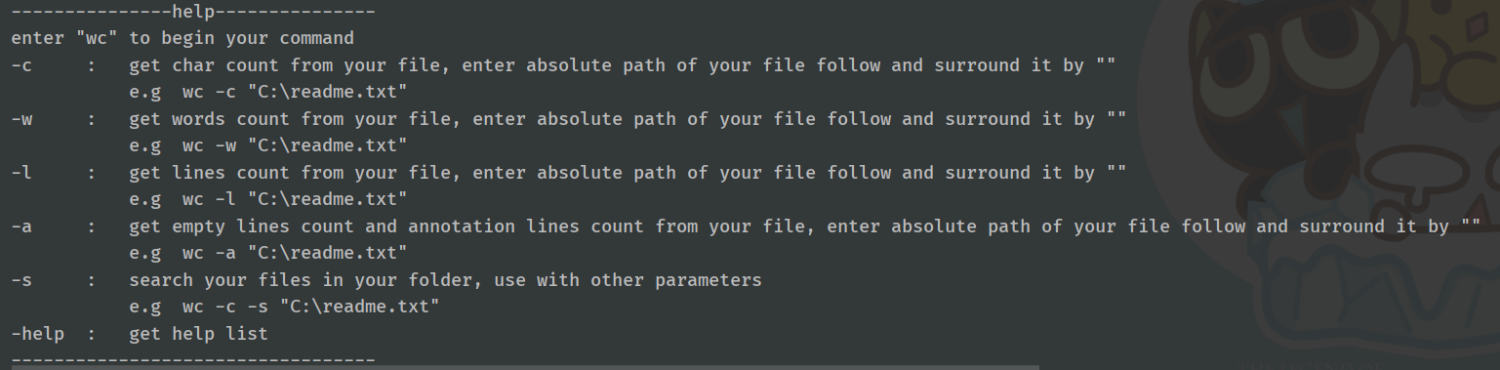
    private void helpList(){
        System.out.println();
        System.out.println("---------------help---------------");
        System.out.println("enter \"wc\" to begin your command");
        System.out.println("-c     :   get char count from your file, enter absolute path of your file follow and " +
                "surround it by \"\"");
        System.out.println("           e.g  wc -c \"C:\\readme.txt\"");
        System.out.println("-w     :   get words count from your file, enter absolute path of your file follow and " +
                "surround it by \"\"");
        System.out.println("           e.g  wc -w \"C:\\readme.txt\"");
        System.out.println("-l     :   get lines count from your file, enter absolute path of your file follow and " +
                "surround it by \"\"");
        System.out.println("           e.g  wc -l \"C:\\readme.txt\"");
        System.out.println("-a     :   get empty lines count and annotation lines count from your file, enter absolute path of your file follow and " +
                "surround it by \"\"");
        System.out.println("           e.g  wc -a \"C:\\readme.txt\"");
        System.out.println("-s     :   search your files in your folder, use with other parameters");
        System.out.println("           e.g  wc -c -s \"C:\\readme.txt\"");
        System.out.println("-help  :   get help list");
        System.out.println("----------------------------------");
        System.out.println();
    }
}
其中show()方法为主要展示方法,调用显示程序欢迎信息后循环等待输入命令。
welcome()方法为欢迎信息
list()方法为用户输入命令后匹配方法,匹配后跳转到对应的方法内部处理具体的数据交互逻辑
文件处理逻辑
package com.chavy.wordcount.service.impl;

import com.chavy.wordcount.service.FileService;
import lombok.extern.slf4j.Slf4j;
import org.springframework.stereotype.Service;
import org.springframework.util.Assert;

import java.io.*;

/**
 * @author Chavy
 * @date
 */
@Service
@Slf4j
public class FileServiceImpl implements FileService {

    @Override
    public long getCharNum(String path) {
        //换行算2字符,中文算3字符,空格1字符
        Assert.isTrue(path != null,"文件路径不能为空!");
        File file = new File(path);
        if(!file.exists()){
            return -1;
        }
        return file.length();
    }

    @Override
    public long getWordNum(String path) {
        Assert.isTrue(path != null,"文件路径不能为空!");
        File file = new File(path);
        if(!file.exists()){
            return -1;
        }
        BufferedReader bufferedReader = null;
        long wordNum = 0;
        try {
            bufferedReader = new BufferedReader(new InputStreamReader(new FileInputStream(file)));
            String[] words = null;
            while (bufferedReader.read() != -1){
                String line = bufferedReader.readLine();
                words = line.split("[\\W]+");
                for(String s : words){
                    if(s.matches("[\\w]+")){
                        wordNum++;
                    }
                }
            }
            return wordNum;
        }catch (IOException e){
            log.error("IO Exception");
            return -1;
        }finally {
            try{
                if(bufferedReader != null){
                    bufferedReader.close();
                }
            }catch (IOException e){
                log.error("IO Exception");
            }
        }
    }

    @Override
    public long getLineNum(String path) {
        Assert.isTrue(path != null,"文件路径不能为空!");
        File file = new File(path);
        if(!file.exists()){
            return -1;
        }
        LineNumberReader lineNumberReader = null;
        long length = file.length();
        try {
            lineNumberReader = new LineNumberReader(new FileReader(file));
            lineNumberReader.skip(length);
            return lineNumberReader.getLineNumber() + 1;
        } catch (IOException e) {
            log.error("IO Exception");
            return -1;
        }finally {
            try {
                if (lineNumberReader != null) {
                    lineNumberReader.close();
                }
            }catch (IOException e){
                log.error("IO Close Exception!");
            }
        }
    }

    @Override
    public long getEmptyLineNum(String path){
        Assert.isTrue(path != null,"文件路径不能为空!");
        File file = new File(path);
        if(!file.exists()){
            return -1;
        }
        BufferedReader bufferedReader = null;
        long emptyLineNum = 0;
        try{
            bufferedReader = new BufferedReader(new FileReader(file));
            while(bufferedReader.read() != -1){
                String line = bufferedReader.readLine();
                if(line.trim().isEmpty()){
                    emptyLineNum++;
                }
            }
            return emptyLineNum;
        }catch (IOException e){
            log.error(e.getMessage());
            return -1;
        }finally {
            try {
                if (bufferedReader != null) {
                    bufferedReader.close();
                }
            }catch (IOException e){
                log.error("IO Close Exception!");
            }
        }
    }

    @Override
    public long getAnnotationLineNum(String path) {
        Assert.isTrue(path != null,"文件路径不能为空!");
        File file = new File(path);
        if(!file.exists()){
            return -1;
        }
        BufferedReader bufferedReader = null;
        long annotationLineNum = 0;
        try{
            bufferedReader = new BufferedReader(new FileReader(file));
            //单行注释正则
            String regexAnnotation = "\\s*/{2}.*";
            //多行注释正则
            String regexAnnotationStart = "\\s*/\\x2A.*";
            String regexAnnotationEnd = "\\s*\\x2A/.*";
            String line = null;
            while (null != (line = bufferedReader.readLine())) {
                // 多行注释统计
                if (line.matches(regexAnnotationStart)) {
                    do {
                        annotationLineNum++;
                        line = bufferedReader.readLine();
                    } while (!line.matches(regexAnnotationEnd));
                }
                 if (line.matches(regexAnnotation)) {
                     // 单行注释统计
                     annotationLineNum++;
                 }
            }
            return annotationLineNum;
        }catch (IOException e){
            log.error(e.getMessage());
            return -1;
        }finally {
            try{
                if(bufferedReader != null){
                    bufferedReader.close();
                }
            }catch (IOException e){
                log.error(e.getMessage());
            }
        }
    }
}
该类为文件处理服务类,主要对文件进行对应的计算。
getWordNum()方法举例,将路径封装为File对象,读取该文件并打开一个输入流,读取该文件内信息,使用正则判断计算文件内单词个数,然后将计算后的总数返回。其后是一些关闭流的处理和异常处理。
其他的文件处理方法大同小异。
测试运行
代码复审
使用Assert断言对参数判空等处理。
对业务逻辑的代码编码规范复审。
运行测试
- 欢迎信息
- -c 参数,计算文件内字符数
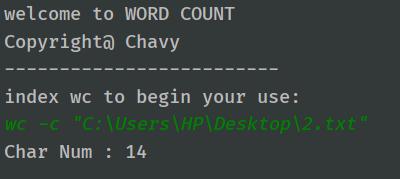
- wc -c "C:\Users\HP\Desktop\2.txt"
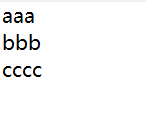
- 测试用例:14字符(换行符算2个字符)

- 预测结果:14
- 实际结果:

- -w 参数,计算文件内词数
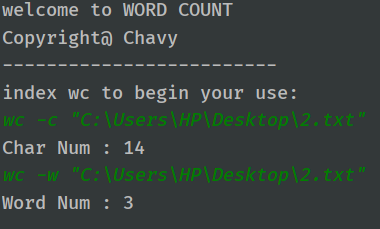
- wc -w "C:\Users\HP\Desktop\2.txt"
- 测试用例:

- 预测结果:3
- 实际结果:

- -l 参数,计算文件内行数
- wc -l "C:\Users\HP\Desktop\2.txt"
- 测试用例:

- 预测结果:3
- 实际结果:


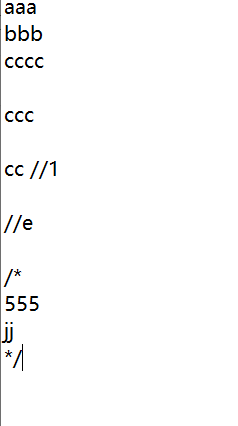
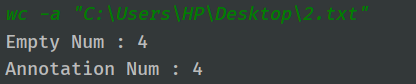
- -a 参数,计算文件内空行和注释行数
- wc -a "C:\Users\HP\Desktop\2.txt"
- 测试用例:

- 测试结果:4,4
- 实际结果:

- -s 参数,文件夹处理
- wc -l -s "C:\Users\HP\Desktop\23" 计算文件夹内所有符合条件文件的行数
- 预测结果:7
- 实际结果:


- -help 参数,帮助菜单
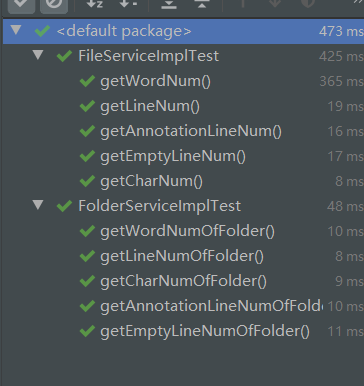
单元测试
主要的处理逻辑都在service层,因此单元测试的主要对象针对service层。
所有测试代码在test下
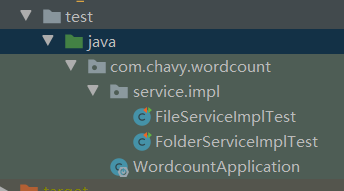
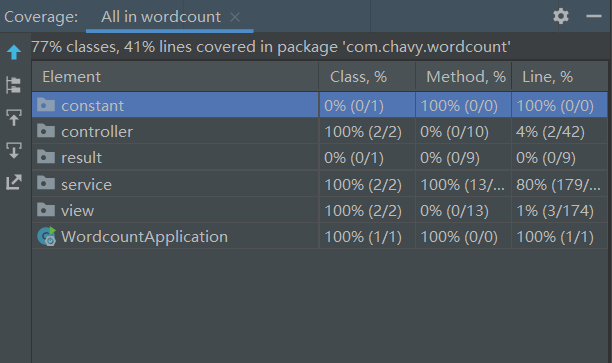
测试运行结果:
代码覆盖率80%,方法覆盖率100%
效能分析
使用JProfiler集成IDEA的JProfiler插件运行
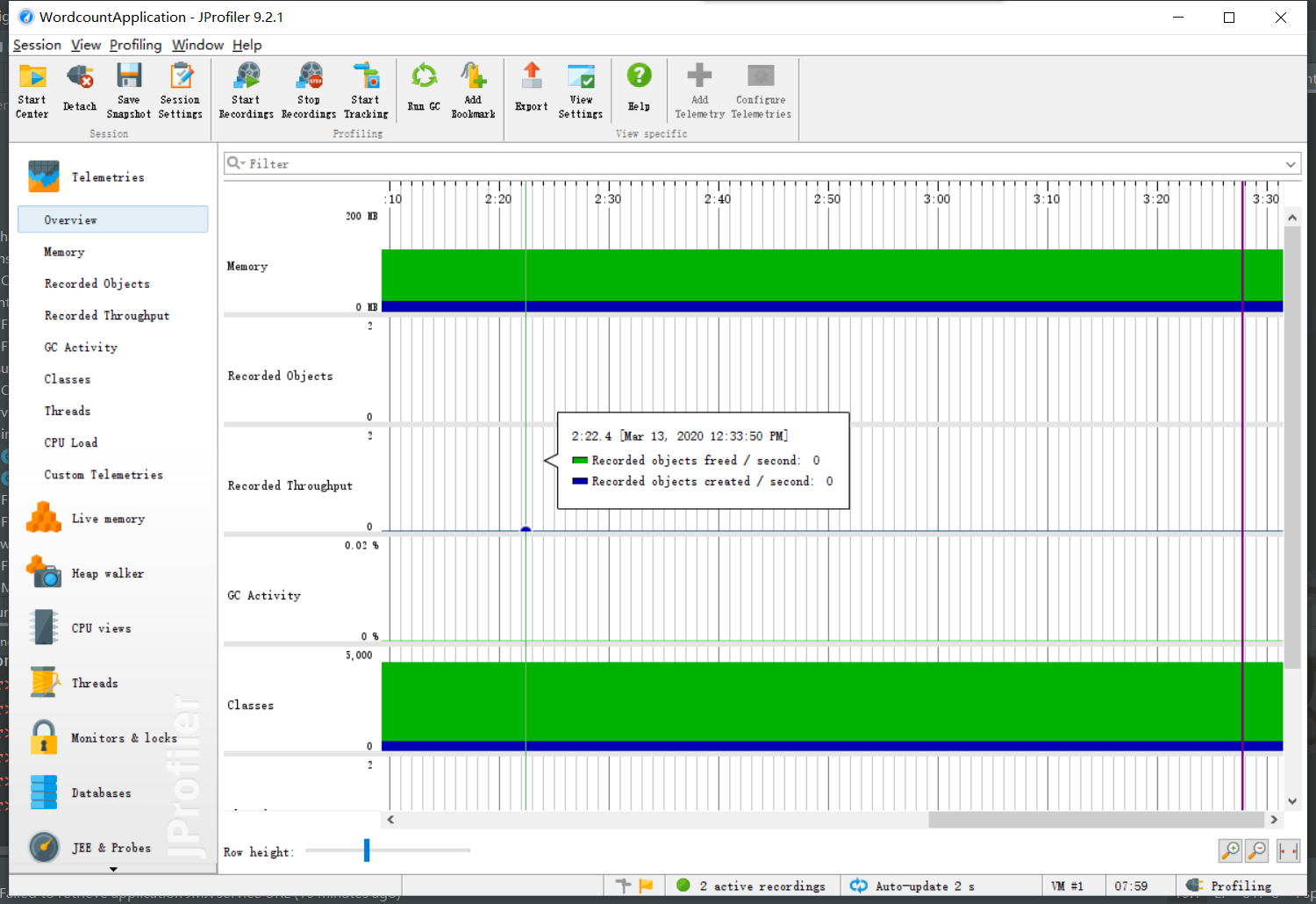
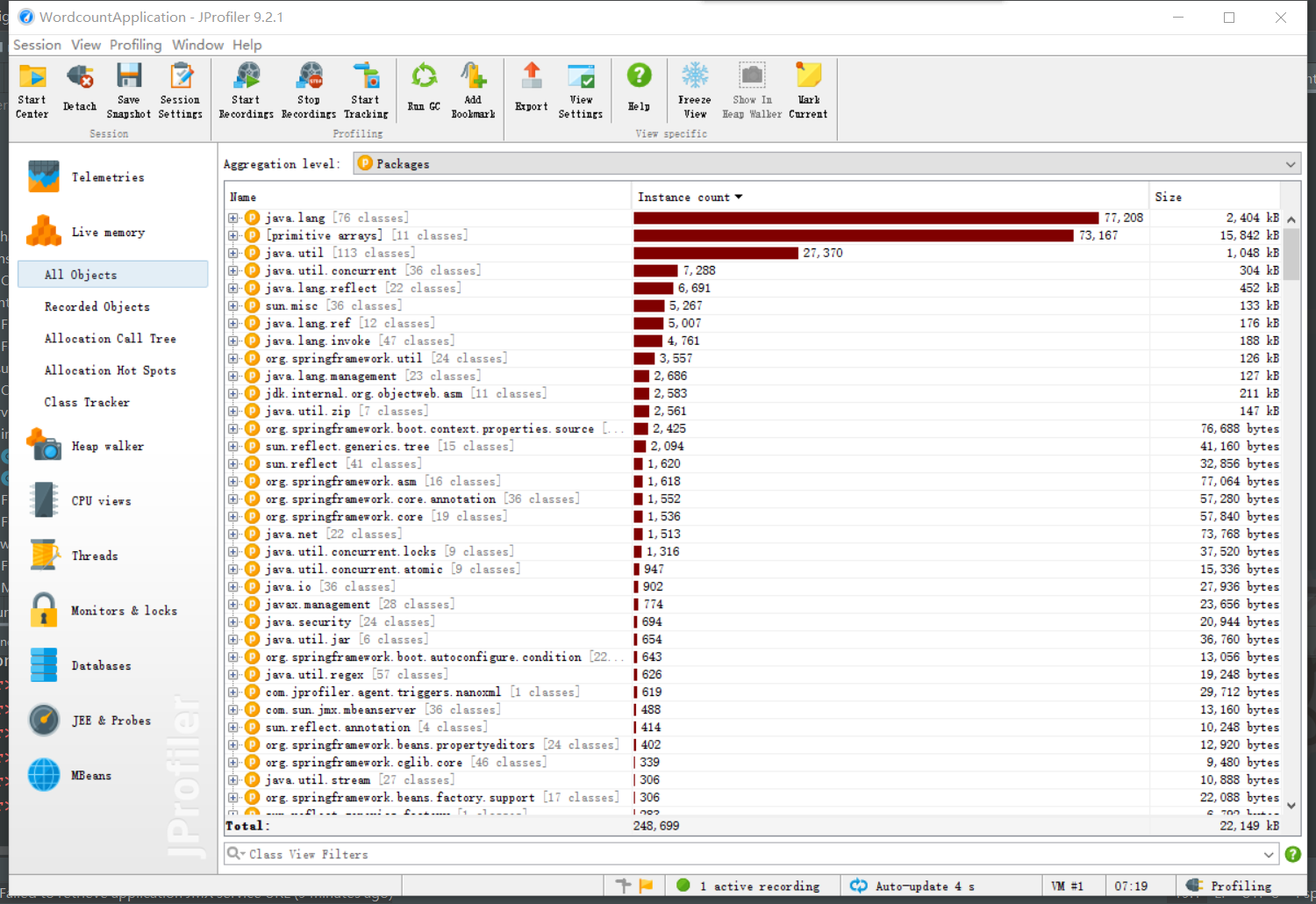
由于是单线程命令行程序,没有什么特别之处。
总结
对于该项目开发,结合PSP表格,整体耗时比想象中要少得多,主要原因是在编程规范以及文档处理这一方面按照自己原有的习惯来整理,在项目文档中的耗时主要花费在了一些个人方面的模块。
在具体开发中,由于原有的习惯,使用的架构以及设计模式无需经过太久思考,基本上比较流畅顺利地完成了整个项目的架构。具体的技术上、业务逻辑上的问题通过百度谷歌,以及利用现有api解决了。
 posted on

 浙公网安备 33010602011771号