
SpringBoot + FFmpeg + ZLMediaKit 实现本地视频推流
# 拉取镜像
docker pull zlmediakit/zlmediakit:master

# 启动
docker run -d \
  --name zlm-server \
  -p 1935:1935 \
  -p 8099:80 \
  -p 8554:554 \
  -p 10000:10000 \
  -p 10000:10000/udp \
  -p 8000:8000/udp \
  -v /docker-volumes/zlmediakit/conf/config.ini:/opt/media/conf/config.ini \
zlmediakit/zlmediakit:master[hls]
broadcastRecordTs=0
deleteDelaySec=300 # 推流的视频保存多久(5分钟)
fileBufSize=65536
filePath=./www # 保存路径
segDur=2 # 单个.ts 切片时长(秒)。
segNum=1000 # 直播时.m3u8 里最多同时保留多少个切片。
segRetain=9999 # 磁盘上实际保留多少个历史切片# 查看启动状态
docker logs -f zlm-server# 下载路径
https://www.gyan.dev/ffmpeg/builds/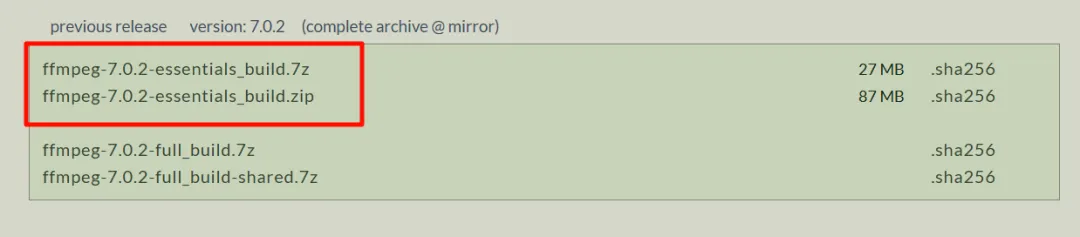
C:\ffmpeg\ffmpeg-7.0.2-essentials_build\bin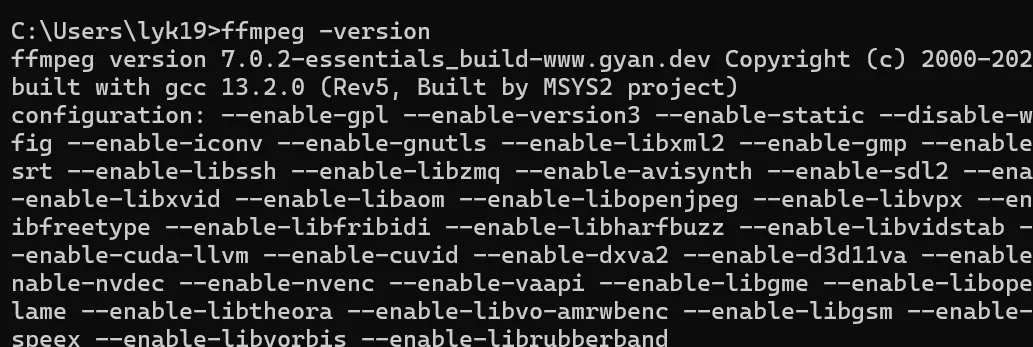


<dependencies>

    <!-- 进程管理 -->
    <dependency>
        <groupId>org.apache.commons</groupId>
        <artifactId>commons-exec</artifactId>
        <version>1.3</version>
    </dependency>

</dependencies>package com.lyk.plugflow.config;
import lombok.Data;
import org.springframework.boot.context.properties.ConfigurationProperties;
import org.springframework.stereotype.Component;
@Data
@Component
@ConfigurationProperties(prefix = "stream")
public class StreamConfig {
/**
* ZLMediaKit服务地址
*/
private String zlmHost;
/**
* RTMP推流端口
*/
private Integer rtmpPort;
/**
* HTTP-FLV拉流端口
*/
private Integer httpPort;
/**
* FFmpeg可执行文件路径
*/
private String ffmpegPath;
/**
* 视频存储路径
*/
private String videoPath;
}package com.lyk.plugflow.service;
import com.lyk.plugflow.config.StreamConfig;
import lombok.extern.slf4j.Slf4j;
import org.apache.commons.exec.*;
import org.springframework.beans.factory.annotation.Autowired;
import org.springframework.stereotype.Service;
import java.io.ByteArrayOutputStream;
import java.io.File;
import java.util.Map;
import java.util.concurrent.ConcurrentHashMap;
@Slf4j
@Service
public class StreamService {
@Autowired
private StreamConfig streamConfig;
// 存储推流进程
private final Map<String, DefaultExecutor> streamProcesses = new ConcurrentHashMap<>();
// 添加手动停止标记
private final Map<String, Boolean> manualStopFlags = new ConcurrentHashMap<>();
/**
* 开始推流
*/
public boolean startStream(String videoPath, String streamKey) {
try {
// 检查视频文件是否存在
File videoFile = new File(videoPath);
if (!videoFile.exists()) {
log.error("视频文件不存在: {}", videoPath);
return false;
}
// 构建RTMP推流地址
String rtmpUrl = String.format("rtmp://%s:%d/live/%s",
streamConfig.getZlmHost(), streamConfig.getRtmpPort(), streamKey);
// 构建FFmpeg命令
CommandLine cmdLine = getCommandLine(videoPath, rtmpUrl);
// 创建执行器
DefaultExecutor executor = new DefaultExecutor();
executor.setExitValue(0);
// 设置watchdog用于进程管理
ExecuteWatchdog watchdog = new ExecuteWatchdog(ExecuteWatchdog.INFINITE_TIMEOUT);
executor.setWatchdog(watchdog);
// 设置输出流
ByteArrayOutputStream outputStream = new ByteArrayOutputStream();
PumpStreamHandler streamHandler = new PumpStreamHandler(outputStream);
executor.setStreamHandler(streamHandler);
// 异步执行
executor.execute(cmdLine, new ExecuteResultHandler() {
@Override
public void onProcessComplete(int exitValue) {
log.info("推流完成, streamKey: {}, exitValue: {}", streamKey, exitValue);
streamProcesses.remove(streamKey);
}
@Override
public void onProcessFailed(ExecuteException e) {
boolean isManualStop = manualStopFlags.remove(streamKey);
if (isManualStop) {
log.info("推流已手动停止, streamKey: {}", streamKey);
} else {
log.error("推流失败, streamKey: {}, error: {}", streamKey, e.getMessage());
}
streamProcesses.remove(streamKey);
}
});
// 保存进程引用
streamProcesses.put(streamKey, executor);
log.info("开始推流, streamKey: {}, rtmpUrl: {}", streamKey, rtmpUrl);
return true;
} catch (Exception e) {
log.error("推流启动失败", e);
return false;
}
}
private CommandLine getCommandLine(String videoPath, String rtmpUrl) {
CommandLine cmdLine = new CommandLine(streamConfig.getFfmpegPath());
cmdLine.addArgument("-re"); // 按原始帧率读取
cmdLine.addArgument("-i");
cmdLine.addArgument(videoPath);
cmdLine.addArgument("-c:v");
cmdLine.addArgument("libx264"); // 视频编码
cmdLine.addArgument("-c:a");
cmdLine.addArgument("aac"); // 音频编码
cmdLine.addArgument("-f");
cmdLine.addArgument("flv"); // 输出格式
cmdLine.addArgument("-flvflags");
cmdLine.addArgument("no_duration_filesize");
cmdLine.addArgument(rtmpUrl);
return cmdLine;
}
/**
* 停止推流
*/
public boolean stopStream(String streamKey) {
try {
DefaultExecutor executor = streamProcesses.get(streamKey);
if (executor != null) {
// 设置手动停止标记
manualStopFlags.put(streamKey, true);
ExecuteWatchdog watchdog = executor.getWatchdog();
if (watchdog != null) {
watchdog.destroyProcess();
} else {
log.warn("进程没有watchdog,无法强制终止, streamKey: {}", streamKey);
}
streamProcesses.remove(streamKey);
log.info("停止推流成功, streamKey: {}", streamKey);
return true;
}
return false;
} catch (Exception e) {
log.error("停止推流失败", e);
return false;
}
}
/**
* 获取拉流地址
*/
public String getPlayUrl(String streamKey, String protocol) {
return switch (protocol.toLowerCase()) {
case "flv" -> String.format("http://%s:%d/live/%s.live.flv",
streamConfig.getZlmHost(), streamConfig.getHttpPort(), streamKey);
case "hls" -> String.format("http://%s:%d/live/%s/hls.m3u8",
streamConfig.getZlmHost(), streamConfig.getHttpPort(), streamKey);
default -> null;
};
}
/**
* 检查推流状态
*/
public boolean isStreaming(String streamKey) {
return streamProcesses.containsKey(streamKey);
}
}stream:
zlm-host: 192.168.159.129
rtmp-port: 1935
http-port: 8099
ffmpeg-path: ffmpeg
video-path: \videos\
# 文件上传配置
spring:
servlet:
multipart:
max-file-size: 1GB
max-request-size: 1GB

-
启动 ZLMediaKit 服务
-
上传视频文件到服务器
-
调用推流接口,指定视频路径和推流密钥
-
Spring Boot 执行 FFmpeg 命令推流到 ZLMediaKit
-
获取推流地址(HTTP-FLV 或 HLS)
-
支持实时播放和回放
-
前端播放
正在找工作,欢迎发 JD 到我邮箱,坐标上海浦东新区。

 浙公网安备 33010602011771号