
python-selenium -- xpath定位方法详解
web driver提供了八种元素定位的方法:
id, name, class name, tag name,
link text, partial link text, xpath, css selector
下面主要介绍一下xpath:
一、xpath基本定位用法
1.1 使用id定位 -- driver.find_element_by_xpath('//input[@id="kw"]')

1.2 使用class定位 -- driver.find_element_by_xpath('//input[@class="s_ipt"]')

1.3 当然 通过常用的8种方式结合xpath均可以定位(name、tag_name、link_text、partial_link_text)以上只列举了2种常用方式哦。
二、xpath相对路径/绝对路径定位
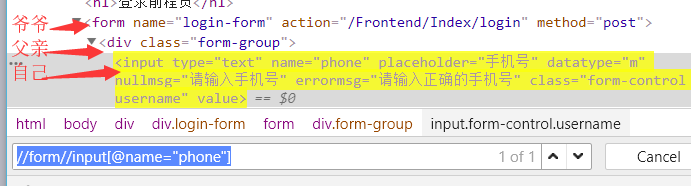
2.1 相对定位 -- 以// 开头 如://form//input[@name="phone"]
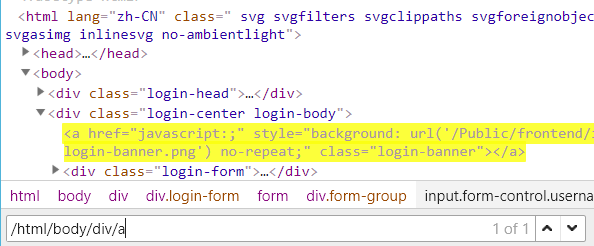
2.2 绝对定位 -- 以/ 开头,但是要从根目录开始,比较繁琐,一般不建议使用 如:/html/body/div/a
三、xpath文本、模糊、逻辑定位
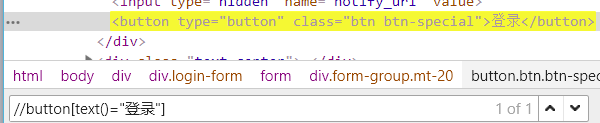
3.1【文本定位】使用text()元素的text内容 如://button[text()="登录"]
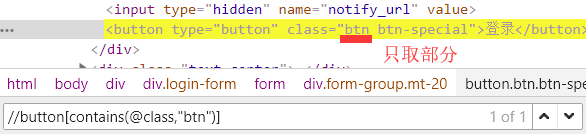
3.2 【模糊定位】使用contains() 包含函数 如://button[contains(text(),"登录")]、//button[contains(@class,"btn")] 除了contains不是=等于
3.3 【模糊定位】使用starts-with -- 匹配以xx开头的属性值;ends-with -- 匹配以xx结尾的属性值 如://button[starts-with(@class,"btn")]、//input[ends-with(@class,"-special")]
3.4 使用逻辑运算符 -- and、or;如://input[@name="phone" and @datatype="m"]
四、xpath轴定位
4.1 轴运算
parent:父节点
prceding-sibling:当前元素节点标签之前的所有兄弟节点
prceding:当前元素节点标签之前的所有节点
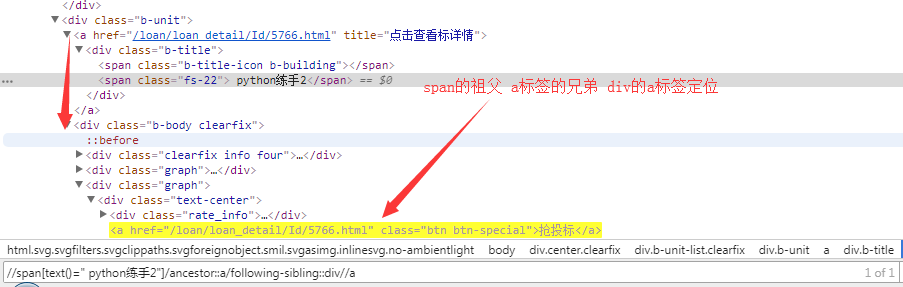
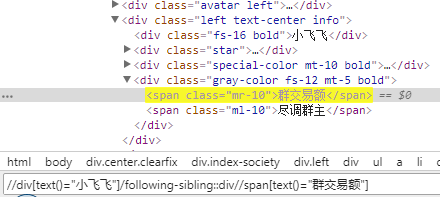
注意:
#定位 找到元素 -- 做到唯一识别
#优先使用id
#舍弃:有下标的出现、有绝对定位的出现、id动态变化时舍弃
【Selenium】通过xpath定位svg元素
SVG 意为可缩放矢量图形(Scalable Vector Graphics)
定位svg元素要用xpath的name()函数,比如//svg/line[2],要用//*[name()='svg']/*[name()='line'][2]"代替
刚验证了一下,这样写是可以的
//div[@class='tg-tree-item'][text()='sharing']//ancestor::div[contains(@class,'tg-row')]/div[contains(@class,'action-menu-icon')]/div/div/*[name()='svg']
转载于:https://www.cnblogs.com/MasterMonkInTemple/p/10528623.html
https://www.cnblogs.com/longronglang/p/7476557.html
xpath不等于、不包含的写法
简介:写自动化用例时经常会用到xpath来定位元素,这里总结一下xpath语法中不等于、不包含的写法
问题
如下图:该页面有两个页签,我们需要在第二个页签进行操作:在输入框输入后点击确定按钮。
第一次写的xpath是这样的
//button[./span[text()='确定']]
运行时报错 element not interactable,出现这种错误通常因为是这个xpath定位到的元素不在当前页面,所以报不可点击错误。报错信息如下:
org.openqa.selenium.ElementNotVisibleException: element not interactable
分析
用XpathHelper在页面测试了一下,发现该xpath定位到了两个确定按钮,如下图:
通过F12查看对应元素的dom树,如下图
可以看到该目标元素上层有两个class='el-tab-pane’的div,点开第一个class='el-tab-pane’的div,如下图:
可以看到,第一个class='el-tab-pane’的div下面也有一个“确定”按钮,说明我前面写的xpath定位到了第一个“确定”按钮。
继续观察,第一个class='el-tab-pane’的div里面还多了一个 style=“display: none;” 属性,那我们要定位第二个div时就可以排除这个属性。
解决
这里尝试了三种写法都可以定位到第二个“确定”按钮,分别如下:
- 使用不等于符号:!=
//div[@class='el-tab-pane' and @style!='display: none;']//button[./span[text()='确定']]
- 使用 not()
//div[@class='el-tab-pane' and not(@style='display: none;')]//button[./span[text()='确定']]
- 使用 not(contains())
//div[@class='el-tab-pane' and not(contains(@style,'none'))]//button[./span[text()='确定']]
最后都能成功定位到第二个“确定”按钮,如下图:
https://testerhome.com/topics/20296
Js根据xpath定位元素
1
|
function find_element_by_xpath(STR_XPATH) {
|

 浙公网安备 33010602011771号